소개
The Thermaltake CT120 ARGB Sync PC Cooling Fan is a new generation PWM fan designed for optimal PC cooling and customizable lighting. This manual provides instructions for installation, operation, maintenance, and troubleshooting to ensure proper use and longevity of your fans.
패키지 내용
- 2 x Thermaltake CT120 ARGB Sync PC Cooling Fans
- 장착 나사
- PWM Cables (for fan power)
- ARGB Cables (for lighting control)
- 케이블 관리 클립
설정 및 설치
Follow these steps to properly install your Thermaltake CT120 ARGB Sync PC Cooling Fans:
- PC 케이스를 준비하세요: Ensure your PC case has available 120mm fan mounting points. For optimal access to motherboard headers, it may be necessary to temporarily remove components such as the graphics card.
- 팬을 장착하세요: Position the fans in your desired location (e.g., front intake, rear exhaust, top exhaust). Use the provided mounting screws to secure each fan firmly to the case. The fans feature integrated anti-vibration mounting pads to reduce noise.
- PWM 케이블을 연결하세요: Each fan has a PWM cable for power and speed control. Connect the PWM cable from the first fan to an available 4-pin fan header on your motherboard. Utilize the daisy-chain design by connecting the PWM cable from the second fan to the first fan's daisy-chain connector. This minimizes cable clutter and port usage.
- ARGB 케이블을 연결하세요: Each fan also has an ARGB cable for lighting control. Connect the ARGB cable from the first fan to an available 5V addressable RGB header on your motherboard. Daisy-chain the ARGB cable from the second fan to the first fan's ARGB daisy-chain connector. Ensure correct polarity (+5V, Data, Ground) to prevent damage.
- 케이블 관리 : Use the included cable management clips to neatly route and secure all cables, improving airflow and aesthetics within your PC case.

Image: Thermaltake CT120 ARGB Sync PC Cooling Fan showcasing its customizable lighting.
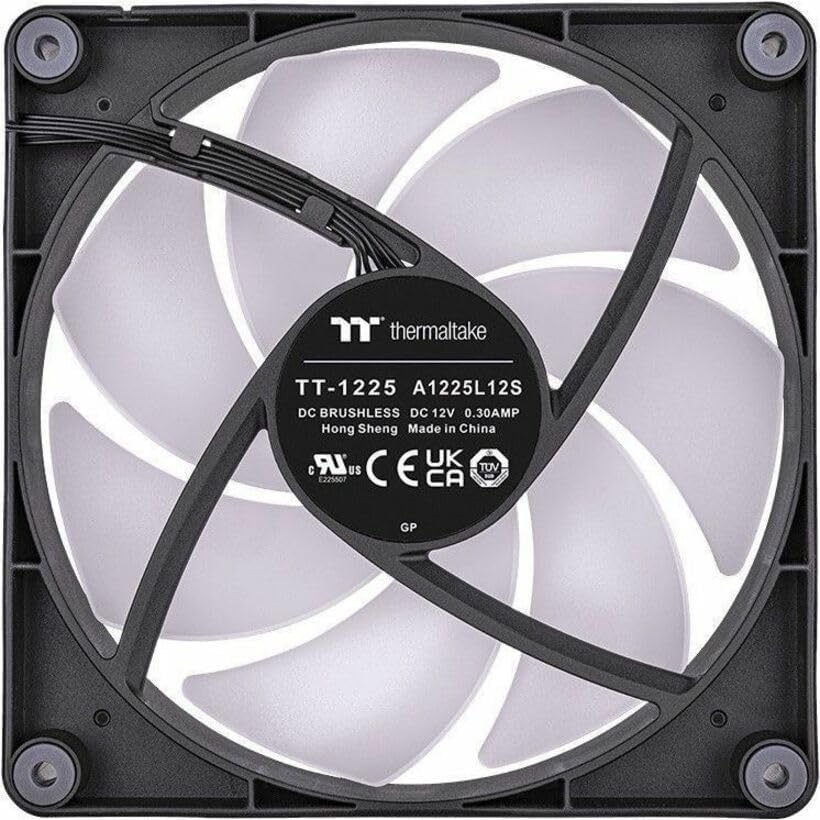
이미지: 후면 view of the CT120 fan, highlighting the power and ARGB connectors for installation.

Image: Illustration of the daisy-chain cabling system for simplified fan connections.

Image: Detail of the integrated anti-vibration mounting pads designed to reduce operational noise.
작동 지침
The Thermaltake CT120 ARGB Sync PC Cooling Fans offer both speed and lighting control:
- 팬 속도 제어(PWM): The fans utilize Pulse Width Modulation (PWM) technology, allowing your motherboard to dynamically adjust fan speeds (500-2000 RPM) based on system temperature. This ensures efficient cooling when needed and quieter operation during lighter loads.
- ARGB 조명 제어: The 9 addressable LEDs on each fan can be controlled via compatible 5V motherboard sync software (e.g., ASUS Aura Sync, MSI Mystic Light Sync, GIGABYTE RGB Fusion, ASRock Polychrome Sync). This software allows you to customize lighting effects, colors (16.8 million options), and synchronization with other ARGB components in your system.
- 초기 부팅: Upon initial system boot, the fans will power on. If connected correctly, the motherboard software should detect and synchronize the ARGB lighting. Allow a moment for the software to recognize and apply your preferred lighting profiles.

Image: Multiple CT120 ARGB fans installed in a PC case, demonstrating synchronized lighting effects.
유지
Regular maintenance helps ensure optimal performance and longevity of your cooling fans:
- 먼지 청소: Periodically inspect the fan blades and frame for dust accumulation. Use compressed air or a soft brush to gently remove dust. Ensure the PC is powered off and unplugged before cleaning.
- 연결 확인: Occasionally verify that all PWM and ARGB cables are securely connected to the motherboard headers and to each other, especially after moving or servicing your PC.
문제 해결
If you encounter issues with your Thermaltake CT120 fans, consider the following:
- 팬이 회전하지 않음:
- Check if the 4-pin PWM power cables are securely connected to the motherboard fan headers.
- Ensure the motherboard fan headers are enabled in the BIOS/UEFI settings.
- 전원 공급 장치가 마더보드와 팬에 충분한 전력을 공급하고 있는지 확인하십시오.
- ARGB Lighting Not Working/Synchronizing:
- Confirm that the 5V ARGB cables are correctly connected to the motherboard's 5V addressable RGB headers (not 12V RGB headers).
- Check the motherboard's ARGB sync software to ensure the fans are detected and the desired lighting effects are applied.
- Ensure the ARGB cables are properly daisy-chained between fans.
- Restart your PC to allow the software to re-detect the fans.
- 과도한 소음:
- Verify that the fans are securely mounted and the anti-vibration pads are correctly positioned.
- 선풍기 날개에 닿는 케이블이나 장애물이 있는지 확인하십시오.
- Clean any dust accumulation on the fan blades.
- 소음이 우려되고 온도가 허용한다면, 메인보드의 BIOS/UEFI 또는 소프트웨어에서 팬 속도 설정을 낮은 RPM으로 조정하십시오.
명세서
| 특징 | 사양 |
|---|---|
| 모델 번호 | CL-F149-PL12SW-A |
| 팬 크기 | 120 x 120 x 25mm(4.72인치 길이 x 0.98인치 너비 x 4.72인치 높이) |
| 팬 속도 | PWM 500 ~ 2000 R.P.M |
| 최대 공기압 | 2.23mm-물 |
| 최대 공기 흐름 | 57.05 퀴놀론 |
| 소음 수준 | 25.8dB-A |
| 베어링 유형 | 유압 베어링 |
| 기대수명 | 40,000시간, 25℃ |
| 정격 볼륨tag전자(팬) | 12V(XNUMXV) |
| 정격 볼륨tag전자(LED) | 5V(XNUMXV) |
| Power Input (one fan) | 1.32 W (Fan) & 1.55 W (LED) |
| 커넥터 | 4-Pin PWM (Fan), 3-Pin ARGB (LED) |
| LED | 9 Addressable LEDs, 16.8 Million Colors |
| 특징 | Cable-Integrated Daisy-Chain Design, Anti-vibration Mounting System |
보증 및 지원
Thermaltake products are manufactured to high quality standards. For specific warranty information, terms, and conditions, please refer to the warranty card included with your product or visit the official Thermaltake website. For technical support, product registration, or further assistance, please visit the Thermaltake support page or contact their customer service directly.
Visit the Thermaltake Store: Thermaltake Official Store