소개
Welcome to the Ducky One 3 Mini Aura 60% Mechanical Keyboard. This manual provides essential information for setting up, operating, and maintaining your new keyboard. The Ducky One 3 series incorporates the innovative QUACK Mechanics design philosophy, focusing on enhanced aesthetics, hot-swappable functionality, superior sound dampening, and improved stabilizers.
Your Ducky One 3 Mini Aura features a low-profile case with a unique 3-layer design, allowing for vibrant RGB lighting. It includes a silicone plate damp에너지 및 EVA 폼 케이스 dampener for optimal acoustics. The keyboard is equipped with hot-swappable Kailh Yellow Sockets, Ducky's V2 stabilizers for improved stability, and 3-level adjustable feet. The keycaps are Double Shot Pudding style PBT, offering durability and enhanced RGB illumination.
패키지 내용
패키지에 모든 품목이 들어 있는지 확인하세요.
- Ducky One 3 Mini Aura 60% 기계식 키보드
- USB-C 케이블
설정
키보드 연결
- 키보드 뒷면에서 USB-C 포트를 찾으세요.
- 제공된 USB-C 케이블을 키보드에 연결하세요.
- USB-A 커넥터의 다른 쪽 끝을 컴퓨터의 사용 가능한 USB 포트에 연결하십시오.
- 키보드는 운영 체제에서 자동으로 인식됩니다.

Image: The Ducky One 3 Mini Aura keyboard connected to its detachable USB-C cable.
키보드 높이 조정
The keyboard features 3-level adjustable feet on the underside. Flip out the desired feet to achieve your preferred typing angle.
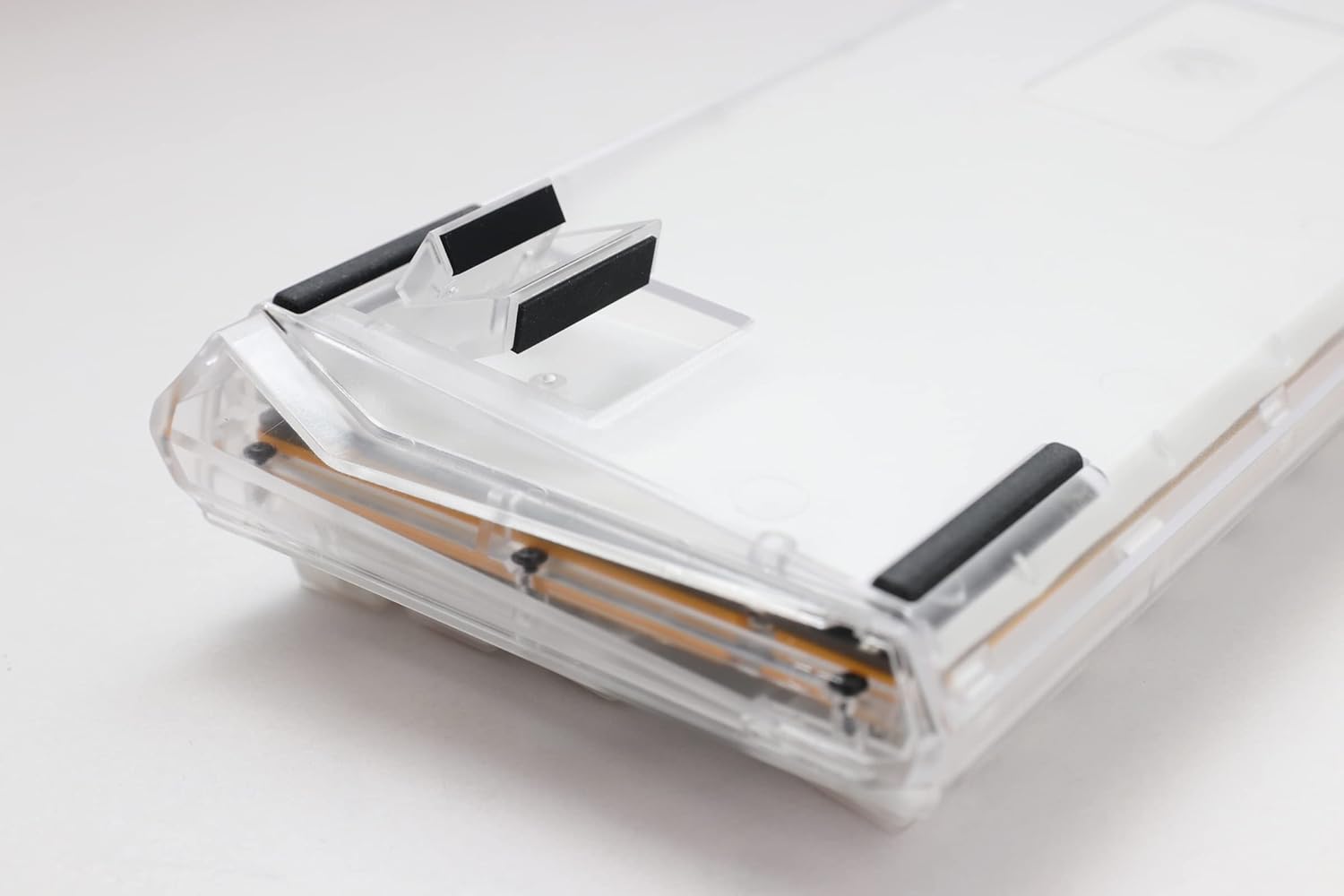
Image: The underside of the Ducky One 3 Mini Aura keyboard, highlighting the adjustable feet for ergonomic positioning.
작동 지침
기본 키보드 기능
The Ducky One 3 Mini Aura functions as a standard 60% mechanical keyboard. Refer to the keycap legends for primary functions. Secondary functions are typically accessed via the Fn key combination.

이미지: 위에서 아래로 view of the Ducky One 3 Mini Aura 60% mechanical keyboard, showcasing its compact layout and white keycaps.
RGB 조명
The keyboard features per-key programmable RGB lighting. Various lighting modes and customization options are available directly on the keyboard. Consult the official Ducky website or included quick guide for detailed instructions on changing lighting effects and colors.
매크로 기능
The Ducky One 3 Mini Aura supports a remapped macro layout, allowing users to program custom key sequences. Specific instructions for macro recording and assignment can be found in the comprehensive user guide available on the Ducky support page.
핫 스와핑 스위치
Your Ducky One 3 Mini Aura is equipped with a hot-swappable PCB and Kailh Yellow Sockets, allowing you to change mechanical switches without soldering. This feature enables customization of typing feel and sound.
- 전원 끄기 : Disconnect the keyboard from your computer before attempting to remove or install switches.
- 키캡 제거: 키캡 풀러를 사용하여 원하는 키캡을 조심스럽게 제거하세요.
- 스위치 제거: 스위치 풀러를 사용하여 스위치의 위쪽과 아래쪽 클립을 조심스럽게 잡고 똑바로 위로 당깁니다.
- 새로운 스위치 설치: 새 스위치의 핀을 PCB의 구멍에 맞추세요. 스위치가 제자리에 딸깍 소리가 날 때까지 살짝 누르세요. 핀이 구부러지지 않았는지 확인하세요.
- 키캡 교체: 키캡을 새 스위치 스템에 다시 끼우세요.
비디오: 오버view of the Ducky One 3 series, demonstrating features like hot-swappable switches and the QUACK Mechanics design philosophy.
유지
키보드 청소
- 키보드를 컴퓨터에서 분리합니다.
- 부드러운 브러시나 압축 공기를 사용하여 키캡 사이의 먼지와 이물질을 제거하세요.
- For stubborn dirt, gently remove keycaps using a keycap puller and clean the exposed switches and plate with a damp cloth (ensure it's not dripping wet).
- Clean keycaps with mild soap and water, then dry thoroughly before reattaching.
일반 관리
Avoid exposing the keyboard to extreme temperatures, direct sunlight, or liquids. Do not attempt to disassemble the keyboard beyond switch and keycap removal, as this may void your warranty.
문제 해결
키보드가 응답하지 않음
- USB-C 케이블이 키보드와 컴퓨터에 모두 단단히 연결되어 있는지 확인하세요.
- 키보드를 컴퓨터의 다른 USB 포트에 연결해보세요.
- 시스템 특정 문제를 배제하기 위해 다른 컴퓨터에서 키보드를 테스트하세요.
- USB 허브를 사용하는 경우 컴퓨터에 직접 연결해보세요.
Incorrect Key Input or RGB Issues
- Perform a factory reset (refer to the official Ducky manual for specific key combinations).
- Ensure no switches are bent or improperly seated if you have recently hot-swapped them.
- 필요한 경우 컴퓨터의 USB 드라이버를 업데이트하세요.
명세서
| 상표 | 예보 |
| 모델 번호 | DKON2161ST-BUSPDAWWWWC1 |
| 제품 치수 | 12.2 x 4.33 x 1.57 인치 |
| 품목 무게 | 2.09파운드 |
| 키보드 설명 | 기계적 |
| 연결 기술 | USB-C |
| 호환 장치 | PC |
| 특징 | 백라이트(RGB) |
| 스위치 유형 | Cherry MX Brown (Hot-Swappable) |
| 키캡 재질 | 폴리부틸렌 테레프탈레이트(PBT) |
| 스타일 | 60% 흰색 |
| 언어 | 영어 |
보증 및 지원
제품 보증
This Ducky keyboard comes with a manufacturer's warranty. Please refer to the warranty card included with your product for specific terms, conditions, and duration. Keep your proof of purchase for warranty claims.
선택적 보호 계획
추가 보장 플랜은 별도로 구매하실 수 있습니다.
- 3년 보호 계획
- 4년 보호 계획
- Asurion Complete Protect (monthly billing)
These plans offer additional coverage beyond the standard manufacturer's warranty. Review the terms of each plan for details.
고객 지원
For technical assistance, troubleshooting, or warranty inquiries, please visit the official Ducky website or contact their customer support. You can often find FAQs, driver downloads, and detailed manuals on their support pages.