소개
This manual provides detailed instructions for the installation, operation, and maintenance of your CP PLUS CP-V41A 4MP Wi-Fi Camera. Please read this manual thoroughly before using the product to ensure correct usage and optimal performance. Keep this manual for future reference.
제품 끝view
The CP PLUS CP-V41A is a 4MP Wi-Fi camera designed for home security and surveillance. It features high-resolution imaging, night vision capabilities, and smart integration options.
주요 특징:
- 4MP CMOS Image Sensor: 선명하고 자세한 비디오 제공tage.
- 3.6mm 렌즈: 다양한 분야를 제공합니다 view 종합적인 보장을 위해.
- H.265 비디오 압축: 화질 저하 없이 저장 공간을 절약하기 위해 비디오를 효율적으로 압축합니다.
- 와이파이 지원: Enables wireless connectivity for flexible placement.
- IR Distance of 15 Mtr.: Ensures clear night vision up to 15 meters.
- IP65 등급: Suitable for both indoor and outdoor use, offering protection against dust and water jets.
- 스마트 홈 통합: Works with Google Assistant and Amazon Alexa for voice control and smart automation.
상자 안에 무엇이 들어있나요?
- CP PLUS CP-V41A 4MP Wi-Fi Camera
- 전원 어댑터
- 장착 나사 및 플러그
- 빠른 시작 가이드(자세한 내용은 이 설명서를 참조하세요)

Image: The CP PLUS CP-V41A 4MP Wi-Fi Camera, highlighting its model and key features.
설정
1. 물리적 설치
- 위치를 선택하세요: 원하는 촬영 위치를 고려하여 카메라에 적합한 장소를 선택하세요. viewing area, Wi-Fi signal strength, and power source accessibility. The camera is rated IP65, making it suitable for both indoor and outdoor environments.
- 카메라 장착:
- 카메라 장착 받침대를 본떠서 벽이나 천장에 드릴로 뚫을 위치를 표시하세요.
- 구멍을 뚫고 제공된 벽면 플러그를 꽂으세요.
- Secure the camera's mounting base with the screws.
- 필요에 따라 카메라 각도를 조정하세요.
- 전원 연결: Plug the power adapter into the camera's power input and then into a power outlet. The camera will power on and initiate its startup sequence.
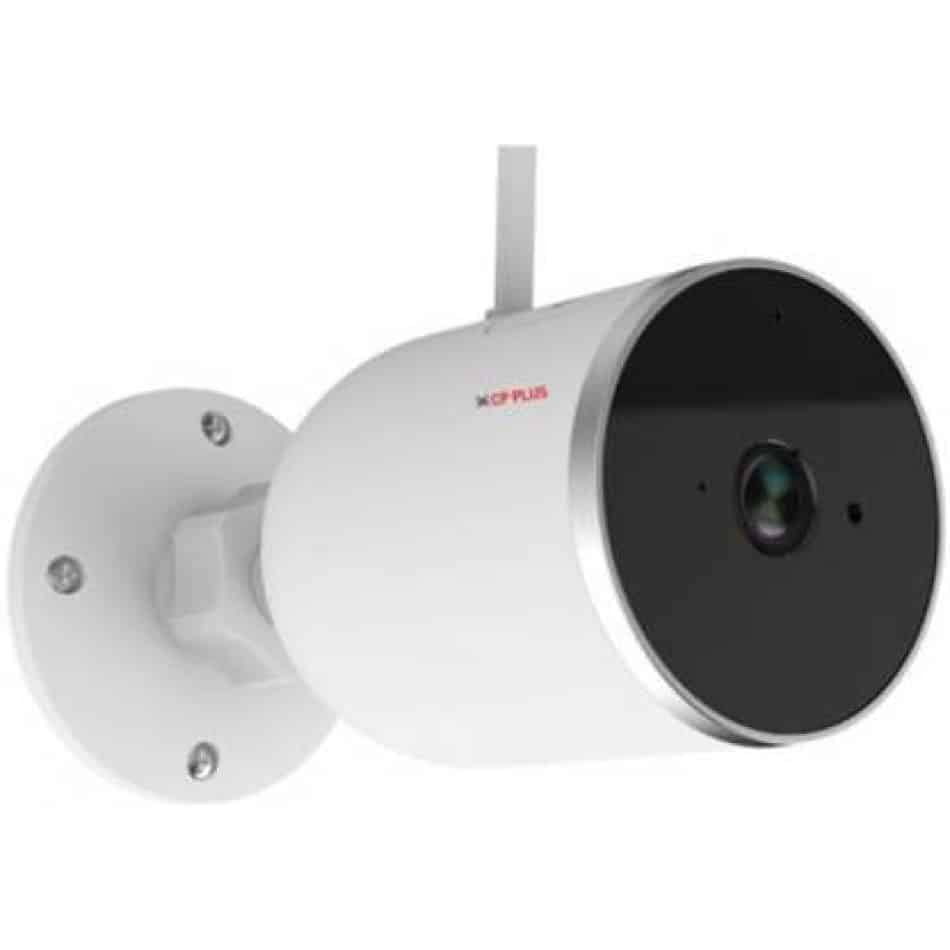
이미지: 측면 view of the CP PLUS CP-V41A camera showing its mounting base and antenna, illustrating physical installation.
2. 네트워크 연결(Wi-Fi)
- 앱 다운로드: 검색 the official CP PLUS mobile application on your smartphone's app store (iOS or Android) and install it.
- 계정 생성: 앱을 열고 새 계정을 등록하거나 이미 계정이 있다면 로그인하세요.
- 장치 추가: 앱 내 안내에 따라 새 카메라를 추가하세요. 일반적으로 다음이 포함됩니다.
- Scanning a QR code on the camera.
- Connecting your phone to the camera's temporary Wi-Fi hotspot.
- Selecting your home Wi-Fi network and entering its password.
- 완성: Once connected, the camera's status indicator will change, and you will see the camera online in your app.
작동 지침
1. 라이브 View 그리고 녹음
- 라이브 액세스 View: Open the CP PLUS app and select your camera from the device list to view 라이브 피드.
- 수동 녹음: Tap the record button in the app to start or stop manual video recording.
- 스냅 사진: Use the snapshot button to capture still images from the live feed.
2. 동작 감지 및 알림
- 동작 감지 활성화: Navigate to the camera settings in the app and enable motion detection.
- 감도 조정: Set the motion detection sensitivity to minimize false alarms.
- Set Alert Schedule: Configure specific times or days for receiving motion alerts.
- 알림 수신: The app will send push notifications to your smartphone when motion is detected.
3. 야간 투시경
The camera automatically switches to night vision mode in low-light conditions, utilizing its infrared (IR) LEDs to provide clear black-and-white video up to 15 meters. Ensure no obstructions block the IR lights for optimal performance.
4. Smart Home Integration (Google Assistant / Amazon Alexa)

Image: The CP PLUS CP-V41A camera integrated into a smart home environment, indicating compatibility with Google Assistant.
- 계정 연결: In your Google Home or Amazon Alexa app, search for the CP PLUS skill/service and link your CP PLUS account.
- 장치 검색: 연결이 완료되면 스마트 어시스턴트에게 새로운 기기를 검색해달라고 요청하세요.
- 음성 명령: You can now use voice commands to view your camera feed on compatible smart displays (e.g., "Hey Google, show me the front door camera" or "Alexa, show me the living room camera").
유지
- 청소:
- 부드럽고 마른 천으로 카메라 렌즈와 본체를 살짝 닦으세요.
- 독한 화학 물질이나 연마성 세제를 사용하지 마십시오.
- 청소하기 전에 카메라의 전원이 꺼져 있는지 확인하세요.
- 펌웨어 업데이트: Regularly check the CP PLUS app for available firmware updates. Updates often include performance improvements, new features, and security enhancements. Follow the in-app instructions to perform updates.
- 스토리지 관리: If using a local storage (e.g., microSD card, not included), periodically review 그리고 기록된 음식을 관리하세요tage to ensure sufficient space.
문제 해결
| 문제 | 가능한 원인 | 해결책 |
|---|---|---|
| 카메라 전원이 켜지지 않습니다. | 전원 어댑터가 연결되지 않았거나 결함이 있습니다. | Ensure the power adapter is securely connected to the camera and a working power outlet. Try a different outlet. |
| Wi-Fi에 연결할 수 없습니다. | Incorrect Wi-Fi password, weak signal, or camera too far from router. | Verify Wi-Fi password. Move the camera closer to the router. Ensure your router is broadcasting a 2.4GHz network (5GHz is not supported by many smart devices). Reset the camera and try pairing again. |
| 이미지 품질이 좋지 않거나 영상이 흐릿합니다. | Protective film on lens, dirty lens, or insufficient lighting. | Remove any protective film. Clean the lens with a soft cloth. Ensure adequate lighting or check night vision functionality. |
| 동작 감지가 작동하지 않습니다. | Motion detection disabled, sensitivity too low, or incorrect schedule. | Check app settings to ensure motion detection is enabled, sensitivity is appropriate, and the schedule is correctly configured. |
| No sound or poor audio. | Microphone/speaker blocked, app volume low, or network issues. | Ensure nothing is obstructing the microphone or speaker. Check volume settings in the app and on your phone. Verify stable network connection. |
명세서
| 특징 | 세부 사항 |
|---|---|
| 모델 번호 | CP-V41A |
| 이미지 센서 | 1/2.8” 4MP CMOS (0.9071cm) |
| 렌즈 | 3.6mm |
| 비디오 압축 | H.265 |
| 연결성 | 와이파이, 이더넷 |
| IR 거리 | 15미터 |
| 침투 방지 | IP65 |
| 스마트 어시스턴트 호환성 | 구글 어시스턴트, 아마존 알렉사 |
| 전원 | 코드식 전기 |
| 실내/실외 사용 | 실내, 실외 |
| 품목 무게 | 460g |
| 치수(길이x너비x높이) | 20 x 10 x 5 센티미터 |
| 포함된 구성 요소 | 어댑터 |

Image: An office setting with the CP PLUS CP-V41A camera mounted, illustrating its 4MP CMOS image sensor capability.
보증 및 지원
CP PLUS products are designed for reliability and performance. For warranty information, please refer to the warranty card included with your product or visit the official CP PLUS website. For technical support, troubleshooting assistance, or service inquiries, please contact CP PLUS customer support through their official channels.
참고: 제품 사양 및 기능은 사전 고지 없이 변경될 수 있습니다.


