소개
This manual provides comprehensive instructions for the installation, operation, maintenance, and troubleshooting of the Grandstream GDS3712 Single Button HD IP Video Door System. Please read this manual thoroughly before attempting to install or operate the device to ensure proper functionality and safety.
The Grandstream GDS3712 is an HD IP Video Door System designed for secure access control and monitoring. It features powerful video resolution, robust construction, and SIP video streaming capabilities, making it suitable for various security applications.
안전 정보
설치 및 작동 시 다음 안전 예방 조치를 준수하세요.
- Ensure all power connections are secure and meet local electrical codes.
- 장치를 극한의 온도, 습도 또는 직사광선에 노출시키지 마십시오.
- 강한 전자기장 근처에 장치를 두지 마십시오.
- 제조업체가 지정한 액세서리만 사용하세요.
- 기기를 직접 열거나 수리하지 마십시오. 모든 정비는 자격을 갖춘 기술자에게 맡기십시오.
- 설치하는 동안 적절한 개인 보호 장비(PPE)를 착용하세요.
패키지 내용
패키지에 모든 품목이 들어 있는지 확인하세요.
- Grandstream GDS3712 Unit
- 장착 브래킷 및 나사
- 배선 마구
- Quick Installation Guide (This manual serves as the detailed guide)
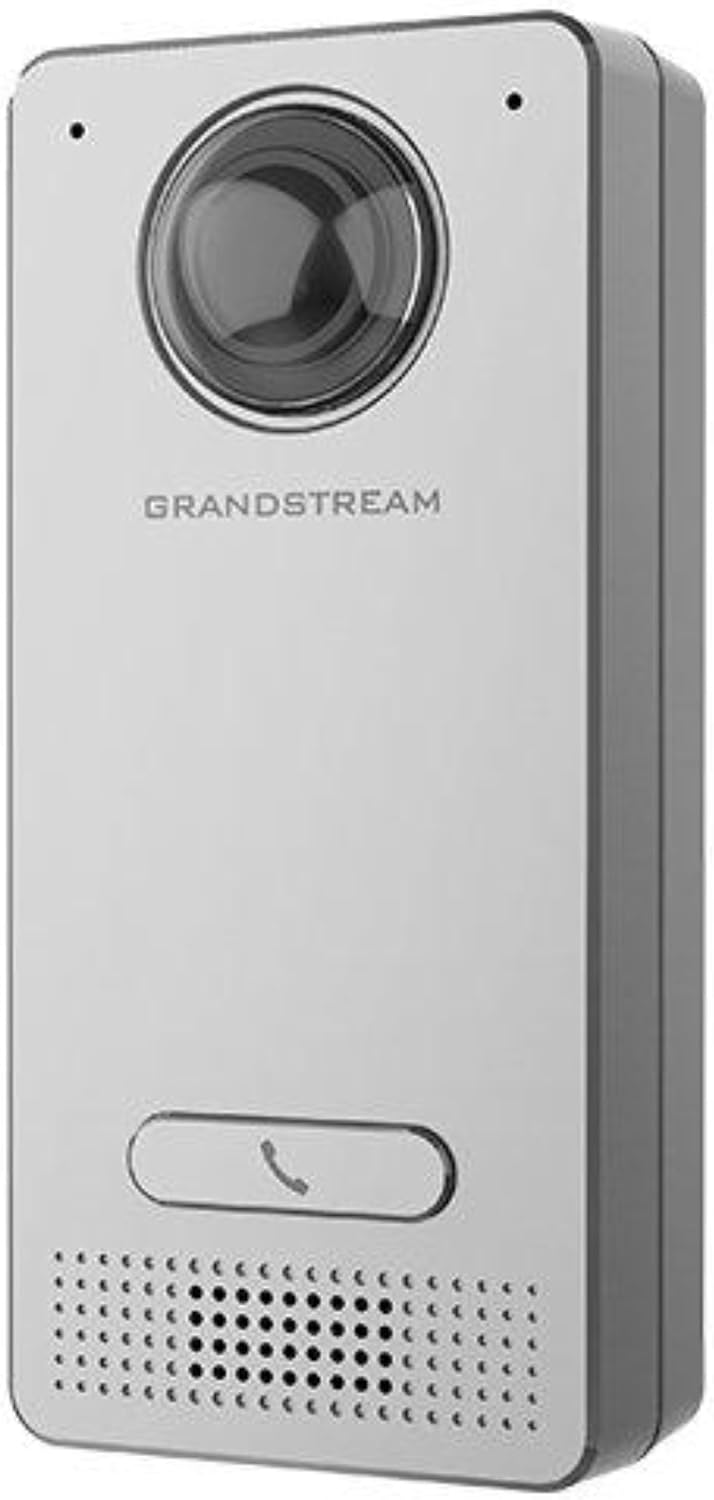
Image: Grandstream GDS3712 unit with included mounting accessories.
제품 끝view
The GDS3712 is a robust IP video door system designed for reliable access control and surveillance. Key features include:
- 고화질 비디오: Supports resolutions up to 1080p for clear visual identification.
- Integrated Relays: Two relays for electric lock and alarm output, and two alarm inputs for exit buttons and door sensors.
- SIP Compatibility: Enables video streaming to NVRs, video intercom stations, IP phones, and smartphones simultaneously.
- 내구성 있는 구조: 금속 casing provides weatherproof and vandal-resistant protection.
- 넓은 분야 View: Built-in hemispheric camera offers 180-degree wall-to-wall coverage.

이미지: 앞면 view of the GDS3712, highlighting the camera lens, call button, and speaker/microphone grille.
설치 및 설정
1. 장치 장착
- 위치를 선택하십시오 : Select a suitable outdoor or indoor location, ensuring clear line of sight for the camera and easy access for visitors. Consider mounting height for optimal facial recognition.
- 배선 준비: Route necessary Ethernet (PoE recommended) and control wiring through the wall to the mounting point.
- 안전한 브라켓: Use the provided screws to securely attach the mounting bracket to the wall.
- 배선 연결: Connect the Ethernet cable to the GDS3712's RJ45 port. If using external power, connect the power adapter. Connect alarm inputs/outputs and electric lock relays as required. Refer to the wiring diagram in the full technical datasheet for detailed connections.
- 장치 연결: Carefully align the GDS3712 unit with the mounting bracket and secure it in place.
2. 초기 네트워크 구성
- 전원 켜기: Apply power to the GDS3712. The device will boot up.
- 장치 검색: Use Grandstream's GDS Manager software or a network scanner to discover the GDS3712's IP address on your local network.
- 입장 Web 사용자 인터페이스: 열기 web browser and enter the device's IP address. Log in using the default credentials (usually admin/admin).
- 네트워크 설정 구성: Set a static IP address, subnet mask, gateway, and DNS server if required by your network.
- 펌웨어 업데이트: Check for and install the latest firmware updates from the Grandstream website for optimal performance and security.
3. SIP 계정 등록
- Navigate to the SIP settings in the web UI.
- Configure the SIP server address, SIP User ID, Authenticate ID, and Password as provided by your SIP service provider or IP PBX administrator.
- Ensure the SIP status shows "Registered" after applying settings.
작동 지침
1. 전화 걸기
- Visitor Initiated Call: A visitor presses the single call button on the GDS3712. The device will dial the pre-configured SIP extension(s).
- Receiving Call: The call can be received on a compatible IP phone, video intercom station, or smartphone application.
2. Remote Door Opening
- During an active call, the recipient can enter a DTMF code (e.g., a PIN) on their receiving device to trigger the electric lock relay, opening the door.
- The specific DTMF code is configured in the GDS3712's web 인터페이스.
3. 영상 모니터링
- The GDS3712's video stream can be accessed via an NVR, compatible IP video phone, or a dedicated surveillance application.
- Refer to your NVR or surveillance software documentation for instructions on adding an IP camera.
4. Alarm Inputs/Outputs
- 알람 입력 : Connect an exit button or door sensor to the alarm input ports. These can trigger events such as initiating a call or sending an alert.
- 알람 출력 : The alarm output can be configured to activate external devices (e.g., a siren) based on specific events detected by the GDS3712.
유지
- 청소: Periodically clean the camera lens and the device's exterior with a soft, damp 옷감. 강한 화학 물질이나 연마성 세제를 사용하지 마십시오.
- 펌웨어 업데이트: 그랜드스트림을 정기적으로 점검하세요 website for new firmware versions. Keeping the firmware updated ensures optimal performance, security, and access to new features.
- 케이블 검사: 주기적으로 모든 케이블과 연결부를 점검하여 마모 또는 손상 흔적이 있는지 확인하십시오.
- 백업 구성: It is recommended to regularly back up the device's configuration settings through the web 인터페이스.
문제 해결
| 문제 | 가능한 원인 | 해결책 |
|---|---|---|
| 장치의 전원이 켜지지 않습니다. | No power, faulty power adapter, or PoE issue. | Check power source, power adapter, and PoE switch/injector. Ensure cables are securely connected. |
| 접근할 수 없습니다 web 인터페이스. | IP 주소가 잘못되었거나, 네트워크 연결 문제가 있거나, 방화벽이 액세스를 차단하고 있습니다. | Verify IP address. Check network cable. Ensure device and computer are on the same network segment. Temporarily disable firewalls. |
| SIP account fails to register. | Incorrect SIP server details, wrong credentials, or network issues preventing SIP communication. | Double-check SIP server address, user ID, and password. Verify network connectivity to the SIP server. Check firewall settings. |
| No video stream. | Network bandwidth issues, incorrect video settings, or NVR/client configuration. | Check network load. Verify video encoding settings in the GDS3712 web UI. Ensure NVR/client is configured correctly to receive the stream. |
| Door lock does not open remotely. | Incorrect DTMF code, relay wiring issue, or lock malfunction. | Verify the DTMF code in the GDS3712 settings. Check wiring between the GDS3712 and the electric lock. Test the electric lock independently. |
명세서
| 특징 | 세부 사항 |
|---|---|
| 모델 | GDS3712 |
| 제조업체 | 그랜드스트림 |
| 비디오 해상도 | 최대 1080p |
| 릴레이 | 2 (for Electric Lock and Alarm Out) |
| 알람 입력 | 2 (for Exit button and Door sensor) |
| 카메라 | Hemispheric, 180-degree coverage |
| Casing | Metal, Weatherproof, Vandal Resistant |
| 전력 소비 | 3 와트 |
| 품목 무게 | 6온스(170그램) |
| 경고 유형 | 모션 전용 |
보증 및 지원
For warranty information, please refer to the official Grandstream website or the warranty card included with your product. Technical support can be obtained through Grandstream's official support channels, including their web사이트, 지식 기반 및 고객 서비스 연락처 정보입니다.
Always provide your product model number (GDS3712) and serial number when contacting support.


