소개
Thank you for choosing the sonoro Primus Internet Radio with Bluetooth. This manual provides essential information for setting up, operating, and maintaining your device to ensure optimal performance and longevity. Please read it thoroughly before use.
중요 안전 지침
- 전원: 지정된 전원 어댑터만 사용하세요. 볼륨을 확인하세요.tage는 귀하의 지역 전원 공급 장치와 일치합니다.
- 통풍: 환기구를 막지 마십시오. 공기가 원활하게 흐르도록 장치 주변에 충분한 공간을 확보하십시오.
- 물과 습기: Do not expose the unit to rain, moisture, dripping, or splashing. Keep liquids away from the device.
- 열: 라디에이터, 난방 조절기, 스토브 또는 기타 장치(다음을 포함)와 같은 열원 근처에 설치하지 마십시오. amp열을 생성하는 발전기.
- 청소: Unplug the unit before cleaning. Use a dry cloth only.
- 서비스: 이 제품을 직접 수리하려고 하지 마십시오. 모든 서비스는 자격을 갖춘 서비스 담당자에게 문의하십시오.
- 레이저 제품: This product contains a Class 1 laser. Do not open the casing.
패키지 내용
모든 항목이 있는지 확인하세요.
- sonoro Primus Internet Radio Unit
- 전원 어댑터
- 리모콘(배터리 포함)
- 사용 설명서 (본 문서)
설정
1. 풀기 및 배치
Carefully remove the unit from its packaging. Place the sonoro Primus on a stable, flat surface, ensuring adequate ventilation around the device. Avoid placing it near strong magnetic fields or direct sunlight.
2. 전원 연결하기
Connect the provided power adapter to the AC IN port on the rear of the unit. Plug the other end into a suitable wall outlet. The unit will enter standby mode.
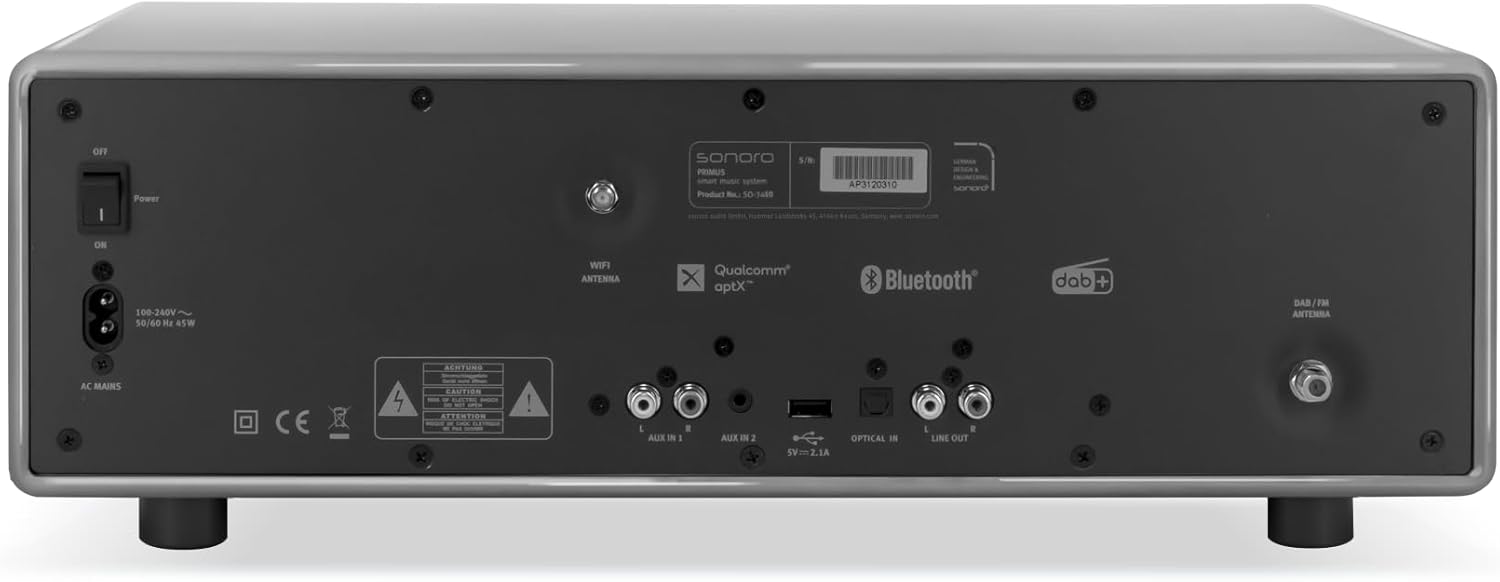
영상: Rear panel of the sonoro Primus, highlighting the power input and other connectivity options like AUX-in, Optical-in, and antenna connections.
3. 안테나 연결
For optimal FM and DAB+ reception, connect the included antenna to the appropriate antenna input on the rear panel. Extend the antenna fully for best signal quality.
4. 초기 전원 켜기
Press the Power button on the front panel or the remote control to turn on the unit. Follow the on-screen instructions for initial setup, including language selection and network configuration.

영상: 앞쪽 view of the sonoro Primus, displaying the central screen, control knobs, and various buttons for media playback and source selection.
작동 지침
기본 제어
The sonoro Primus features intuitive controls on the front panel and a comprehensive remote control. Key controls include:
- 전원 버튼: 기기를 켜거나 끄거나 대기 모드로 전환합니다.
- 볼륨 노브: 마스터 볼륨 레벨을 조절합니다.
- 튜닝/선택 노브: 메뉴를 탐색하고 옵션을 선택합니다.
- 소스 버튼: Selects input sources (Internet Radio, DAB+, FM, Bluetooth, CD, AUX-in, Optical-in).
- 재생 컨트롤: Play/Pause, Skip Forward/Backward for CD and streaming.
Internet Radio and Podcasts
Access over 25,000 internet radio stations and numerous podcasts worldwide. Ensure your device is connected to a stable Wi-Fi network. Navigate through the menu using the Tune/Select knob to find and save your favorite stations.
DAB+ and FM Radio
Switch to DAB+ or FM mode using the source buttons. The unit will automatically scan for available stations. You can manually tune or save presets for quick access to your preferred channels.
블루투스 연결
To connect a Bluetooth device (smartphone, tablet, laptop):
- Select the Bluetooth source on the sonoro Primus.
- 외부 장치에서 Bluetooth를 활성화합니다.
- 검색 "sonoro Primus" in your device's Bluetooth settings and pair.
- 연결되면 장치에 무선으로 오디오를 스트리밍할 수 있습니다.
CD 재생
Insert an audio CD into the CD slot. The unit will automatically detect and begin playback. Use the playback controls to manage your music.
Streaming Services (Spotify Connect, Amazon Music, Deezer)
The sonoro Primus supports various streaming services. To use Spotify Connect, Amazon Music, or Deezer, ensure your device is connected to Wi-Fi and you have an active subscription to the respective service. Follow the instructions within the service's app to connect to your sonoro Primus.
AUX-in and Optical-in
Connect external audio devices using the AUX-in (3.5mm jack) or Optical-in ports on the rear panel. Select the corresponding source on the unit to play audio from these inputs.
유지
장치 청소
To clean the exterior of the unit, unplug it from the power source. Use a soft, dry, lint-free cloth. Do not use abrasive cleaners, waxes, or solvents as they may damage the finish.
CD 플레이어 관리
Handle CDs by their edges to avoid fingerprints. If a CD is dirty, wipe it gently with a soft, dry cloth from the center outwards. Do not use solvents or abrasive cleaners on CDs.
소프트웨어 업데이트
Periodically check for software updates via the unit's menu (if available). Updates can improve performance and add new features. Ensure a stable internet connection during updates.
문제 해결
| 문제 | 가능한 원인 | 해결책 |
|---|---|---|
| 전원이 없습니다 | 전원 케이블이 연결되지 않았습니다. 전원 콘센트에 결함이 있습니다. | 전원 케이블 연결을 확인하고 다른 콘센트를 사용해 보세요. |
| 소리가 나지 않습니다 | Volume too low; wrong input source selected; mute activated. | Increase volume; select correct input source; deactivate mute. |
| 라디오 수신 불량 | Antenna not properly connected or extended; interference. | 안테나 위치를 조정하고, 기기를 다른 전자 기기에서 멀리 떨어뜨려 놓으십시오. |
| 블루투스 페어링이 실패했습니다 | 기기가 너무 멀리 떨어져 있습니다. 외부 기기에서 블루투스가 활성화되어 있지 않습니다. 기기가 페어링 모드가 아닙니다. | Ensure devices are close; enable Bluetooth; put sonoro Primus in pairing mode. |
| CD가 재생되지 않습니다 | CD가 잘못 삽입되었습니다. CD가 더럽거나 긁혔습니다. 지원되지 않는 디스크 형식입니다. | Reinsert CD correctly; clean or replace CD; ensure it's an audio CD. |
| Wi-Fi 연결 문제 | 잘못된 비밀번호; 라우터와의 거리가 너무 멀음; 네트워크 간섭. | Verify Wi-Fi password; move unit closer to router; restart router. |
문제가 지속되면 고객 지원팀에 문의하세요.
명세서
- 상표: 소노로
- 모델: e60a53a9-4d44-4a55-b129-3386e8f3e186
- 튜너 기술: FM, DAB+
- 오디오 출력 모드: 스테레오 재생
- 지원되는 오디오 형식: MP3, AAC, WAV
- 스피커 구성: 2.1 (Two coaxial speakers and a powerful 5.25 inch subwoofer)
- 연결성: Optical, Auxiliary, Bluetooth, WLAN
- 호환 장치: Laptop, MP3 player, Smartphone, Tablet
- 전원: 코드식 전기
- 디스플레이 유형: LCD 또는 LED
- 포함된 구성 요소: Power adapter, Remote control (with Lithium-metal batteries)
- 크기(패키지): 52.6 x 33.2 x 27.4cm
- 무게(패키지): 9.45kg
- 색상: Chalk Grey (Note: Other colors may be available for different models)
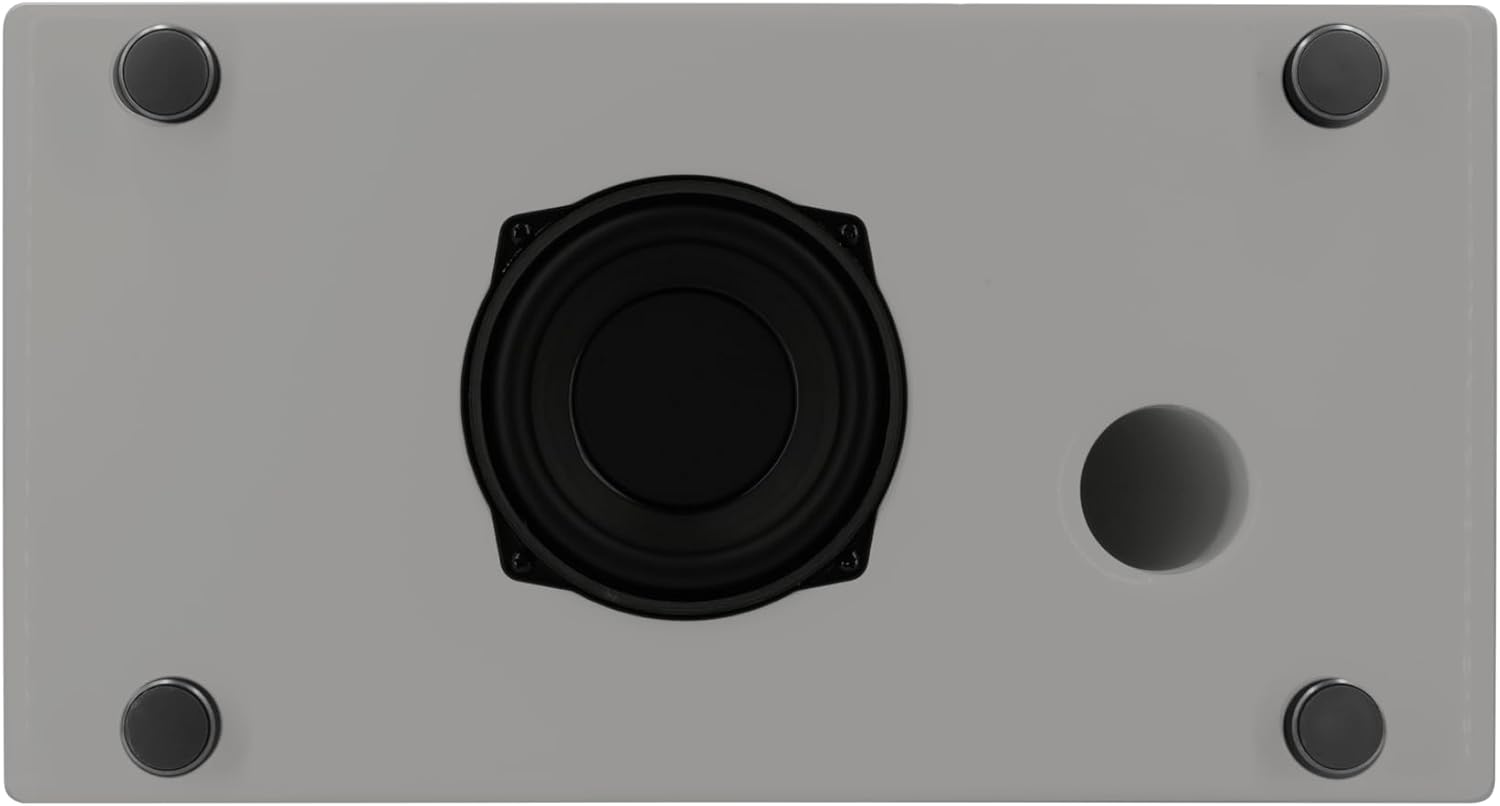
영상: Underside of the sonoro Primus, revealing the integrated 5.25-inch subwoofer for enhanced bass performance.
보증 및 지원
The sonoro Primus comes with a standard manufacturer's warranty. Please refer to the warranty card included in your package for specific terms and conditions. For technical support, service, or warranty claims, please contact sonoro audio GmbH customer service through their official web구매 시 제공된 사이트 또는 연락처 정보.
제조업체: 소노로 오디오 GmbH
첫 번째 가능한 날짜: 2년 2023월 XNUMX일


