소개
Welcome to the instruction manual for your MokerLink 12-Port Gigabit Ethernet Switch. This document provides detailed information on the product's features, installation, operation, and troubleshooting to ensure optimal performance and longevity of your device.
제품 끝view
The MokerLink 12-Port Gigabit Ethernet Switch is an unmanaged network switch designed for small office/home office (SOHO) and small to medium business (SMB) environments. It features 8 Gigabit PoE+ ports, 2 Gigabit Uplink ports, and 2 Gigabit SFP ports, offering flexible connectivity and power options for various network devices.

그림 1: 전면 view of the MokerLink 12-Port Gigabit Ethernet Switch, showcasin컴팩트한 디자인과 포트 배치가 특징입니다.
주요 특징
- 12개의 기가비트 포트: Includes 8 Gigabit PoE+ ports, 2 Gigabit Uplink ports, and 2 Gigabit SFP ports for versatile network connections.
- High PoE Power: Supports IEEE 802.3af/at standards, providing up to 30W per port with a total power budget of 120W.
- 관리되지 않는 플러그 앤 플레이: Automatically detects devices and provides data links, compatible with both PoE and non-PoE devices without requiring complex configuration.
- 확장 모드: Allows PoE ports 7-8 to extend transmission distance up to 250 meters at a speed of 10Mbps.
- PoE 워치독: Automatically monitors PoE devices and restarts ports if a device becomes unresponsive, enhancing network reliability.
- 팬리스 디자인: 다양한 환경에 적합하며, 조용한 작동을 보장합니다.
- 내구성 있는 금속 하우징: 뛰어난 보호 기능과 열 방출 기능을 제공합니다.
- 4KV 낙뢰 보호: Offers enhanced protection against electrical surges.
- 폭넓은 작동 온도: Functions reliably in temperatures ranging from -20°C to +50°C.

Figure 2: Visual representation of the MokerLink 12-Port Gigabit Ethernet Switch's main features.
패키지 내용
포장 내용물을 꼼꼼히 확인해 주십시오. 누락되거나 손상된 품목이 있을 경우 즉시 판매처에 연락하십시오.
- 1 x MokerLink 12-Port Gigabit PoE Switch
- 1 X 전원 코드
- 1 x 사용자 설명서
하드웨어 설명
전면 패널
The front panel of the switch features all network ports, LED indicators, and a DIP switch for mode selection.
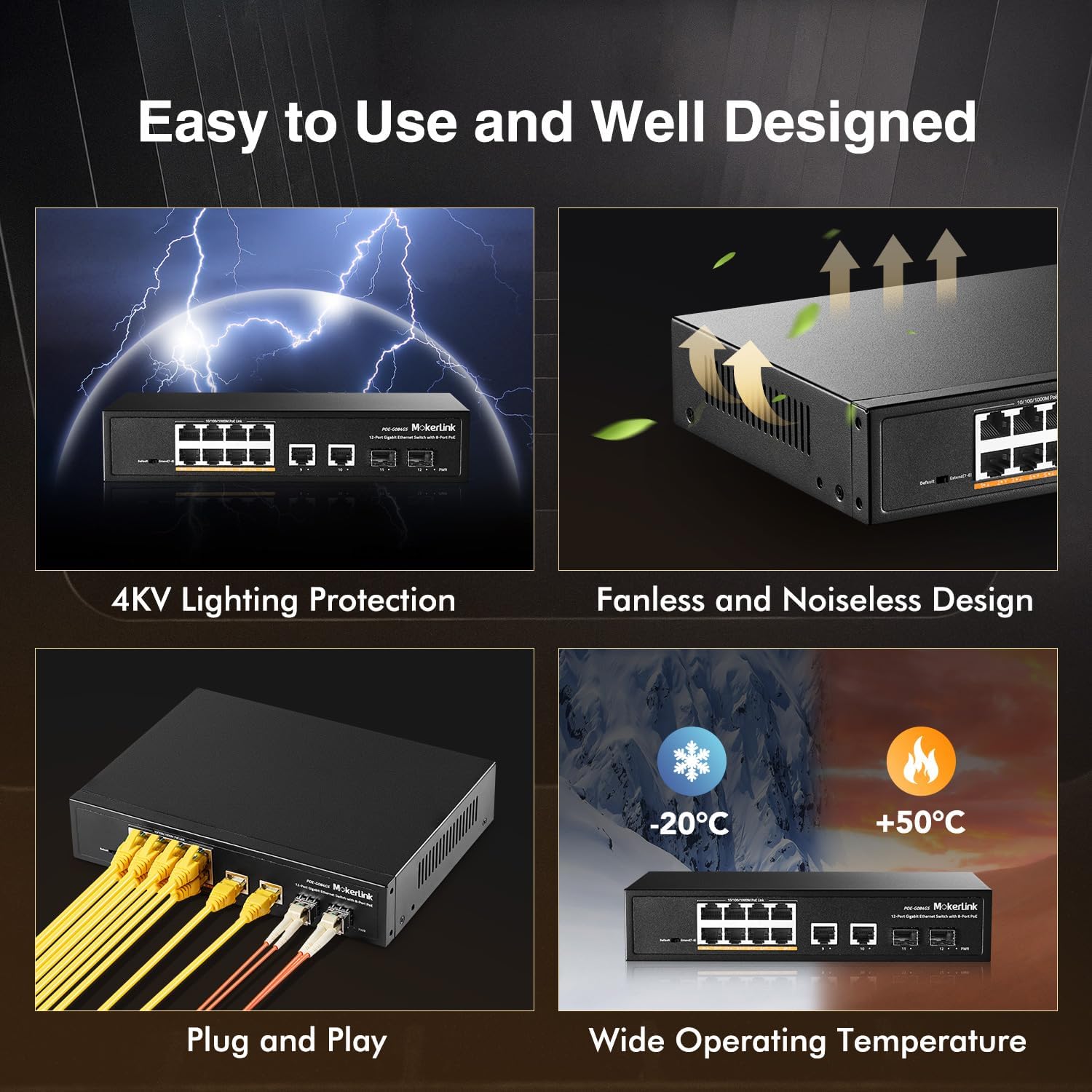
그림 3: 상세 view of the switch's front panel with port labels and DIP switch.
- 포트 1-8: Gigabit PoE+ Ethernet ports (10/100/1000Mbps). These ports provide both data and power to connected PoE-compatible devices.
- 포트 9-10: Gigabit Uplink Ethernet ports (10/100/1000Mbps). Used for connecting to routers, NVRs, or other network devices.
- 포트 11-12: Gigabit SFP Ports. Used for fiber optic connections with compatible SFP modules (single-mode or multimode).
- 딥 스위치: Used to select between Default Mode and Extend Mode.
후면 패널
The rear panel includes the AC power input.

그림 4: 후면 view of the switch, highlighting the AC power input.
- AC Input 100-240V: Power connector for the switch.
LED 표시등
이 스위치는 상태 정보를 제공하는 LED 표시등을 갖추고 있습니다.
- 전원 LED: 스위치에 전원이 들어오면 불이 들어옵니다.
- 링크/동작 LED(포트당): Illuminates when a network link is established and flashes during data transmission.
- PoE LED 표시등(PoE 포트당): Illuminates when PoE power is being supplied to a connected device.
설정 및 설치
1단계: 짐 풀기
Carefully remove the switch from its packaging. Ensure all components listed in the "Package Contents" section are present and undamaged.
2단계: 전원 연결
Connect the power cord to the AC input on the rear panel of the switch and then to a standard electrical outlet. The PWR LED on the front panel should illuminate, indicating that the switch is receiving power.
3단계: 네트워크 연결
Connect your network devices to the switch as follows:
- PoE 장치 연결하기: Connect your PoE-compatible devices (e.g., IP cameras, wireless access points, IP phones) to ports 1-8 using standard Ethernet cables. The Link/Act and PoE LEDs for these ports will light up, indicating a successful connection and power delivery.
- PoE를 지원하지 않는 장치 연결하기: Connect non-PoE network devices (e.g., computers, routers, NVRs) to any of the Gigabit Ethernet ports (1-10). The switch will automatically detect non-PoE devices and provide data connectivity without power.
- 업링크 연결: Connect one of the Gigabit Uplink ports (9 or 10) to your router or main network backbone using an Ethernet cable.
- SFP Connection: For fiber optic connections, insert compatible SFP modules into ports 11-12 and connect fiber optic cables.
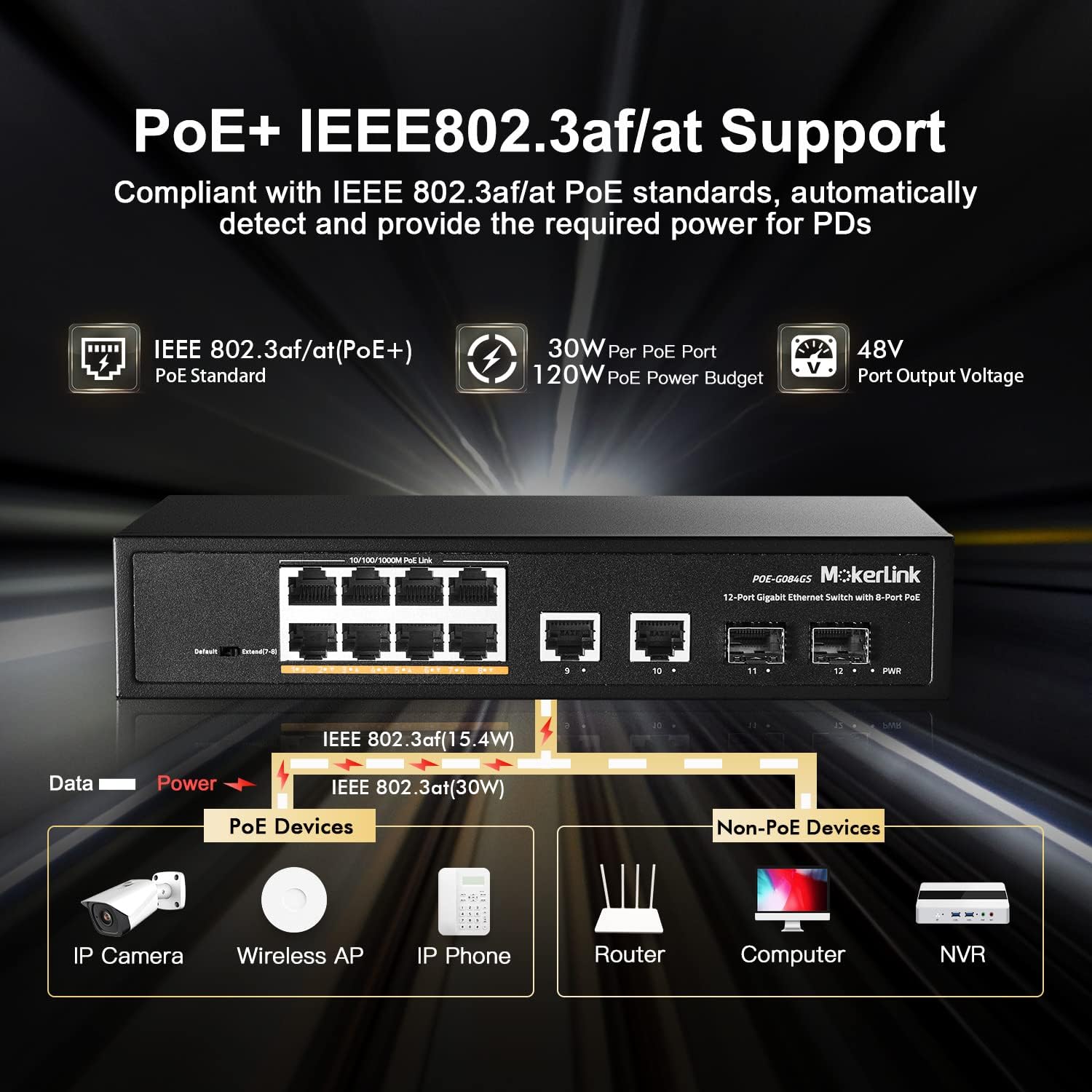
그림 5: 예ample of connecting various devices to the MokerLink PoE switch.
작동 지침
The MokerLink 12-Port Gigabit Ethernet Switch is an unmanaged, plug-and-play device. No software configuration is typically required for basic operation.
데이터 전송
Once devices are connected and powered on, the switch will automatically facilitate high-speed data transmission between all connected devices at Gigabit speeds (10/100/1000Mbps).
이더넷 전원 장치(PoE)
For devices connected to PoE+ ports (1-8) that support IEEE 802.3af/at standards, the switch will automatically detect their power requirements and supply the necessary power through the Ethernet cable. This eliminates the need for separate power adapters for PoE-compatible devices.
Advanced Features: Extend Mode and PoE Watchdog
The DIP switch on the front panel allows you to enable advanced features for specific ports.

Figure 6: DIP switch settings and their effect on port distance and speed.
확장 모드
When the DIP switch is set to "Extend" mode, PoE ports 7 and 8 will operate at a reduced speed of 10Mbps but can extend the PoE transmission distance up to 250 meters. This feature is particularly useful for connecting devices located further away, such as outdoor IP cameras, where standard Ethernet cable length limits (100 meters) would otherwise be an issue.
PoE 워치독
Simultaneously, enabling Extend Mode also activates the PoE Watchdog function for ports 7 and 8. The PoE Watchdog continuously monitors the status of connected PoE devices. If a device becomes unresponsive or drops its connection, the switch will automatically restart the corresponding PoE port to re-establish the connection, improving system reliability and reducing the need for manual intervention.
문제 해결
If you encounter issues with your MokerLink switch, please refer to the following troubleshooting tips:
- 전원 없음: Ensure the power cord is securely connected to both the switch and a working electrical outlet. Check if the PWR LED is illuminated. If not, try a different power outlet.
- 링크/활동 없음: Verify that Ethernet cables are securely connected to both the switch and the connected device. Ensure the connected device is powered on and functioning correctly. Try a different Ethernet cable or port to rule out cable or port issues.
- No PoE Power: Confirm that the connected device is PoE-compatible (IEEE 802.3af/at standard). Check if the PoE LED for the port is illuminated. If using Extend Mode, ensure the device can operate at 10Mbps.
- 느린 연결: Ensure all connected devices and cables support Gigabit Ethernet for optimal performance. If using Extend Mode, remember that ports 7-8 will operate at 10Mbps.
- 간헐적인 연결: Check for loose cable connections. Ensure the switch is placed in a well-ventilated area to prevent overheating, as excessive heat can affect performance.
명세서
| 특징 | 세부 사항 |
|---|---|
| 상표 | 모커링크 |
| 모델 번호 | POE-G084GS |
| 포트 수 | 12 (8 GE PoE+, 2 GE Uplink, 2 Gigabit SFP) |
| 데이터 전송 속도 | 초당 1000메가비트 |
| PoE 표준 | IEEE 802.3af / at |
| PoE 포트당 최대 전력 | 30 와트 |
| 총 PoE 전력 예산 | 120 와트 |
| 스위치 유형 | 관리되지 않음 |
| 케이스 소재 | 금속 |
| 냉각 | 팬리스 |
| 작동 온도 | -20°C ~ +50°C |
| 권tage | 100-240V AC 입력 |
| 품목 무게 | 1.25 킬로그램 |
보증 및 지원
This MokerLink product comes with a 1-year warranty. For technical support or warranty inquiries, please contact MokerLink customer service through their official web제품이 구매된 사이트 또는 플랫폼.
For further assistance, please refer to the MokerLink official store page: 모커링크 스토어.