1. 서론
This manual provides essential information for the safe and efficient operation of your KLIM K9000 Portable Air Conditioner. Please read it thoroughly before use and retain it for future reference. The KLIM K9000 is a versatile 3-in-1 unit offering cooling, dehumidification, and fan functions.
2. 안전 지침
To reduce the risk of fire, electrical shock, or injury, always follow these basic precautions:
- 기기를 사용하기 전에 모든 지침을 읽으세요.
- 전원 공급 장치가 볼륨과 일치하는지 확인하십시오.tag등급 라벨에 지정되어 있습니다.
- 손상된 코드나 플러그를 사용하여 장치를 작동하지 마십시오.
- 제품을 열원과 직사광선에서 멀리 두십시오.
- 공기 흡입구나 배출구를 막지 마십시오.
- 청소나 정비를 하기 전에는 항상 장치의 플러그를 뽑아두세요.
- 본 기기는 신체적, 감각적 또는 정신적 능력이 저하된 사람(어린이 포함)이나 경험 및 지식이 부족한 사람이 사용하도록 의도된 것이 아니며, 안전을 책임질 사람으로부터 기기 사용에 관한 감독이나 지시를 받은 경우에만 사용할 수 있습니다.
- 습기가 많은 환경이나 물 근처에서 제품을 사용하지 마십시오.
- 제조업체가 권장하는 액세서리만 사용하세요.
3. 패키지 내용
패키지에 모든 품목이 들어 있는지 확인하세요.
- KLIM K9000 Air Conditioner Unit
- 원격 제어
- 배기 호스
- 배기 포트
- 배기 호스 커넥터
- 배수 호스
- Window Seal Fixing Plate
- Window Cover Extension
- 2 AAA Alkaline Batteries (for remote control, if included)
4. 제품 오버view
The KLIM K9000 is a compact and efficient portable air conditioner designed to provide comfort in various environments. It integrates three primary functions: cooling, dehumidification, and fan operation.

그림 4.1: KLIM K9000 Portable Air Conditioner unit with remote control, illustrating air circulation.
Its 3-in-1 functionality allows it to cool rooms, circulate air as a fan, and reduce humidity levels, making it suitable for various climate control needs.

그림 4.2: The KLIM K9000 offers 3-in-1 comfort: cooling, dehumidifying, and fan functions, with a 9000 BTU cooling capacity.
5. 설정 및 설치
Proper installation is crucial for optimal performance. Follow these steps for quick setup:
- 위치: Place the unit on a flat, stable surface, ensuring at least 30 cm (12 inches) of space around it for proper airflow.
- 배기 호스 부착: Connect the exhaust hose to the unit's exhaust port. Extend the hose and connect the window seal fixing plate or window cover extension.
- 창 설치: Secure the window seal fixing plate or extension in a compatible window opening (sliding windows). For tilt windows, a separate seal kit is required and sold separately. Ensure the hot air is expelled outdoors.
- 전원 연결: 전원 코드를 접지된 콘센트에 꽂으세요.
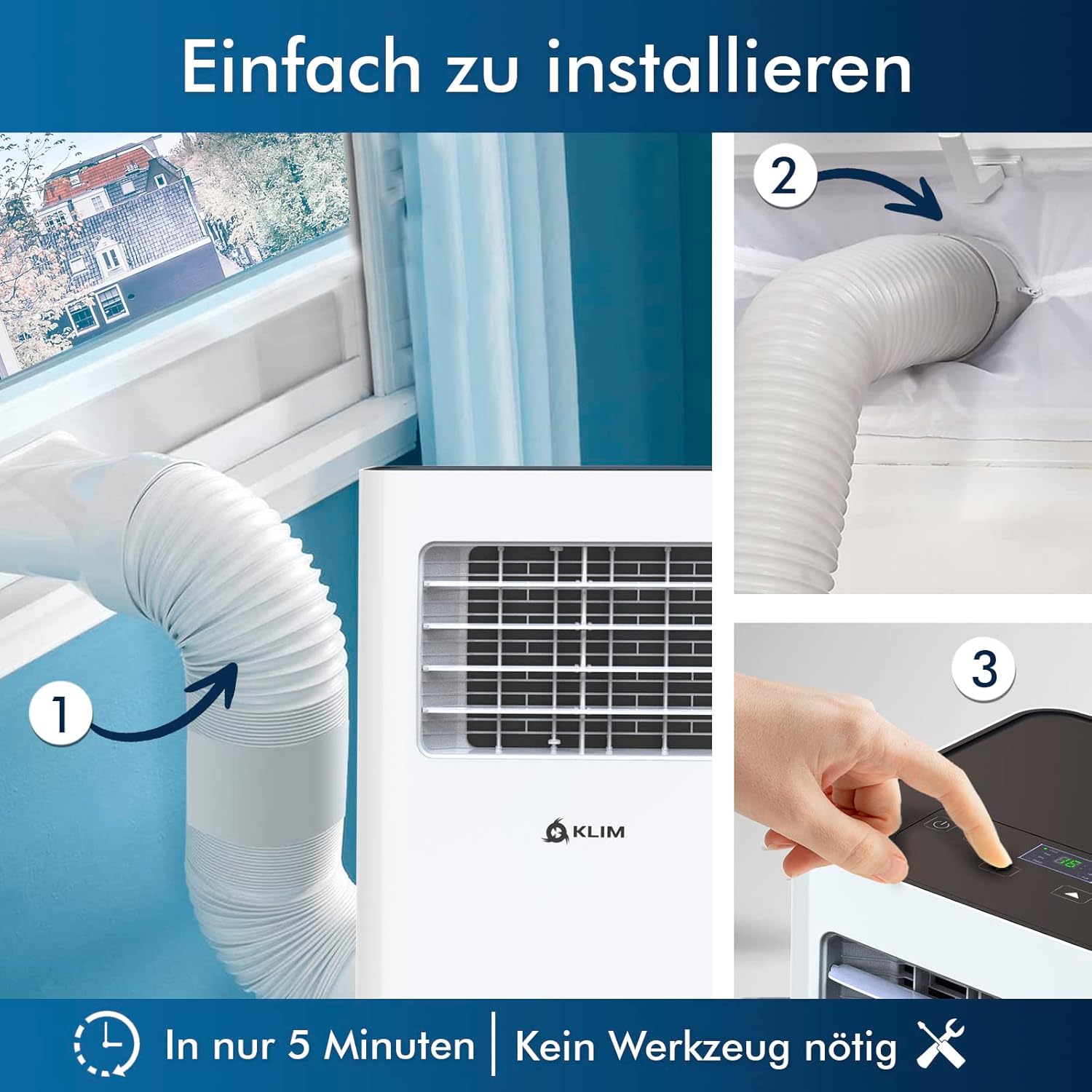
그림 5.1: Visual guide for quick installation, typically completed in 5 minutes without special tools.

그림 5.2: Illustration of window kit compatibility, showing options for sliding windows and mentioning a separate seal for tilt windows.
6. 사용 설명서
The KLIM K9000 can be operated via the control panel on the unit or the included remote control.
6.1. 제어판 및 원격 제어
The remote control allows convenient operation from a distance. Ensure AAA batteries are correctly inserted. The control panel on the unit provides direct access to all functions.
6.2. 작동 모드
- 냉각 모드: Activates the compressor to cool the room. Set your desired temperature (down to 16°C). This mode is effective for rooms up to 20 m² (80 m³).
- 팬 모드: Circulates air without cooling. Adjustable fan speeds are available.
- 제습기 모드: Removes excess moisture from the air. In this mode, the unit collects water, which will need to be drained.
- 수면 모드 : Designed for quiet operation during rest. The unit operates at a reduced noise level (approx. 65 dB) and may adjust temperature settings automatically for comfort.

그림 6.1: The sleep mode provides a cool and quiet environment for restful sleep, operating at approximately 65 dB.
To switch between modes, press the "Mode" button on the control panel or remote control.
7. 유지관리
Regular maintenance ensures the longevity and efficiency of your KLIM K9000.
7.1. 공기 필터 청소
The air filter should be cleaned every two weeks or more frequently depending on usage. A dirty filter can reduce cooling efficiency and airflow.
- 에어컨의 플러그를 콘센트에서 뽑으세요.
- 공기 필터를 찾아 제거합니다(일반적으로 장치 뒷면이나 측면에 있음).
- 필터를 따뜻한 비눗물로 씻으세요. 깨끗이 헹군 후 완전히 자연 건조시킨 후 다시 장착하세요.
- 건조 필터를 다시 설치하고 장치의 전원을 다시 꽂으세요.
7.2. 배수
The unit features an auto-evaporation system in cooling mode, reducing the need for frequent drainage. However, in high humidity or dehumidifier mode, water will accumulate and needs to be drained.
- 연속 배수: For continuous dehumidification, attach the drainage hose to the drain outlet and direct it to a suitable container or floor drain.
- 수동 배수 : When the internal water tank is full, the unit may stop operating and display an indicator. To drain manually, unplug the unit, place a shallow pan or tray under the drain plug, and remove the plug. Be aware that the internal water container can be cumbersome to empty, and it may require two people to safely tilt the unit for complete drainage if using the bottom drain.
8. 문제 해결
일반적인 문제와 해결 방법은 이 섹션을 참조하세요.
| 문제 | 가능한 원인 | 해결책 |
|---|---|---|
| 기기가 켜지지 않습니다. | 전기가 들어오지 않고, 회로 차단기가 작동했고, 물 탱크가 가득 찼습니다. | 전원 코드를 확인하고, 차단기를 재설정하고, 물 탱크를 비우세요. |
| 냉각이 충분하지 않습니다. | Dirty air filter, blocked air intake/outlet, open windows/doors, room too large, exhaust hose not properly installed. | Clean filter, clear obstructions, close windows/doors, ensure proper exhaust hose installation. |
| 이 장치는 시끄럽습니다. | Normal operation sound (compressor/fan), unit not on a level surface. | The unit operates at approximately 65 dB, which is normal. Ensure it is on a flat surface. |
| 누수. | Drain plug not securely closed, drainage hose improperly connected. | Check drain plug, ensure drainage hose is securely attached and not kinked. |
이러한 해결 방법을 시도한 후에도 문제가 지속되면 고객 지원팀에 문의하세요.
9. 사양
| 상표 | 클림 |
| 모델 번호 | K9000WH |
| 냉각 용량 | 9000비티유 |
| 추천 객실 크기 | 최대 20m²(80m³) |
| 기능 | 냉각, 제습기, 선풍기 |
| 에너지 효율 등급 | A |
| 연간 전력 사용량 | 960 와트 |
| 소음 수준 | 65데시벨 |
| 냉각제 | R-290 (Natural Refrigerant) |
| 치수(길이 x 너비 x 높이) | 29.5 x 32.5 x 70.4cm |
| 무게 | 25.58kg |
| 재료 | ABS |
| 전원 | 전기 케이블 |

그림 9.1: The KLIM K9000's high energy efficiency (Class A) contributes to cost savings and environmental protection.
10. 보증 및 지원
The KLIM K9000 Portable Air Conditioner comes with a 5년 보증품질과 성능에 대한 안심을 보장합니다.
For technical assistance, warranty claims, or any questions not covered in this manual, please contact KLIM customer support through their official website or the retailer where the product was purchased. Please have your model number (K9000WH) and purchase date ready.


