소개
Thank you for choosing the AFEXOA Luminous Alarm Clock. This device is designed to provide a pleasant wake-up experience with its customizable alarms, soothing sleep sounds, and vibrant color lights. It also functions as a night light and features a convenient USB charging port. Please read this manual carefully to ensure proper use and maintenance of your alarm clock.

Figure 1: AFEXOA Luminous Alarm Clock, showcasing its digital display and colorful ambient lighting.
설정
1. 언박싱 및 구성품
패키지를 열면 모든 구성품이 들어 있는지 확인하세요.
- AFEXOA Luminous Alarm Clock (1 unit)
- USB-C Power Cord (1 unit)
- Wall Adapter (1 unit)
- 사용 설명서 (본 문서)

Figure 2: Included components: Wall adapter, USB-C power cord, the alarm clock, and the user manual.
2. 전원 연결
- Connect the USB-C end of the power cord to the USB-C port on the back of the alarm clock.
- Plug the USB-A end of the power cord into the provided wall adapter.
- Insert the wall adapter into a standard electrical outlet.
- 디스플레이에 불이 들어오면 기기가 켜진 것입니다.
작동 지침
1. 시간 및 날짜 설정
Refer to the specific buttons on your device (usually labeled 'SET' or 'TIME') to enter time setting mode. Use the '+' and '-' buttons to adjust hours, minutes, and date. Confirm each setting by pressing the 'SET' button again.
The clock supports both 12-hour and 24-hour formats. This setting can typically be toggled within the time setting menu.
2. 알람 설정
The AFEXOA Luminous Alarm Clock features dual alarms, allowing you to set two separate wake-up times.
- 알람 설정: Press the 'ALARM 1' or 'ALARM 2' button to select an alarm. Use '+' and '-' to set the desired wake-up time.
- 작업 모드: Each alarm can be configured for three working modes:
- 매일: Alarm sounds daily.
- 주중: 알람은 월요일부터 금요일까지 울립니다.
- 주말: 알람은 토요일과 일요일에 울립니다.
- 알람 소리: Choose from 7 unique alarm sounds to wake up naturally and pleasantly.
- 볼륨 조절: The alarm volume can be adjusted across 16 levels. The alarm starts softly and gradually increases to the set volume.
- 스누즈 기능 : When the alarm sounds, press the snooze button (often a large button on top) to get an extra 9 minutes of sleep. This can be repeated.

Figure 3: Illustration of the dual alarm feature with options for Everyday, Weekdays, and Weekends.

Figure 4: Demonstrates the 7 alarm sounds and the snooze function, along with the 16-level volume adjustment.
3. Night Light and Color Settings
The alarm clock features a vibrant light display with various customization options.
- 색상 모드: Choose from 5 solid colors, 1 rainbow color, and 2 dynamic light modes.
- 밝기 조절: Adjust the display and light brightness from 0% to 100% using the dimmer wheel located on the side of the device. There are 10 brightness levels available.
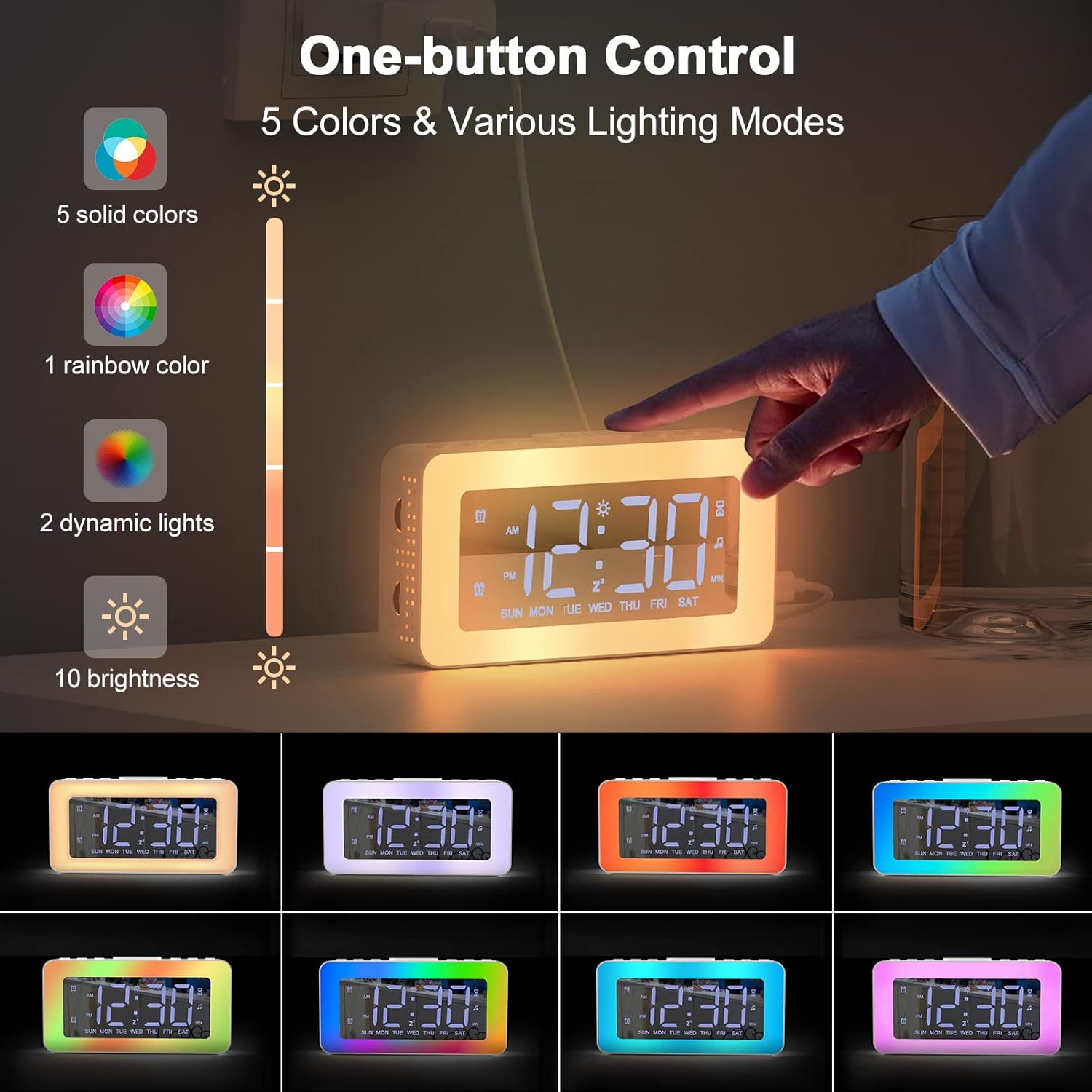
Figure 5: One-button control for selecting from 5 solid colors, 1 rainbow color, 2 dynamic lights, and 10 brightness levels.

Figure 6: Demonstrates the 0-100% adjustable dimmer function for comfortable brightness.
4. Soothing Sounds and Sleep Timer
The alarm clock includes features to aid in relaxation and sleep.
- 진정시키는 소리: Access 8 different soothing sounds designed to help you fall asleep.
- 수면 타이머 : Set a timer for the soothing sounds to play for 10 to 120 minutes (in 10-minute increments).

Figure 7: The 8 soothing sounds available for sleep, with a timer function from 10 to 120 minutes.
5. USB 충전 포트
The alarm clock is equipped with a USB charging port, allowing you to conveniently charge your smartphone or other small electronic devices directly from the clock.
Figure 8: The alarm clock's USB charging port in use, charging a smartphone.
6. Mirror Function
The display surface of the alarm clock can also function as a mirror, providing added utility in your daily life.

Figure 9: The alarm clock's display surface acting as a mirror.
유지
청소
To clean your AFEXOA Luminous Alarm Clock:
- Ensure the device is unplugged from the power source before cleaning.
- Use a soft, dry, lint-free cloth to wipe the display and exterior surfaces.
- 완고한 자국의 경우 약간 damp물에 적신 천으로 닦으십시오. 연마성 세제, 용제 또는 에어로졸 스프레이는 표면을 손상시킬 수 있으므로 사용하지 마십시오.
- 장치를 물이나 다른 액체에 담그지 마십시오.
저장
When not in use for extended periods, store the alarm clock in a cool, dry place, away from direct sunlight and extreme temperatures.
문제 해결
| 문제 | 가능한 원인 | 해결책 |
|---|---|---|
| 화면이 꺼져 있거나 어둡습니다. | Not powered on; brightness set too low. | Ensure power cord is securely connected. Adjust brightness using the dimmer wheel. |
| 알람이 울리지 않습니다. | Alarm not activated; volume too low; incorrect alarm mode. | Verify alarm is set and enabled. Increase alarm volume. Check if the alarm mode (Everyday, Weekdays, Weekends) matches the current day. |
| 시간이 정확하지 않습니다. | 시간이 잘못 설정되었거나 정전이 발생했습니다. | "시간 및 날짜 설정" 지침에 따라 시간을 재설정하세요. |
| Soothing sounds not playing. | Sound function not activated; timer expired. | Ensure soothing sound mode is active. Check the sleep timer setting. |
명세서
| 특징 | 세부 사항 |
|---|---|
| 상표 | AFEXOA |
| 모델 번호 | CH-06 |
| 색상 | 하얀색 |
| 치수(길이 x 너비 x 높이) | 16 x 3.81 x 3.8cm(6.3 x 1.5 x 1.5인치) |
| 무게 | 20g(0.04파운드) |
| 재료 | 플라스틱 |
| 디스플레이 유형 | 디지털 |
| 전원 | 코드식 전기 |
| 특별 기능 | Alarm, Loud Alarm, Large Display, Timer, Charging Port, Mirror Display, Color Lights, Brightness Control, 12/24 Hour Format, Snooze, Dual Alarm, 7 Alarm Sounds, 8 Sleeping Sounds |
| 배터리 | 1 CR2032 (included) - likely for memory backup |
보증 및 지원
For warranty information or technical support, please refer to the contact details provided on the product packaging or the official AFEXOA web사이트. 구매 증빙 자료로 구매 영수증을 보관하세요.
If you encounter any issues not covered in this manual, please contact AFEXOA customer service for assistance.


