소개
This manual provides comprehensive instructions for the Keychron K1 Pro TKL Ultra-Slim QMK/VIA Custom Mechanical Keyboard. It covers setup, operation, maintenance, and troubleshooting to ensure optimal use of your device. The K1 Pro features a tenkeyless (TKL) layout, ultra-slim design, QMK/VIA programmability, Bluetooth wireless and USB wired connectivity, hot-swappable low-profile Gateron mechanical switches, and RGB backlighting with durable PBT keycaps.
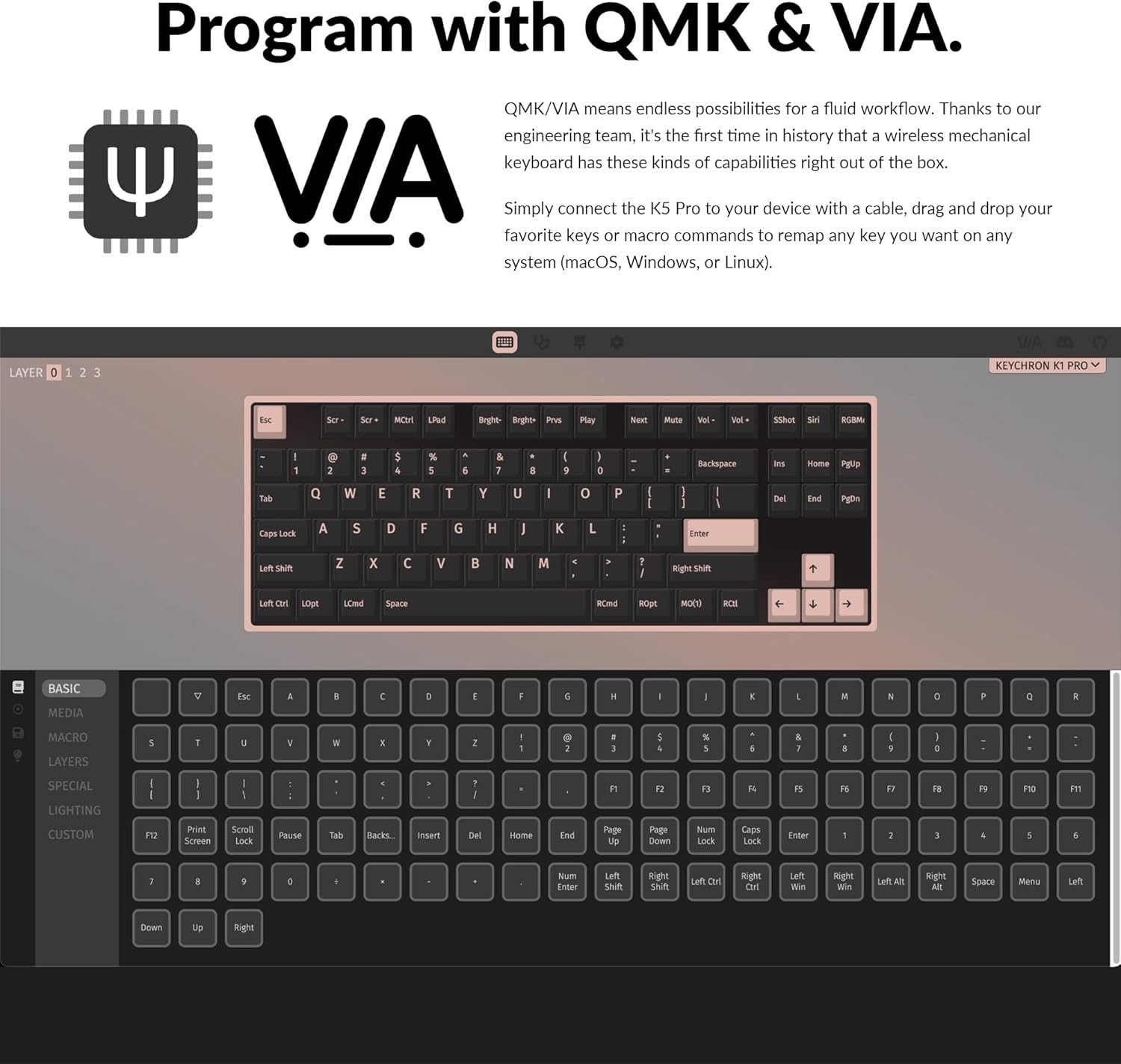
Image: The Keychron K1 Pro TKL mechanical keyboard, showcasing its compact tenkeyless layout and sleek design.
설정
포함된 구성 요소
The Keychron K1 Pro package includes:
- 1x Fully Assembled Keyboard (including case, PCB, keycaps, and Gateron low-profile 스위치)
- 1x Type-A - Type-C 케이블
- 1x 스위치 풀러
- 1x 키캡 풀러

이미지: 측면 view of the Keychron K1 Pro, highlighting the physical switches for connectivity and operating system selection.
초기 연결
To begin, connect the keyboard to your computer using the provided USB Type-C cable. This will power the keyboard and allow for wired operation.
운영 체제 스위치
Locate the operating system switch on the side of the keyboard. Slide it to the appropriate position for your system (Mac/iOS or Windows/Android) to ensure correct key mapping and functionality.
블루투스 페어링
The K1 Pro supports Bluetooth 5.1, allowing connection to up to 3 devices wirelessly. To pair:
- Ensure the keyboard is in Bluetooth mode using the side switch.
- 를 누르고 계세요 Fn + 1 (또는 2, 3) key combination for 4 seconds until the key starts flashing, indicating it is ready for pairing.
- On your device (laptop, phone, tablet), search for Bluetooth devices and select "Keychron K1 Pro" to connect.
- Repeat for additional devices using Fn + 2 or Fn + 3.
- Switch between paired devices by pressing Fn + 1, 2, 또는 3.
작동 지침
연결 모드
The K1 Pro offers both wireless and wired connectivity:
- 블루투스 무선: Connects to up to 3 devices via Broadcom Bluetooth 5.1 for seamless multitasking.
- USB 타입 C 유선: Provides a stable connection with a 1000 Hz polling rate, suitable for competitive gaming.
QMK & VIA Customization
The K1 Pro is fully programmable with QMK and VIA software, allowing you to remap keys, create macros, and customize layers. Connect the keyboard via USB-C, then use the VIA software (available for macOS, Windows, or Linux) to drag and drop commands to your desired keys.

Image: Screenshot of the QMK and VIA software interface, demonstrating how to customize key assignments and macros for the Keychron K1 Pro.
핫스왑 가능 스위치
The K1 Pro features hot-swappable sockets, allowing you to change low-profile Gateron mechanical switches without soldering. This enables customization of your typing experience. Use the included switch puller to carefully remove and insert switches. Note: The K1 Pro is compatible only with Gateron low-profile 기계식 스위치.

이미지: 클로즈업 view of the hot-swappable low-profile Gateron mechanical switches on the Keychron K1 Pro, showing how they can be easily removed and replaced.
RGB 백라이트
The keyboard includes over 22 types of RGB backlight settings, along with a static white backlight option. You can fine-tune the RGB hue, saturation, brightness, and effect speed using onboard key combinations or the VIA software.

Image: The Keychron K1 Pro keyboard illuminated with vibrant RGB backlighting, showcasing 다양한 색상 효과.
로우프로file 더블샷 PBT 키캡
The K1 Pro is equipped with durable low-profile double-shot PBT keycaps. These keycaps offer excellent oil resistance for long-term use and a comfortable typing experience.

Image: The Keychron K1 Pro keyboard on a desk, highlighting the texture and profile of its low-profile 이중사출 PBT 키캡.
인체공학적 특징
The K1 Pro is designed for comfort with three levels of adjustable typing angle, providing ergonomic wrist support. It also features redesigned stabilizers for large keys (space bar, left Shift, backspace, Enter) to ensure reliability and minimize wobble.

Image: A split image showing the redesigned stabilizers on large keys and the adjustable typing angles of the Keychron K1 Pro for ergonomic support.

Image: An illustration comparing the ultra-slim profile of the Keychron K1 Pro (17mm) with a conventional mechanical switch and a Gateron Low-Profile 2.0 Mechanical Switch, alongside a quarter for scale.
유지
청소
키보드의 성능과 외관을 유지하려면 다음 사항을 준수하십시오.
- 청소하기 전에 키보드의 전원을 차단하십시오.
- 부드럽고 털이 없는 천을 살짝 사용하세요.amp물이나 순한 세척액을 사용하여 키캡과 섀시를 닦으세요.
- 키 사이의 먼지와 이물질을 제거하려면 압축 공기나 작은 브러시를 사용하세요.
- 마감이나 키캡 레전드를 손상시킬 수 있는 강한 화학 물질이나 연마재는 피하세요.
문제 해결
연결 문제
- 블루투스 연결 끊김: Ensure the keyboard is charged. Re-pair the device if connection is lost. Some operating systems may require manual reconnection after waking from sleep.
- 유선 연결이 감지되지 않았습니다: 양쪽 USB-C 케이블 연결을 확인하세요. 다른 USB 포트나 케이블을 사용해 보세요.
Key Input Problems
- 키가 응답하지 않음: Ensure the correct operating system mode is selected. If using hot-swappable switches, ensure switches are fully seated.
- 잘못된 키 출력: Verify the keyboard layout in your operating system settings. If using VIA, check your custom keymaps for unintended reassignments.
백라이트 문제
- 백라이트가 작동하지 않음: Ensure the backlight is enabled and brightness is adjusted. Check keyboard battery level if in wireless mode.
- Dim LEDs: The brightness of the LEDs can vary. Ensure maximum brightness is set.
Physical Switches (Bluetooth/Cable, Win/Mac)
- Difficulty Reading Labels: The labels on the small physical switches for connectivity and OS selection can be very small. Use adequate lighting or a magnifier if needed to ensure correct selection.
명세서
| 상표 | 키크론 |
| 모델 번호 | K1PH3 |
| 키보드 설명 | 기계적 |
| 연결 기술 | USB-C, Bluetooth 5.1 |
| 호환 장치 | 맥OS, 윈도우, 리눅스 |
| 특징 | Backlit (RGB), Hot-swappable, QMK/VIA Programmable, Ultra-Slim |
| 키보드 백라이트 색상 지원 | RGB |
| 제품 치수 | 13.62 x 4.67 x 0.95인치(34.59 x 11.86 x 2.41cm) |
| 품목 무게 | 1.98파운드(0.9kg) |
| 배터리 | 1개의 리튬 폴리머 배터리(포함) |
| 첫 번째 이용 가능 날짜 | 14년 2022월 XNUMX일 |
보증 및 지원
For warranty information, technical support, or further assistance, please refer to the official Keychron web사이트를 방문하거나 고객 서비스에 직접 문의하세요. 보증 청구를 위해 구매 영수증을 보관하세요.


