1. 서론
Thank you for choosing the SEHMUA 2K Light Bulb Security Camera. This manual provides detailed instructions for the setup, operation, and maintenance of your new security camera. Please read this manual thoroughly before use to ensure proper functionality and safety.

Figure 1: SEHMUA 2K Light Bulb Security Camera and Mobile Application Interface.
2. 제품 오버view
2.1 패키지 내용
- SEHMUA 2K Light Bulb Security Camera (Model L1)
- 사용자 설명서
- Mounting Accessories (if applicable, not specified in data but common)
2.2 주요 특징
- 2K 풀 HD 해상도: 선명하고 자세한 비디오 제공tage.
- 360° Pan/Tilt/Zoom (PTZ) & Remote Control: Allows for comprehensive area coverage and remote adjustment via mobile app.
- 컬러 나이트 비전: 내장형 스포트라이트로 저조도 환경에서의 시야 확보가 향상되었습니다.
- Motion Detection & Siren Alert: Automatically detects movement and can trigger an audible siren for deterrence.
- 자동 추적 : Follows detected motion within its field of view.
- 양방향 오디오 : 카메라에 내장된 마이크와 스피커를 통해 통신이 가능합니다.
- SD 카드 및 클라우드 저장소: Supports local storage (SD card not included) and optional cloud storage for continuous recording.
- 간편한 설치: Designed for E26/E27 light bulb sockets.
- Wi-Fi 연결: 가정용 2.4GHz Wi-Fi 네트워크에 연결됩니다.
- 알렉사 호환성: 아마존 알렉사와 연동하여 음성 제어가 가능합니다.
3. 설정
3.1 앱 다운로드 및 계정 등록
- Scan the QR code provided on the product packaging or in the quick start guide to download the official SEHMUA security camera application from your device's app store (iOS or Android).
- Open the application and follow the on-screen prompts to register a new account or log in if you already have one.
3.2 카메라 설치
The SEHMUA Light Bulb Security Camera is designed for easy installation into standard E26/E27 light bulb sockets. Ensure the power to the socket is turned off before installation.
- Locate a suitable E26/E27 light bulb socket where you wish to install the camera. This can be indoors or outdoors, provided the socket is protected from direct weather exposure if outdoors (IP65 rating means it's dust tight and protected against water jets, but not submersion).
- Carefully screw the camera into the light bulb socket until it is securely fastened. Do not overtighten.
- Turn on the power to the light bulb socket. The camera will power on and initiate its startup sequence.

Figure 2: Easy installation into an E27 socket.

그림 3: 설치 예amples for indoor and outdoor use.
3.3 네트워크 연결
Once powered on, the camera will enter pairing mode (indicated by a specific light pattern or voice prompt). Follow these steps to connect it to your Wi-Fi network:
- In the SEHMUA app, tap "Add Device" or the "+" icon.
- 목록에서 카메라 모델을 선택하세요.
- Follow the in-app instructions to connect the camera to your 2.4GHz Wi-Fi network. This typically involves entering your Wi-Fi password and scanning a QR code generated by the app with the camera's lens.
- Once connected, the camera will confirm successful pairing, and you can begin view라이브 피드를 시청하세요.
4. 사용 설명서
4.1 라이브 View and Remote Control (PTZ)
Access the live video feed from your camera through the SEHMUA mobile application. The app allows you to remotely control the camera's pan (horizontal) and tilt (vertical) movements for a 360-degree view잉 각도.
- Open the SEHMUA app and select your camera from the device list.
- The live feed will display. Use the directional controls within the app to pan the camera horizontally (350°) and tilt it vertically (90°).

Figure 4: Pan, Tilt, and Zoom (PTZ) functionality.

Figure 5: The camera provides 2K Full HD resolution for clearer details.
4.2 기록 및 저장
The camera supports 24/7 continuous recording and event-triggered recording. Footage can be stored locally on a microSD card (not included) or via optional cloud storage.
- MicroSD 카드: Insert a compatible microSD card (up to 128GB, Class 10 or higher recommended) into the camera's SD card slot. The camera will automatically begin recording.
- 클라우드 스토리지: Subscribe to the cloud storage service through the SEHMUA app for secure, off-site storage of your video recordings.
- View 기록된 footage by navigating to the "History" or "Cloud" sections within the app.

Figure 6: Storage options include Cloud and SD Card (not included).
4.3 동작 감지 및 알림
The camera is equipped with motion detection capabilities to alert you to activity in its monitored area.
- 동작 감지 활성화: In the app settings for your camera, enable motion detection. You can adjust sensitivity levels to minimize false alerts.
- 활동 구역: 카메라 내의 특정 영역을 정의합니다. view 다른 영역을 무시하고 동작 감지를 활성화하려는 영역입니다.
- 실시간 알림: 움직임이 감지되면 스마트폰으로 푸시 알림을 받으세요.
- 자동 추적 : When enabled, the camera will automatically pan and tilt to follow detected motion.
- 사이렌 및 스트로보 라이트: Configure the camera to activate an audible siren and/or a bright strobe light upon motion detection for deterrence.

Figure 7: Motion detection with real-time alerts and auto tracking.

Figure 8: Adjusting activity zones for precise motion detection.

Figure 9: Auto-tracking feature in action.

Figure 10: Deterrence with siren and strobe light.
4.4 야간 투시경
The camera features color night vision, providing clear images even in very low light conditions, enhanced by an integrated spotlight.
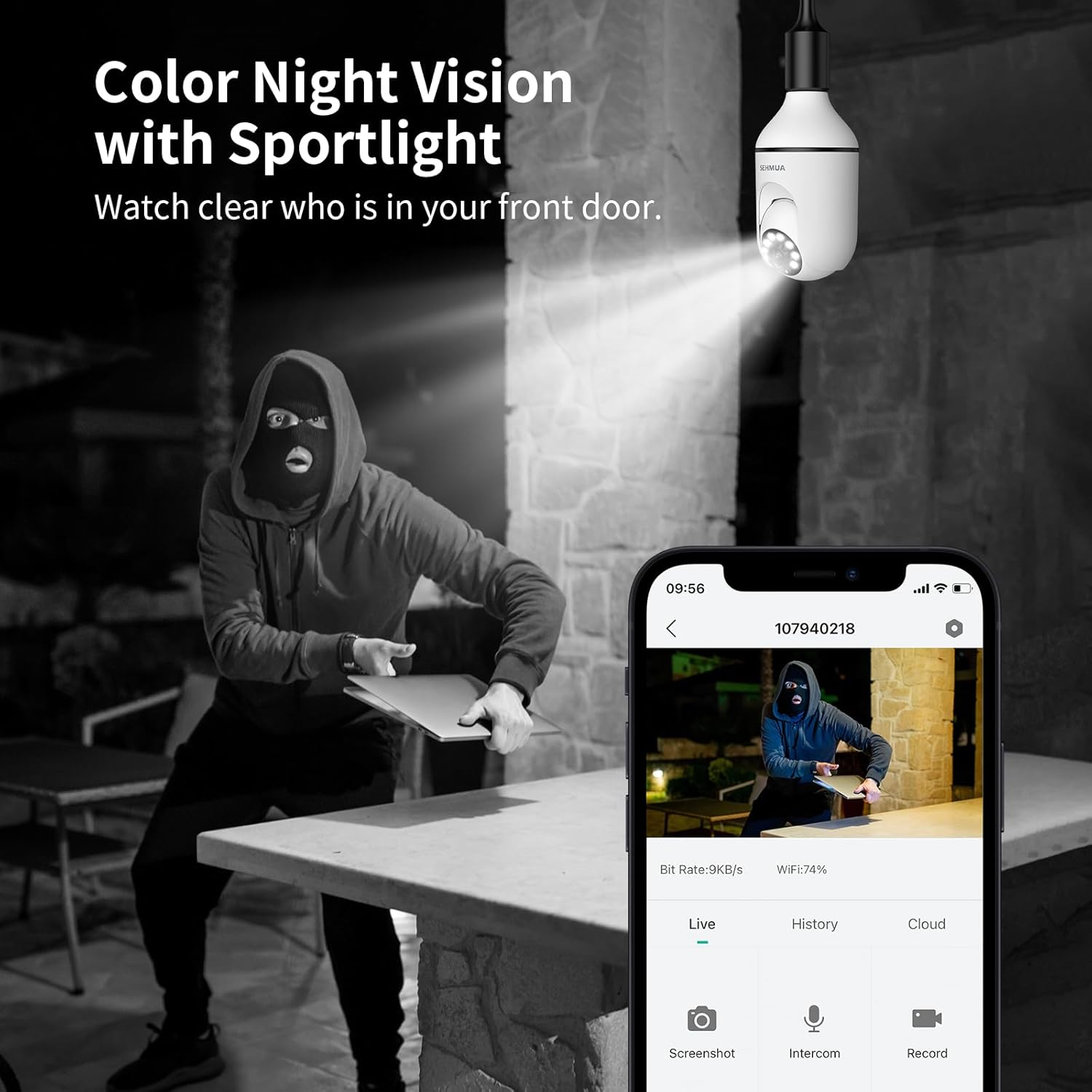
Figure 11: Color Night Vision with spotlight.
4.5 양방향 오디오
카메라의 양방향 오디오 기능을 사용하여 방문객과 소통하거나 침입자를 막을 수 있습니다.
- 라이브에서 view 앱에서 마이크 아이콘을 탭하면 카메라 스피커를 통해 말할 수 있습니다.
- The camera's built-in microphone will capture audio from the camera's location, which you can hear through your phone.

그림 12: 양방향 오디오 통신.
4.6 Amazon Alexa 통합
The SEHMUA camera can be integrated with Amazon Alexa for convenient voice control and view호환되는 스마트 디스플레이에서 재생 가능.
- 스마트폰에서 Alexa 앱을 엽니다.
- 검색 and enable the "SEHMUA" skill.
- Link your SEHMUA account with your Alexa account.
- Discover devices. You can now use voice commands like "Alexa, show me the [camera name]" on your Echo Show or other compatible devices.
5. 유지관리
- 청소: 부드럽고 마른 천으로 카메라 렌즈와 본체를 부드럽게 닦으세요. 강한 화학 물질이나 연마성 세척제는 사용하지 마세요.
- 펌웨어 업데이트: Regularly check the SEHMUA app for available firmware updates to ensure optimal performance and security.
- 환경 조건: While rated IP65 for outdoor use, avoid exposing the camera to extreme temperatures, direct water submersion, or high-pressure water jets.
6. 문제 해결
| 문제 | 가능한 원인 | 해결책 |
|---|---|---|
| 카메라 전원이 켜지지 않습니다. | No power to the socket; camera not screwed in properly. | Ensure the light socket has power. Re-screw the camera firmly into the socket. |
| Wi-Fi에 연결할 수 없습니다. | 와이파이 비밀번호가 잘못되었습니다. 카메라가 공유기에서 너무 멀리 떨어져 있습니다. 5GHz 와이파이 네트워크를 사용하고 있습니다. | Verify Wi-Fi password. Move camera closer to the router during setup. Ensure you are connecting to a 2.4GHz Wi-Fi network. |
| 움직임 감지 알림이 없습니다. | Motion detection disabled; sensitivity too low; activity zones not set correctly. | Enable motion detection in the app. Adjust sensitivity. Check and configure activity zones. |
| 비디오 품질이 좋지 않습니다. | Wi-Fi 신호가 약하고 렌즈가 더러워요. | 와이파이 신호 강도를 개선하세요(예: 와이파이 확장기 사용). 카메라 렌즈를 청소하세요. |
| 양방향 오디오가 작동하지 않습니다. | Microphone/speaker muted in app; volume too low. | Check audio settings in the app. Ensure microphone and speaker are not muted and volume is adequate. |
7. 사양
| 특징 | 세부 사항 |
|---|---|
| 모델 번호 | L1 |
| 해결 | 2K 풀 HD |
| 연결성 | 2.4GHz 와이파이 |
| 전원 | Corded Electric (E26/E27 Socket) |
| 팬 / 틸트 각도 | 350° 팬, 90° 틸트 (360° 시야각) View) |
| 나이트 비전 | Color Night Vision with Spotlight |
| 저장 옵션 | MicroSD Card (up to 128GB, not included), Cloud Storage (optional) |
| 오디오 | 양방향 오디오 |
| 알림 | Motion Detection, Siren, Strobe Light |
| 호환성 | Amazon Alexa, Smartphone (iOS/Android) |
| 실내/실외 사용 | 야외(IP65 등급) |
| 품목 무게 | 10.5 온스 |
| 패키지 크기 | 6.89 x 3.31 x 3.23 인치 |
8. 보증 및 지원
For detailed warranty information and technical support, please refer to the warranty card included with your product or visit the official SEHMUA web해당 사이트를 참조하십시오. 제품 지원 페이지에서도 추가 자료 및 FAQ를 찾아보실 수 있습니다.
For further assistance, please contact SEHMUA customer service through the contact information provided on their official web웹사이트 또는 모바일 애플리케이션 내에서.
A PDF version of the Instructions for Use (IFU) is available for download 여기.


