1. 서론
Thank you for choosing the Perlegear Full Motion TV Wall Mount, Model PGLF4. This manual provides essential information for the safe and correct installation, operation, and maintenance of your TV wall mount. Please read these instructions thoroughly before beginning installation and keep them for future reference.
2. 안전 정보
WARNING: Failure to read and follow these instructions may result in personal injury, property damage, or voiding your warranty. If you do not understand these instructions or have doubts about the safety of the installation, please contact customer support or a qualified installer.
- This product is designed for installation on 12"/16" wood studs, solid concrete, or concrete block walls. 건식벽체에만 설치하지 마십시오.
- Ensure the wall structure can safely support the combined weight of the mount and your TV. The maximum weight capacity for this mount is 132파운드(60kg).
- Verify your TV's VESA pattern and weight are within the specified limits before installation.
- Use only the mounting hardware provided. If any parts are missing or defective, contact Perlegear customer service.
- 목재 스터드를 정확하게 찾으려면 항상 스터드 파인더를 사용하십시오.
- Do not overtighten screws, as this may cause damage and reduce the mount's stability.
- 설치하는 동안 어린이의 접근을 차단하세요.
3. 패키지 내용
Please check to ensure all components are included and undamaged:
- 관절형 암이 있는 벽판 조립체
- TV 브래킷 (2개)
- 설치 하드웨어 키트(TV와 벽 사이의 간격을 조절하는 다양한 나사, 와셔, 스페이서 포함)
- 버블 레벨
- 드릴링 템플릿
- Cable Ties (Velcro straps)
- 사용 설명서
4. 제품 특징
- 헤비 듀티 건설: Made from robust alloy steel, designed to securely hold TVs up to 132 lbs.
- Wide TV Compatibility: Supports most 37-85 inch flat or curved TVs.
- VESA 규정 준수: 200x100mm부터 600x400mm까지의 VESA 패턴과 호환됩니다.
- 완전한 동작 조정:
- Tool-Free Tilt: Adjust your TV 15° forward and 5° backward to reduce glare and optimize view주고받음.
- 받침: Swivel your TV up to 45° left or right for flexible view각도를 나타냅니다.
- 확장 및 수축: Extends up to 16.9 inches (43 cm) from the wall for immersive viewing and retracts to a slim 2.72 inches (6.9 cm) for a clean profile.
- 향상된 안정성: Features durable articulating arms, anti-drop end caps, and security locks to keep your TV safely in place.
- 설치 후 수평 조정: Allows for a ±3° leveling adjustment after mounting to ensure a perfectly level screen.
5. 호환성
설치하기 전에 TV가 다음 조건을 충족하는지 확인하십시오.
- TV 크기 : 37~85인치 TV 대부분에 호환됩니다.
- TV 무게: Your TV must weigh no more than 132 lbs (60 kg).
- 베사 패턴: The mounting holes on the back of your TV must match one of the following VESA patterns: 200x100mm, 200x200mm, 300x200mm, 300x300mm, 400x200mm, 400x300mm, 400x400mm, 500x400mm, 600x400mm.
- 벽 유형: Suitable for 12"/16" wood stud walls, solid concrete walls, or concrete block walls. 건식벽체에만 설치하지 마십시오.

This image illustrates the wide compatibility of the mount, supporting TVs from 37 to 85 inches and various VESA patterns.

This diagram shows the supported wall types for installation: concrete, block walls, and 12-inch or 16-inch wood studs. It explicitly warns against mounting on drywall only.
6. 설정 및 설치
Follow these general steps for installation. Refer to the detailed instructions provided in your package for specific diagrams and hardware usage.
6.1 설치 전 체크리스트
- Ensure you have all necessary tools (e.g., drill, stud finder, screwdriver, pencil).
- Confirm your TV and wall meet the compatibility requirements.
- Have a helper available, especially for lifting the TV.
6.2 설치 단계
- Attach TV Brackets to Your TV: Secure the vertical TV brackets to the back of your television using the appropriate screws, washers, and spacers from the hardware kit. Ensure they are centered and securely fastened.
- Mount the Wall Plate Assembly:
- Use a stud finder to locate the center of your wood studs or mark the desired position on concrete/block walls.
- Position the drilling template on the wall at your desired height and mark the pilot hole locations.
- Drill pilot holes according to the instructions for your wall type.
- Attach the wall plate assembly to the wall using the provided lag bolts and washers. Ensure it is level and securely tightened.
- TV를 걸어두세요: Carefully lift your TV (with attached brackets) and hook the brackets onto the wall plate assembly. Engage the security locks to prevent accidental dislodgement.

This image shows the use of the handy drilling template to mark precise locations for mounting screws on the wall, simplifying the installation process.

This image displays the Perlegear TV wall mount securely installed on a wall, highlighting its maximum weight capacity of 132 lbs.
This video provides a full review and demonstration of the Perlegear TV mount, including aspects of its installation and functionality.
7. 사용 설명서
Once installed, your Perlegear PGLF4 mount allows for various adjustments to achieve optimal view주고받음.
- 기울기 조정: The mount features tool-free tilt. Locate the tilt adjustment levers on the TV brackets. Loosen them to adjust the TV's vertical angle (15° forward, 5° backward), then tighten to secure.
- 회전 조정: Gently push or pull the TV to swivel it left or right (up to 45° in each direction) along the articulating arms.
- 확장 및 수축: Extend the TV out from the wall by pulling it forward (up to 16.9 inches) or push it back towards the wall to retract (to 2.72 inches).
- 설치 후 수평 조정: If your TV appears slightly unlevel after installation, use the ±3° leveling adjustment feature to fine-tune its horizontal position. Refer to your detailed manual for specific instructions on how to access and use this feature.

This image demonstrates the mount's ability to tilt the TV +5° to -15° and swivel ±45°, providing the best view from any seat.

This image shows a hand utilizing the tool-free tilt mechanism, allowing for easy adjustment of the TV's vertical angle without additional tools.
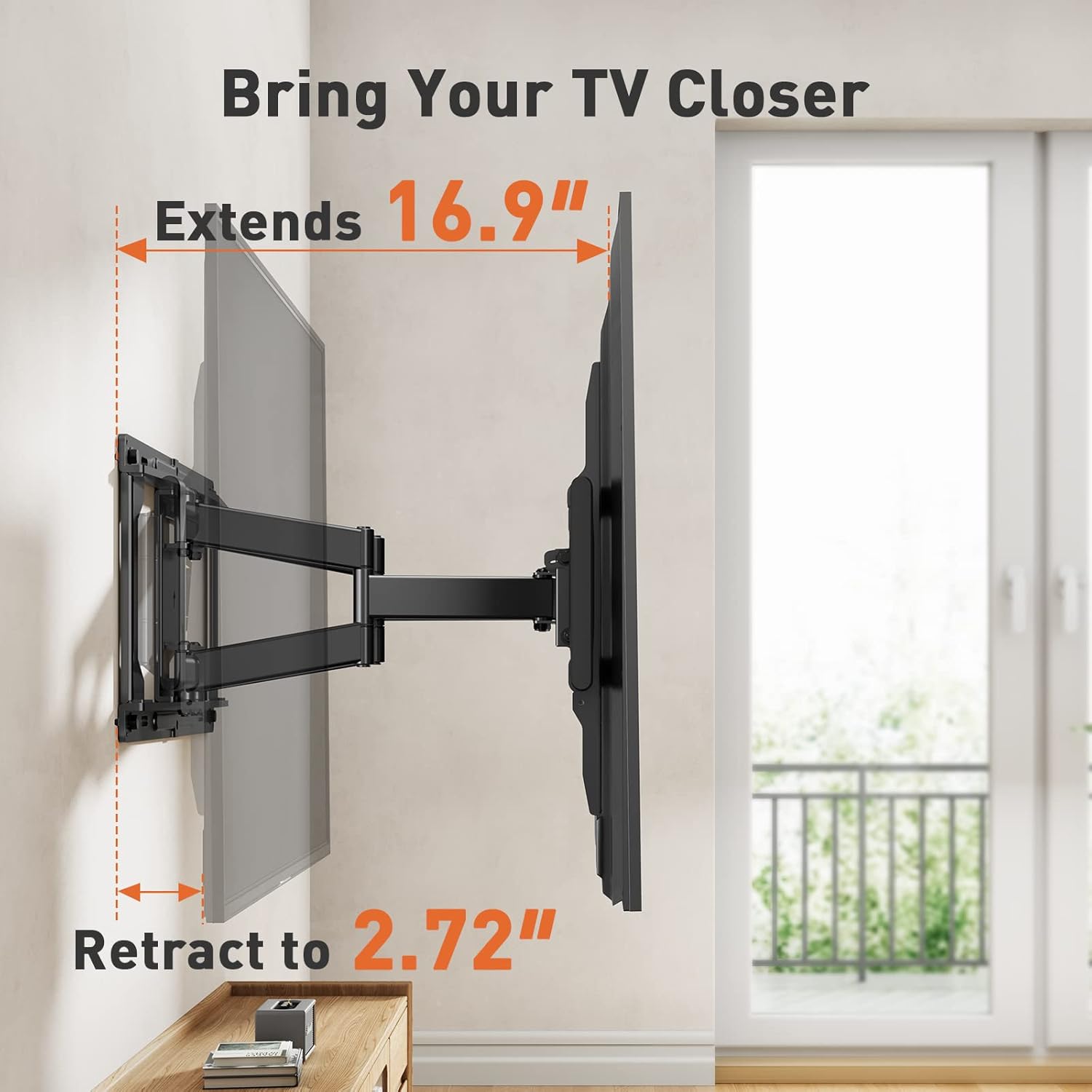
This image illustrates the mount's extension capability, allowing the TV to be pulled out 16.9 inches from the wall and retracted to a compact 2.72 inches.
8. 유지관리
정기적인 유지 관리는 TV 벽걸이 거치대의 수명 연장과 안전한 작동을 보장합니다.
- 청소: 먼지를 제거하려면 부드럽고 마른 천으로 거치대를 닦으십시오. 연마성 세척제나 용제를 사용하지 마십시오.
- 연결 확인: 모든 나사와 볼트가 단단히 조여져 있는지 주기적으로 확인하십시오. 필요한 경우 다시 조이되, 과도하게 조이지 마십시오.
- 손상 여부 검사: 거치대에 마모, 손상 또는 부식 흔적이 있는지 정기적으로 점검하십시오. 문제가 발견되면 사용을 중단하고 고객 지원팀에 문의하십시오.
9. 문제 해결
설치 중이나 설치 후에 문제가 발생하면 다음의 일반적인 해결 방법을 참조하세요.
- TV 수평이 맞지 않음: Use the post-installation leveling adjustment feature (±3°) to correct the TV's horizontal alignment.
- TV 이동/조정에 어려움이 있습니다: Ensure all adjustment levers and bolts are sufficiently loosened before attempting to move the TV. If the mount feels stiff, check for any obstructions or overtightened components.
- 산이 불안정하게 느껴집니다: Recheck all wall and TV connections. Ensure lag bolts are securely fastened into studs or appropriate anchors in concrete. Verify the TV's weight does not exceed the mount's capacity.
- 잃어버린 부분들: If any parts are missing from your package, contact Perlegear customer support immediately.
10. 사양
| 사양 | 세부 사항 |
|---|---|
| 상표 | 펄기어 |
| 모델 번호 | PGLF4 |
| TV 크기 호환성 | 37-85 인치 |
| 최대 중량 용량 | 132파운드(60kg) |
| VESA 호환성 | 200x100mm ~ 600x400mm |
| 기울기 각도 | +15° / -5° |
| 회전 각도 | ±45° |
| 벽에서 연장된 부분 | 2.72인치(6.9cm) ~ 16.9인치(43cm) |
| 설치 후 레벨링 | ±3° |
| 벽 유형 호환성 | 12"/16" Wood Studs, Solid Concrete, Concrete Block |
| 재료 | 합금강 |
| 색상 | 검은색 |
11. 보증 및 지원
Perlegear provides a limited warranty for this product. For detailed warranty information, please refer to the warranty card included in your package or visit the official Perlegear web대지.
Should you have any issues or questions, please do not hesitate to contact us:
- 미국/캐나다: 1-800-456-5231 (Mon-Fri, 8am-8pm CST)
- UK/DE: 44-808-196-4165 (Mon-Fri, 2pm-10pm UTC)
- 이메일: support@perlegear.com
- Web대지: www.perlegear.com


