소개
구매해주셔서 감사합니다asing the KOSUMOSU 3D LED Digital Clock. This manual provides detailed instructions for the setup, operation, and maintenance of your new clock. Please read this manual thoroughly before use to ensure proper functionality and to maximize your product experience. Keep this manual for future reference.
안전 정보
- Ensure the power adapter (not included) is 5V/1A. Using an incorrect adapter may damage the device.
- Keep the clock away from water and high humidity environments.
- 시계를 직접 분해하거나 수리하지 마십시오. 자격을 갖춘 서비스 담당자에게 문의하십시오.
- Avoid placing the clock in direct sunlight or near heat sources to prevent overheating.
- Handle the remote control and its battery with care. Keep button batteries out of reach of children.
패키지 내용
패키지에 모든 품목이 들어 있는지 확인하세요.
- KOSUMOSU 3D LED Digital Clock (9.7 inches)
- Remote Control (with CR2025 button battery included)
- 3-meter USB Power Cable
- Desk Stand Bracket
- Wall Mounting Accessories (screws, anchors)
- 사용 설명서 (본 문서)

Image: The KOSUMOSU 3D LED Digital Clock with its remote control, showcasing its modern design and warm light display.

Image: A visual representation of the KOSUMOSU 3D LED Digital Clock's package contents, including the clock, remote, USB cable, and mounting hardware.
제품 끝view
The KOSUMOSU 3D LED Digital Clock features a large, clear display with warm light, suitable for various rooms. It includes a remote control for easy adjustments and offers multiple display modes.
주요 특징:
- Large 3D LED Display: 9.7 inches for clear visibility.
- 원격 제어: 멀리서도 편리하게 설정을 조정할 수 있습니다.
- 밝기 조정: 3 manual levels (High/Medium/Low) and 8 automatic levels via built-in light sensor.
- 다기능 디스플레이 : Shows time, date, and temperature (℃/℉).
- 스누즈 기능이 있는 알람: Customizable alarm with a 5-minute snooze function.
- 12/24시간 모드: Easily switch between time formats.
- 다양한 배치: Can be used as a desk clock with the included stand or wall-mounted.
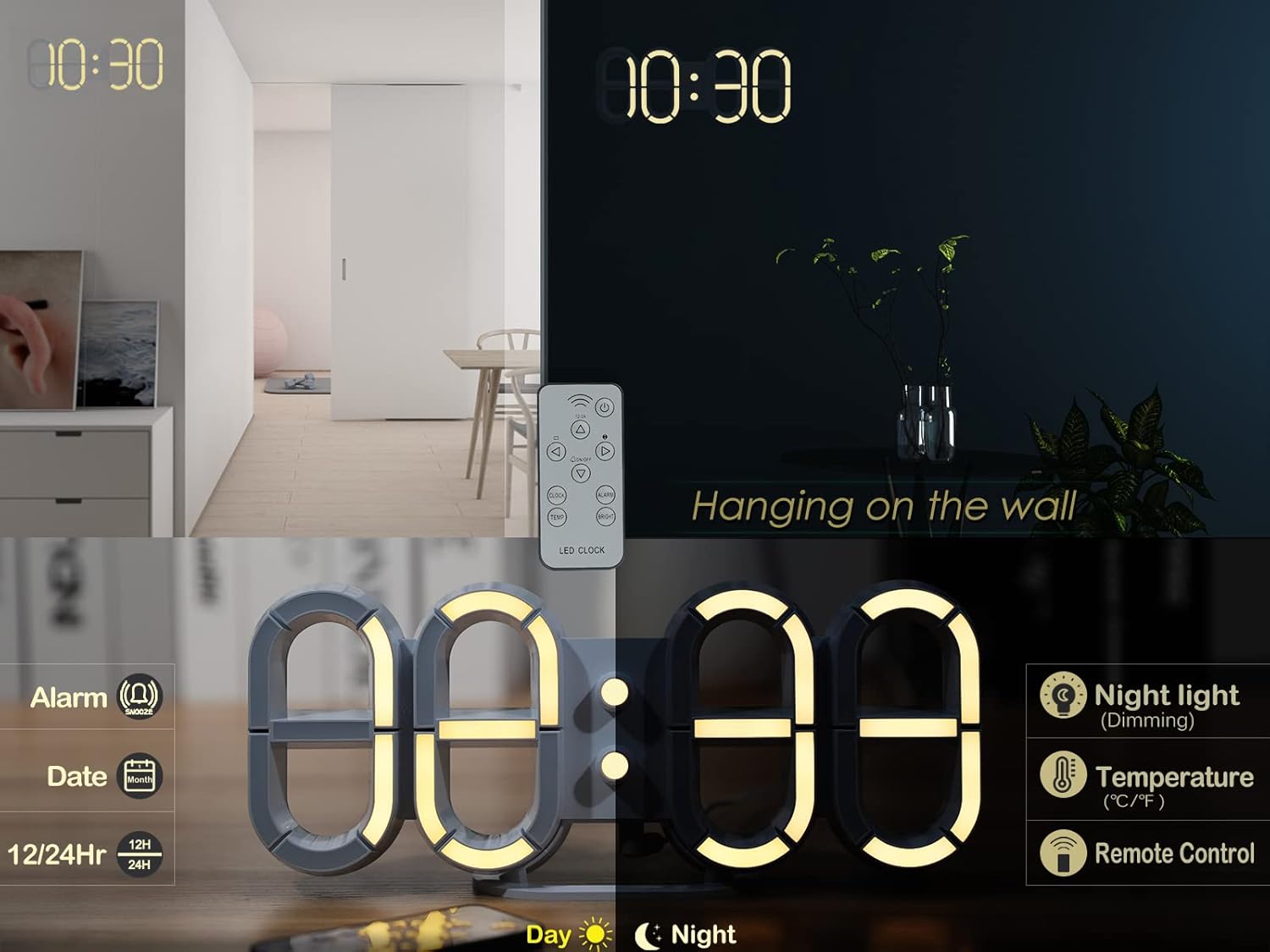
Image: The KOSUMOSU 3D LED Digital Clock showcasing its ability to display time, date, and temperature, highlighting its multi-functional capabilities.
설정
1. 전원 연결
- Connect the provided 3-meter USB power cable to the clock's power input port.
- Plug the other end of the USB cable into a 5V/1A AC adapter (not included).
- Plug the AC adapter into a standard wall outlet. The clock display will light up.
메모: The built-in super farad capacitor provides approximately 2 hours of time memory during power failure; it does not power the clock for regular operation.
2. 리모콘 배터리
The remote control comes with a CR2025 button battery pre-installed. If the remote does not respond, check or replace the battery.
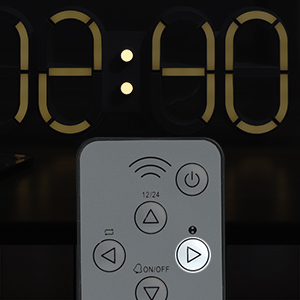
이미지: 클로즈업 view of the remote control, indicating the location of the CR2025 button battery for operation.
3. 배치 옵션
책상 배치:
Attach the included desk stand bracket to the bottom of the clock for stable placement on any flat surface, such as a desk, bedside table, or shelf.
벽면 장착:
The clock features a wall-mounted hanging hole. Use the provided screws and anchors to securely mount the clock on a wall. Ensure the power cable can reach an outlet.

Image: The KOSUMOSU 3D LED Digital Clock displayed as a wall-mounted unit, illustrating its versatility in placement.
작동 지침
All settings are controlled via the remote control.
1. 시간 및 날짜 설정
- 를 누르세요 세트 button on the remote control to enter setting mode.
- 사용하세요 UP (▲) 및 아래에 (▼) buttons to adjust the value.
- 누르다 세트 again to confirm and move to the next setting (e.g., Hour → Minute → Year → Month → Day).
- Once all settings are complete, the clock will return to normal display.
2. 12/24시간 모드
를 누르세요 12/24시간 button on the remote control to switch between 12-hour and 24-hour time formats.
3. 밝기 조정
자동 디밍:
The clock has a built-in light sensor that automatically adjusts brightness across 8 levels based on ambient light conditions. This feature is enabled by default.
수동 디밍:
를 누르세요 밝은 button on the remote control to cycle through 3 manual brightness levels: High, Medium, Low. Pressing it again will return to automatic dimming mode.

Image: Illustration of the KOSUMOSU 3D LED Digital Clock's dimming capabilities, demonstrating both automatic adjustment via a light sensor and manual control with three brightness levels.
4. 알람 기능
- 를 누르세요 경보 button on the remote control to enter alarm setting mode.
- 사용하세요 UP (▲) 및 아래에 (▼) buttons to set the desired alarm time.
- 누르다 경보 알람 시간을 다시 한번 확인하겠습니다.
- 알람을 활성화/비활성화하려면 다음을 누르세요. 켜짐/꺼짐 button (often shared with the alarm icon). An alarm icon will appear on the display when active.
스누즈 기능 :
When the alarm rings, press any button on the remote (except 켜짐/꺼짐 or 힘) to activate the snooze function. The alarm will pause for 5 minutes and ring again. This can be repeated up to 3 times.
5. Loop Display (Time, Date, Temperature)
The clock can cycle through displaying time, date, and temperature. Press the 고리 button (often indicated by a refresh icon) on the remote control to enable or disable this feature.

Image: The KOSUMOSU 3D LED Digital Clock demonstrating its loop display feature, cycling between showing the current time, date, and temperature.
유지
- 청소: Use a soft, dry cloth to wipe the clock's surface. Do not use abrasive cleaners or solvents.
- 힘: Disconnect power before cleaning or if the clock will not be used for an extended period.
- 원격 제어: Replace the CR2025 battery in the remote control when its range decreases or it stops responding.
문제 해결
| 문제 | 가능한 원인 | 해결책 |
|---|---|---|
| Clock does not light up. | No power supply; incorrect adapter; loose connection. | Ensure 5V/1A AC adapter is connected and plugged in. Check USB cable connection. |
| 리모컨이 작동하지 않습니다. | Battery drained; remote not pointed at clock; obstruction. | Replace CR2025 battery. Point remote directly at the clock. Remove any obstructions. |
| 화면이 너무 어둡거나 밝습니다. | Automatic dimming active; manual setting needed. | 를 누르세요 밝은 button on the remote to adjust manually or return to auto mode. |
| 알람이 울리지 않습니다. | Alarm not activated; volume too low (not applicable for this model). | Ensure the alarm is set and activated using the remote control. |
| Time/Date incorrect after power outage. | 파워 아웃tage exceeded capacitor memory. | Reset time and date using the remote control. |
명세서
| 특징 | 세부 사항 |
|---|---|
| 상표 | 코스모스 |
| 모델 번호 | 9.7IN Digital Clock-ACD310Y |
| 디스플레이 유형 | 디지털 LED |
| 제품 치수 | 폭 9.7인치 x 높이 3.9인치 x 깊이 0.9인치 |
| 품목 무게 | 5.1 온스(146g) |
| 전원 | Corded Electric (5V/1A AC adapter, not included) |
| 배터리(리모컨용) | 1 CR2025(포함) |
| 시간 기억 | Built-in super farad capacitor (approx. 2 hours) |
| 밝기 조절 | 8-level auto dimming, 3-level manual dimming (High/Medium/Low) |
| 특별 기능 | Alarm with Snooze, Temperature Display (℃/℉), Date Display, 12/24H Mode, Remote Control |
| 장착 유형 | Desk Clock, Wall Mount |
| 재료 | 플라스틱(아크릴로니트릴 부타디엔 스티렌) |

Image: A detailed diagram showing the dimensions and key specifications of the KOSUMOSU 3D LED Digital Clock, including its weight and power requirements.
보증 및 지원
KOSUMOSU provides a 2년 보증 for this product. If you encounter any quality or operational issues with your KOSUMOSU 3D LED Digital Clock, please contact our customer service team. We are committed to providing support, guidance, and replacements as needed.
For assistance, please refer to the contact information provided on the product packaging or the official KOSUMOSU web대지.


