User Manual: AXIS P1468-LE Compact Outdoor Camera
Model: 02342-001 | Brand: Axis Communications
소개
The AXIS P1468-LE is a robust, outdoor-ready network camera designed for advanced surveillance scenarios. It delivers excellent image quality and incorporates deep learning-based analytics at the edge, enhancing its capabilities for intelligent monitoring. This camera also features built-in cybersecurity measures to ensure secure operation. This manual provides essential information for the setup, operation, and maintenance of your AXIS P1468-LE camera.
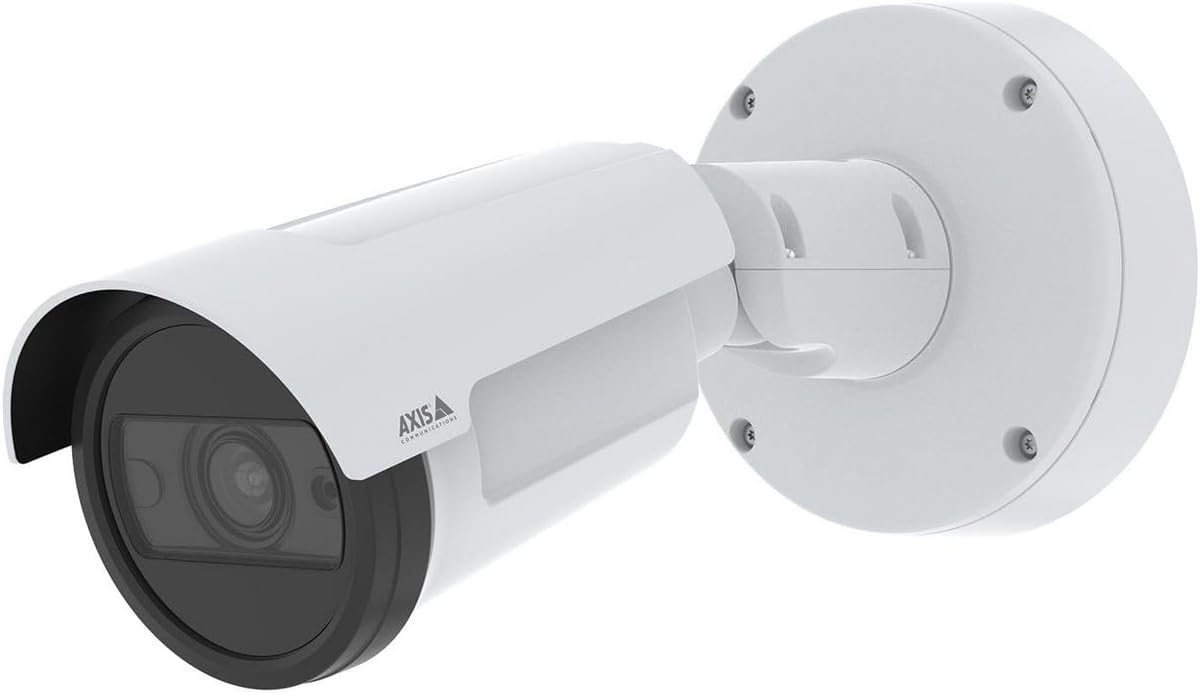
그림 1: The AXIS P1468-LE Compact Outdoor Camera, showcasing its white cylindrical body, integrated sunshield, and wall-mount bracket. The camera features a dark lens housing and the Axis Communications logo on its side.
설정
1. 패키지 내용
설치를 시작하기 전에 모든 구성 요소가 있는지 확인하세요.
- AXIS P1468-LE 네트워크 카메라
- 설치 가이드
- 장착 브래킷 및 하드웨어
- 드릴 템플릿
- Resistorx® T20 tool
2. 카메라 장착
The AXIS P1468-LE is designed for wall or ceiling mounting. Ensure the mounting surface is strong enough to support the camera's weight and withstand environmental conditions.
- 위치 선택: 원하는 분야를 제공하는 위치를 선택하세요 view and is within reach of network and power connections.
- 표면 준비: 제공된 드릴 템플릿을 사용하여 장착면에 드릴 구멍 위치를 표시하십시오.
- 브라켓 설치: Secure the mounting bracket using appropriate screws and anchors for your surface type.
- 카메라 부착: Mount the camera body onto the bracket, ensuring it is securely fastened. Adjust the camera's angle for optimal view주고받음.
3. 네트워크 및 전원 연결
Connect the camera to your network and power source. The camera supports Power over Ethernet (PoE) for simplified installation.
- 이더넷 케이블: Connect a standard Ethernet cable from your network switch (preferably PoE-enabled) to the camera's Ethernet port.
- 전원(선택 사항): If PoE is not used, connect a compatible power adapter (not included) to the camera's power input. Refer to specifications for voltag요구사항
4. 초기 구성
After physical installation, access the camera's web 초기 설정을 위한 인터페이스.
- 카메라 발견: AXIS IP Utility 또는 AXIS Device Manager 소프트웨어를 사용하여 네트워크에서 카메라를 검색하십시오.
- 입장 Web 인터페이스: 열기 web 브라우저를 열고 카메라의 IP 주소를 입력하세요.
- 루트 비밀번호를 설정하세요: For security, you will be prompted to set a new root password upon first access.
- 설정 구성: Follow the on-screen wizard to configure basic settings such as IP address, date/time, and video stream settings.
카메라 작동
1. 라이브 View 그리고 녹음
카메라의 실시간 영상에 접속하세요 view and manage recording settings through its web 인터페이스 또는 호환되는 비디오 관리 소프트웨어(VMS).
- 살다 View: "라이브"로 이동하세요 View" tab to see the real-time video feed.
- 녹음: Configure recording schedules, motion detection triggers, and storage locations (e.g., SD card, network storage) under the "Recordings" or "Events" section.
2. 고급 기능
The AXIS P1468-LE offers several advanced features for enhanced surveillance:
- Deep Learning Analytics: Utilize built-in analytics for object classification, motion detection, and other intelligent event triggers. Configure these under the "Applications" or "Analytics" menu.
- Cybersecurity Features: The camera includes features like signed firmware and secure boot to prevent unauthorized access and ensure system integrity. Regularly check for firmware updates to maintain security.
- 적외선 조명: The integrated IR LEDs provide clear video in low-light or complete darkness. This feature is typically automatic but can be adjusted in video settings.
유지
1. 카메라 청소
Regular cleaning ensures optimal image quality and extends the camera's lifespan.
- 렌즈: Gently wipe the lens with a soft, lint-free cloth moistened with a mild cleaning solution or lens cleaner. Avoid abrasive materials.
- 주택: 카메라 하우징을 청소하세요.amp 옷감. 강한 세제나 용제를 사용하지 마세요.
2. 펌웨어 업데이트
Keep the camera's firmware updated to benefit from the latest features, performance improvements, and security patches.
- 업데이트 확인: Visit the Axis Communications website or use AXIS Device Manager to check for available firmware updates for your model.
- 설치: Follow the instructions provided by Axis for safe firmware installation. Ensure a stable power supply during the update process.
문제 해결
| 문제 | 가능한 원인 | 해결책 |
|---|---|---|
| 비디오 피드 없음 | 전원 문제, 네트워크 케이블 연결 해제, 잘못된 IP 주소. | Check power supply/PoE, ensure Ethernet cable is securely connected, verify camera's IP address and network settings. |
| 화질이 나쁘다 | Dirty lens, improper focus, low light conditions, incorrect video settings. | Clean the lens, adjust focus via web interface, ensure IR illumination is active in low light, check resolution and compression settings. |
| 접근할 수 없습니다 web 인터페이스 | 잘못된 IP 주소, 네트워크 연결 문제, 방화벽이 액세스를 차단하고 있습니다. | Verify IP address, check network connection, temporarily disable firewall to test, reset camera to factory defaults if necessary. |
명세서
| 특징 | 세부 사항 |
|---|---|
| 상표 | 액시스 커뮤니케이션 |
| 모델명 | AXIS P1468-LE - Netzwerk-Überwachungskam |
| 품목 모델 번호 | 02342-001 |
| ASIN | B0BNZ1MW19 |
| 실내/실외 사용 | 집 밖의 |
| 연결 기술 | 열광한 |
| 연결 프로토콜 | 홈플러그 |
| 컨트롤러 유형 | 아이리스 |
| 장착 유형 | 벽걸이형 |
| 색상 | 하얀색 |
| 항목 수 | 1 |
| 포함된 구성 요소 | 카메라/액세서리 |
| 채널 수 | 4 |
| 무선 통신 기술 | 와이파이 |
| 재료 | 금속 |
| 왓tage | 16 와트 |
| 품목 치수(LxWxH) | 19.69 x 19.69 x 11.02 인치 |
| 배터리가 필요하세요? | 아니요 |
| 품목 무게 | 1.5킬로그램(3.3파운드) |
| 줌 타입 | 광학 줌 |
| 경고 유형 | 모션 전용 |
| 객실 유형 | 사무실 |
| 광원 유형 | 적외선 |
| 비디오 캡처 형식 | MPEG-4 |
| 단위 수 | 1.0 카운트 |
| 포토 센서 기술 | CMOS |
| 국제 보호 등급 | IP66, IP67 |
| 제어 방법 | 앱 |
| 운영 체제 | 아이폰 OS |
| 제조업체 | AXIS - 카메라 |
| 첫 번째 이용 가능 날짜 | 31년 2022월 XNUMX일 |
| 제품의 권장 용도 | 감시 |
| 특징 | Mac, Netcam, PC, Wireless connectivit |
보증 및 지원
1. 제품 보증
Axis Communications products typically come with a limited hardware warranty. For specific warranty terms and conditions applicable to your AXIS P1468-LE camera, please refer to the warranty documentation included with your purchase or visit the official Axis Communications web대지.
2. 기술 지원
For technical assistance, troubleshooting, or further inquiries regarding your AXIS P1468-LE camera, please contact Axis Communications support:
- 온라인 지원: 방문하세요 Axis Communications Support Portal for FAQs, documentation, and software downloads.
- 연락처 정보: Find regional contact details for phone or email support on the official Axis Communications web대지.
고객 지원팀에 문의하실 때는 카메라 모델 번호(02342-001)와 일련 번호를 준비해 주시기 바랍니다.


