소개
This manual provides detailed instructions for the setup, operation, and maintenance of your KOSUMOSU 9.7-inch 3D LED Neon Digital Wall/Desk Clock. Please read this manual thoroughly before using the product to ensure proper function and longevity.
안전 정보
- Ensure the clock is powered by a 5V/1A AC adapter (not included). Using an incorrect power adapter may damage the device.
- 기기를 물과 습도가 높은 환경에서 멀리 두십시오.
- Do not attempt to disassemble or repair the clock yourself. Contact customer service for assistance.
- Keep the remote control battery (CR2025) out of reach of children.
패키지 내용
- KOSUMOSU 9.7-inch 3D LED Neon Digital Clock
- Remote Control (with CR2025 button battery)
- 3-meter USB Power Cable
- 데스크탑 브래킷
- Wall Mounting Accessories (Dowel, Screws)
- 사용 설명서 (본 문서)
설정
1. 전원 연결
- Connect the provided 3-meter USB power cable to the clock's power input port.
- Plug the other end of the USB cable into a 5V/1A AC adapter (not included).
- Plug the AC adapter into a standard wall outlet. The clock will power on.
Note: The clock has a built-in super farad capacitor for time memory, providing approximately 2 hours of backup in case of power failure. This is not for regular power supply.
2. 리모콘 배터리
The remote control comes with a CR2025 button battery pre-installed. If the remote does not respond, check or replace the battery.
3. 장착 옵션

이미지: 후면 view of the KOSUMOSU 3D LED Neon Digital Clock, illustrating the wall mounting holes and the location of the function buttons. The image also displays product specifications.
- 데스크탑 배치: Attach the included desktop bracket to the bottom of the clock for stable placement on any flat surface.
- 벽면 장착: Use the provided screws and dowels to securely mount the clock on a wall. The clock features keyhole slots on the back for easy hanging.
작동 지침
The clock is primarily operated using the included remote control. There are also three function buttons on the back of the clock for basic adjustments.
원격 제어 기능

Image: The KOSUMOSU 3D LED Neon Digital Clock showing the time in vibrant colors, with its remote control positioned in front.
- 세트: Enter/Exit setting mode.
- 위/아래 화살표: Adjust values during setting.
- 12/24시간: 12시간제와 24시간제 시간 형식 간에 전환하세요.
- 경보: Activate/Deactivate alarm, enter alarm setting mode.
- 선잠: Activate snooze function when alarm sounds.
- 밝은: Cycle through brightness levels (High/Medium/Low/Auto/Off).
- COLOR/MODE: Change display color modes (Neon, 7 separate colors, color gradient, custom).
- TEMP (℃/℉): 섭씨와 화씨 온도 표시를 전환합니다.
- 날짜: Display date, enter date setting mode.
시간 및 날짜 설정
- 를 누르세요 세트 button on the remote. The hour digits will flash.
- 사용하세요 UP 그리고 아래에 시간을 조정하는 화살표.
- 누르다 세트 다시 분 단위로 이동한 다음 조정합니다. 위/아래.
- 계속 누르기 세트 연도, 월, 일 설정을 순환하며 각각을 조정합니다. 위/아래.
- 누르다 세트 설정 모드를 종료하려면 마지막으로 한 번 더 누르세요.
- 12시간 형식과 24시간 형식을 전환하려면 다음을 누릅니다. 12/24시간 단추.
알람 설정
- 를 누르세요 경보 button on the remote. The alarm hour digits will flash.
- 사용 위/아래 알람 시간을 설정합니다.
- 누르다 경보 again to set the alarm minutes, adjust with 위/아래.
- 누르다 경보 알람을 확인하고 활성화하려면 다시 한 번 누르십시오. 디스플레이에 알람 아이콘이 나타납니다.
- To deactivate the alarm, press 경보 again until the icon disappears.
- 알람이 울리면 누르세요. 선잠 for an additional 5 minutes of sleep (up to 3 times).
밝기 조정

Image: The KOSUMOSU 3D LED Neon Digital Clock illustrating its automatic dimming function via a built-in light sensor and remote control dimming with High, Medium, Low, and Off settings.
- 를 누르세요 밝은 button on the remote to cycle through brightness levels: High, Medium, Low, Auto, and Off.
- 자동 디밍: When set to "Auto", the clock's built-in light sensor will automatically adjust the brightness across 8 levels based on ambient light conditions.
색상 모드

Image: The KOSUMOSU 3D LED Neon Digital Clock showcasing different custom color and neon light options, highlighting its multi-color LED capabilities.

Image: The KOSUMOSU 3D LED Neon Digital Clock illustrating how to switch between various colors using the remote control, showing different color displays for day and night.
를 누르세요 COLOR/MODE button on the remote to cycle through different display color options:
- Neon Light: Dynamic, flashing neon light effect.
- 색상 그라데이션: 색상 간의 부드러운 전환.
- 7 Separate Colors: Static display of individual colors.
- Custom Color Option: Allows selection of a specific color.
Loop Display (Time, Date, Temperature)
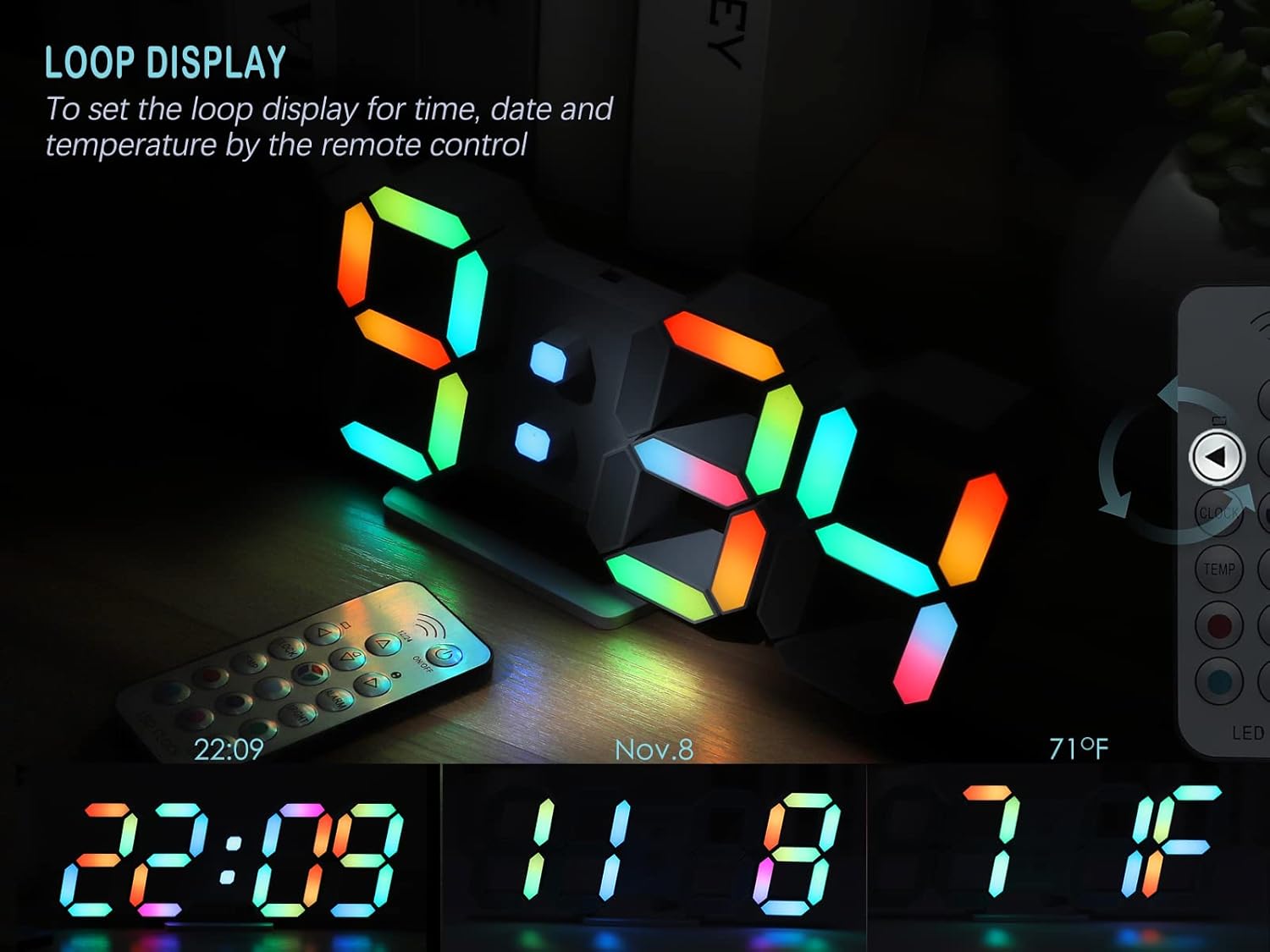
Image: The KOSUMOSU 3D LED Neon Digital Clock demonstrating its loop display feature, cycling through the current time, date (November 8th), and temperature (71°F).
To activate the loop display for time, date, and temperature, press the dedicated 고리 button on the remote control (if available, otherwise it cycles automatically after setting date/temp display). The clock will automatically cycle through these displays.
유지
- 부드럽고 마른 천으로 시계 표면을 닦으십시오. 연마성 세제나 용제를 사용하지 마십시오.
- 청소하기 전에 시계의 전원 플러그를 뽑으십시오.
- Replace the remote control battery (CR2025) as needed.
문제 해결
| 문제 | 가능한 원인 | 해결책 |
|---|---|---|
| 시계 전원이 켜지지 않습니다. | No power, faulty adapter, or loose connection. | Ensure the USB cable is securely connected and the 5V/1A AC adapter is plugged into a working outlet. Try a different adapter if available. |
| 리모컨이 작동하지 않습니다. | Remote battery is dead or incorrectly inserted. Obstruction between remote and clock. | Replace the CR2025 battery in the remote. Ensure there are no obstructions and point the remote directly at the clock. |
| 알람이 울리지 않습니다. | 알람이 작동하지 않거나 볼륨이 너무 작습니다(조절 가능한 경우). | Verify the alarm icon is displayed on the clock. Ensure the alarm time is set correctly. (Note: This model does not specify adjustable alarm volume). |
| Display is too bright/dim at night/day. | 밝기 설정이 최적화되지 않았습니다. | Adjust brightness using the 밝은 button on the remote. Set to "Auto" for automatic adjustment based on ambient light. |
명세서
Image: A visual representation of the KOSUMOSU 3D LED Neon Digital Clock's dimensions and key specifications, including product weight, size, input voltage, and power supply requirements.
| 특징 | 세부 사항 |
|---|---|
| 상표 | 코스모스 |
| 모델 | 9.7IN Neon Clock-ACD210C |
| 제품 치수 | 24.64 x 3.81 x 9.91cm(9.7 x 3.9 x 0.9인치) |
| 제품 무게 | 154.22g |
| 디스플레이 유형 | Digital LED (3D effect) |
| 전원 | Corded Electric (5V/1A AC adapter, not included) |
| USB 케이블 길이 | 3 미터 |
| 시간 기억 | Built-in super farad capacitor (approx. 2 hours) |
| 리모컨 배터리 | CR2025 (포함) |
| 장착 옵션 | Table top, Wall mount |
| 특별 기능 | Alarm with snooze, Auto Dimmable (8 levels), Remote Dimmable (High/Medium/Low/Off), RGB Neon Colors (7 colors, gradient, custom), Large Display, Time/Date/Temperature display. |
| 재료 | 플라스틱 |
보증 및 고객 지원
The KOSUMOSU 9.7-inch 3D LED Neon Digital Wall/Desk Clock comes with a 2년 보증.
If you encounter any quality issues or require assistance with product usage or settings, please contact KOSUMOSU customer service immediately. We are committed to providing support and will guide you through troubleshooting or arrange for a replacement if necessary.
For support, please refer to the contact information provided with your purchase or visit the official KOSUMOSU web대지.


