1. 서론
The Concept OV2012 is a versatile appliance designed to improve indoor air quality by combining dehumidification with air purification. This device effectively reduces excess humidity, which can contribute to mold growth and discomfort, while simultaneously filtering airborne pollutants. It features a triple filtration system, intuitive touch controls, and smart app connectivity for convenient operation.

그림 1: 전면 view of the Concept OV2012 Dehumidifier.
2. 안전 정보
제품을 사용하기 전에 모든 안전 지침을 주의 깊게 읽으십시오. 이 지침을 따르지 않으면 감전, 화재 또는 심각한 부상이 발생할 수 있습니다.
- 전원 공급 장치 볼륨을 확인하십시오.tage는 기기의 정격 라벨과 일치합니다.
- 손상된 전원 코드나 플러그를 사용하여 장치를 작동하지 마십시오.
- Keep the appliance away from water and other liquids. Do not immerse it.
- 공기 흡입구 또는 배출구를 막지 마십시오. 적절한 공기 흐름을 위해 제품 주변에 충분한 공간을 확보하십시오.
- 청소, 유지 보수 또는 장기간 사용하지 않을 때는 제품의 전원을 뽑으십시오.
- 이 기기는 신체적, 감각적, 정신적 능력이 저하되었거나 경험과 지식이 부족한 사람(어린이 포함)이 감독이나 지시를 받지 않는 한 사용하도록 의도된 것이 아닙니다.
- Do not use the appliance in areas where flammable gases or vapors are present.
3. 제품 구성품
Familiarize yourself with the main parts of your Concept OV2012 dehumidifier.
- 제어판: Touch-sensitive interface for setting modes and functions.
- 공기 배출구: Where processed air is released.
- 공기 흡입구/필터 커버: Located at the rear, provides access to the air filters.
- 수조: 응축된 물을 모읍니다.
- 연속 배수구: Port for attaching a hose for continuous water drainage.
- 360° Rolling Wheels: 장치를 쉽게 이동할 수 있습니다.

그림 2: 후면 view of the dehumidifier, showing air intake and water tank.
4. 제어판 및 디스플레이
The OV2012 features an intuitive touch control panel with a digital display and LED indicators.
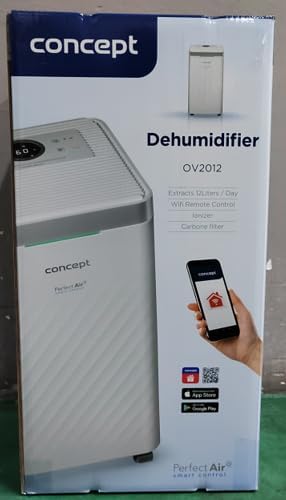
그림 3: 상세 view 터치 컨트롤 패널의.
- 전원 버튼: 장치를 켜거나 끕니다.
- 모드 선택: Cycles through operating modes (Automatic, Continuous, Laundry Drying, Fan).
- Humidity Slider/Buttons: 원하는 습도 수준을 조절합니다.
- 타이머 버튼: Sets the delayed on/off time (up to 24 hours).
- 팬 속도: Adjusts fan speed (usually two levels).
- 이온화기 버튼: 이온화 기능을 활성화 또는 비활성화합니다.
- LED Humidity Indicator: Changes color based on current room humidity:
- 빨간색: High humidity (RH > 70%)
- 녹색: Satisfactory humidity (70% ≥ RH ≥ 50%)
- 파란색: Low humidity (RH < 50%)
5. 초기 설정
- 짐 풀기: 제습기를 포장에서 조심스럽게 꺼내세요. 나중에 보관하거나 운반할 수 있도록 포장을 보관하세요.
- 놓기: Place the unit on a firm, level surface. Ensure there is at least 20 cm of clear space around all sides for optimal airflow. The 360° rolling wheels allow for easy positioning.
- 전원 연결: 전원 코드를 접지된 콘센트에 꽂으세요.
- 수조: 물탱크가 장치에 올바르게 삽입되었는지 확인하세요.
6. 작동 모드
The OV2012 offers four distinct operating modes to suit various needs:
- 자동 모드: The dehumidifier automatically maintains the humidity level you select. The unit will cycle on and off to achieve and sustain the target humidity.
- 연속 작업: Ideal for long-term drying of very wet areas. In this mode, the unit runs continuously regardless of the ambient humidity. It is recommended to use the continuous drainage hose in this mode.
- 세탁물 건조 모드: Accelerates the drying of laundry and helps prevent moisture buildup in the room, reducing the risk of mold.
- Fan Mode (Air Purification without Dehumidification): In this mode, the compressor is off, and only the fan and filtration system operate to purify the air without removing moisture.
Using the Concept Home Mobile Application
The OV2012 can be controlled remotely via the Concept Home mobile application, available for iOS and Android devices. This app allows you to:
- 장치를 켜거나 끕니다.
- Select desired operating modes.
- Check the current air status in the room.
- Create a precise operating schedule for the dehumidifier.

Figure 4: The Concept Home mobile application for remote control.
7. 배수
물탱크 배수
When the 2.2-liter water tank is full, the unit will automatically shut off, and an indicator light will illuminate. Carefully remove the water tank, empty it, and reinsert it securely to resume operation.
연속 배수
For continuous operation without needing to empty the water tank, attach the included hose to the continuous drainage outlet. Direct the hose to a suitable drain, ensuring it is sloped downwards for proper water flow. This allows the unit to operate uninterrupted.
8. 유지관리 및 청소
정기적인 유지관리를 통해 제습기의 최적의 성능과 수명을 보장할 수 있습니다.
필터 시스템
The OV2012 features a triple filter system:
- 먼지 필터: Captures coarse impurities like dust particles, hair, fur, and pollen. This filter should be cleaned regularly.
- 활성탄 필터: Absorbs toxic, suffocating, and foul-smelling gases and vapors, such as formaldehyde, benzene, and cigarette smoke. This filter requires periodic replacement (Optional accessory: Carbon filter - 42394390).
- 이오나이저: Refreshes and purifies the air by increasing negatively charged ions, neutralizing odors and absorbing positively charged particles, viruses, and bacteria.
To clean the dust filter, remove the rear filter cover, gently remove the filter, and clean it with a vacuum cleaner or rinse it with water. Ensure it is completely dry before reinserting. Replace the activated carbon filter as recommended by the manufacturer or when you notice a decrease in odor removal effectiveness.

Figure 5: Illustration of the triple filtration system.
물탱크 청소
Periodically clean the water tank with mild detergent and warm water to prevent mold and bacterial growth. Rinse thoroughly and dry before reinserting.
외부 청소
부드러운 천으로 기기 외부를 닦아주세요.amp 천. 연마성 세척제나 용매를 사용하지 마십시오.
9. 문제 해결 가이드
제습기에 문제가 발생하면 다음의 일반적인 문제와 해결 방법을 참조하세요.
| 문제 | 가능한 원인 | 해결책 |
|---|---|---|
| 장치가 켜지지 않습니다 | 전원 공급이 되지 않습니다. 물탱크가 가득 찼거나 잘못 설치되었습니다. | Check power cord connection; Empty and reinsert water tank correctly. |
| 제습 없음 | Room temperature too low; Air filters clogged; Humidity setting too high. | Ensure room temperature is above 5°C; Clean or replace filters; Lower the desired humidity setting. |
| 장치가 시끄럽다 | 장치가 평평한 표면에 있지 않음; 공기 필터가 막힘. | Place unit on a flat, stable surface; Clean or replace air filters. |
| Water tank full indicator remains on after emptying | Water tank not fully inserted; Sensor malfunction. | Push the water tank firmly into place; If problem persists, contact customer support. |
이러한 해결 방법을 시도한 후에도 문제가 지속되면 고객 지원팀에 문의하세요.
10. 기술 사양
| 특징 | 사양 |
|---|---|
| 모델 번호 | OV2012 |
| Dehumidification Performance (max) | 하루 12리터 (30°C, 상대습도 80% 기준) |
| 물탱크 용량 | 2.2리터 |
| 전력 소비 | 210 W (Note: Product description also mentions 245W, refer to product label for exact value) |
| 소음 수준 | ≤ 45dB |
| 치수(폭 x 깊이 x 높이) | 250 x 250 x 460mm(25 x 25 x 46cm) |
| 품목 무게 | 10.82kg |
| 케이블 길이 | 1.8분 |
| 작동 모드 | 4 (Automatic, Continuous, Laundry Drying, Fan) |
| 필터 시스템 | Dust filter, Activated Carbon filter, Ionizer |
| 제어 | Touch control, Mobile App (Concept Home) |
| 특별 기능 | Automatic Shut-off, Timer, 360° wheels, LED Humidity Indicator |

그림 6: 제품 치수
11. 보증 및 고객 지원
For warranty information, please refer to the warranty card included with your product or contact your local Concept distributor. For technical support, spare parts, or service inquiries, please contact Concept customer service. Contact details may be found on the product packaging or the official Concept web대지.
Example contact information from product packaging (may vary by region):
- CZ : Zavolejte nám +420 465 471 400, www.my-concept.cz
- SK : Zavolajte nám +421 326 583 465, www.my-concept.sk
- 폴란드어: Zadzwoń do nas +48 71 339 04 44, www.my-concept.pl


