1. 서론
Thank you for choosing the Waring Commercial WMO120 Heavy Duty Microwave Oven. This appliance is designed for commercial use, offering robust performance and durability. With 1.2 cubic feet of capacity, 1800 watts of power, and advanced programming features, it is engineered to meet the demands of a busy kitchen environment. Please read this manual thoroughly before operation to ensure proper use, maintenance, and safety.
2. 중요 안전 지침
When using electrical appliances, basic safety precautions should always be followed to reduce the risk of fire, electrical shock, injury to persons, or exposure to excessive microwave energy.
- 기기를 사용하기 전에 모든 지침을 읽으세요.
- 문을 열어둔 채로 오븐을 작동하지 마십시오. 전자레인지 에너지에 해롭게 노출될 수 있습니다.
- 오븐 전면과 도어 사이에 물건을 두거나 밀봉 표면에 흙이나 세제 찌꺼기가 쌓이지 않도록 하세요.
- Do not operate the oven if it is damaged. Ensure the oven door closes properly and there is no damage to the door, hinges, latches, or door seals.
- 자격을 갖춘 서비스 담당자만이 이 기기를 조정하거나 수리해야 합니다.
- 폭발의 위험이 있으므로 밀폐된 용기에 담긴 액체나 기타 음식을 가열하지 마십시오.
- 이 기기에 부식성 화학 물질이나 증기를 사용하지 마십시오.
- 이 기기는 접지되어야 합니다. 적절하게 접지된 콘센트에만 연결하세요.
3. 제품 오버view 및 기능
The Waring Commercial WMO120 microwave oven is constructed from durable stainless steel and features a user-friendly control panel. Key features include:
- 1.2 Cubic Feet Capacity
- 1800 Watts of Power with Dual Magnetrons
- 10 Programmable Memory Pads and 100 Programmable Settings
- 5 Power Levels for versatile cooking
- 3-에스tage Cooking Functionality
- Touch-Control Keypad with Braille for accessibility
- Cleanable/Replaceable Air Filter
- Stackable Design for space efficiency

그림 1: 전면 view of the Waring Commercial WMO120 Microwave Oven, showcasin스테인리스 스틸 외관과 제어판이 특징입니다.

Figure 2: The stackable design of the WMO120 microwave oven, allowing for efficient use of kitchen space.
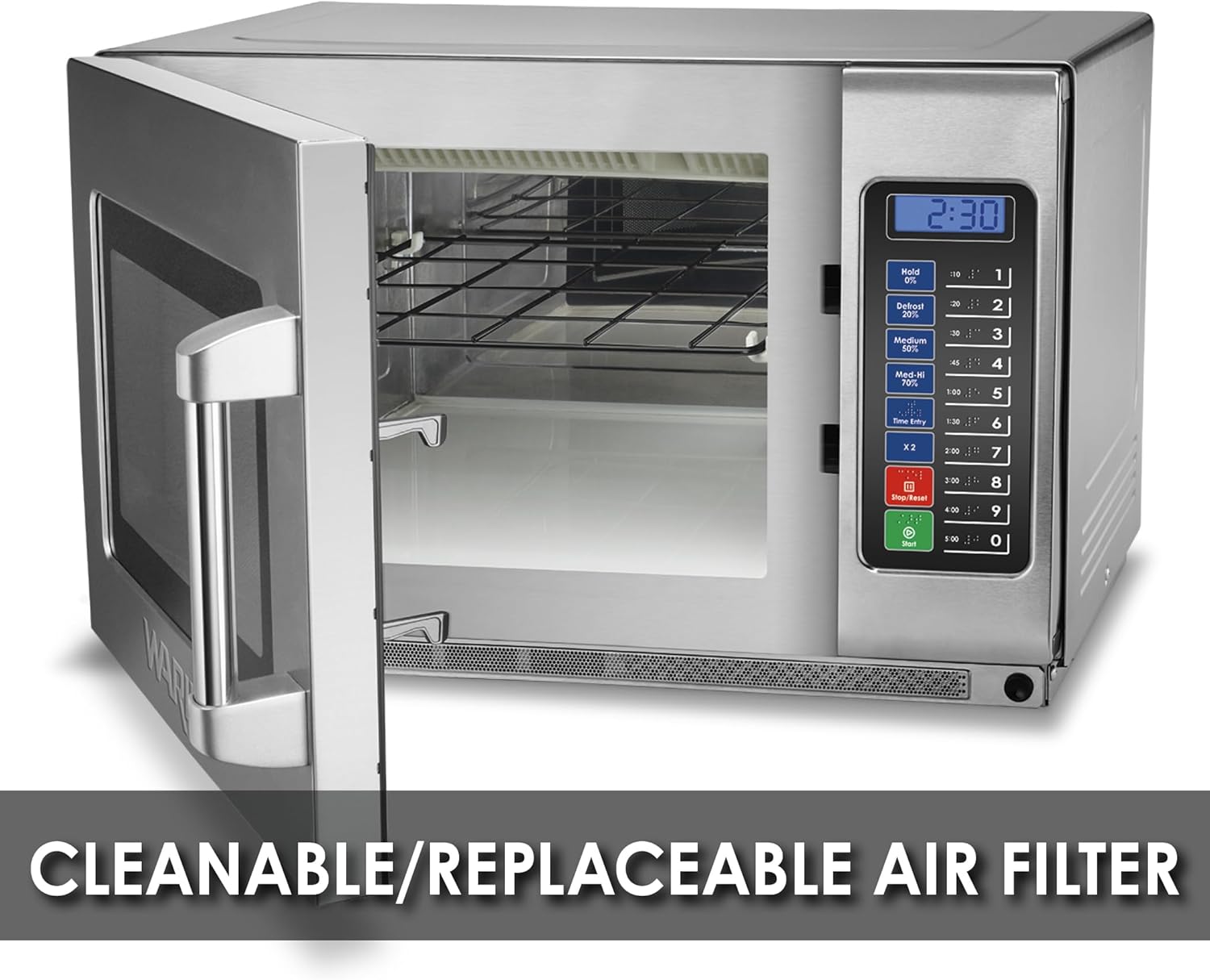
그림 3: 내부 view of the microwave with the door open, indicating the location of the cleanable/replaceable air filter for easy maintenance.

그림 4: 상세 view of the touch control keypad, featuring Braille markings for enhanced accessibility.
4. 설정 및 설치
4.1 풀기
Carefully remove the microwave oven from its packaging. Retain all packaging materials for future transport or service needs. Inspect the oven for any signs of damage. If damage is present, do not operate the appliance and contact your supplier immediately.
4.2 배치
- 오븐을 평평하고 안정적이며 내열성이 있는 표면에 놓으세요.
- Ensure adequate ventilation around the oven. Maintain a minimum clearance of 4 inches (10 cm) on the top, sides, and rear for proper airflow.
- 통풍구를 막지 마십시오.
- Keep the oven away from heat sources, water, or high humidity.
4.3 전기 연결
This appliance requires a 208/230V, 1800W electrical supply with a 6-15 Phase Plug. Ensure the electrical outlet is properly grounded and matches the specifications of the oven. Do not use extension cords or adapters.
5. 사용 설명서
5.1 Basic Heating
- 음식을 전자레인지용 용기에 담아 오븐 안에 넣으세요.
- 오븐 문을 단단히 닫으세요.
- Enter the desired cooking time using the numeric keypad (e.g., '1' for 10 seconds, '1:00' for 1 minute).
- 를 누르세요 시작 버튼을 눌러 요리를 시작합니다.
5.2 Using Power Levels
The WMO120 offers 5 power levels. The default power level is 100% (High). To adjust:
- 원하는 조리시간을 입력하세요.
- Press the desired power level button (e.g., 'Defrost 20%', 'Medium 50%', 'Med-Hi 70%', 'Hold 0%').
- 를 누르세요 시작 단추.
5.3 3-에스tage 요리
This feature allows you to program up to three consecutive cooking stages with different times and power levels.
- 첫 번째 s에 대한 시간과 전력 레벨을 입력하십시오.tage.
- 초당 시간과 전력 레벨을 입력하세요.tage.
- Enter the time and power level for the third stage(선택 사항).
- 를 누르세요 시작 단추.

Figure 5: The control panel highlighting the 3-stage cooking capability and the five distinct power levels available.
6. Programming Memory Settings
The WMO120 allows you to store up to 10 frequently used cooking programs for quick access.
- 를 누르세요 프로그램 button (if available, or follow specific model instructions for programming mode).
- Select a memory pad number (1-10) to store the program.
- Enter the desired cooking time and power level for each stag프로그램의 전자.
- 를 누르세요 프로그램 다시 버튼을 눌러 저장하세요.
To use a stored program, simply press the corresponding memory pad number.

Figure 6: Close-up of the control panel, illustrating the 10 programmable memory pads for quick access to frequently used settings.
7. 유지관리 및 청소
7.1 일반 청소
- 청소하기 전에 항상 오븐의 플러그를 뽑으세요.
- 광고로 내부 및 외부 표면 청소amp 천과 순한 세제를 사용하세요. 연마성 세제나 수세미는 사용하지 마세요.
- Wipe the door seals and adjacent parts frequently to remove any spills or splatters.
- 제품을 물에 담그지 마십시오.
7.2 공기 필터 유지 관리
The WMO120 features a cleanable/replaceable air filter. Regularly check and clean the filter to ensure optimal performance and prevent overheating.
- Locate the air filter, typically behind a removable panel or grille.
- Remove the filter and clean it with warm, soapy water. Rinse thoroughly and allow to air dry completely before reinserting.
- 필터에 손상이나 과도한 마모 흔적이 보이면 교체하십시오.
8. 문제 해결
전자레인지에 문제가 발생하면 다음의 일반적인 문제와 해결 방법을 참조하세요.
| 문제 | 가능한 원인 | 해결책 |
|---|---|---|
| 오븐이 시작되지 않습니다 | 문이 제대로 닫히지 않음; 전원 코드가 뽑힘; 퓨즈가 끊어짐/회로 차단기가 작동함 | Ensure door is securely closed; Check power cord connection; Check household fuse/circuit breaker |
| 음식이 가열되지 않음 | Incorrect cooking time/power level; Microwave-safe container not used | 시간/출력을 조절하고, 적절한 조리 도구를 사용하십시오. |
| 작동 중 이상한 소음 | Foreign object inside; Improper placement | Remove any objects; Ensure stable placement |
이러한 해결 방법을 시도한 후에도 문제가 지속되면 자격을 갖춘 서비스 담당자에게 문의하십시오.
9. 사양
| 특징 | 사양 |
|---|---|
| 모델 번호 | WMO120 |
| 용량 | 1.2입방 피트 |
| 왓tage | 1800 와트 |
| 권tage | 208/230 볼트 |
| 제품 크기(D x W x H) | 20.75인치 x 22.6인치 x 14.5인치 |
| 품목 무게 | 73.1 파운드 |
| 재료 | 스테인리스 스틸 |
| 특별 기능 | Auto Cook, Braille Keypad, Defrost, Programmable, Shortcut Keys |
| 인증 | CULUS, ETL Sanitation, FCC |

그림 7: 차원view of the Waring Commercial WMO120 Microwave Oven.
10. 보증 및 지원
For warranty information and customer support, please refer to the documentation provided with your purchase or visit the official Waring Commercial website. Ensure you have your model number (WMO120) and purchase date available when contacting support.


