소개
The mophie powerstation Go is a versatile portable device designed to provide power in various emergency situations. It functions as a car jump starter, a portable power bank for mobile devices, and a bright LED work light. This manual provides essential instructions for safe and effective use, maintenance, and troubleshooting of your powerstation Go.
안전 정보
Read all safety warnings and instructions before using this product. Failure to follow these instructions may result in electric shock, fire, or serious injury.
- Do not expose the powerstation Go to moisture or extreme temperatures.
- 장치를 분해하거나 개조하지 마십시오.
- 어린이의 손이 닿지 않는 곳에 보관하세요.
- Ensure proper polarity when connecting jumper cables to a vehicle battery. Incorrect connection can cause damage or injury.
- Use only the provided jumper cables and charging accessories.
- 직사광선에 장기간 노출을 피하십시오.
- 기기가 과열될 경우 즉시 사용을 중단하십시오.
패키지 내용
- mophie powerstation Go
- Mini Jumper Cables
- 충전 케이블(USB-C-USB-A)
- 사용자 설명서
제품 끝view
Familiarize yourself with the components of your mophie powerstation Go.


- LED 손전등: Located at one end, provides bright illumination.
- 작업등: Integrated into the body, offers broad area lighting.
- 전원 버튼: 장치를 활성화하고 배터리 상태를 확인합니다.
- LED 배터리 표시기: 남은 배터리 잔량을 표시합니다.
- USB-A 출력 포트: 모바일 기기를 충전하는 데 사용합니다.
- 점퍼 케이블 포트: Dedicated port for connecting the mini jumper cables.
- USB-C 입력 포트: For recharging the powerstation Go.
설정: 초기 충전
Before first use, fully charge your mophie powerstation Go.
- Connect the provided USB-C charging cable to the USB-C input port on the powerstation Go.
- Connect the other end of the charging cable to a compatible USB wall adapter (not included) or a powered USB port.
- The LED battery indicator lights will illuminate and flash, indicating the charging status. All four lights will be solid when fully charged.
- 충전 시간은 전원에 따라 달라질 수 있습니다.
작동 지침
1. 차량 점프 스타트
Ensure the powerstation Go is at least 50% charged before attempting to jump start a vehicle.
- Connect the mini jumper cables to the jumper cable port on the powerstation Go. Ensure a secure connection.
- 연결하다 빨간색 clamp to the positive (+) terminal of the vehicle's dead battery.
- 연결하다 검은색 clamp to a metal part of the vehicle's chassis (unpainted, non-moving part) or the negative (-) terminal of the battery, if accessible and safe.
- Once connected, the powerstation Go will automatically perform safety checks. Wait for the indicator light on the jumper cable connector to turn solid green.
- Start your vehicle. If it doesn't start immediately, wait 30 seconds and try again. Do not attempt more than three consecutive jump starts.
- 차량 시동이 걸리면 즉시 검은색 플러그를 분리하십시오.amp그러면 빨간색amp, and finally disconnect the jumper cables from the powerstation Go.
2. 모바일 기기 충전
Use the USB-A output port to charge your smartphone, tablet, or other USB-powered devices.

- Connect your device's USB charging cable to the USB-A output port on the powerstation Go.
- The powerstation Go will automatically begin charging your device. The LED battery indicator lights will show the remaining charge.
- 충전이 완료되면 기기를 분리하세요.
3. Using the LED Flashlight and Work Light
The powerstation Go features both a focused LED flashlight and a broad work light.
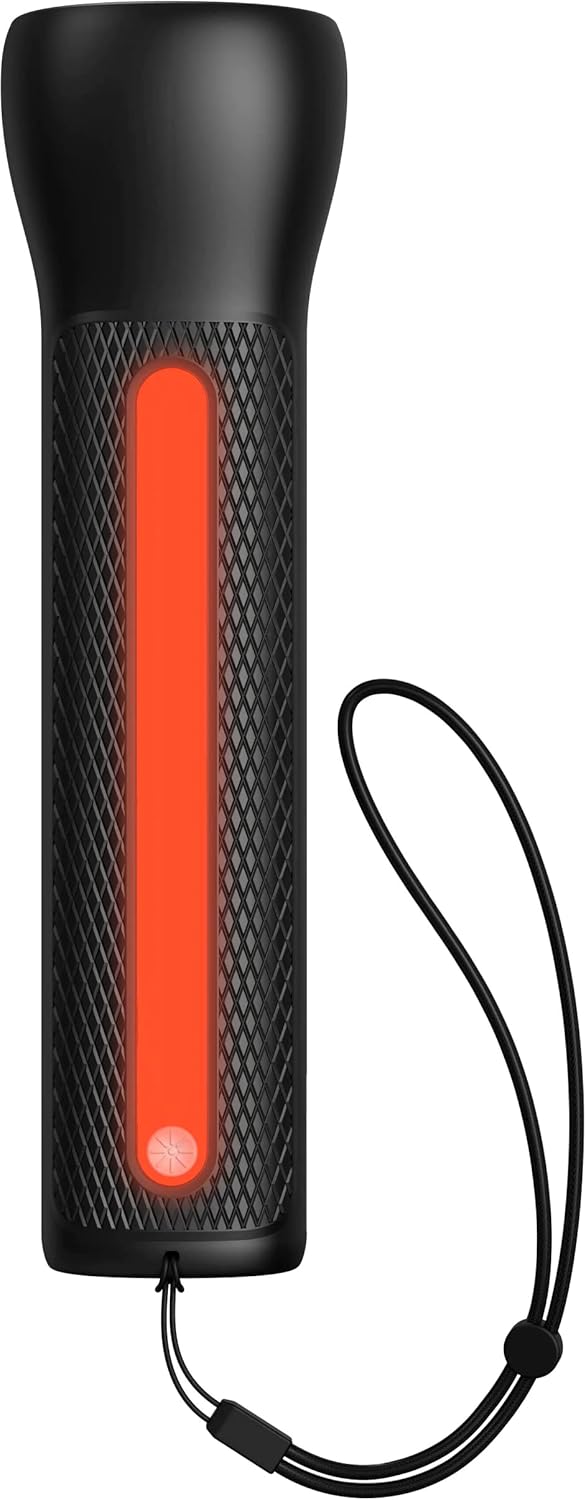

- To activate the LED Flashlight: Press and hold the power button for 2 seconds. Press again to cycle through modes (high, low, strobe, off).
- To activate the Work Light: Double-press the power button. Double-press again to cycle through modes (white, red, flashing red, off).
유지
- 청소: 부드럽고 마른 천으로 기기를 닦으세요. 강한 화학 물질이나 연마재를 사용하지 마세요.
- 저장: Store the powerstation Go in a cool, dry place away from direct sunlight. For optimal battery life, recharge the device every 3 months if not in regular use.
- 배터리 관리 : The internal battery is not user-replaceable. Do not attempt to open the device.
문제 해결
| 문제 | 가능한 원인 | 해결책 |
|---|---|---|
| 기기가 충전되지 않음 | Charging cable or adapter faulty; port obstruction. | Try a different USB-C cable and wall adapter. Ensure ports are clean and free of debris. |
| 차량 시동이 걸리지 않음 | Low powerstation Go charge; incorrect cable connection; severely dead battery. | Ensure powerstation Go is fully charged. Verify correct clamp polarity. Check vehicle battery for severe damage. Consult vehicle manual. |
| Mobile device not charging | Powerstation Go battery low; faulty USB cable; device incompatibility. | Recharge powerstation Go. Try a different USB cable. Ensure your device is compatible with standard USB charging. |
| 조명이 작동하지 않습니다 | Powerstation Go battery low; incorrect button press. | Recharge powerstation Go. Refer to "Using the LED Flashlight and Work Light" section for correct operation. |
명세서
- 상표: 모피
- 모델 번호: mpsgrgd-FL36630
- 제조업체 부품 번호: 401107454
- 배터리 용량: 9900mAh(36.6Wh)
- 권tage: 12 Volts (for jump starting)
- 제품 무게: 1.07 킬로그램
- 치수: 30.3 x 24.69 x 10.79cm (패키지)
- 특별 기능: LED Indicator Lights, 450-lumen LED Flashlight, Spark-proof Jumper Cables
- Automotive Service Type: 트럭, 자동차
보증 및 지원
보증 정보 및 고객 지원은 mophie 공식 웹사이트를 방문하세요. web사이트를 방문하거나 고객 서비스 부서에 문의하세요. 보증 청구를 위해 구매 증빙 자료를 보관하세요.
온라인 지원: www.mophie.com/support


