소개
The WOBANE Dual Motion Sensor LED Strip Light provides versatile and convenient illumination for various indoor spaces. Featuring dual motion sensors, a rechargeable battery, and flexible design, this LED strip is ideal for enhancing visibility in areas such as stairs, hallways, closets, and cabinets. This manual provides essential information for proper installation, operation, and maintenance of your device.

이미지: 이상view of the WOBANE Dual Motion Sensor LED Strip Light kit, showing the LED strip, two control boxes with motion sensors, USB charging cables, and connectors.
상자 안에 무엇이 들어있나요?
상자를 풀 때 모든 구성품이 들어 있는지 확인하세요.
- 16.4ft LED Strip
- 2 Control Boxes with Motion Sensors
- 커넥터
- 2 USB 충전 케이블
- Adhesive Tapes for mounting
- Mini Black Tapes (for light sensor blocking)
Video: An unboxing of the motion sensor strip light, detailing the contents of the package.
설정 및 설치
The WOBANE LED Strip Light is designed for easy, tool-free installation. Follow these steps for optimal setup:
1. Prepare the Surface
Ensure the installation surface is clean, dry, and smooth. Wipe down the area with a clean cloth to remove any dust or debris for optimal adhesive performance.

Image: Visual guide for preparing the surface by cleaning, peeling the adhesive backing, and applying the LED strip.
2. Install the LED Strip
- LED 스트립의 접착면 보호 필름을 조심스럽게 떼어내세요.
- Press the strip firmly onto the desired surface, ensuring it adheres evenly along its entire length.
- The strip is flexible and can be bent to fit corners or curves.
3. Position the Control Boxes
The control boxes feature a magnetic adsorption method for easy attachment and removal. Apply the provided adhesive tape to the back of the magnetic pieces, then stick them to your desired location. The control box can then be magnetically attached to these pieces.

Image: Close-up of the control box, highlighting its magnetic backing for easy installation and removal.
4. Connect the Strip to the Control Box
Plug the connector from the LED strip into the designated port on the control box. Ensure a secure connection.
5. Customizing Length and Reconnection
The LED strip can be cut at designated marks to adjust its length. After cutting, use the provided mating connectors to reconnect sections if needed, or to create multiple shorter lights from a single strip.


Images: Left shows where the LED strip can be safely cut. Right shows the connectors used for rejoining cut sections.
작동 지침
The WOBANE LED Strip Light offers three operating modes:
- 수동 모드(M): The light remains continuously ON or OFF, controlled by pressing the button on the control box.
- Automatic Mode (A - Night): The light automatically turns ON when motion is detected in a dark environment and turns OFF after approximately 20 seconds of no movement.
- Automatic Mode (A - Day/Night): The light automatically turns ON when motion is detected, regardless of ambient light conditions.
모드 전환
Use the switch on the side of the control box to select between 'M' (Manual) and 'A' (Automatic) modes. In Automatic mode, the built-in light sensor determines if it's dark enough for activation. To enable motion detection during daylight hours, cover the light sensor with the provided mini black tape.
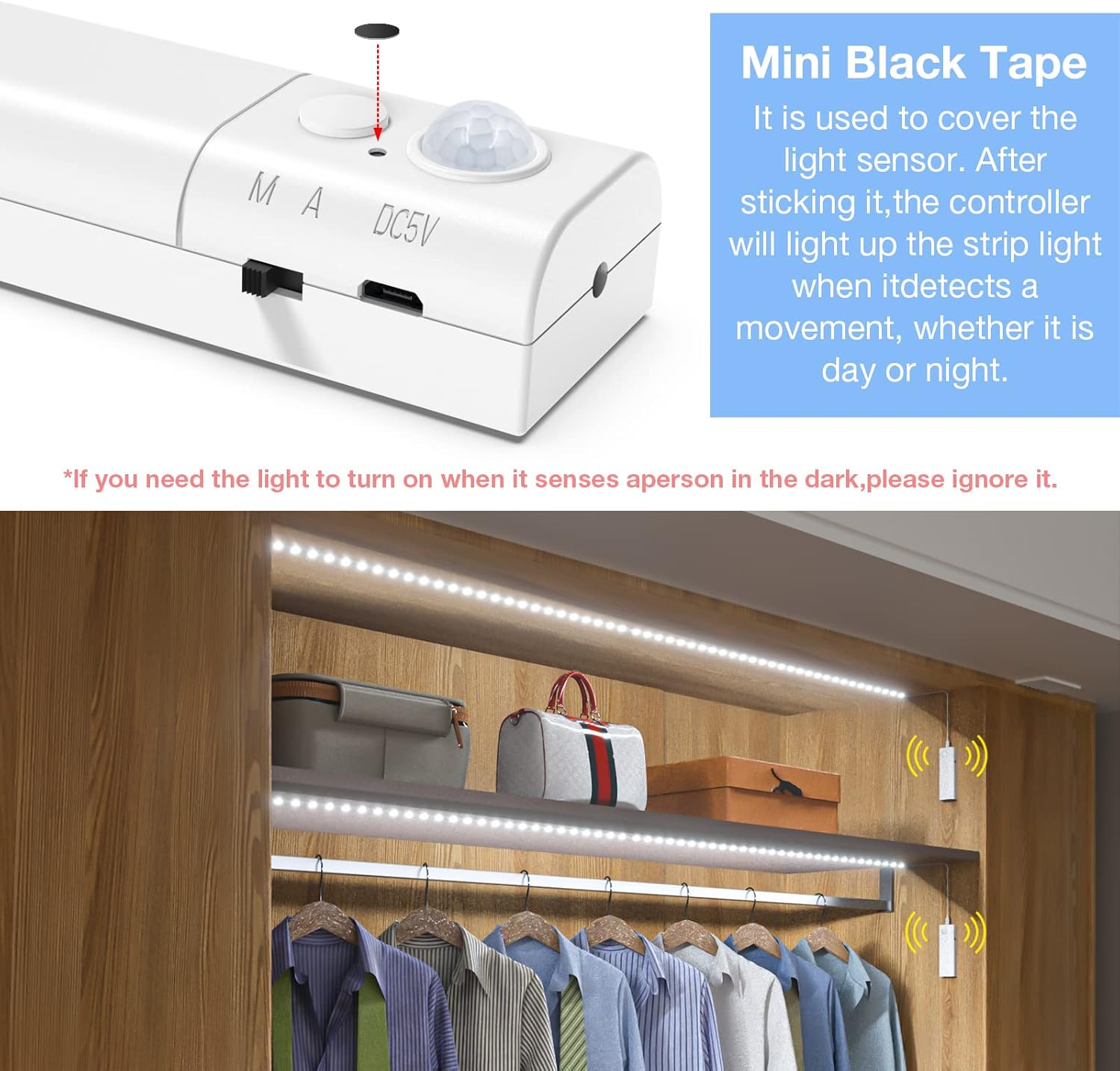
Image: The control box showing the motion sensor and the light sensor, with an illustration of how to cover the light sensor with black tape for continuous motion detection.
모션 센서 기능
The dual motion sensors (located at both ends of the 16.4ft strip) activate the light when movement is detected within a 7-10 feet range. The light will remain on as long as motion is detected and for approximately 20 seconds after the last movement.
Video: A detailed guide on how to use the WOBANE Rechargeable Motion Sensor Strip Light, demonstrating its features and modes.
유지 관리 및 충전
The control boxes contain a built-in 2200mAh rechargeable lithium-ion battery. To charge:
- Gently detach the control box from its magnetic mounting.
- Connect the provided USB charging cable to the micro-USB port on the control box.
- USB 케이블의 다른 쪽 끝을 호환되는 USB 전원(예: 벽면 어댑터, 컴퓨터, 모바일 배터리)에 꽂습니다.
- The indicator light on the control box will turn red during charging and green when fully charged.
- 일반적으로 완전 충전에는 약 4시간이 걸립니다.

Image: The control box showing the indicator light for charging (red) and fully charged (green).
문제 해결
- Light not turning on in Automatic mode: Ensure the battery is charged. Check if the light sensor is covered by the mini black tape if you intend for it to work in bright conditions. Verify that motion is within the detection range (7-10 feet).
- 조명이 꺼지지 않음: Ensure no continuous motion is detected within range. Check if the mode switch is set to 'A' (Automatic) and not 'M' (Manual).
- Poor adhesive: Clean the surface thoroughly before applying the strip. Ensure the surface is smooth and dry.
- Strip not lighting up after cutting/reconnecting: Ensure cuts were made precisely at the designated marks. Verify that connectors are properly aligned and securely fastened.
명세서
| 상표 | 워베인 |
| 모델명 | LED Strip Light (CL13-6000) |
| 길이 | 16.4피트(200인치) |
| LED의 수 | 150 |
| 색온도 | 6000K(화이트) |
| 명도 | 340루멘 |
| 왓tage | 5 와트 |
| 전원 | 배터리 구동(리튬 이온 배터리 2개 포함) |
| 배터리 용량 | 2200 mAh (per control box) |
| 완전 충전 시간 | 약 4시간 |
| 모션 센서 범위 | 7-10피트 |
| 제어 방법 | Manual-Automatic Switch, Motion Sensor |
| 설치 유형 | Adhesive, Magnetic |
| 실내/실외 사용 | 실내 |
| 방수 레벨 | 방수가 되지 않음 |
보증 및 지원
For warranty information, technical support, or any inquiries regarding your WOBANE Dual Motion Sensor LED Strip Light, please contact WOBANE customer service through the retailer's platform or visit the official WOBANE store online.
각 제품에는 고유 코드가 있으며, 배송 전에 이 코드를 확인하여 제품의 정품 여부를 보장합니다.


