소개
Thank you for choosing the Havit Gaming Mouse MS955. This optical gaming mouse features a USB interface, adjustable DPI settings, and RGB backlighting, designed to enhance your gaming experience. This manual provides essential information for setting up, operating, and maintaining your mouse.
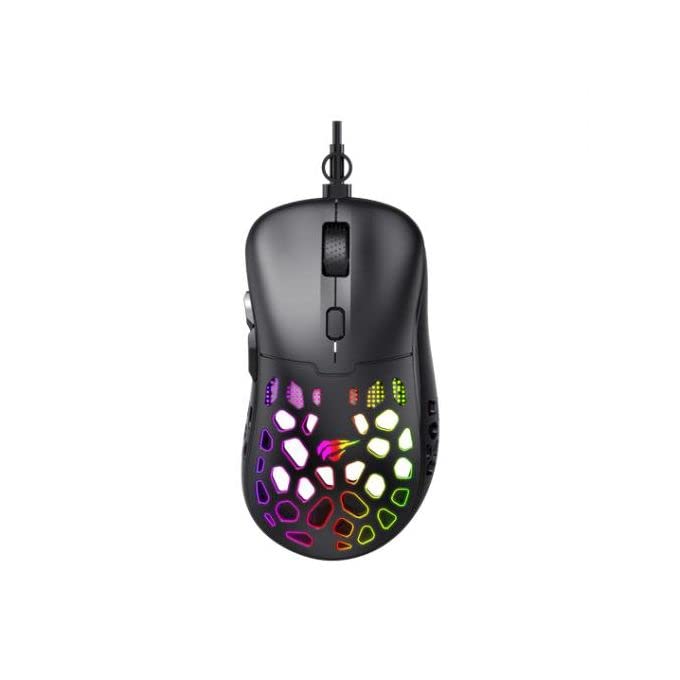
이미지: 위에서 아래로 view of the Havit Gaming Mouse MS955, showcasin인체공학적 디자인과 벌집 모양 외피를 통해 들어오는 생생한 RGB 조명이 특징입니다.
설정
- 마우스 풀기: Carefully remove the Havit Gaming Mouse MS955 from its packaging.
- 컴퓨터에 연결: Locate an available USB port on your computer. Insert the USB connector of the mouse into the USB port.
- 드라이버 설치: 이 마우스는 플러그 앤 플레이 방식입니다. 운영 체제(Windows XP, Windows 7, Linux 등)에서 필요한 드라이버를 자동으로 감지하고 설치합니다. 기본적인 기능을 사용하기 위해 추가 소프트웨어를 설치할 필요는 일반적으로 없습니다.
- 테스트 기능: 연결되면 마우스를 움직이고 버튼을 클릭하여 제대로 작동하는지 확인하십시오.
작동 지침
The Havit Gaming Mouse MS955 features 6 programmable buttons and adjustable DPI settings for precise control.

이미지: 측면 view of the Havit Gaming Mouse MS955, highlighting the left-side buttons and scroll wheel.
- 왼쪽 클릭 버튼: Primary button for selection and interaction.
- 오른쪽 클릭 버튼: Secondary button for context menus and alternative actions.
- 스크롤 휠: 문서를 스크롤하는 데 사용됩니다. web pages. It also functions as a clickable middle button.
- DPI 조정 버튼: Located behind the scroll wheel. Press this button to cycle through different DPI sensitivity levels (800-1200-2400-3200 DPI). Each press changes the sensitivity, allowing you to adapt to various gaming or work scenarios.
- 측면 버튼: Two buttons are located on the left side of the mouse. These are typically used for 'forward' and 'backward' navigation in web 브라우저에서 실행되거나 게임 내 동작을 위해 프로그래밍될 수 있습니다.
RGB 조명
The Havit Gaming Mouse MS955 features an integrated RGB backlight system. The lighting effects are typically automatic and may change with DPI settings or cycle through various colors. There are no dedicated buttons for controlling the RGB lighting directly on the mouse.
유지
- 청소: To clean the mouse, disconnect it from your computer. Use a soft, dry cloth to wipe the surface. For stubborn dirt, a slightly damp cloth can be used, ensuring no liquid enters the mouse. Do not use harsh chemicals or abrasive cleaners.
- 저장: 마우스를 깨끗하고 건조한 곳에 보관하고, 극한 온도와 직사광선을 피하십시오.
- 케이블 관리: 손상을 방지하려면 USB 케이블을 과도하게 구부리거나 비틀지 마세요.
문제 해결
- 마우스가 응답하지 않음:
- USB 케이블이 컴퓨터의 작동하는 USB 포트에 단단히 꽂혀 있는지 확인하세요.
- 마우스를 다른 USB 포트에 연결해 보세요.
- 컴퓨터를 다시 시작하세요.
- DPI가 변경되지 않음:
- Press the DPI button firmly. Ensure you are pressing the correct button.
- The mouse cycles through fixed DPI settings; there is no visual indicator other than cursor speed change.
- RGB 조명이 작동하지 않음:
- 마우스가 컴퓨터에 제대로 연결되어 있는지 확인하십시오.
- The RGB lighting is automatic; if the mouse is functioning otherwise, the lighting should also be active.
명세서
| 특징 | 세부 사항 |
|---|---|
| 상표 | 하빗 |
| 모델 | MS955 |
| 인터페이스 유형 | USB |
| 치수 | 115.2 x 63 x 37.6mm |
| 키의 개수 | 6 |
| 칩셋 | NST5311 |
| DPI 해상도 | 800-1200-2400-3200DPI |
| 운영 볼륨tage | 5V |
| 키 수명 | 3,000,000번 클릭 |
| 케이블 길이 | 1.5분 |
| 움직임 감지 | 광학 |
| 손의 방향 | 오른쪽 |
| 권장 사용 | 노름 |
| 운영 체제 | 리눅스, 윈도우 7, 윈도우 XP |
| 색상 | 검은색 |
보증 및 지원
For warranty information or technical support, please refer to the documentation included with your purchase or visit the official Havit web사이트. 보증 청구를 위해 구매 증빙 자료를 보관하세요.


