1. 서론
This manual provides instructions for the Waveshare 5G Dongle Module, an adapter designed to integrate 5G modules with M.2 (NGFF) Key B interface into various host devices via a USB 3.1 Type A port. It includes quad antennas and an aluminum alloy heatsink for optimal performance and heat dissipation. Please note that the 5G module itself is not included and must be purchased separately.

그림 1: 이상view of the Waveshare 5G Dongle Module components.
2. 특징
- Supports 5G modules with M.2 (NGFF) Key B interface, compatible with SIMCom and Quectel 5G modules.
- Supports 5G modules with 3042/3052 form factor, such as SIM82XX and RM50XQ series 5G modules.
- USB 3.1 Type A port for connecting to PC, Raspberry Pi, or Jetson Nano host boards to enable high-speed 5G network access.
- Includes 4x SMA antenna connectors for easy antenna installation.
- Onboard SIM card slot for Nano SIM cards.
- Onboard power and network indicators, with multiple reserved pads, for checking module operating status and testing other functions.
- PCB ENIG process, with reserved multi-slots and positioning holes for integration.
- Comes with a customized aluminum alloy heatsink for effective heat dissipation, protection, and durability.
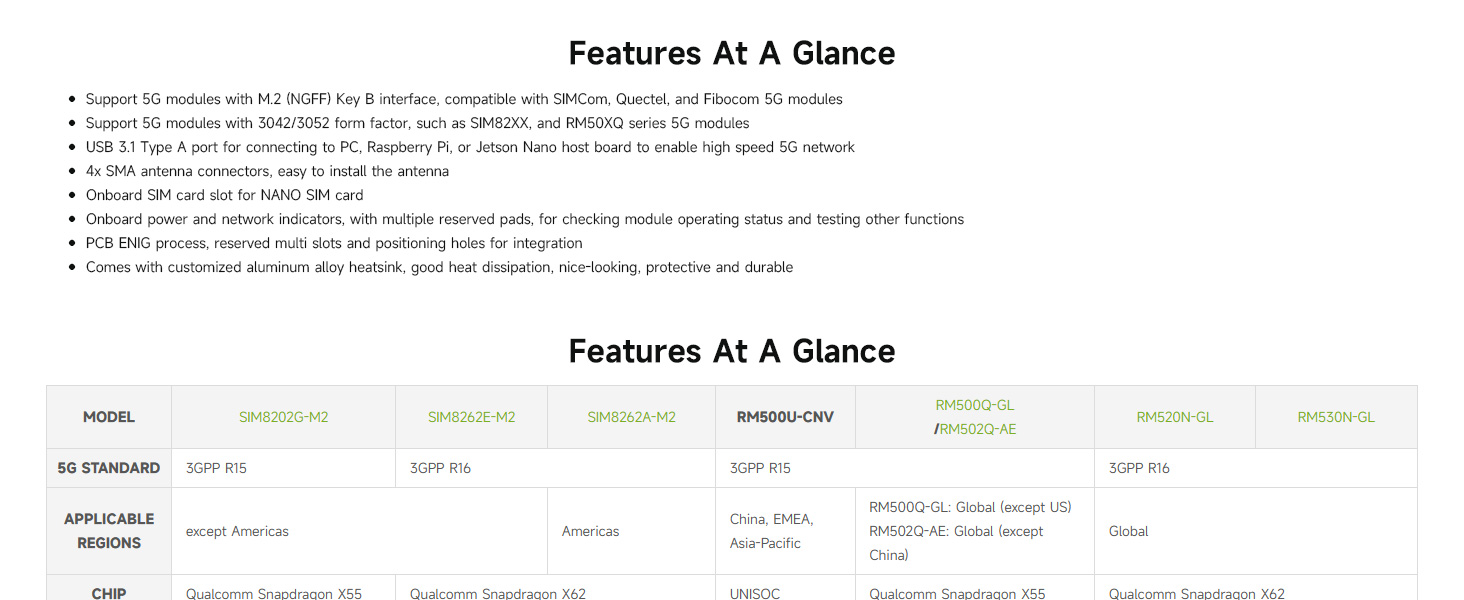
Figure 2: Key features and compatibility overview.
3. 설정 및 설치
3.1 패키지 내용물 확인
설치를 진행하기 전에 패키지에 모든 구성품이 포함되어 있는지 확인하십시오.
- Waveshare USB TO M.2 B KEY board
- Aluminum alloy heatsink
- 쿼드 안테나
- USB 3.1 Type A cable (with auxiliary power option)
- SMA to IPEX adapter cables (for antenna connection)
- Screws and thermal pads
Note: A 5G module (e.g., SIMCom, Quectel) is NOT included and must be purchased separately.
3.2 모듈 어셈블리
- 5G 모듈을 설치하세요: Carefully insert your compatible 5G module (3042/3052 form factor) into the M.2 Key B slot on the Waveshare board. Secure it with the provided screws.
- Apply Thermal Pad and Heatsink: Place the thermal pad onto the 5G module. Then, attach the aluminum alloy heatsink over the 5G module and secure it to the Waveshare board using the appropriate screws. Ensure good contact for effective heat dissipation.
- 안테나 연결: Connect the SMA to IPEX adapter cables to the 5G module's antenna ports and the SMA connectors on the Waveshare board. Then, screw the quad antennas onto the SMA connectors.
- 나노 SIM 카드를 삽입하세요: Locate the Nano SIM card slot on the board and insert your activated Nano SIM card.
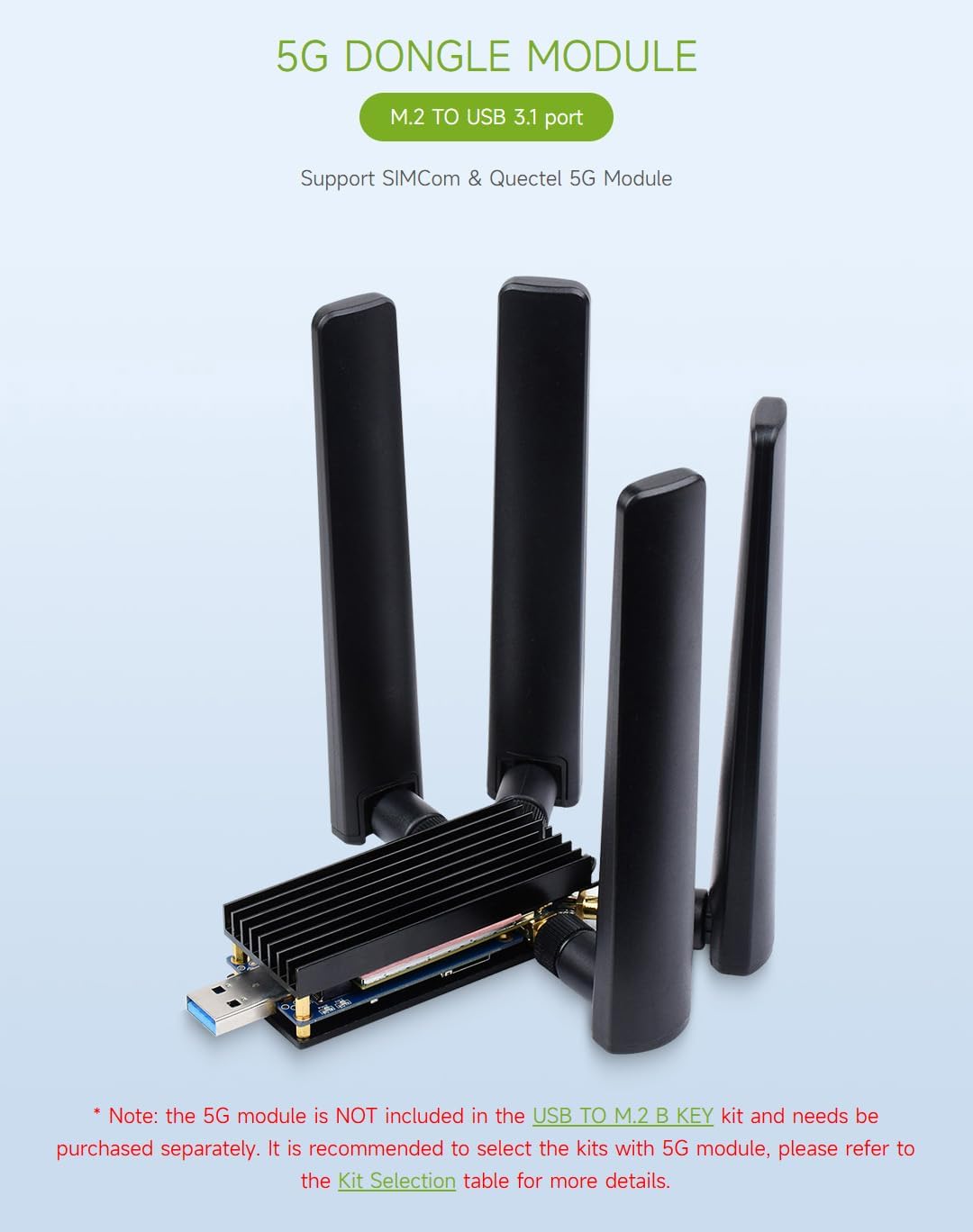
Figure 3: Fully assembled 5G Dongle Module with antennas and heatsink.
3.3 호스트 장치에 연결하기
Connect the assembled 5G Dongle Module to your host device (PC, Raspberry Pi, Jetson Nano) using the provided USB 3.1 Type A cable. If your 5G module has high power consumption, use the auxiliary power supply cable by connecting both USB male ports to your host device or a suitable power source.
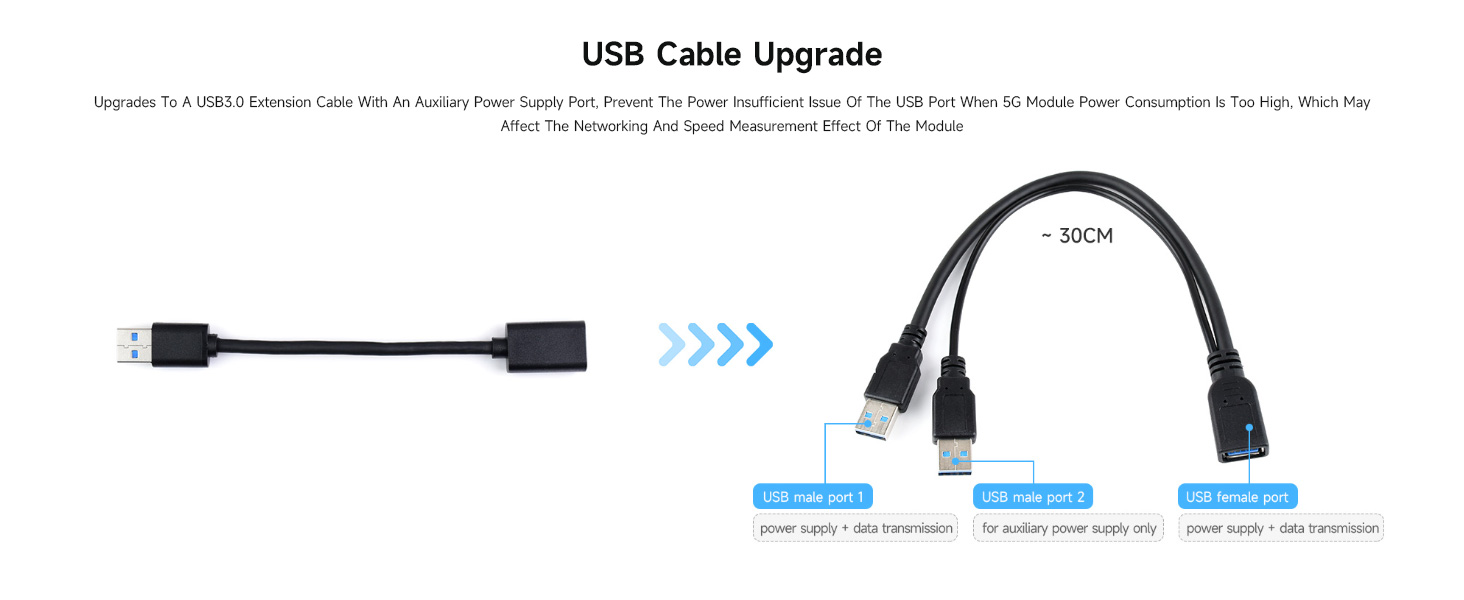
그림 4: 연결 예amples with various host devices.

Figure 5: USB cable with auxiliary power for high-power 5G modules.
4. 사용 설명서
4.1 시스템 호환성
The Waveshare 5G Dongle Module supports Windows and Linux operating systems. After connecting the module, your system should detect the new hardware.
4.2 드라이버 설치
Depending on your specific 5G module and operating system, you may need to install drivers. Refer to the documentation provided with your 5G module or visit the Waveshare official website for driver downloads and detailed setup guides for your specific module and OS combination.
4.3 네트워크 연결
Once drivers are installed and the module is recognized, configure your network settings according to your operating system's instructions to establish a 5G network connection. The onboard power and network indicators will provide visual feedback on the module's operational status.

Figure 6: Multi-system support and heatsink function.
5. 유지관리
The Waveshare 5G Dongle Module is designed for durability. To ensure its longevity and optimal performance:
- 기기를 깨끗하고 먼지가 없는 상태로 유지하세요. 청소 시에는 부드럽고 마른 천을 사용하세요.
- 모듈을 극한의 온도, 습도 또는 직사광선에 노출시키지 마세요.
- Ensure the heatsink remains clear of obstructions to allow for proper airflow and heat dissipation.
- Handle the module and its components with care to prevent physical damage to connectors or the PCB.
6. 문제 해결
6.1 Module Not Recognized by Host Device
- 연결 확인: Ensure the USB cable is securely connected to both the dongle and the host device.
- 보조 전원: If using a high-power 5G module, ensure the auxiliary power USB cable is also connected to provide sufficient power.
- 드라이버 설치: Verify that the correct drivers for your specific 5G module are installed on your operating system. Refer to the 5G module manufacturer's website or Waveshare's support resources.
- 모듈형 좌석: Ensure the 5G module is correctly seated in the M.2 Key B slot and secured.
6.2 과열 문제
- 방열판 설치: Confirm the aluminum alloy heatsink is properly installed with the thermal pad making good contact with the 5G module.
- 공기 흐름: Ensure the heatsink is not obstructed and has adequate airflow.
- 전원 공급 장치: Insufficient power can sometimes lead to instability and heat. Use the auxiliary power cable if needed.
6.3 네트워크 신호 없음
- 안테나 연결: Verify that all four antennas are securely connected to the SMA connectors and that the IPEX cables are properly attached to the 5G module.
- SIM 카드: 나노 SIM 카드가 올바르게 삽입되었고 유효한 데이터 요금제로 활성화되었는지 확인하십시오.
- 5G Module Compatibility: Confirm that your 5G module is compatible with the network bands available in your region.
- 소프트웨어 구성 : Check your operating system's network settings and the 5G module's software for correct APN settings and network selection.
6.4 누락 또는 손상된 부품
If you find any parts missing or damaged upon arrival, please contact your vendor or Waveshare support immediately for assistance.
7. 사양
| 특징 | 세부 사항 |
|---|---|
| 모델 번호 | USB TO M.2 B KEY |
| 하드웨어 인터페이스 | USB 3.1 유형 A |
| 호환 모듈 | 5G modules with M.2 (NGFF) Key B interface (3042/3052 form factor), e.g., SIMCom, Quectel SIM82XX, RM50XQ series |
| 안테나 커넥터 | 4x SMA |
| SIM 카드 슬롯 | 나노 SIM |
| 데이터 링크 프로토콜 | USB |
| 데이터 전송 속도 | 초당 5기가비트 |
| 호환 장치 | PC, Raspberry Pi, Jetson Nano |
| 방열판 소재 | 알루미늄 합금 |
| 패키지 크기 | 7.17 x 5.31 x 1.81 인치 |
| 품목 무게 | 8.4온스(0.24킬로그램) |
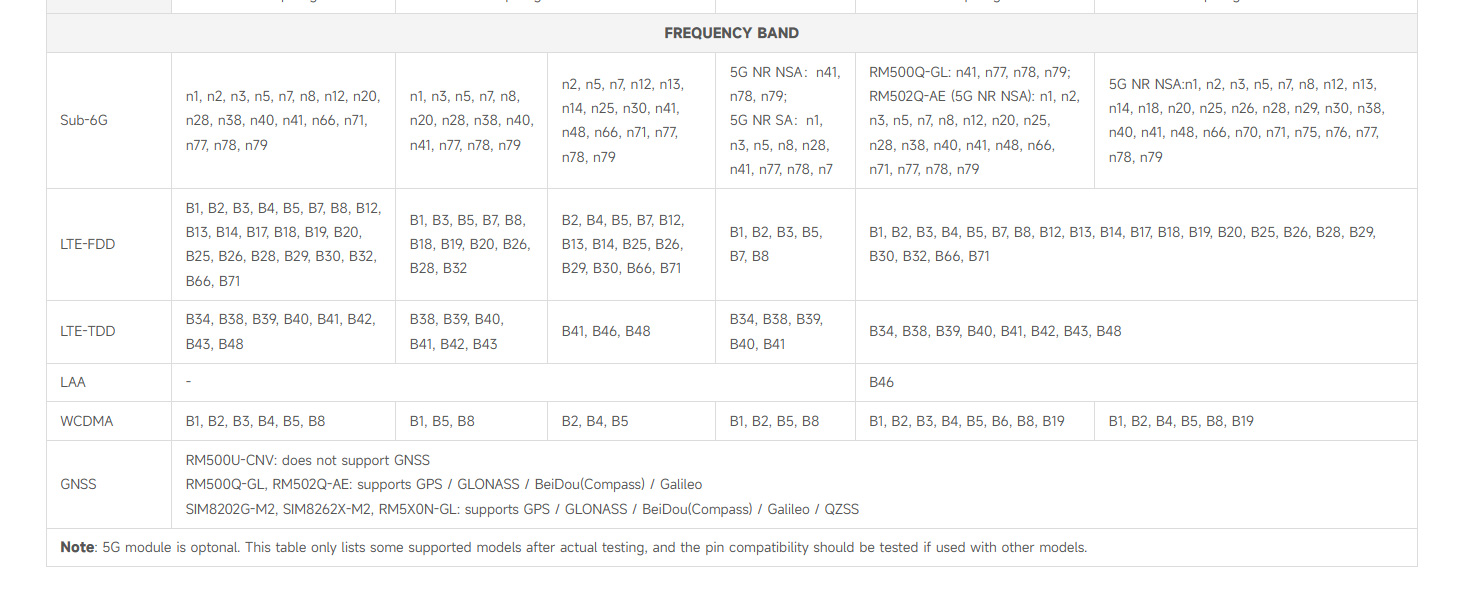
Figure 7: Detailed table of compatible 5G modules and their specifications.

Figure 8: Multiple size compatibility for M.2 modules.
8. 보증 및 지원
Specific warranty information for the Waveshare 5G Dongle Module is not provided in this document. For warranty details, technical support, or further assistance, please refer to the official Waveshare web사이트를 방문하거나 고객 서비스에 직접 문의하세요. 보증 청구를 위해 구매 영수증을 보관하세요.


