소개
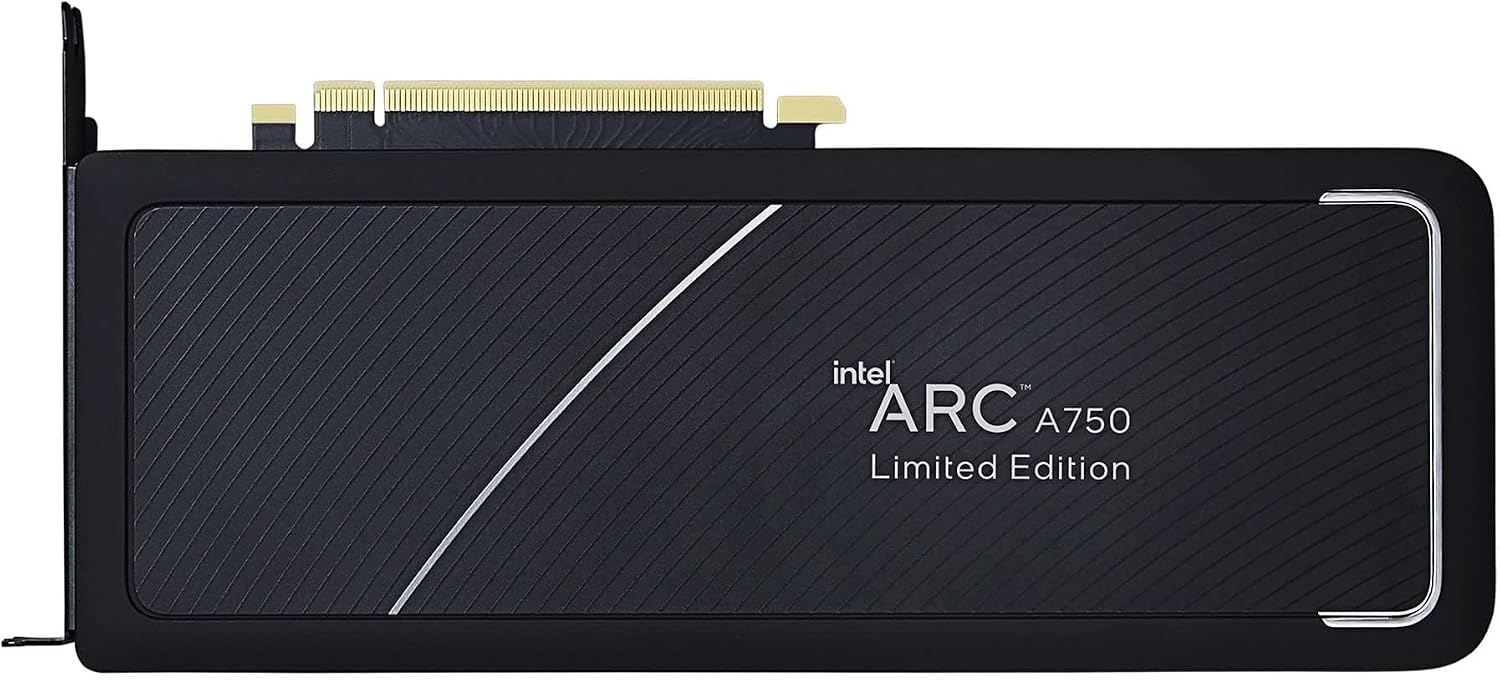
This manual provides essential information for the installation, operation, maintenance, and troubleshooting of your Intel Arc A750 Limited Edition 8GB PCI Express 4.0 Graphics Card. Please read this manual thoroughly before using the product to ensure optimal performance and longevity.
패키지 내용
제품 포장에 모든 품목이 들어 있는지 확인하세요.
- Intel Arc A750 Limited Edition 8GB PCI Express 4.0 Graphics Card
- 문서(이 사용자 설명서)

시스템 요구 사항
설치하기 전에 시스템이 다음 최소 요구 사항을 충족하는지 확인하십시오.
- PCI Express 4.0 Slot: A motherboard with an available PCI Express 4.0 x16 slot is required for optimal performance. While compatible with PCIe 3.0, performance may be reduced.
- Resizable BAR (ReBAR) Support: For best performance, your system's motherboard and CPU should support and have Resizable BAR enabled in the BIOS/UEFI.
- 전원 공급 장치(PSU): A minimum 700W power supply is recommended, especially for 4K gaming or demanding workloads, to ensure stable operation.
- 운영 체제: Windows 10 (64-bit) or Windows 11 (64-bit).
- 프로세서: Compatible Intel or AMD processor.
- 메모리(RAM): 8GB system memory or more.
설정
1. 물리적 설치
- 시스템 준비: 컴퓨터 전원을 끄고 모든 케이블을 분리하세요. 컴퓨터 케이스를 여세요.
- PCIe 슬롯 찾기: Identify an available PCI Express 4.0 x16 slot on your motherboard. Remove any expansion slot covers that block the slot.
- 그래픽 카드를 설치하세요: Carefully align the graphics card with the PCIe slot. Press down firmly and evenly until the card is securely seated in the slot and the retention clip engages.
- 카드를 안전하게 보호하세요: Secure the graphics card to the computer case using the screws from the expansion slot covers.
- 전원 케이블 연결: Connect the necessary PCIe power cables from your power supply to the graphics card. The Intel Arc A750 typically requires one 8-pin and one 6-pin PCIe power connector. Ensure they are fully seated.
- 케이스를 닫고 주변 장치를 연결하십시오: 컴퓨터 케이스를 닫고 모든 케이블(모니터, 키보드, 마우스, 전원 케이블)을 다시 연결한 후 시스템 전원을 켜십시오.

2. 드라이버 설치
After physical installation, you must install the latest graphics drivers for your Intel Arc A750 card. This is crucial for proper functionality and performance.
- 드라이버 다운로드: Visit the official Intel support web사이트 (www.intel.com/support/arc) to download the latest drivers for your Intel Arc A750.
- 드라이버 설치: Run the downloaded installer and follow the on-screen instructions. It is recommended to perform a clean installation if prompted.
- 시스템 재시작: 드라이버 설치가 완료되면 컴퓨터를 다시 시작하십시오.
- Intel Arc Control Software: The driver package typically includes the Intel Arc Control software, which allows you to monitor performance, update drivers, and customize settings.
그래픽 카드 작동하기
The Intel Arc A750 is designed to deliver strong performance for gaming and content creation. Key features include:
Intel Xe Super Sampling (XeSS)
XeSS is an AI-enhanced upscaling technology that leverages machine learning to deliver high-performance, high-fidelity gaming experiences. It reconstructs images with sub-pixel details, enabling higher frame rates while maintaining visual quality.
Real-time Ray Tracing Support
The Intel Arc A750 supports hardware-accelerated ray tracing, allowing for more realistic lighting, shadows, and reflections in supported games and applications. This technology enhances visual immersion by simulating the physical behavior of light.
Intel Arc Control Software
The Intel Arc Control software provides a centralized hub for managing your graphics card. Features include:
- 성과 모니터링: View real-time statistics such as GPU utilization, temperature, and clock speeds.
- 드라이버 업데이트 : Easily check for and install the latest graphics drivers.
- Game Optimization: Optimize game settings for the best balance of performance and visual quality.
- Creator Features: Access tools for streaming and content creation, including virtual camera setup.
유지
Proper maintenance ensures the longevity and stable performance of your graphics card:
- 드라이버 업데이트 유지: Regularly check for and install the latest graphics drivers from the Intel support web사이트. 드라이버 업데이트에는 성능 향상, 버그 수정 및 호환성 개선 사항이 포함되는 경우가 많습니다.
- 먼지 제거: Periodically clean dust from the graphics card fans and heatsink using compressed air. Ensure the system is powered off and unplugged before cleaning. Dust buildup can impede cooling and lead to overheating.
- 적절한 공기 흐름을 보장합니다. Make sure your computer case has adequate airflow to prevent heat buildup. Ensure no cables or other components are obstructing the graphics card's fans.
문제 해결
This section addresses common issues you might encounter with your Intel Arc A750 graphics card.
| 문제 | 가능한 원인 / 해결책 |
|---|---|
| 설치 후 화면이 나오지 않거나 검은 화면만 나타납니다. |
|
| Low frame rates or poor performance in games. |
|
| Screen flickering or intermittent black screens. |
|
| Fans are excessively loud or vibrating. |
|
명세서
| 특징 | 세부 사항 |
|---|---|
| 상표 | 인텔 |
| 모델 번호 | 21P02J00BA |
| 그래픽 코프로세서 | Intel Arc A750 |
| 그래픽 카드 RAM 크기 | 8GB (XNUMX기가바이트) |
| GPU 클럭 속도 | 2050MHz |
| 비디오 출력 인터페이스 | 디스플레이포트 |
| 품목 무게 | 2파운드 |
| 제품 크기(LxWxH) | 17.3 x 11.1 x 0.1 인치 |
| PCI Express 버전 | 4.0 |
보증 및 지원
The Intel Arc A750 Limited Edition Graphics Card typically comes with a 1-year limited warranty. For detailed warranty information, technical support, or to register your product, please visit the official Intel support web대지:
You can also find frequently asked questions (FAQs) and community forums on the Intel support page, which can be valuable resources for troubleshooting and optimizing your experience.


