1. 서론
The Renkchip Wireless HDMI Transmitter and Receiver system provides a convenient solution for wirelessly transmitting 1080P/60Hz video and audio signals from your laptop, PC, or smartphone to an HDTV or projector. This plug-and-play device eliminates the need for lengthy HDMI cables, offering flexibility for home theater, conferences, office presentations, and educational settings.

이미지 1.1: 이상view of the Renkchip Wireless HDMI Transmitter and Receiver Kit.
Important Note: The transmitter is compatible only with laptops featuring a USB-C type output port that supports USB-C 3.1 or Thunderbolt 3/4 interfaces with DisplayPort Alternate Mode.
2. 상자 안에 무엇이 들어있나요?
패키지에 모든 구성품이 들어 있는지 확인하세요.
- USB C 송신기
- HDMI 수신기
- USB 케이블(전원용)
- HDMI cable (for receiver connection)
- VGA cable (for receiver connection, if needed)

Image 2.1: The Renkchip Wireless HDMI Transmitter and Receiver components.
3. 설정 지침
Follow these steps to set up your Renkchip Wireless HDMI system:
3.1 수신기(RX) 연결하기
- Connect the HDMI Receiver to your display device (HDTV, monitor, or projector) using either the HDMI or VGA port.
- Connect the provided USB cable to the receiver's power input and then to a 5V/2A USB power adapter (not included) or a powered USB port on your display device. Ensure the receiver receives stable power.

이미지 3.1: 후면 view of the receiver showing HDMI and VGA output ports.
3.2 송신기(TX) 연결하기
- Plug the USB-C Transmitter into the USB-C port of your source device (laptop, PC, or smartphone).
- Ensure your source device's USB-C port supports USB-C 3.1 or Thunderbolt 3/4 with DisplayPort Alternate Mode for proper functionality.
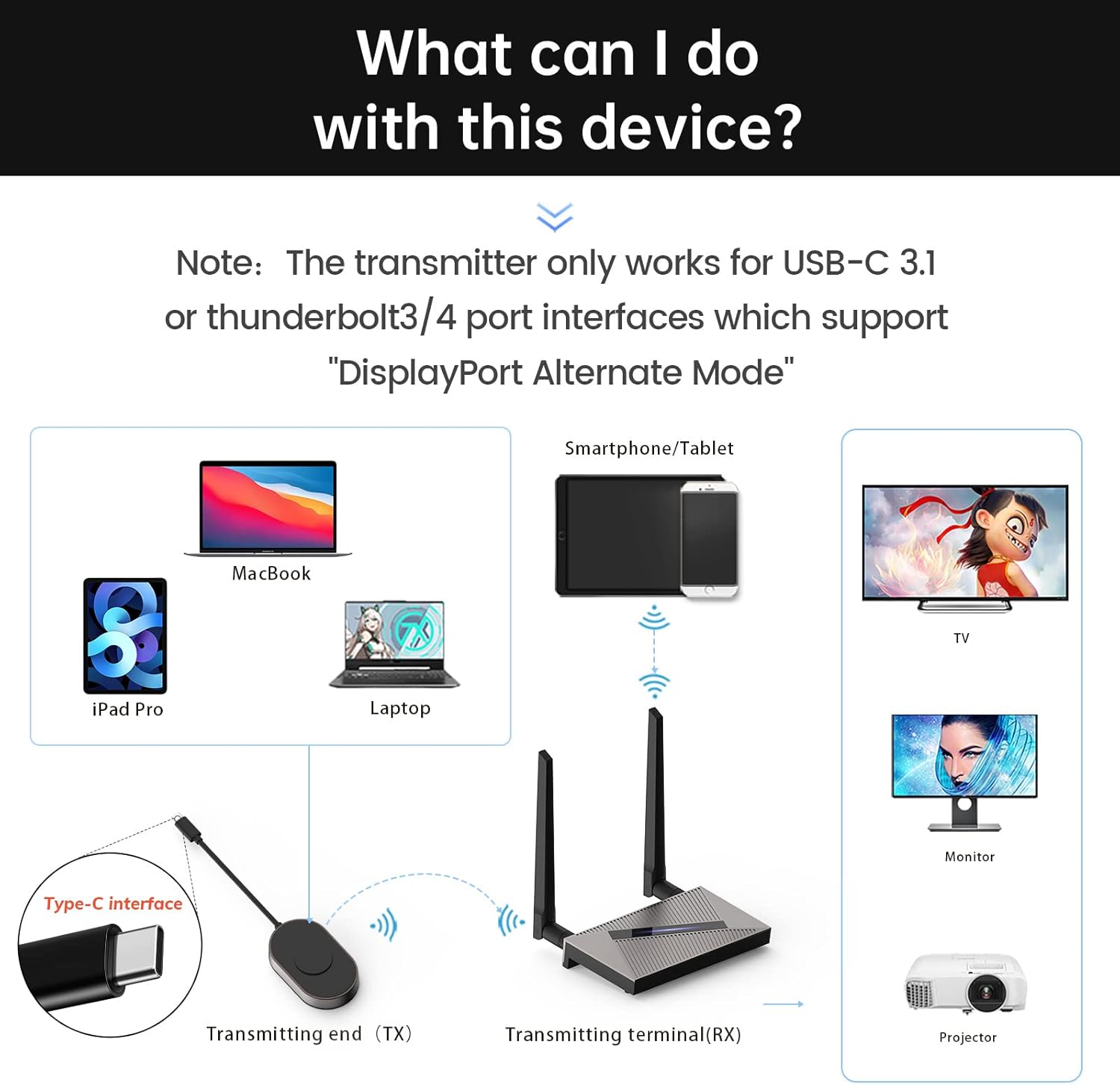
Image 3.2: Connection diagram illustrating transmitter and receiver setup with various devices.
3.3 송신기와 수신기 페어링
The transmitter and receiver are pre-paired from the factory. If re-pairing is necessary:
- Insert a thin object (like a pin) into the receiver's "RESET" position and hold for 5 seconds to enter pairing mode.
- Press and hold the transmitter button for 3 seconds. The indicator light will flash quickly.
- After approximately 20 seconds, the screen will show that pairing is successful.
4. 사용 설명서
Once connected and paired, the system operates on a plug-and-play basis:
- Ensure both the transmitter and receiver are powered on and connected as described in Section 3.
- The display device connected to the receiver should automatically detect the incoming signal and mirror the content from your source device.
- The system supports 1080P/60Hz HD signal transmission with real-time audio synchronization and a delay of less than 0.1 seconds.
- The dual high-gain antennas (2.4G+5G) ensure a strong and stable transmission signal.

이미지 4.1: Example of a laptop wirelessly mirroring its display to a large screen for a meeting.

이미지 4.2: Example of a smartphone wirelessly mirroring video content to a television.
The system supports various operating systems including Windows, Mac OS/iPad OS/iOS, and Android, utilizing technologies like Airplay, DLNA, and Miracast for seamless mirroring.

Image 4.3: Compatibility details for different operating systems and mirroring protocols.
5. 유지관리
To ensure the longevity and optimal performance of your Renkchip Wireless HDMI system, consider the following:
- 기기를 깨끗하고 먼지가 없는 상태로 유지하세요. 청소 시에는 부드럽고 마른 천을 사용하세요.
- 기기를 극한의 온도, 습도 또는 직사광선에 노출시키지 마세요.
- Do not attempt to disassemble or repair the devices yourself. Refer to qualified service personnel if issues arise.
6. 문제 해결
문제가 발생하면 다음의 일반적인 해결 방법을 참조하세요.
- No Signal/No Display:
- Ensure the receiver is properly powered (5V/2A).
- Verify that the HDMI/VGA cable is securely connected between the receiver and the display device.
- Confirm that your source device's USB-C port supports DisplayPort Alternate Mode.
- Check if the transmitter and receiver are successfully paired (refer to Section 3.3).
- Try connecting the transmitter to a different USB-C port on your source device, if available.
- Intermittent Connection/Signal Drop:
- Reduce the distance between the transmitter and receiver. The theoretical maximum transmission distance is 98 feet, but environmental factors like walls and air humidity can affect performance.
- Ensure there are no significant obstructions between the transmitter and receiver.
- 2.4G 또는 5G 주파수 대역에서 작동하는 다른 무선 장치와의 간섭을 최소화하십시오.
- Device Heats Up During Use:
- It is normal for the device to generate some heat due to signal decoding. The product is designed with ventilation holes to manage heat and will not affect product life during long-term use.
- Driver/APP Installation:
- This product is designed for plug-and-play operation and does not require driver or APP installation.

Image 6.1: Common questions and answers regarding the Renkchip Wireless HDMI system.
7. 사양
| 특징 | 세부 사항 |
|---|---|
| 모델 | Z08 |
| 해결 | 1080P/60Hz |
| I / O 인터페이스 | Audio, Type-C, VGA, HDMI |
| 전원 입력 | 5V 2A |
| 회로망 | 2.4G/5G Dual Antenna |
| 재료 | Zinc Alloy + ABS |
| 색상 | 검은색 |
| 제품 치수 | 9 x 6 x 2인치(대략적인 포장 크기) |
| 품목 무게 | 1.23파운드 |
| 연결 기술 | HDMI, USB, VGA |
| 특별 기능 | DLNA, 미라캐스트 |
| 호환 장치 | Smartphone, Laptop, PC, Projector, HDTV |

Image 7.1: Physical dimensions and key parameters of the transmitter and receiver.
8. 보증 및 지원
Renkchip products are designed for reliability and performance. For warranty information or technical support, please contact Renkchip customer service through the retailer where the product was purchased or visit the official Renkchip web대지.


