1. 서론
Thank you for choosing the Beafon SL605 Silverline Flip Phone. This manual provides essential information for setting up, operating, and maintaining your device. The SL605 is designed with ease of use in mind, featuring large buttons, a clear display, and an SOS emergency call function, making it ideal for seniors.

Figure 1.1: Beafon SL605 Silverline Flip Phone (Closed)
This image shows the Beafon SL605 flip phone in its closed state, displaying the external screen with the current time and date. The phone has a sleek black and silver design.
2. 패키지 내용
제품을 개봉하신 후 구성품을 확인해 주십시오. 누락된 품목이나 손상된 품목이 있을 경우 판매점에 문의해 주십시오.
- Beafon SL605 Flip Phone
- 충전식 리튬이온 배터리
- 충전 케이블
- Charging Cradle (if included with your model)
- 사용 설명서 (본 문서)
3. 디바이스 오버view
Familiarize yourself with the key components of your Beafon SL605.

Figure 3.1: Beafon SL605 Silverline Flip Phone (Open)
This image displays the Beafon SL605 flip phone in its open position, revealing the internal color display and the large, illuminated keypad. The keypad features clearly marked buttons for easy dialing and navigation.
3.1 정면 View (닫은)
- 외부 디스플레이: Shows time, date, battery status, and incoming call information.
- 알림 LED: Indicates new messages or missed calls.
3.2 정면 View (열려 있는)
- 내부 디스플레이: 2.4-inch color screen for menus, contacts, and messages.
- 키패드 : Large, illuminated buttons for dialing and navigation. Includes dedicated call, end call, and SOS buttons.
- 탐색 키: Up, Down, Left, Right, and OK/Confirm buttons.
- Photo Contact Indicator: Feature to display contact photos.
3.3 후면 View

그림 3.2: 후면 View of Beafon SL605
This image shows the back of the Beafon SL605 flip phone, highlighting the prominent SOS emergency call button and the speaker grille at the bottom.
- SOS 비상 버튼: Press and hold to activate the emergency call sequence.
- 스피커: For loud ringtones and hands-free calls.
3.4 측면 View
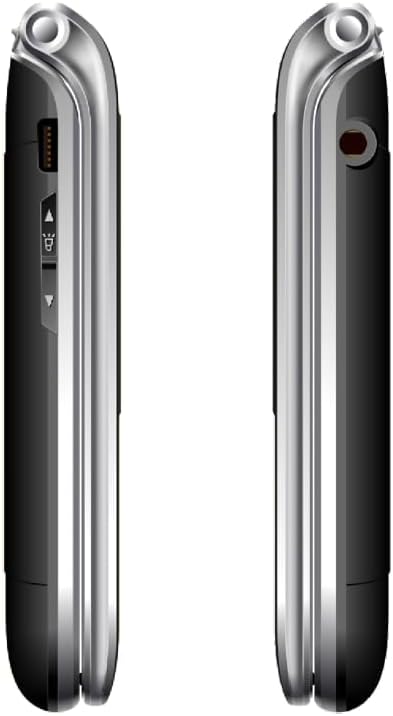
그림 3.3: 측면 View of Beafon SL605
이 이미지는 측면을 나타냅니다. view of the Beafon SL605 flip phone, illustrating the charging port and volume control buttons located on the side of the device.
- 충전 포트: For connecting the charging cable or placing in the charging cradle.
- 볼륨 버튼: Adjust call volume and ringtone volume.
- 헤드폰 잭: 3.5 mm port for headphones.
4. 설정
4.1 배터리 및 SIM 카드 설치
- 노치 부분을 살살 들어 올려 휴대폰 뒷면 커버를 분리하세요.
- Insert your SIM card into the designated slot. Ensure the gold contacts face downwards and the cut corner aligns with the slot.
- Insert the Lithium-ion battery, aligning the contacts with those in the phone.
- 뒷면 덮개를 다시 씌우고 딸깍 소리가 나면서 제자리에 고정될 때까지 세게 누르십시오.
4.2 배터리 충전
처음 사용하기 전에 휴대폰 배터리를 완전히 충전하십시오.
- Connect the charging cable to the phone's charging port or place the phone in its charging cradle.
- 케이블의 반대쪽 끝을 전원 콘센트에 연결합니다.
- The battery icon on the display will indicate charging status. A full charge typically takes 2-3 hours.
4.3 전원 켜기/끄기
- 전원을 켜려면: 를 누르고 계세요 통화 종료/전원 화면이 켜질 때까지 버튼을 누릅니다.
- 전원을 끄려면: 를 누르고 계세요 통화 종료/전원 button until a power-off prompt appears, then confirm.
5. 사용 설명서
5.1 전화 걸기 및 받기
- 전화하려면: Open the phone, enter the phone number using the keypad, and press the 부르다 단추.
- 연락처에서: Navigate to the "Contacts" menu, select a contact, and press the 부르다 단추.
- 대답하려면: 전화벨이 울리면 덮개를 열거나 버튼을 누르세요. 부르다 단추.
- 통화를 종료하려면: 를 누르세요 통화 종료 button or close the flip.
5.2 SOS Emergency Call Function
The SOS button is located on the back of the phone. It allows you to quickly contact pre-set emergency numbers.
- SOS 번호 설정: 이동하다 Menu > SOS Settings to add up to 5 emergency contacts.
- SOS 활성화: 를 누르고 계세요 SOS 버튼 on the back of the phone for 3 seconds.
- The phone will automatically call the first number in the SOS list. If unanswered, it will call the next number, and so on, cycling through the list up to 3 times.
- An emergency SMS message will also be sent to all SOS contacts.
5.3 메시지(SMS)
- To Send: 이동하다 Menu > Messages > Write Message. Enter your message and select a recipient from contacts or enter a number.
- To Read: New messages will be indicated by a notification. Go to Menu > Messages > Inbox 읽다.
5.4 전화 설정
Access various settings via the 메뉴 단추.
- 벨소리 볼륨: Adjust using the side volume buttons or in 메뉴 > 설정 > 프로files.
- Number Announcement: Enable or disable the feature that announces dialed numbers by button press in Menu > Settings > Call Settings.
- 언어: The device supports multiple languages. Change the interface language in Menu > Settings > Phone Settings > Language. (Note: Some models may have limited language options, such as German as a primary language.)

Figure 5.1: Beafon SL605 Photo Contact Feature
This image shows two open Beafon SL605 phones side-by-side. The phone on the right demonstrates the photo contact feature, where a contact's picture is displayed on the screen, making it easier to identify callers.
6. 유지관리 및 관리
- Keep the phone dry. Liquids can corrode electronic circuits.
- 휴대전화를 청소할 때 강한 화학 물질, 세척 용제 또는 강력한 세제를 사용하지 마세요. 부드러운 천으로 닦으세요.amp 옷감.
- Do not store the phone in high temperatures, as this can shorten the life of electronic devices, damage batteries, and warp or melt certain plastics.
- Do not store the phone in cold temperatures, as moisture can form inside the phone when it returns to normal temperature, which could damage the electronic circuit boards.
- 휴대전화를 떨어뜨리거나, 부딪히거나, 흔들지 마십시오. 거칠게 다루면 내부 회로 기판과 정밀 기계 부품이 손상될 수 있습니다.
- The phone has IP54 protection against dust and splashes. While it offers some protection, it is not waterproof and should not be submerged in water.
7. 문제 해결
| 문제 | 가능한 원인 | 해결책 |
|---|---|---|
| 전화기의 전원이 켜지지 않습니다. | 배터리가 방전되었거나 올바르게 설치되지 않았습니다. | 배터리를 충전하세요. 배터리가 올바르게 삽입되었는지 확인하세요. |
| 전화를 걸거나 받을 수 없습니다. | 유성 카드가 없거나, 유성 카드가 제대로 삽입되지 않았거나, 네트워크 신호가 없습니다. | Ensure SIM card is properly inserted. Check network signal strength. Contact your service provider if issues persist. |
| 소리가 너무 작거나 큽니다. | Volume settings are incorrect. | Adjust volume using the side buttons during a call or in the phone's settings. |
| SOS 버튼이 작동하지 않습니다. | SOS numbers not set or incorrect. | Verify that SOS emergency numbers are correctly configured in the settings. |
| External display is blank or white. | Possible software glitch or hardware issue. | Try restarting the phone. If the problem persists, contact customer support. |
8. 사양
- 모델: 비폰 SL605
- 제품 유형: 접이식 휴대폰
- 색상: 검은색
- 운영 체제: Beafon OS
- 내부 디스플레이: 2.4 inches (6.09 cm) Color LCD
- 외부 디스플레이: 1.44 inches (3.65 cm) Color LCD
- 셀룰러 기술: 2G
- 연결성: 블루투스, 3.5mm 잭
- 특별 기능: IP54 Dust and Splash Protection, Rubberized Surface, Ergonomic Design, Extra Large Illuminated Buttons, Extra Loud Ringtone, Photo Contact Indicator, Number Announcement (optional)
- 배터리: 리튬이온(포함)
- 메모리 저장 용량: 32GB (XNUMX기가바이트)
- 제조업체: 비폰
- 원산지: 중국
9. 보증 및 지원
For warranty information, please refer to the warranty card included in your product packaging or contact your point of purchase. Beafon provides customer support for product inquiries and technical assistance.
온라인 지원: Beafon 공식 웹사이트를 방문하세요. webFAQ, 소프트웨어 업데이트, 연락처 정보는 사이트에서 확인하세요.
고객 서비스: Contact details for customer service can typically be found on the manufacturer's web사이트 또는 구매 문서에서 확인하세요.
10. 중요한 안전 정보
- Do not attempt to disassemble or modify the phone. This can void the warranty and cause damage.
- 승인된 배터리, 충전기, 액세서리만 사용하세요.
- Dispose of the phone and battery responsibly according to local regulations. Do not dispose of them in household waste.
- Avoid using the phone in extreme temperatures or highly humid environments.
- 휴대폰을 심장박동기 및 기타 의료기기에서 멀리 두십시오.
- 운전 중이거나 중장비를 조작하는 동안에는 휴대전화를 사용하지 마십시오.
11. 공식 제품 영상
제공된 데이터에는 이 모델에 대한 판매자의 공식 제품 비디오가 없습니다.


