소개
The AQIRYS Mira is a compact 65% mechanical keyboard designed for versatility and performance. It offers triple connectivity options: wired USB-C, 2.4GHz wireless, and Bluetooth, making it compatible with PC, Mac, mobile devices, and consoles. Featuring Outemu Red mechanical switches, N-key rollover, full anti-ghosting, and dynamic RGB backlighting, the Mira keyboard provides a responsive and customizable typing and gaming experience. Its hot-swap design allows for easy switch replacement.
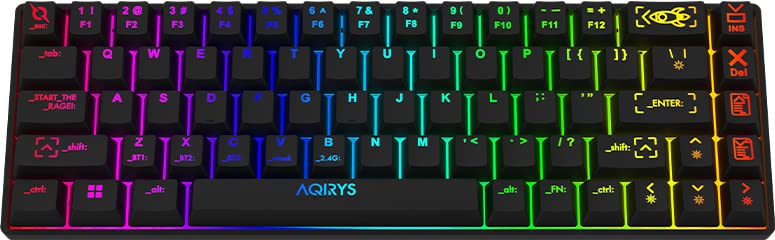
Image: The AQIRYS Mira 65% Mechanical Keyboard, showcasin컴팩트한 레이아웃과 생생한 RGB 백라이트가 특징입니다.
설정
패키지 내용
- AQIRYS Mira 65% Mechanical Keyboard
- USB-C to USB-A 케이블
- 2.4GHz 무선 동글(일반적으로 키보드의 배터리 칸이나 전용 슬롯에 보관됨)
- Keycap Puller (optional, for maintenance)
- Switch Puller (optional, for maintenance)
키보드 충전하기
Before initial use, ensure the keyboard is fully charged. Connect the provided USB-C cable to the keyboard's USB-C port and the other end to a powered USB port on your computer or a USB wall adapter. The charging indicator will show the charging status.
연결 모드
The AQIRYS Mira keyboard supports three connection modes: Wired, 2.4GHz Wireless, and Bluetooth. A switch on the keyboard (usually on the back or side) allows you to select the desired mode.
1. 유선 연결
- 키보드의 모드 스위치를 '유선' 또는 'USB' 위치로 설정합니다.
- USB-C 케이블은 키보드에, USB-A 케이블은 컴퓨터에 연결하세요.
- 키보드는 운영 체제에서 자동으로 인식됩니다.
2. 2.4GHz 무선 연결
- 2.4GHz USB 동글을 찾으세요.
- USB 동글을 컴퓨터나 장치의 사용 가능한 USB 포트에 꽂습니다.
- 키보드의 모드 스위치를 '2.4G' 위치로 설정합니다.
- 키보드가 자동으로 연결됩니다. 그렇지 않으면 Fn + P 3초 동안 페어링을 시작합니다.
3. 블루투스 연결
The keyboard can pair with up to three different Bluetooth devices.
- 키보드의 모드 스위치를 'BT' 위치로 설정합니다.
- To enter pairing mode for a specific slot (BT1, BT2, or BT3), press and hold Fn + Q (BT1용) Fn + W (BT2의 경우) 또는 Fn + E (for BT3) for 3-5 seconds. The corresponding key (Q, W, or E) will flash rapidly, indicating pairing mode.
- On your device (PC, Mac, mobile), enable Bluetooth and search for new devices. Select "AQIRYS Mira" from the list.
- Once paired, the flashing light will become solid for a few seconds and then turn off.
- 페어링된 블루투스 기기 간 전환하려면 짧게 누르세요. Fn + Q, Fn + W, 또는 Fn + E.

이미지: 측면 view of the AQIRYS Mira keyboard, highlighting the USB-C port for wired connection and charging.
작동 지침
주요 기능 및 조합
The AQIRYS Mira keyboard features a 68-key US layout. Many functions are accessed via the Fn 다른 키와 조합하여 사용하는 키입니다.
- Fn + 1/2/3: 블루투스 기기(BT1, BT2, BT3) 간 전환.
- 에프앤피: Initiate 2.4GHz pairing (hold for 3 seconds).
- Fn + 백스페이스: 삭제 키.
- Fn + \|: 백라이트 효과를 켜고 끕니다.
- Fn + [{: 백라이트 밝기를 낮추세요.
- Fn + ]}: 백라이트 밝기를 높입니다.
- Fn + ;:: 백라이트 속도를 낮추세요.
- Fn + '"': 백라이트 속도를 높입니다.
- Fn + ,<: Decrease backlight color (for static modes).
- Fn + .>: Increase backlight color (for static modes).
- Fn + 왼쪽 화살표: 이전 트랙.
- Fn + 오른쪽 화살표: 다음 트랙.
- Fn + 위쪽 화살표: 볼륨을 높여요.
- Fn + 아래쪽 화살표: 볼륨 낮추기.
- Fn + Enter: 재생/일시 중지.
- Fn + Win: Windows 키 잠금/잠금 해제.
백라이트 사용자 정의
The keyboard features full RGB dynamic backlighting. Basic adjustments can be made using Fn key combinations as listed above. For in-depth customization, including per-key lighting and advanced effects, connect the keyboard in wired mode and use the dedicated AQIRYS software (available for download from the official AQIRYS web대지).
N-Key Rollover and Anti-Ghosting
The Mira keyboard supports N-key rollover and full anti-ghosting, ensuring that every keystroke is registered accurately, even when multiple keys are pressed simultaneously. This is particularly beneficial for fast typing and gaming.
Hot-Swap Switch Design
The keyboard's hot-swap design allows you to change mechanical switches without soldering. It is compatible with Outemu 3-pin switches. This feature enables customization of typing feel and easy replacement of faulty switches.
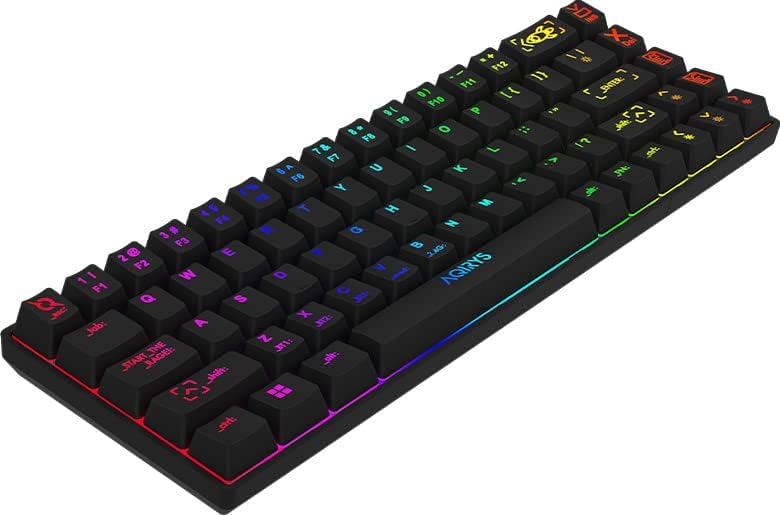
Image: Close-up of the AQIRYS Mira keyboard's keycaps, illustrating the US layout and RGB backlighting.
유지
키보드 청소
- 먼지 제거: 압축 공기 캔을 사용하여 키캡 사이의 먼지와 이물질을 불어냅니다.
- 표면 청소: Gently wipe the keycaps and chassis with a soft, lint-free cloth damp소량의 물이나 순하고 마모성이 없는 세척액으로 닦아주세요. 과도한 습기는 피하십시오.
- 딥 클리닝 : For thorough cleaning, you may use a keycap puller to remove keycaps and clean the switches and plate underneath. Ensure the keyboard is powered off and disconnected before removing keycaps.
Switch Replacement (Hot-Swap)
The AQIRYS Mira keyboard features hot-swappable switches, allowing for easy replacement without soldering.
- 전원 끄기 : Ensure the keyboard is disconnected from power and turned off.
- 키캡 제거: Use a keycap puller to carefully remove the keycap from the switch you wish to replace.
- 스위치 제거: Use a switch puller to grasp the top and bottom clips of the switch. Gently pull the switch straight up and out of the PCB.
- 새 스위치 삽입: Align the pins of the new Outemu 3-pin compatible switch with the holes on the PCB. Press the switch firmly until it clicks into place. Ensure the pins are not bent.
- 키캡 교체: 키캡을 새 스위치에 다시 끼웁니다.

이미지: 대안 view of the AQIRYS Mira keyboard, highlighting the keycap profiles and overall design.
문제 해결
- 키보드가 응답하지 않음(유선):
- USB-C 케이블이 키보드와 컴퓨터에 모두 단단히 연결되어 있는지 확인하세요.
- 컴퓨터의 다른 USB 포트를 사용해 보십시오.
- Ensure the keyboard mode switch is set to 'Wired' or 'USB'.
- 키보드가 응답하지 않습니다(2.4GHz 무선):
- Ensure the 2.4GHz USB dongle is securely plugged into your device.
- Ensure the keyboard mode switch is set to '2.4G'.
- 키보드 배터리가 충전되었는지 확인하세요.
- Try re-pairing by holding Fn + P 3초 동안.
- 블루투스 페어링 문제:
- Ensure the keyboard mode switch is set to 'BT'.
- 기기의 Bluetooth가 활성화되어 있고 검색 가능한지 확인하세요.
- Make sure the keyboard is in pairing mode (e.g., Fn + Q held for 3-5 seconds, with the key flashing).
- Forget the device from your computer's Bluetooth settings and try pairing again.
- Try pairing to a different Bluetooth slot (BT1, BT2, BT3).
- 키가 등록되지 않거나 두 번 입력됨:
- 키캡 아래나 스위치 주변에 이물질이 있는지 확인하십시오.
- If a specific switch is faulty, consider replacing it using the hot-swap feature.
- 백라이트가 작동하지 않거나 어두워짐:
- 키보드 배터리가 충전되어 있는지 확인하세요.
- 밝기를 조정하려면 다음을 사용하세요. Fn + [{ 그리고 Fn +]}.
- Cycle through backlight effects using Fn + \|.
- If using software, ensure settings are correctly applied.
명세서
| 상표 | 아퀴리스 |
| 모델 | 미라 |
| 연결성 | 2.4GHz 무선, 블루투스, USB-C 유선 |
| 공들여 나열한 것 | US Layout, 68 Keys (65% Form Factor) |
| 스위치 | Outemu Red Mechanical (Linear, 4mm travel, 47gF actuation) |
| 안티 고스팅 | N-Key Rollover, Full Anti-Ghosting |
| 백라이트 | Full RGB Dynamic Backlight |
| 배터리 | 1300mAh 리튬 배터리 |
| 호환성 | PC (Windows 10), Mac, Mobile (Smartphone, Tablet), Console |
| 제품 치수 | 30.8 x 10.1 x 3.9cm |
| 품목 무게 | 900g |
| 재료 | 플라스틱, 고무 |
| 포함된 구성 요소 | USB 케이블 |
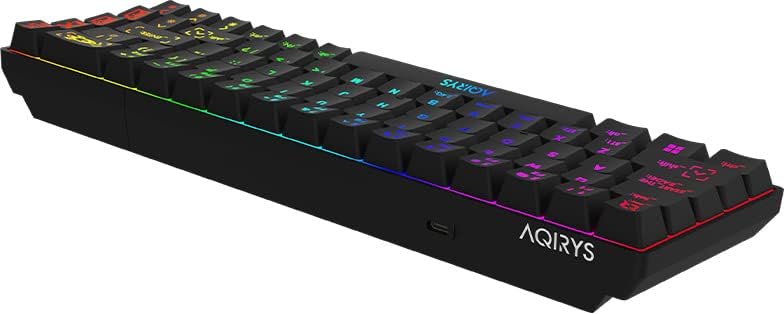
이미지: 낮은 각도에서 촬영 view of the AQIRYS Mira keyboard, highlighting the chassis design and rubber coating.
보증 정보
For detailed warranty terms and conditions, please refer to the warranty card included with your product or visit the official AQIRYS website. Warranty coverage typically includes manufacturing defects for a specified period from the date of purchase. Keep your proof of purchase for warranty claims.
고객 지원
If you encounter any issues not covered in this manual or require further assistance, please visit the AQIRYS official website for support resources, FAQs, and contact information for customer service. You may also reach out to your retailer for product support.


