1. 서론
This manual provides essential information for the proper setup, operation, and maintenance of your Sharp 32FG6EA 32-inch HD Android TV. The Sharp 32FG6EA offers a wide range of connection options and features the Android TV operating system, providing a modern and intuitive television experience. It functions as an all-in-one entertainment hub, integrating Google Assistant for a smarter viewing experience. Users can quickly access entertainment, control smart devices, and obtain on-screen information using voice commands.
2. 안전 정보
TV를 사용하기 전에 모든 안전 지침을 주의 깊게 읽으십시오. 나중에 참고할 수 있도록 이 설명서를 보관하십시오.
- 전원 공급 장치: TV가 올바른 전압의 전원에 연결되어 있는지 확인하십시오.tage. 전원 콘센트에 과부하를 걸지 마십시오.
- 통풍: 통풍구를 막지 마세요. 과열을 방지하기 위해 TV 주변에 충분한 공간을 확보하여 공기가 원활하게 흐르도록 하세요.
- 물과 습기: Do not expose the TV to rain, moisture, or excessive humidity. Avoid placing objects filled with liquids on or near the TV.
- 청소: 청소하기 전에 TV 플러그를 뽑으세요. 부드럽고 마른 천을 사용하세요. 액체 세척제나 에어로졸 스프레이는 사용하지 마세요.
- 놓기: TV를 안정적이고 평평한 곳에 놓으십시오. 벽걸이 설치 시에는 벽걸이 마운트가 단단히 고정되어 TV 무게를 지탱할 수 있는지 확인하십시오.
- 서비스: TV를 직접 수리하려고 하지 마십시오. 모든 수리는 자격을 갖춘 서비스 담당자에게 맡기십시오.
3. 패키지 내용
모든 품목이 포장에 들어 있는지 확인하세요.
- Sharp 32FG6EA 32-inch HD Android TV
- 리모컨(AAA 배터리 2개 포함)
- Stand Type Base
- 사용 설명서
- 전원 케이블
4. 설정
4.1 풀기
TV와 모든 액세서리를 포장에서 조심스럽게 꺼내십시오. 향후 운송 또는 서비스 시 필요할 수 있으므로 포장재를 보관하십시오.
4.2 스탠드 부착하기
If you are not wall-mounting the TV, attach the included stand base:
- 손상을 방지하려면 TV 화면을 아래로 하여 부드럽고 평평한 표면에 놓으세요.
- 스탠드 베이스를 TV 바닥의 장착 구멍에 맞춥니다.
- 제공된 나사를 사용하여 스탠드를 고정하세요. 스탠드가 단단히 고정되었는지 확인하세요.
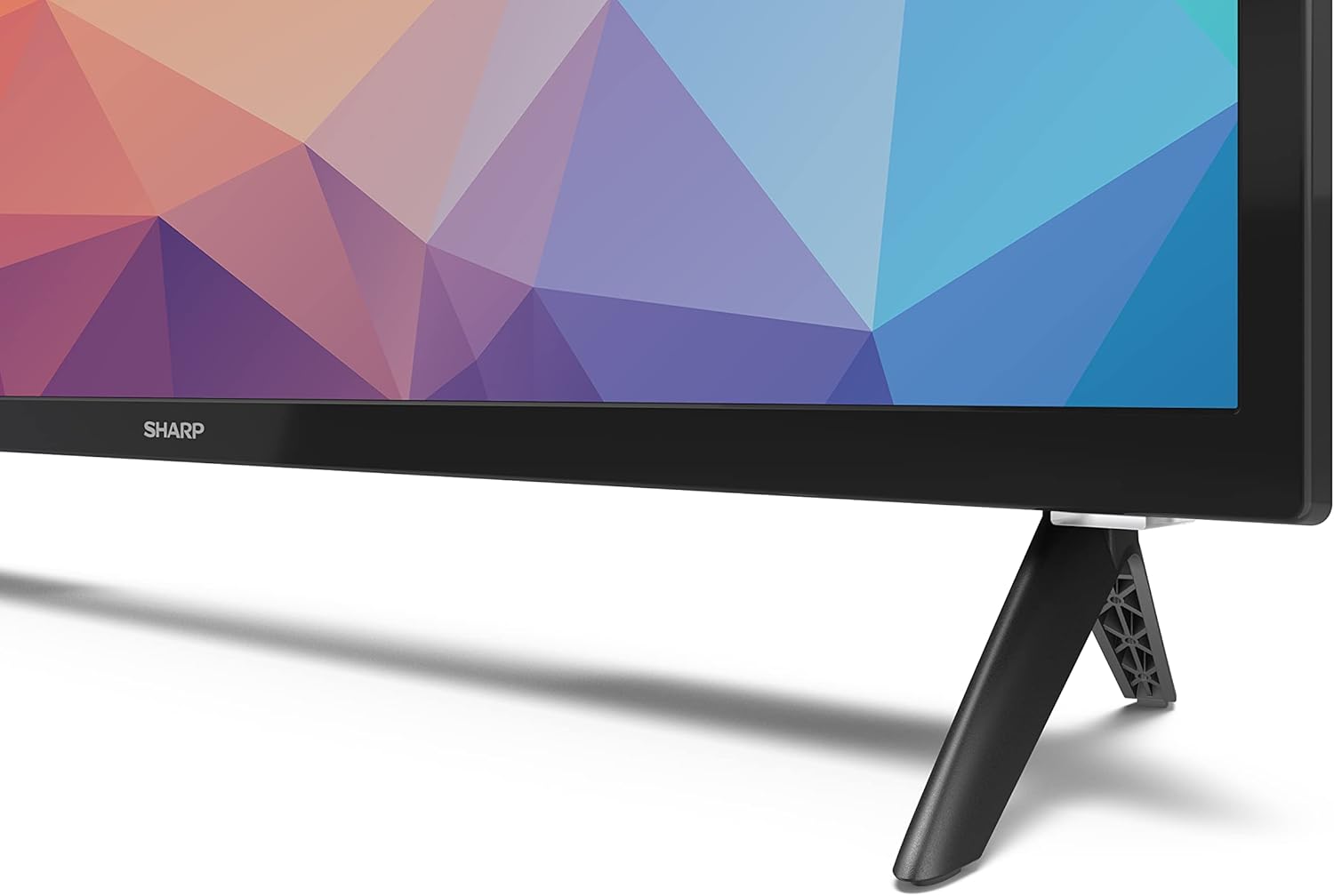
Image: Close-up of the TV stand attachment.
4.3 벽면 장착
The Sharp 32FG6EA supports VESA wall mounts with dimensions of 75 x 75 mm. Wall mount hardware is not included. Follow the instructions provided with your wall mount kit.
4.4 외부 장치 연결
TV에는 다양한 기기를 연결할 수 있는 여러 포트가 있습니다.
- HDMI : Connect Blu-ray players, game consoles, or set-top boxes to the 2 HDMI ports.
- USB: Connect USB storage devices for media playback to the 2 USB ports.
- 안테나/케이블: 방송 채널을 시청하려면 안테나나 케이블 TV 소스를 연결하세요.
- 이더넷: 유선 인터넷 연결의 경우.
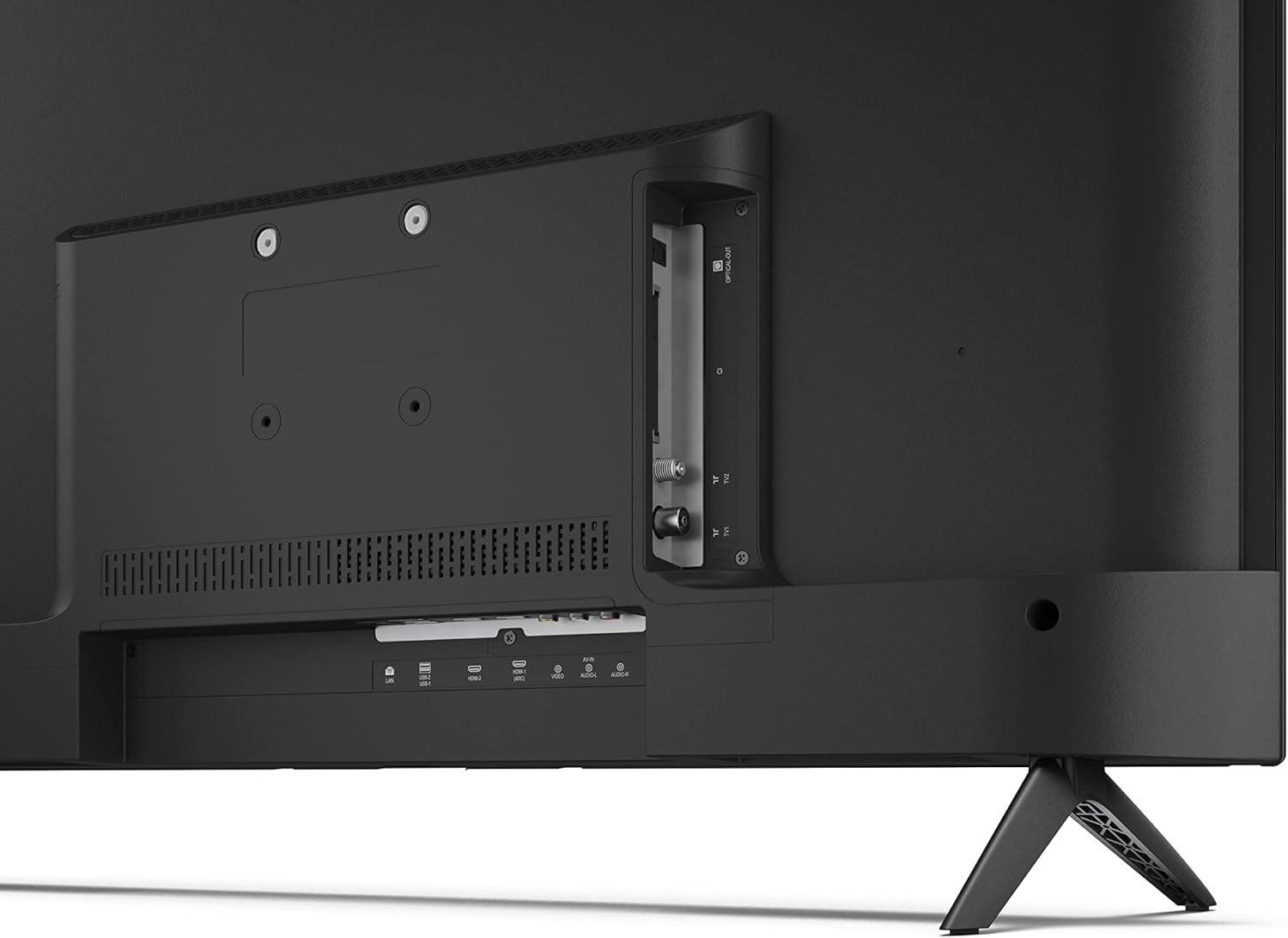
이미지: 후면 view TV에는 연결 포트가 있습니다.
4.5 전원 연결
After connecting all necessary devices, plug the power cable into the TV and then into a wall outlet.
4.6 초기 설정 마법사
처음 전원을 켜면 TV가 초기 설정 과정을 안내합니다. 여기에는 다음이 포함됩니다.
- 언어 선택.
- 네트워크 연결(Wi-Fi 또는 이더넷).
- Google account sign-in (required for full Android TV features).
- 채널 스캐닝.
5. 운영
5.1 원격 제어view
The included remote control allows you to navigate the TV's features. Insert the 2 AAA batteries into the remote control before use.
- 전원 버튼: TV를 켜거나 끕니다.
- Directional Pad (D-Pad) & OK Button: 메뉴를 탐색하고 선택 사항을 확인합니다.
- 뒤로가기 버튼: 이전 화면으로 돌아갑니다.
- 홈 버튼: Android TV 홈 화면에 접속합니다.
- 볼륨 높이기/낮추기: 오디오 볼륨을 조절합니다.
- 채널 위/아래: TV 채널을 변경합니다.
- Google 어시스턴트 버튼: 음성 제어를 활성화합니다.
- 앱 바로가기 버튼: Dedicated buttons for popular streaming services like Netflix, Prime Video, and YouTube.
5.2 안드로이드 TV 인터페이스 탐색
The Android TV home screen provides access to your installed apps, recommended content, and settings. Use the directional pad on your remote to navigate through the interface.
5.3 Google 어시스턴트
리모컨의 Google 어시스턴트 버튼을 누르고 마이크에 대고 말하세요.
- 검색 영화, 쇼 또는 정보.
- 스마트 홈 기기를 제어하세요.
- 지원서 접수 중입니다.
- TV 설정을 조정하세요.
5.4 크롬캐스트 내장
The TV includes Chromecast built-in, allowing you to cast content from compatible apps on your smartphone, tablet, or computer directly to the TV screen.
5.5 블루투스 연결
Connect Bluetooth devices such as headphones or speakers to your TV for a personalized audio experience. Navigate to the TV's settings menu to pair new Bluetooth devices.
5.6 오디오 설정
The TV supports Dolby Audio with 2 x 6 W RMS speakers. You can adjust audio settings, including sound modes and equalizer, through the TV's settings menu.
6. 유지관리
6.1 TV 청소
TV 화면과 캐비닛을 청소하려면:
- 벽면 콘센트에서 전원 코드를 뽑으세요.
- Use a soft, lint-free cloth to gently wipe the screen and surfaces.
- 완고한 자국의 경우 약간 damp천에 물이나 특수 스크린 세척제를 묻혀 닦으세요(천에 바르고 스크린에 직접 바르지 마세요).
- 연마성 세척제, 왁스, 용제를 사용하지 마세요.
6.2 소프트웨어 업데이트
안드로이드 TV는 성능 향상 및 새로운 기능 추가를 위해 정기적인 소프트웨어 업데이트를 받을 수 있습니다. 업데이트를 받으려면 TV가 인터넷에 연결되어 있는지 확인하세요. TV 설정 메뉴에서 수동으로 업데이트를 확인할 수도 있습니다.
7. 문제 해결
TV에 문제가 발생하면 다음의 일반적인 문제와 해결 방법을 참조하세요.
- 전원 없음: 전원 케이블이 TV와 정상적으로 작동하는 벽면 콘센트에 모두 단단히 꽂혀 있는지 확인하세요. 다른 콘센트에 연결해 보세요.
- 화면/소리 없음: 올바른 입력 소스가 선택되었는지 확인하십시오. 모든 케이블(HDMI, 안테나)이 제대로 연결되어 있는지 확인하십시오.
- 원격 제어가 작동하지 않음: 배터리를 확인하고 올바르게 삽입되었는지 확인하십시오. 리모컨을 TV의 적외선 센서에 직접 향하게 하십시오.
- 화질이 좋지 않음: Check antenna/cable connections. Adjust picture settings in the TV menu. For streaming content, ensure a stable internet connection.
- 인터넷에 연결되지 않음: Verify Wi-Fi password or Ethernet cable connection. Restart your router and the TV.
- 앱이 작동하지 않습니다: TV 소프트웨어가 최신 버전인지 확인하세요. 앱의 캐시를 삭제하거나 앱을 다시 설치해 보세요.
If problems persist, consult the Sharp support web사이트를 방문하거나 고객 서비스에 문의하세요.
8. 사양
| 특징 | 사양 |
|---|---|
| 모델 번호 | 32FG6EA |
| 상표 | 날카로운 |
| 화면 크기 | 32인치(대각선 81cm) |
| 디스플레이 기술 | 주도의 |
| 해결 | 720p(1366 x 768픽셀) |
| 종횡비 | 16시 9분 |
| 새로 고침 빈도 | 50Hz |
| 운영 체제 | 안드로이드 TV 11 |
| 특별 기능 | Android TV, Google Assistant, Chromecast built-in |
| 오디오 출력 | 2 x 6 W RMS, Dolby Audio |
| HDMI 포트 | 2 |
| USB 포트 | 2 |
| 연결성 | Wi-Fi, 블루투스, 이더넷 |
| VESA 벽걸이 | 75 x 75mm |
| 스탠드 포함 크기(W x H x D) | 731 x 486 x 177mm |
| 스탠드 제외 크기(W x H x D) | 731 x 433 x 68mm |
| 제품 크기(D x W x H) | 16 x 73 x 46.4cm (받침대 포함 대략적인 크기) |
| 무게 | 3.9kg |
| 에너지 효율 등급 | E |

Image: TV dimensions diagram.

Image: Energy Label. For more details, visit EPREL 데이터베이스.
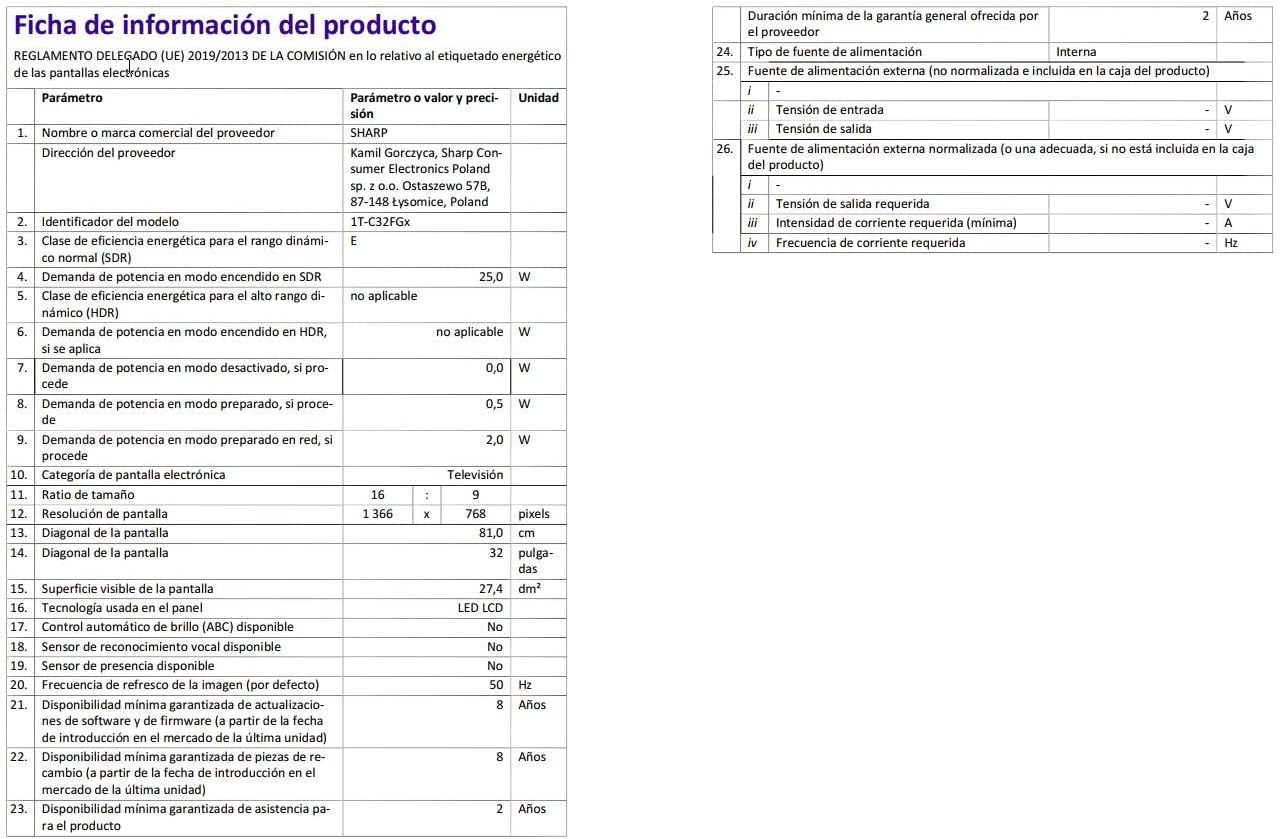
Image: Detailed product information sheet.
9. 보증 및 지원
The Sharp 32FG6EA television comes with a minimum general warranty duration of 2 years from the provider.
For technical support, warranty claims, or further assistance, please refer to the contact information provided with your purchase documentation or visit the official Sharp support web귀하의 지역에 대한 사이트.


