1. 서론
구매해주셔서 감사합니다asing the iDance GO PARTY 4 Portable Bluetooth Speaker. This device is designed to provide high-quality audio streaming via Bluetooth, USB MP3 playback, and includes a wired microphone with voice changer effects and integrated disco LED lights. This manual provides essential information for safe and effective use of your speaker.
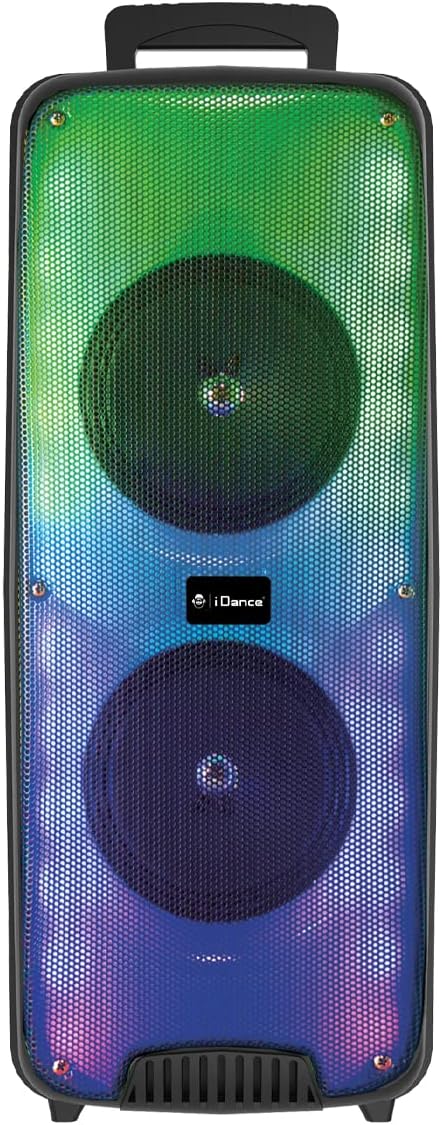
이미지 1.1: 앞면 view of the iDance GO PARTY 4 Portable Bluetooth Speaker, showcasing its dual speakers and vibrant LED lighting.
2. 안전 정보
- 장치를 작동하기 전에 모든 지침을 읽으십시오.
- Keep the speaker away from water, moisture, and extreme temperatures. This product is 방수가 안됨.
- 환기구를 막지 마십시오.
- 제조사가 지정한 부속품/액세서리만 사용하세요.
- 번개가 칠 때나 장기간 사용하지 않을 때에는 장치의 플러그를 뽑아두십시오.
- 직접 수리하지 마십시오. 모든 정비는 자격을 갖춘 기술자에게 맡기십시오.
- 배터리와 전자 부품은 현지 규정에 따라 책임감 있게 폐기하세요.
3. 패키지 내용
패키지에 모든 품목이 들어 있는지 확인하세요.
- iDance GO PARTY 4 Portable Bluetooth Speaker
- 유선 마이크
- 원격 제어
- 충전 케이블(마이크로 USB)

Image 3.1: Included wired microphone and remote control.
4. 제품 오버view
Familiarize yourself with the control panel and ports of your iDance GO PARTY 4 speaker.

Image 4.1: Rear control panel of the iDance GO PARTY 4 speaker.
제어판 기능:
- 온 / 오프 스위치: 스피커의 전원을 켜거나 끕니다.
- 볼륨 노브: 메인 스피커 볼륨을 조절합니다.
- 오디오 입력: 외부 오디오 장치 연결을 위한 3.5mm AUX 입력 단자.
- CHARGING DC 5V Port: 스피커 충전용 마이크로 USB 포트.
- USB 포트: For USB MP3 playback.
- TF 카드 슬롯 : For TF (MicroSD) card MP3 playback.
- PREV / NEXT Buttons: Navigate tracks during MP3 playback.
- SOUND EFFECT Button: 다양한 음향 효과를 활성화합니다.
- VOICE CHANGER Button: Cycles through voice changer modes.
- MODE / LED ON/OFF Button: Switches between input modes (Bluetooth, USB, AUX) and controls LED lights.
- 에코 노브: 마이크의 에코 효과를 조정합니다.
- 마이크 볼륨 노브: 마이크 볼륨을 조정합니다.
- INPUT (MIC) Port: 유선 마이크 연결용 6.35mm 잭.
- 충전 표시기: 충전 상태를 나타내는 LED 표시등.
5. 설정
5.1. 스피커 충전
- Connect the provided Micro USB charging cable to the CHARGING DC 5V Port 스피커에서.
- 케이블의 다른 쪽 끝을 표준 USB 전원 어댑터(포함되지 않음)나 컴퓨터의 USB 포트에 연결합니다.
- 충전 표시등이 켜집니다. 완전히 충전되면 모델에 따라 표시등의 색상이 바뀌거나 꺼질 수 있습니다.
- A full charge provides approximately 4 to 8 hours of playback time.
5.2. 전원 켜기/끄기
- 스피커를 켜려면 슬라이드하세요. 켜짐/꺼짐 스위치 to the 'ON' position.
- 스피커를 끄려면 슬라이드하세요. 켜짐/꺼짐 스위치 'OFF' 위치로 설정하십시오.
6. 사용 설명서
6.1. 블루투스 페어링
- 스피커의 전원이 켜져 있는지 확인하십시오.
- 를 누르세요 방법 button on the control panel or remote control until the speaker is in Bluetooth mode. A voice prompt or indicator light will confirm.
- 모바일 기기(스마트폰, 태블릿 등)에서 Bluetooth를 활성화하고 사용 가능한 기기를 검색하세요.
- Select "iDance GO PARTY 4" or a similar name from the list of devices.
- Once paired, the speaker will indicate a successful connection, and you can begin streaming audio.
6.2. USB MP3 재생
- MP3 오디오가 포함된 USB 플래시 드라이브를 삽입하세요 file에 s USB 포트.
- The speaker should automatically switch to USB mode and begin playing the MP3 files. 그렇지 않은 경우 다음을 누릅니다. 방법 버튼을 눌러 USB 모드를 선택합니다.
- 사용하세요 이전 / 다음 트랙을 건너뛸 수 있는 버튼.
6.3. Microphone Usage and Voice Changer
- 유선 마이크를 연결하세요 INPUT (MIC) Port.
- 를 사용하여 마이크 볼륨을 조정합니다. 마이크 볼륨 노브.
- 회전하다 에코 노브 to add or reduce the echo effect to your voice.
- 를 누르세요 VOICE CHANGER Button to cycle through the four available voice effects: Child, Woman, Man, and Robot.
6.4. LED 조명
The iDance GO PARTY 4 features integrated disco LED lights. Press the MODE / LED ON/OFF Button (or the dedicated LED button on the remote) to turn the lights on or off.
6.5. 원격 제어 기능
The included remote control allows for convenient operation of the speaker from a distance. Functions include:
- 전원 켜기/끄기
- Mode Selection (Bluetooth, USB, AUX)
- 볼륨 높이기/낮추기
- Track Skip (Previous/Next)
- 재생/일시정지
- LED 조명 제어
- Voice Changer Activation
- Sound Effects (EFX1-EFX8)
7. 유지관리
- 청소: 부드럽고 마른 천을 사용하여 스피커 외부를 닦으세요. 액체 세척제나 연마재를 사용하지 마세요.
- 저장: 스피커는 직사광선과 극한의 온도를 피해 시원하고 건조한 곳에 보관하세요.
- 배터리 관리 : 배터리 수명을 연장하려면 배터리를 자주 완전히 방전하지 마세요. 스피커를 사용하지 않더라도 정기적으로 충전하여 배터리 성능을 유지하세요.
8. 문제 해결
| 문제 | 가능한 원인 | 해결책 |
|---|---|---|
| 스피커가 켜지지 않습니다. | 배터리가 소진되었습니다. | 제공된 Micro USB 케이블을 사용하여 스피커를 충전하세요. |
| 스피커에서 소리가 나지 않습니다. | Volume is too low; incorrect input mode; device not paired (Bluetooth). | Increase volume; press MODE button to select correct input; re-pair Bluetooth device. |
| 블루투스 기기가 연결되지 않습니다. | 스피커가 페어링 모드가 아닙니다. 장치가 너무 멀리 떨어져 있습니다. 간섭이 발생합니다. | 스피커가 블루투스 모드인지 확인하고, 기기를 스피커 가까이로 이동시키고, 다른 블루투스 기기의 전원을 끄십시오. |
| 마이크가 작동하지 않습니다. | Microphone not properly connected; MIC VOL too low. | Ensure microphone is fully plugged into the INPUT port; increase MIC VOL. |
| 리모컨이 응답하지 않습니다. | Battery depleted; obstruction between remote and speaker. | Replace remote control battery; ensure clear line of sight to the speaker's IR receiver. |
9. 사양
| 모델 번호 | GOPTY4 |
| 상표 | iDance |
| 연결 기술 | 블루투스 |
| 전력 출력 | 200와트(최대) |
| Speaker Output (Max) | 10 와트 |
| 전원 | 배터리 구동식 (리튬 이온) |
| 배터리 수명 | 4~8시간(대략) |
| 치수(길이 x 너비 x 높이) | 25.5 x 20 x 58cm |
| 무게 | 3.99 킬로그램 |
| 재료 | 플라스틱 |
| 제어 방법 | 리모컨, 기기 버튼 |
| 특별 기능 | Portable, Disco LED Lights, USB MP3 Player, Wired Microphone, Voice Changer (Child, Woman, Man, Robot), Echo Effect |
| 호환 장치 | Smartphones, Tablets, MP3 Players, Home Cinema Systems, Televisions |
| 방수복 | 아니요 |
10. 보증 및 지원
The iDance GO PARTY 4 Portable Bluetooth Speaker comes with a limited warranty. Please refer to the warranty card included in your package for specific terms and conditions. For technical support, service inquiries, or further assistance, please contact your retailer or visit the official iDance web대지.


