소개
This manual provides essential instructions for the installation, operation, and maintenance of your Balboa Water Group BP7 TP600 Retrofit Kit. Please read this manual thoroughly before installation and use to ensure proper function and safety. This kit is designed to upgrade or replace existing spa control systems.
중요한 안전 정보
- Installation must be performed by a qualified technician. Improper installation can lead to serious injury or equipment damage.
- Disconnect all power to the spa at the main breaker before performing any installation, maintenance, or service.
- Follow all local and national electrical codes and plumbing regulations during installation.
- Ensure proper grounding of the control system to prevent electrical hazards.
- Do not operate the spa if any part of the control system or associated components appears damaged.
패키지 내용
Your Balboa Water Group BP7 TP600 Retrofit Kit includes the following components:
- BP7 Control System
- TP600 상부 제어판
- Panel Adapter Plate
- 라이트 케이블
- Overlay(s) for TP600 Panel

Figure 1: The complete Balboa Water Group BP7 TP600 Retrofit Kit, including the main control system, TP600 topside panel, panel adapter plate, light cable, and panel overlay.
설정 및 설치
This section outlines the general steps for installing the BP7 TP600 Retrofit Kit. Specific wiring and plumbing configurations may vary based on your existing spa setup. Always consult a qualified professional for installation.
1. BP7 제어 시스템 설치
Select a suitable location for the BP7 control system, ensuring it is protected from moisture, excessive heat, and direct sunlight. The location should also allow for adequate ventilation and be accessible for future service. Mount the system securely using appropriate fasteners to a stable surface.

Figure 2: The Balboa Water Group BP7 Spa Control System, shown from an angled perspective, ready for installation.
2. 전기 연결
All electrical connections must be made by a licensed electrician in accordance with local and national electrical codes. Failure to do so can result in electric shock, fire, or damage to the equipment.
- Disconnect power to the spa at the main breaker before beginning any electrical work. Verify power is off using a voltag전자 테스터.
- Open the BP7 control system enclosure by removing the designated screws.
- Refer to the detailed wiring diagram provided inside the control system cover for correct connections of the power supply, pumps, heater, ozonator, and other spa accessories. This diagram is crucial for proper and safe operation.
- Ensure all electrical connections are secure, tightened to the specified torque, and properly insulated to prevent shorts.
- Once all connections are verified, carefully close the enclosure cover, ensuring no wires are pinched.
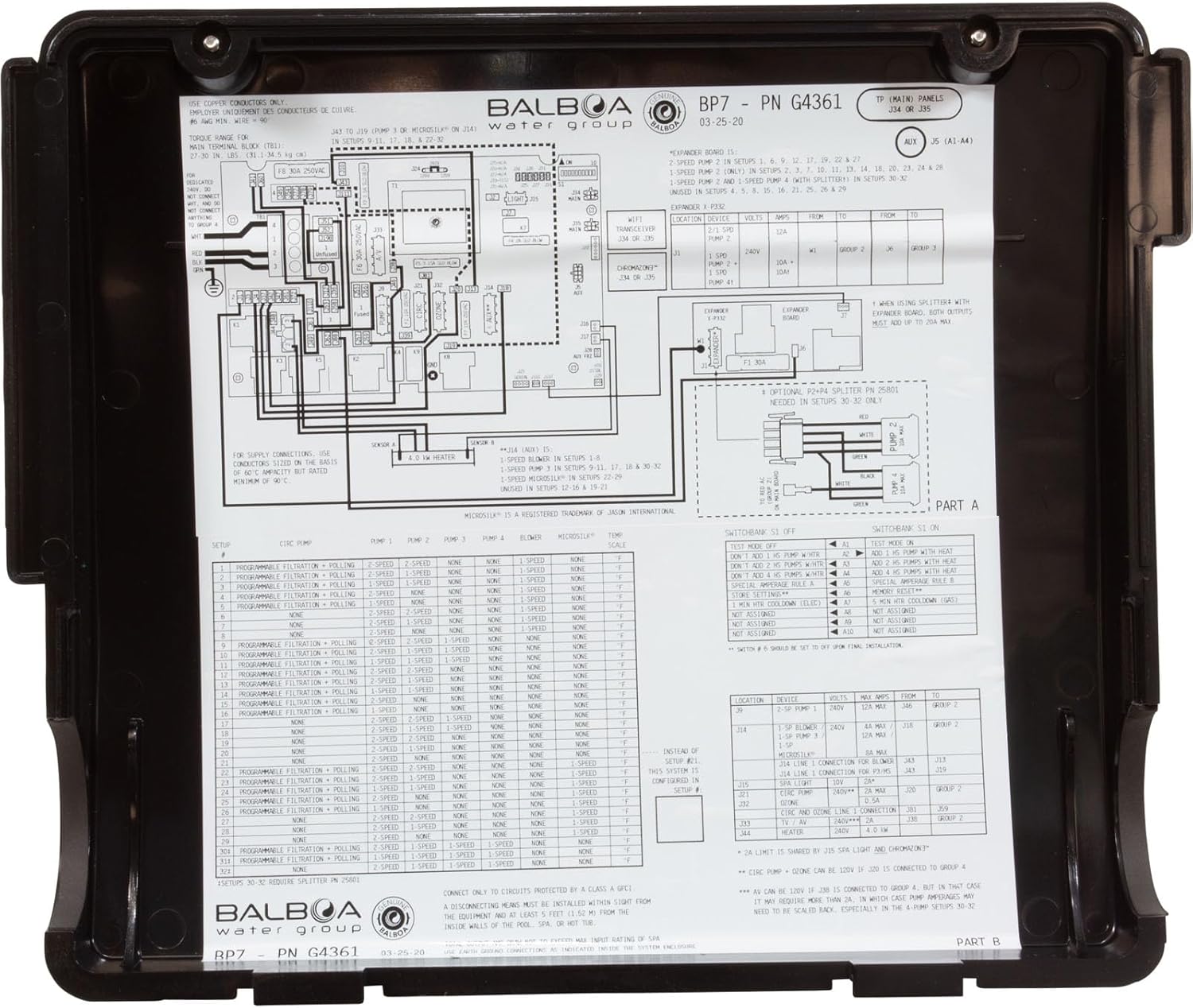
Figure 3: Detailed wiring diagram located inside the BP7 control system cover, illustrating connections for various spa components and power input.
3. 배관 연결
Connect the spa plumbing to the BP7 control system's heater manifold. Ensure all unions are tightened securely to prevent leaks. Use appropriate plumbing practices and sealants as required.

그림 4: 내부 view of the BP7 control system, showing the heater element, circuit board, and various wiring connections.
4. Installing the TP600 Topside Control Panel
Mount the TP600 panel in a convenient and accessible location on the spa shell, typically where the old panel was located.
- If replacing an older, larger panel, use the provided panel adapter plate to cover the existing cutout and provide a clean mounting surface for the TP600.
- Connect the TP600 panel cable to the designated port on the BP7 control system. Ensure the connection is firm and secure.
- Apply the appropriate overlay to the TP600 panel, aligning it carefully with the buttons and display.

Figure 5: The TP600 panel overlay and adapter plate, designed to facilitate mounting and cover existing openings.

Figure 6: The Balboa TP600 topside control panel with its connecting cable, ready for installation.
Operating Your Spa with the TP600 Panel
The TP600 panel provides intuitive control over your spa's functions. Familiarize yourself with the button layout and display indicators.
기본 기능
- 온도 조절: 사용하세요 따뜻한 (Up arrow) and 시원한 (Down arrow) buttons to set your desired water temperature. The display will show the set temperature, then revert to the current water temperature.
- 제트기 : 누르다 제트기 1 or 제트기 2 (if applicable) to activate the corresponding pump. Press again to change speeds (if multi-speed pump) or turn off.
- 빛: 를 누르세요 빛 button to turn the spa light on/off or cycle through available light modes (e.g., color changes, dimming).
- 튀기다: 그만큼 튀기다 button may rotate the display orientation for easier viewing from different angles, depending on panel mounting.
고급 기능
For detailed instructions on advanced functions such as programming filter cycles, economy modes, or other system settings, please refer to the specific TP600 topside control panel owner's manual, which may be available from Balboa Water Group's website or your spa dealer.
유지
Regular maintenance ensures the longevity and optimal performance of your spa and its control system.
- 물 화학: Regularly test and balance your spa water chemistry according to your spa manufacturer's recommendations. Proper water balance prevents corrosion and scale buildup.
- 필터 청소: Clean or replace your spa filter cartridges as recommended by your spa manufacturer. Clogged filters can restrict water flow and affect heater performance.
- 시스템 검사: Periodically inspect all visible components of the control system, wiring, and plumbing for signs of wear, damage, or leaks. Address any issues promptly.
- 겨울철 : If you live in a cold climate, follow your spa manufacturer's guidelines for proper winterization to prevent damage from freezing. Ensure the control system is completely drained and protected.
문제 해결
This section addresses common issues you might encounter. For more complex problems or persistent issues, consult a qualified spa technician.
일반적인 문제 및 솔루션
- 스파에 전원이 공급되지 않습니다:
- Check the main breaker for the spa at your electrical panel.
- Check the GFCI (Ground Fault Circuit Interrupter) for tripping. Reset if necessary.
- Ensure all power connections to the BP7 system are secure and correctly wired.
- Heater Not Working / Water Not Heating:
- Verify the set temperature on the TP600 panel is above the current water temperature.
- Check for error codes on the TP600 panel (e.g., 'FLO' for flow issues, 'HL' for high limit).
- Ensure adequate water flow through the heater. Clean filters if necessary.
- Confirm the spa is not in an economy or sleep mode that restricts heating.
- Jets Not Activating:
- Ensure the water level in the spa is sufficient for pump operation.
- Check if the pump is receiving power. Listen for any hum or vibration.
- Verify that the 'Jets' button on the TP600 panel is functioning correctly.
- 표시된 오류 코드:
- The TP600 panel may display various error codes (e.g., 'FLO', 'HL', 'DR', 'OH').
- Refer to the specific TP600 manual or Balboa Water Group's official website for a comprehensive list of error codes and their corresponding troubleshooting steps.
명세서
The following specifications apply to the Balboa Water Group BP7 control system. These details are typically found on the product label.

Figure 7: Product label displaying electrical specifications, model information, and compliance details for the Balboa BP7 control system.
| 특징 | 사양 |
|---|---|
| 모델 번호 | BP7 |
| 부품 번호 | G4361 |
| 권tage | 240V |
| 빈도 | 60Hz |
| Amp에라 지 | 48A |
| CSA Enclosure Type | 2 |
| 제품 치수 | 21.75 x 8.65 x 18.5 인치 |
| ASIN | B0BCVBBYQ2 |
메모: The serial number for this unit is G4361***2007060065. This information is typically found on the product label and is important for warranty and support inquiries.

그림 8: 후면 view of the BP7 control system, showing a
관련 문서 - BP7 TP600
 |
Balboa TP700 패널 사용자 가이드: 스파 제어 시스템 작동 발보아 TP700 패널에 대한 종합적인 사용자 가이드로, 스파 제어 시스템의 작동, 설정, 기능 및 문제 해결 방법을 자세히 설명합니다. 발보아 워터 그룹의 직관적인 인터페이스를 통해 스파를 관리하는 방법을 알아보세요. |
 |
발보아 스파 사용 설명서: TP400/TP600 및 TP500 가이드 TP400/TP600 및 TP500 모델을 포함한 발보아 워터 그룹 스파 제어 시스템에 대한 종합적인 사용 설명서입니다. 최적의 스파 이용을 위한 설정, 작동, 유지 관리, 문제 해결 및 오류 메시지에 대한 내용을 담고 있습니다. |
 |
ControlMySpa™ 스파 소유자 사용 설명서 - Balboa Water Group Balboa Water Group ControlMySpa™ 시스템에 대한 포괄적인 사용자 가이드입니다. Gateway Ultra 하드웨어 설정, 모바일 앱 다운로드 및 사용 방법, web 포털을 통해 스파를 원격으로 관리하세요. |
 |
발보아 BP 문제 해결 및 서비스 매뉴얼 발보아 워터 그룹의 BP 문제 해결 및 서비스 매뉴얼은 BP 스파 제어 시스템(BP500, BP2000G1) 및 TP 시리즈 패널을 서비스하는 자격을 갖춘 기술자에게 필수적인 기술 정보를 제공합니다. 이 가이드는 스파 장비의 설치, 전기 안전, GFCI 절차, 배선도 및 포괄적인 문제 해결 단계를 자세히 설명합니다. |
 |
Balboa BP100UX 기술 사양서: 스파 제어 시스템 사양 및 설정 Balboa BP100UX 스파 제어 시스템에 대한 종합적인 기술 사양서로, 부품 번호, 전력 요구 사항, 시스템 출력, 하드웨어 설정, 소프트웨어 구성, DIP 스위치 기능, 점퍼 정의, 교체 부품 및 다양한 Balboa 제어 패널의 패널 구성에 대한 자세한 정보를 제공합니다. |
 |
Balboa BP100UX 기술 자료: 사양, 배선 및 구성 Balboa BP100UX 스파 제어 시스템에 대한 포괄적인 기술 자료로, 부품 번호, 전원 요구 사항, 시스템 출력, 배선도, DIP 스위치 기능, 점퍼 정의, 교체 부품 및 다양한 Balboa 제어 패널의 패널 구성에 대한 자세한 정보가 나와 있습니다. |