1. 서론
This manual provides comprehensive instructions for the OMAIC BN59-01312A Replacement Voice Remote Control. It covers setup, operation, compatibility, and troubleshooting to ensure optimal performance with your compatible Samsung television.
2. 제품 오버view
The OMAIC BN59-01312A remote control is designed as a direct replacement for various Samsung Smart TV remotes, offering voice control functionality and quick access buttons for popular streaming services. It features a durable design tested for extensive use.

Figure 1: OMAIC Replacement Voice Remote Control with highlighted shortcut buttons.

그림 2: 호환성view of the remote with different Samsung Smart TV types.
3. 설정 및 페어링
To use your OMAIC Replacement Voice Remote Control, it must first be paired with your Samsung TV. Follow these steps:
- TV의 전원이 켜져 있는지 확인하세요.
- Point the new remote control towards your Samsung TV.
- 를 누르고 계세요 뒤로/나가기 버튼과 재생/일시정지 버튼을 동시에 5~8초간 누르세요.
- A "Pairing complete" message should appear on your TV screen, indicating successful pairing.
- If pairing fails, repeat the steps. It may be helpful to turn the TV off and then on again before re-attempting the pairing process.

Figure 3: Visual guide for pairing the remote control with a Samsung Smart TV.
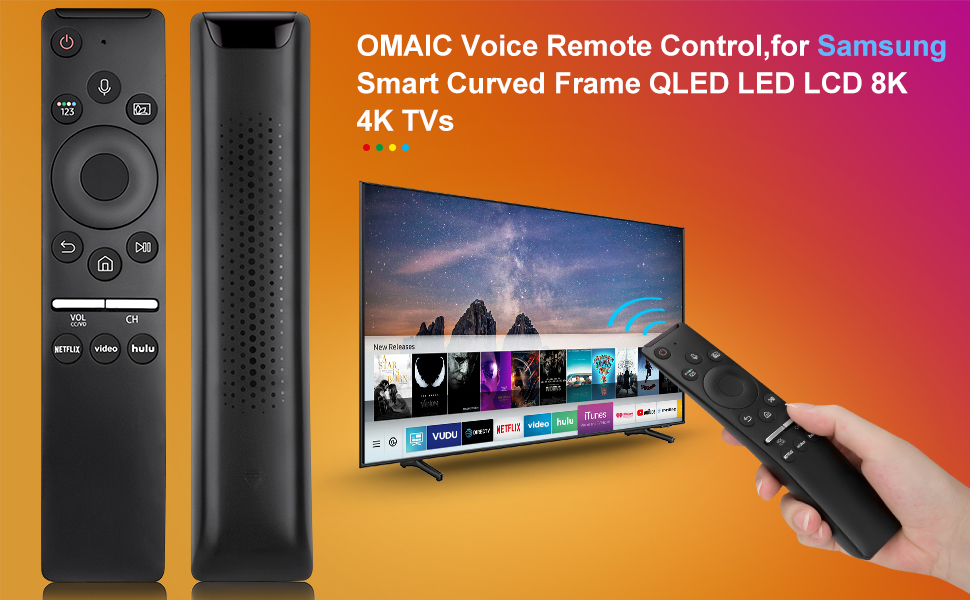
Figure 4: Detailed steps for connecting your Smart TV remote.
4. 사용 설명서
The remote control offers intuitive navigation and quick access to various functions:
- 음성 제어: Press the microphone button and speak your commands to interact with your Smart TV.
- 바로가기 버튼: Dedicated buttons for Netflix, Prime Video, and Hulu provide instant access to these streaming applications.
- Volume and Channel: Use the dedicated volume (VOL) and channel (CH) buttons to adjust audio levels and navigate channels.
- 탐색 패드: The circular navigation pad allows for easy menu navigation and selection.
- Full-Angle Control: The remote is tested to control your TV from any angle within 40 feet.

Figure 5: Key features including voice search and streaming service shortcuts.

Figure 6: Demonstrating voice control functionality to open applications.
5. 배터리 설치
The remote control requires 2 AA batteries for operation. These batteries are typically included with your purchase.
- Slide open the battery cover located on the back of the remote control.
- AA 배터리 두 개를 올바른 극성(+ 및 -)에 맞춰 넣으세요.
- 딸깍 소리가 날 때까지 배터리 덮개를 다시 제자리에 밀어 넣습니다.
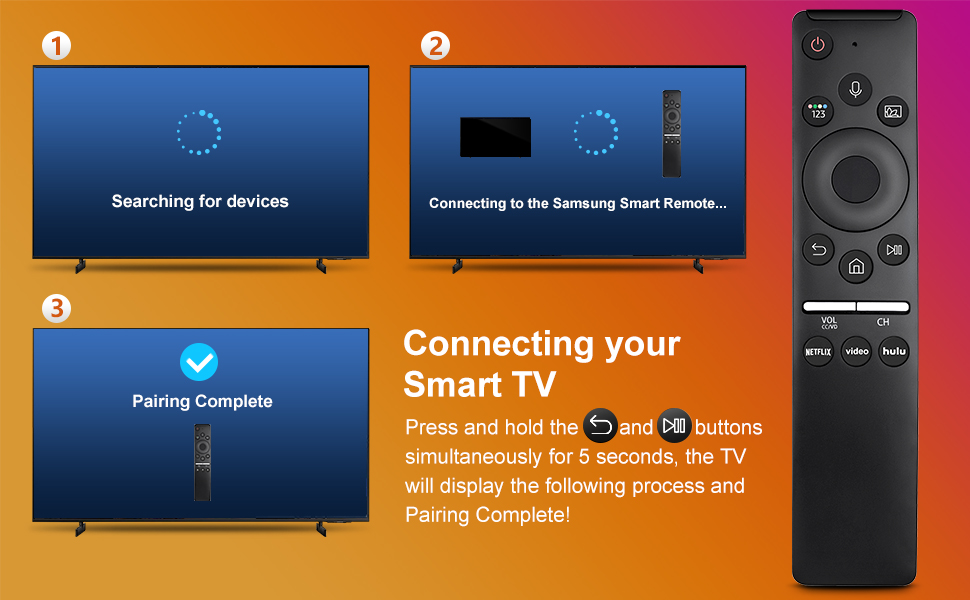
Figure 7: Battery installation and other key features.
6. 호환성
This remote control is compatible with a wide range of Samsung TV models and original remote control models. Refer to the lists below for specific compatibility:
Compatible Samsung TV Remote Control Models:
- BN59-01312A, BN59-01312F, BN59-01312D, BN59-01312E, BN59-01312G, BN59-01312K, BN59-01312L, BN59-01312M, BN59-01312X, BN59-01312U, BN59-01312T
- BN59-01329A, BN59-01329C, BN59-01329F
- BN59-01330A, BN59-01330C, BN59-01330H, BN59-01330N, BN59-01330Q, BN59-01330M, BN59-01330H, BN59-01312Q
호환되는 삼성 TV 모델:
- QN75Q60RAFX, QN43Q60RAFX, QN49Q60RAFX, QN49Q70RAFX, QN55Q60RAFX, QN55Q70RAFX, QN55Q80RAFX, QN65Q60RAFX, QN65Q70RAFX, QN65Q80RAFX, QN65Q90RAFX, QN75Q70RAFX, QN75Q80RAFX, QN75Q90RAFX, QN82Q60RAFX, QN82Q70RAFX, QN82Q80RAFX, QN82Q90RAFX
- QN55Q900RBFX, QN65Q900RBFX, QN75Q900RBFX, QN82Q900RBFX, QN85Q900RBFX, QN98Q900RBFX
7. 문제 해결
- 원격 응답 없음: 배터리가 올바르게 장착되었고 충전량이 충분한지 확인하세요. 필요한 경우 배터리를 교체하세요.
- 페어링 문제: If the remote does not pair, ensure no other remotes are actively paired with the TV. Turn the TV off and on, then re-attempt the pairing process as described in Section 3.
- 음성 제어가 작동하지 않음: Ensure the remote is properly paired. Some TV models may require specific settings to enable voice control. Consult your TV's user manual for details.
- 제한된 범위: Ensure there are no obstructions between the remote and the TV. The remote is designed for optimal performance within 40 feet.
8. 사양
| 특징 | 세부 사항 |
|---|---|
| 제품 치수 | 6.35 x 1.42 x 0.66 인치 |
| 품목 무게 | 1.76 온스 |
| 품목 모델 번호 | BN59-01312A |
| 배터리 | 2개의 AA 배터리 필요(포함) |
| 특징 | 음성 검색 |
| 지원되는 최대 장치 수 | 18 |
| 호환 장치 | 텔레비전 |

Figure 8: Physical dimensions of the OMAIC Replacement Voice Remote Control.
9. 보증 및 지원
OMAIC provides 100 days of after-sales support for this product. If you have any questions or encounter issues, please contact us. We aim to reply within 12 hours and are committed to assisting you.