소개
This manual provides comprehensive instructions for the setup, operation, maintenance, and troubleshooting of your Timex TW5M53900 Men's Wristwatch. Please read this manual carefully to ensure proper use and longevity of your timepiece.
The Timex TW5M53900 is a digital watch equipped with various functions including a Day-Date display, Chronograph, Countdown timer, Dual Time zone, and Alarm.
설정
초기 전원 켜짐 및 시간 설정
Your watch comes with a pre-installed battery. Upon first use, you may need to activate the display or set the current time and date.
- 버튼 식별: Locate the control buttons on the sides of the watch case. Typically, these are labeled or have distinct functions (e.g., MODE, SET, START/STOP, LIGHT). Refer to the image below for button identification.
- 시간 설정 모드로 들어가기: 를 누르세요 방법 button repeatedly until the time setting mode is displayed. Digits for hours or minutes will usually flash.
- 시간 조정: 사용하세요 세트 or 시작/중지 buttons to adjust the flashing digits (hours, minutes, seconds). Press 방법 again to move to the next setting (e.g., from hours to minutes).
- 날짜 설정: 계속 누르기 방법 to cycle through date settings (month, day, year) and adjust them using the 세트 or 시작/중지 버튼.
- 설정 모드 종료: 모든 설정이 정확해지면 다음을 누릅니다. 방법 button or another designated button (e.g., 다시 놓기) to exit the setting mode and return to normal time display.

그림 1: 전면 view of the Timex TW5M53900 watch, highlighting the digital display and button layout.
작동 지침
The Timex TW5M53900 watch offers several modes accessible via the 방법 단추.
시간 및 날짜 표시
In the default mode, the watch displays the current time (hours, minutes, seconds) and the day and date. The display is LCD for clear visibility.
크로노그래프(스톱워치)
To use the chronograph function:
- 를 누르세요 방법 button until "CHRONO" or a similar indicator appears on the display.
- 를 누르세요 시작/중지 타이밍을 시작하려면 버튼을 클릭하세요.
- 누르다 시작/중지 again to pause or stop the timing.
- 를 누르세요 다시 놓기 크로노그래프를 0으로 초기화하는 버튼입니다.
카운트다운 타이머
카운트다운 타이머를 설정하고 사용하려면:
- 를 누르세요 방법 button until "TIMER" or a countdown icon is displayed.
- 사용하세요 세트 or 시작/중지 buttons to set the desired countdown duration (hours, minutes, seconds).
- 누르다 시작/중지 카운트다운을 시작합니다.
- An alarm will sound when the countdown reaches zero. Press any button to stop the alarm.
듀얼 타임
The dual time function allows you to track a second time zone:
- 를 누르세요 방법 button until "DUAL TIME" or "T2" is displayed.
- 사용하세요 세트 or 시작/중지 buttons to adjust the second time zone.
- 누르다 방법 종료합니다.
경보
알람을 설정하고 활성화하려면:
- 를 누르세요 방법 button until "ALARM" or an alarm icon is displayed.
- 사용하세요 세트 or 시작/중지 원하는 알람 시간을 설정하려면 버튼을 누르세요.
- Press a designated button (often 다시 놓기 or 방법 again) to toggle the alarm ON/OFF. An alarm indicator will typically appear on the display when active.
- 알람이 울리면 아무 버튼이나 눌러서 알람을 끄세요.
Indiglo® Night-Light
The watch features an Indiglo® night-light for illumination in low-light conditions. Press the 빛 button (usually located on the top right or left side of the case) to activate the backlight.
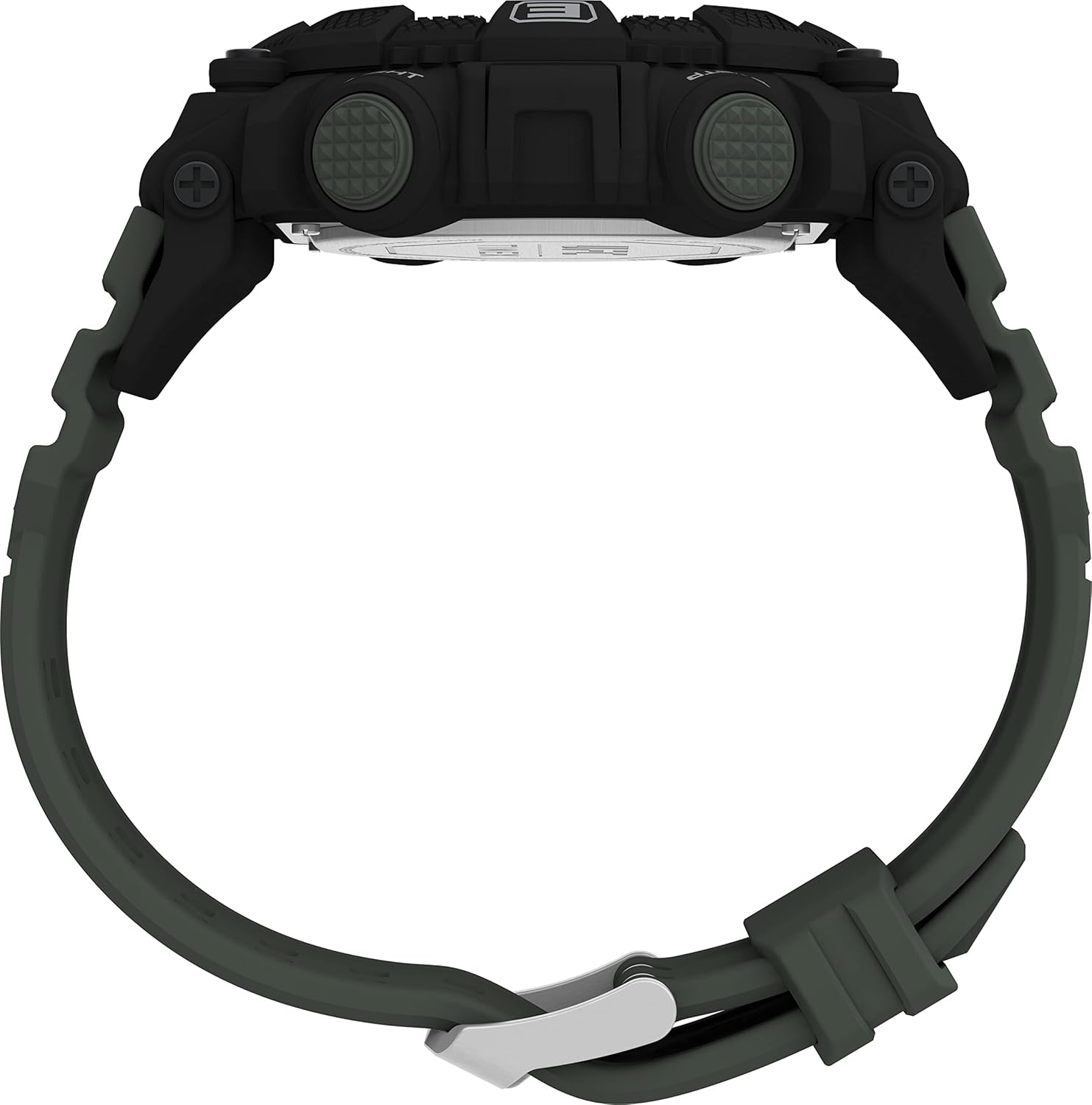
그림 2: 측면 view of the watch, illustrating the placement of control buttons.
유지
청소
- 시계 케이스와 스트랩은 부드러운 천으로 정기적으로 닦아주세요.amp 옷감.
- For stubborn dirt, a mild soap solution can be used, followed by rinsing with clean water and drying thoroughly.
- Avoid using harsh chemicals, solvents, or abrasive cleaners, as these can damage the watch's finish or components.
방수성
This watch is water-resistant up to 5 bar (50 meters). This rating means it is suitable for everyday use and can withstand splashes, rain, and brief immersion in water. It is ~ 아니다 샤워, 수영, 다이빙에 적합합니다.
- 시계가 물에 잠겨 있는 동안에는 버튼을 조작하지 마십시오.
- Ensure the crown (if applicable) is pushed in completely after setting the time to maintain water resistance.

그림 3: 후면 view of the watch, displaying the case back and strap attachment.
배터리 교체
The watch uses a CR2025 cell battery. When the display becomes dim or functions become erratic, it may be time to replace the battery. It is recommended to have the battery replaced by a qualified watch technician to ensure proper sealing and maintain water resistance.

Figure 4: Close-up of the watch's case back, detailing the model number, water resistance, and battery type.
문제 해결
| 문제 | 가능한 원인 | 해결책 |
|---|---|---|
| 디스플레이가 비어 있거나 어둡습니다. | 배터리가 부족하거나 방전되었습니다. | Replace the battery (CR2025). Professional replacement recommended. |
| 버튼이 반응하지 않습니다. | 시계가 잠금 모드이거나 내부적으로 오류가 발생했을 수 있습니다. | Try pressing all buttons firmly. If unresponsive, a battery reset (removing and reinserting battery) might be needed by a professional. |
| Time is incorrect or not keeping time. | 설정이 잘못되었거나 배터리가 부족합니다. | Re-set the time according to the "Initial Power On and Time Setting" section. If issue persists, replace battery. |
| 결정 아래의 응축. | Loss of water resistance or extreme temperature change. | Avoid extreme temperature changes. If condensation persists, seek professional repair immediately to prevent internal damage. |
명세서
| 특징 | 세부 사항 |
|---|---|
| 모델 번호 | TW5M53900 |
| 상표 | 타임스 |
| 디스플레이 유형 | 디지털(LCD) |
| 케이스 직경 | 52mm (XNUMXmm) |
| 케이스 두께 | 15mm (XNUMXmm) |
| 케이스 색상 | 검은색 |
| 스트랩 소재 | 고품질 플라스틱 |
| 스트랩 색상 | 녹색 |
| 스트랩 길이 | 21cm |
| 스트랩 너비 | 27mm (XNUMXmm) |
| 걸쇠 유형 | 핀 버클 |
| 방수성 | 5바(50미터) |
| 무게 | 60그램 |
| 배터리 유형 | CR2025 (포함) |
| 기능 | Day-Date, Chronograph, Countdown, Dual Time, Alarm, Indiglo® Night-Light |
| 원산지 | 중국 |
| 첫 번째 이용 가능 날짜 | 11년 2022월 XNUMX일 |
보증 및 지원
보증 정보
This Timex TW5M53900 watch comes with a 2년 제조사 보증 구매일로부터 적용됩니다. 이 보증은 정상적인 사용 조건에서 발생하는 재료 및 제조상의 결함에 적용됩니다. 다음 사항은 보증 대상에서 제외됩니다.
- 부적절한 취급, 관리 부족, 사고 또는 정상적인 마모로 인한 손상.
- Water damage if the watch was used beyond its specified water resistance rating or if buttons were operated underwater.
- 배터리 교체.
- 허가받지 않은 수리나 개조로 인해 발생한 손상.
보증 청구를 위해 구매 증명서를 보관하십시오.
고객 지원
For technical assistance, warranty claims, or service inquiries, please contact Timex customer support through their official website or the contact information provided with your purchase documentation. When contacting support, please have your watch model number (TW5M53900) and proof of purchase readily available.
Spare parts availability information is currently unavailable. For any repair needs, please contact authorized Timex service centers.


