소개
The SONRU B50 is a versatile 2-in-1 Bluetooth audio adapter, functioning as both a transmitter (TX) and a receiver (RX). It allows you to wirelessly stream audio from non-Bluetooth devices to Bluetooth headphones/speakers (TX mode) or stream audio from Bluetooth-enabled devices to non-Bluetooth audio systems (RX mode). Featuring advanced AptX HD and AptX Low Latency technologies, it ensures high-fidelity sound and minimal audio delay. This manual provides detailed instructions for setup, operation, and maintenance of your SONRU B50 device.
패키지 내용
다음 품목이 패키지에 포함되어 있는지 확인하세요.
- 1 x SONRU B50 Bluetooth Adapter
- 1 x 사용자 설명서
- 1 x Optical Audio Toslink Cable
- 3.5mm AUX 오디오 케이블 1개
- 1 x RCA 오디오 케이블
- 1 x USB 충전 케이블

Image: Contents of the SONRU B50 package, including the adapter, various audio cables (optical, AUX, RCA), and a USB charging cable.
제품 끝view
The SONRU B50 features intuitive controls and multiple connectivity options. Familiarize yourself with the device's layout:

이미지: 상세 view of the SONRU B50 showing its power switch, TX/RX mode switch, LED indicator, song/volume control buttons, pause/playback button, Bluetooth quick pairing button, AUX port, SPDIF TX/RX port, and USB charging port.
주요 특징:
- 전원 스위치: 기기의 켜짐/꺼짐 제어 기능입니다.
- 송수신 모드 전환: 송신 모드와 수신 모드 간 전환.
- LED 표시등: Displays real-time status of codec transmission (e.g., AUX, SPDIF, AptX, SBC, AAC, LL, HD) and pairing status.
- Song/Volume Control: Buttons for skipping tracks and adjusting volume (volume control primarily in RX mode).
- 일시 정지/재생: 오디오 재생을 제어합니다.
- Bluetooth Quick Pairing: Button for initiating Bluetooth pairing.
- AUX 포트 : 3.5mm 오디오 입력/출력.
- SPDIF TX/RX Port: Optical audio input/output.
- USB 충전 포트 : 장치를 충전합니다.
설정 및 충전
장치 충전:
Before first use, fully charge the SONRU B50. Connect the provided USB charging cable to the device's USB charging port and a standard USB power adapter (not included). The device takes approximately 3 hours to fully charge. A full charge provides up to 24 hours of continuous playback.

Image: Visual representation of the SONRU B50's battery life, indicating 3 hours for a full charge and up to 30 hours in TX mode or 28 hours in RX mode.
작동 모드
1. 송신기(TX) 모드
In TX mode, the SONRU B50 transmits audio from non-Bluetooth devices (e.g., TV, PC, projector) to Bluetooth headphones or speakers.
- TX 모드로 전환: Slide the TX/RX switch to the "TX" position.
- 오디오 소스 연결:
- 광학식(SPDIF): Connect the optical cable from your TV/PC's optical audio output to the SPDIF TX/RX port on the B50.
- AUX (3.5mm): Connect the 3.5mm AUX cable from your device's audio output to the AUX port on the B50.
- RCA : Use the RCA cable to connect your device's RCA audio output to the AUX port on the B50 (via the 3.5mm end of the RCA cable).
- Bluetooth 장치와 페어링:
- Bluetooth 헤드폰/스피커가 페어링 모드인지 확인하세요.
- The B50 will automatically search for nearby Bluetooth devices. The LED indicator will flash to show pairing status.
- Once connected, the LED indicator will show the active codec (e.g., AptX HD, AptX LL, SBC, AAC).
- 이중 연결(TX 모드): The B50 supports connecting to two Bluetooth headphones/speakers simultaneously. After connecting the first device, put the second device into pairing mode and press the Bluetooth quick pairing button on the B50 to connect the second device.
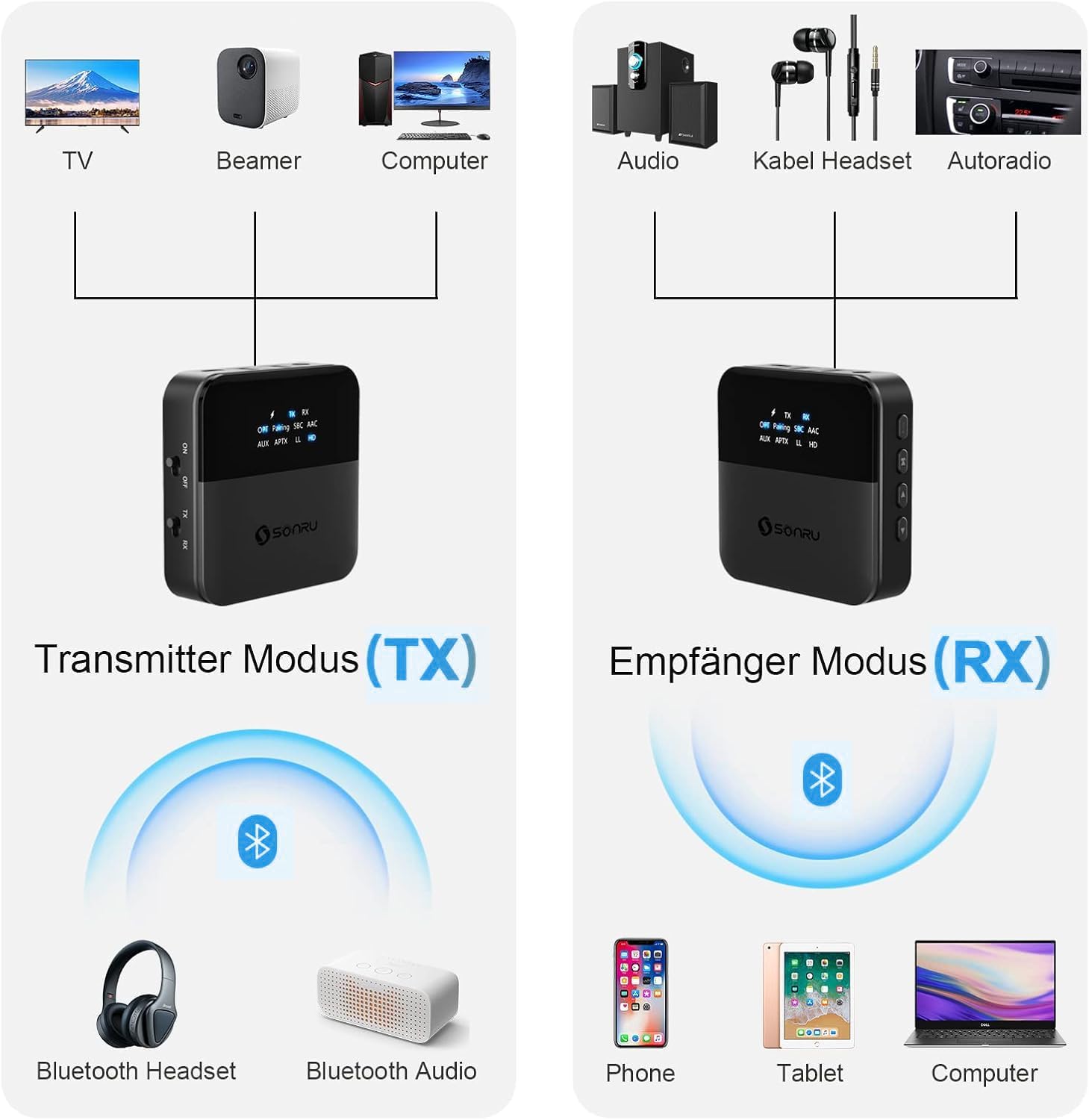
Image: Diagram illustrating the SONRU B50 in Transmitter (TX) mode, showing connections from TV, Beamer, or Computer to the adapter, and then wirelessly to Bluetooth headphones or Bluetooth audio devices.

Image: A couple watching TV with the SONRU B50 connected, each wearing Bluetooth headphones, demonstrating the dual connection feature in TX mode for shared audio experience.
2. 수신기(RX) 모드
In RX mode, the SONRU B50 receives audio from Bluetooth-enabled devices (e.g., smartphone, tablet, laptop) and outputs it to non-Bluetooth audio systems (e.g., home stereo, car stereo, wired headphones).
- RX 모드로 전환: Slide the TX/RX switch to the "RX" position.
- 오디오 출력 연결:
- AUX (3.5mm): Connect the 3.5mm AUX cable from the B50's AUX port to your audio system's AUX input.
- RCA : Use the RCA cable to connect the B50's AUX port (via the 3.5mm end) to your audio system's RCA input.
- 광학식(SPDIF): Connect the optical cable from the B50's SPDIF TX/RX port to your audio system's optical audio input.
- Bluetooth 장치와 페어링:
- 스마트폰, 태블릿, 노트북에서 블루투스를 활성화하세요.
- 검색 "SONRU B50" (or similar name) in your device's Bluetooth settings and select it to pair.
- Once connected, the LED indicator will show the active codec.
- Dual Connection (RX Mode): The B50 supports connecting to two Bluetooth-enabled devices simultaneously. After connecting the first device, pair the second device. You can play music from either connected phone, with the B50 automatically switching between them.

Image: Diagram illustrating the SONRU B50 in Receiver (RX) mode, showing wireless connections from Phone, Tablet, or Computer to the adapter, and then wired connections to Audio systems, Wired Headsets, or Car Stereos.
AptX HD and AptX Low Latency (LL)
The SONRU B50 supports AptX HD for high-resolution audio and AptX LL for minimal audio-visual synchronization delay. For these codecs to function, both the transmitting and receiving devices must also support AptX HD or AptX LL respectively. The LED indicator on the B50 will show if AptX HD or LL is active.

Image: A person watching a football match on TV with headphones, demonstrating the low latency feature of the SONRU B50, ensuring audio and video are synchronized.
문제 해결
If you encounter issues with your SONRU B50, please refer to the following common problems and solutions:
| 문제 | 가능한 원인 / 해결책 |
|---|---|
| 장치의 전원이 켜지지 않습니다. | Battery is low. Charge the device fully. Ensure the power switch is in the "ON" position. |
| Bluetooth 장치와 페어링할 수 없습니다. |
|
| 오디오 출력/입력이 없습니다. |
|
| 오디오 지연/레이턴시. | Ensure both the B50 and your connected Bluetooth device support AptX Low Latency (LL). If not, some delay may be unavoidable. |
| 블루투스 통신 범위가 짧습니다. | Obstacles (walls, furniture) and interference can reduce range. Try to minimize obstructions between the B50 and connected devices. |
명세서
| 특징 | 세부 사항 |
|---|---|
| 모델 번호 | B50 |
| 블루투스 버전 | 5.0 (CSR8675 Chipset) |
| 지원되는 코덱 | AptX HD, AptX Low Latency, SBC, AAC |
| 작동 모드 | 송신기(TX), 수신기(RX) |
| 연결 기술 | Bluetooth, AUX, Optical (SPDIF), RCA |
| 배터리 용량 | 600mAh 리튬 이온 |
| 충전 시간 | 약 3시간 |
| 노는 시간 | 최대 24시간(연속) |
| 무선 범위 | 장애물이 없을 경우 최대 20미터(65피트)까지 |
| 치수 | 대략. 6.6 x 6.6 x 1.96cm |
| 무게 | 140그램 |
유지
To ensure the longevity and optimal performance of your SONRU B50, follow these maintenance guidelines:
- 기기를 건조하게 유지하십시오. 습기나 극한 온도에 노출시키지 마십시오.
- 부드럽고 마른 천으로 기기를 닦으세요. 강한 화학 물질이나 연마성 세제는 사용하지 마세요.
- 장치를 떨어뜨리거나 강한 충격을 가하지 마십시오.
- 장기간 사용하지 않을 때는 기기를 서늘하고 건조한 곳에 보관하세요.
보증 및 지원
For warranty information or technical support, please refer to the contact details provided with your purchase or visit the official SONRU web이 사이트입니다. 이 설명서에 나와 있지 않은 문제가 발생하면 고객 서비스 센터로 문의해 주십시오.


