1. 서론
This manual provides detailed instructions for the proper use and maintenance of your ATUMTEK 60" Selfie Stick Tripod. Please read this manual thoroughly before operating the device to ensure optimal performance and longevity.

Image 1.1: The ATUMTEK 60" Selfie Stick Tripod, showcasing its versatility as both a selfie stick and a tripod, along with its Bluetooth remote.
2. 상자 안에 무엇이 들어있나요?
포장을 풀 때 모든 품목이 있는지 확인하세요.
- 60" Selfie Stick Tripod
- Rechargeable Bluetooth Remote Shutter
- USB 케이블
- 사용자 설명서
3. 제품 특징
- Extra-long Telescopic Pole: Extends up to 60 inches with 7 adjustable sections, allowing for broader views in photos and videos.
- 안정적인 삼각대 받침대: Features a 10.6-inch tripod base with three non-slip silicone pads for enhanced stability.
- One-piece Design: Integrates selfie stick and tripod functions into a single unit, collapsing to 12.8 inches for portability.
- 인체공학적 그립: Handle designed with a lychee texture for comfortable and secure holding.
- 360° 회전: The phone holder allows for 360° rotation and 180° left/right tilt for optimal shooting angles.
- 프리미엄 건설: Made from aviation-grade aluminum alloy for durability.
- 블루투스 원격 셔터: Detachable remote for hands-free operation, with a range of up to 33 feet (10 meters).
- 폭넓은 호환성: Supports most smartphones with widths between 2.2 and 3.5 inches (thick cases may not be suitable).

Image 3.1: Various height configurations of the selfie stick tripod, from compact (12.8") to fully extended (60").

Image 3.2: The ergonomic gripping handle and integrated one-piece design for ease of use and portability.
4. 설정 지침
4.1 삼각대 펼치기
- Hold the handle of the selfie stick firmly.
- Locate the "PUSH" button on the side of the handle.
- Press the "PUSH" button to release the tripod legs. The handle will expand into three legs, forming a stable tripod base.
- Ensure the legs are fully extended and locked into position for maximum stability.

Image 4.1: The one-touch button mechanism for deploying the tripod legs.
4.2 스마트폰 연결
- Gently pull apart the spring-loaded phone holder at the top of the stick.
- Carefully insert your smartphone into the holder, ensuring it is securely gripped. The holder supports devices from 2.2 to 3.5 inches wide.
- 주의: Be mindful of your fingers when attaching or removing the phone to avoid pinching.

Image 4.2: The phone holder's adjustable width and compatibility with various smartphone models.
4.3 블루투스 리모컨 페어링
- Remove the Bluetooth remote from its slot on the selfie stick handle.
- Press and hold the button on the remote until the indicator light flashes, indicating it is in pairing mode.
- 스마트폰에서 Bluetooth 설정으로 가서 사용 가능한 기기를 검색하세요.
- Select "ATUMTEK" or a similar device name to pair. The indicator light will stop flashing once successfully paired.
- The remote will automatically reconnect to your phone once turned on after initial pairing.

Image 4.3: The detachable Bluetooth remote and its charging port.
5. 사용 설명서
5.1 극 확장
- With the phone securely in the holder, gently pull the top section of the pole upwards.
- Extend the pole to your desired length. The pole has multiple sections that can be extended individually.
- For selfie stick use, hold the handle firmly. For tripod use, ensure the legs are deployed and stable before extending the pole to its full height.
5.2 Adjusting Phone Angle and Orientation
- The phone holder can be rotated 360° horizontally. Loosen the knob if present, adjust, and tighten.
- The phone holder can also be tilted 180° vertically (forward and backward). Adjust to achieve the desired angle.
- Effortlessly switch between portrait and landscape modes by rotating the phone holder.
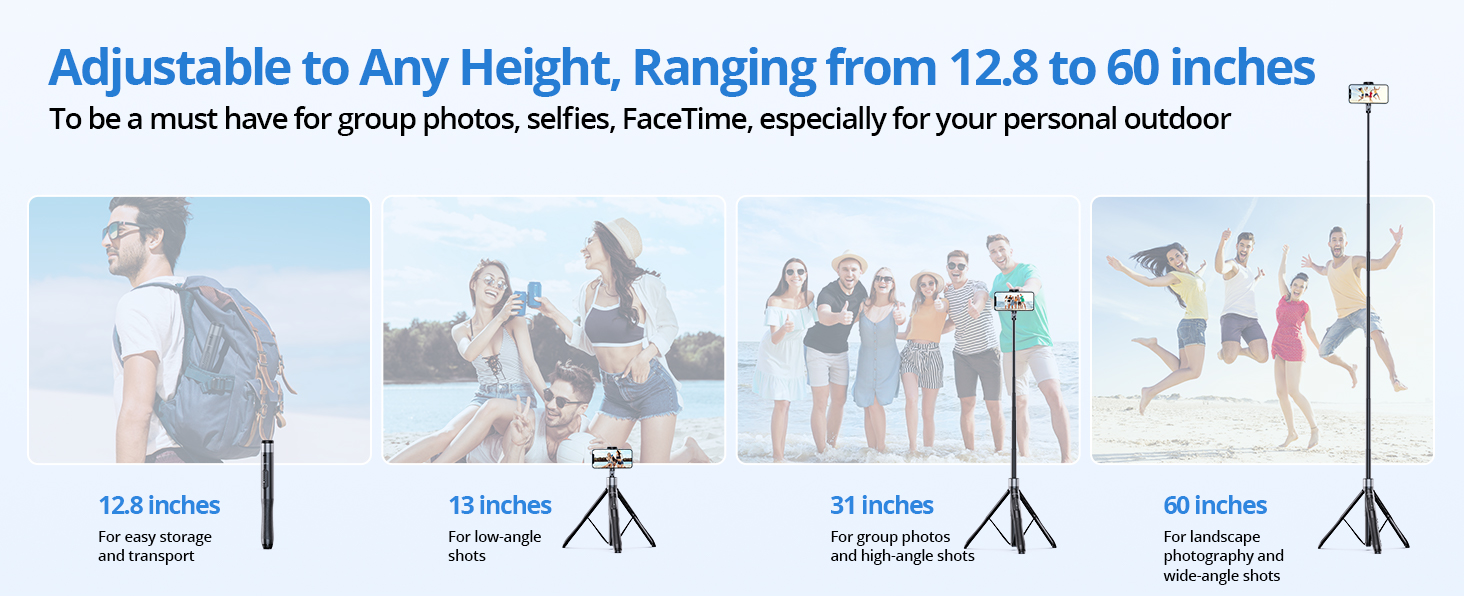
Image 5.1: Demonstrating the full range of motion for the phone holder.
5.3 블루투스 리모컨 사용하기
- Once paired, open your smartphone's camera application.
- Press the button on the Bluetooth remote to trigger the camera shutter.
- The remote can be used for both photos and video recording (start/stop).

Image 5.2: The Bluetooth remote allows for hands-free capture of moments.
6. 유지관리
- 청소: 셀카봉 삼각대는 부드럽고 마른 천으로 닦아주세요. 강한 화학 약품이나 연마성 재질은 사용하지 마세요.
- 저장: Store the device in a cool, dry place away from direct sunlight and extreme temperatures. Ensure it is fully collapsed before storage.
- 배터리: Recharge the Bluetooth remote regularly using the provided USB cable to maintain battery health.
- 과부하를 피하세요: Do not exceed the recommended weight limit of 15 kg (33 lbs) for the tripod.
7. 문제 해결
7.1 Bluetooth Remote Not Connecting
- 리모컨이 충전되어 있는지 확인하세요.
- Turn off and on the remote, then re-attempt pairing.
- Check your phone's Bluetooth settings to ensure it's enabled and visible.
- 이전에 페어링된 적이 있는 경우, 휴대폰의 Bluetooth 설정에서 기기를 삭제하고 다시 페어링해보세요.
7.2 Remote Button Not Triggering Camera (Android Specific)
Some Android phones use the volume keys for functions other than shutter release (e.g., zoom). If your remote button is not triggering the camera:
- 휴대폰의 카메라 앱을 여세요.
- Go to Camera Settings (often represented by a gear icon).
- Look for "Shooting methods" or similar options.
- Find the "Press Volume keys to" setting and ensure it is set to "take picture or record video" or "shutter." Do not select zoom or focus.

Image 7.1: Adjusting Android camera settings for remote shutter functionality.
7.3 삼각대 불안정성
- 삼각대 다리가 완전히 펴지고 고정되었는지 확인하십시오.
- 삼각대를 평평하고 안정적인 표면에 놓으십시오.
- Avoid extending the pole to its maximum height in windy conditions or on uneven terrain.
8. 사양
| 특징 | 사양 |
|---|---|
| 모델명 | ATSS067 |
| 제품 크기 (접었을 때) | 2.36 x 2.36 x 13.31 인치 |
| 품목 무게 | 14.1온스(400그램) |
| 최대 높이 | 60 인치 |
| 중량 제한 | 15킬로그램(33파운드) |
| 재료 | 알루미늄, 폴리카보네이트(PC) |
| 배터리(원격) | 1개의 리튬 금속 배터리(포함) |
| 호환되는 전화 너비 | 2.2~3.5인치 |
| 블루투스 리모컨 범위 | 최대 33피트(10미터) |
| FCC ID | 2ASUP-ATSS055 |
9. 보증 및 지원
ATUMTEK provides a worry-free 3-year warranty for this product. For any questions, technical support, or warranty claims, please contact ATUMTEK customer service through their official channels or the retailer where the product was purchased.
You can also refer to the official ATUMTEK web추가 지원 및 제품 정보를 위한 사이트.


