소개
Thank you for choosing the Tribesigns Kitchen Island Cart Model 216. This versatile and functional kitchen island is designed to provide additional storage and workspace in your kitchen or dining area. Featuring a spacious countertop, open storage shelves, a slim pull-out drawer, and lockable wheels, this cart offers convenience and mobility. This manual provides essential information for safe assembly, operation, and maintenance of your new kitchen island.

Image: The Tribesigns Kitchen Island Cart Model 216, showcasing its design and storage capabilities in a modern kitchen environment.
안전 정보
조립 및 사용 전에 모든 지침을 주의 깊게 읽어 주십시오. 나중에 참조할 수 있도록 이 설명서를 보관하십시오.
- 조립을 시작하기 전에 모든 부품이 있고 손상이 없는지 확인하십시오. 부품이 없거나 파손된 경우 사용하지 마십시오.
- 긁힘을 방지하려면 부드럽고 깨끗한 표면에 장치를 조립하세요.
- 모든 나사와 볼트를 단단히 조이되, 너무 세게 조이지 마십시오. 주기적으로 점검하고 필요에 따라 다시 조여주십시오.
- Do not exceed the weight capacity of the shelves or countertop. Refer to specifications for details.
- Always lock the wheels when the cart is in a stationary position to prevent accidental movement.
- 조립 중에는 어린이의 손이 닿지 않는 곳에 작은 부품을 보관하여 질식 위험을 방지하세요.
- Avoid placing hot items directly on the countertop without protection.
부품 목록
Refer to the separate assembly instruction sheet included in your packaging for a complete and detailed list of all components and hardware. Key components typically include:
- Top Panel (Countertop)
- 사이드 패널
- 바닥 패널
- 선반 패널
- Slim Drawer Unit with Slides
- Casters (Wheels) with Brakes
- 조립 하드웨어(나사, 다웰, 캠 잠금 장치 등)
조립 설명서
Assembly is required for this product. Please follow the step-by-step instructions provided in the separate assembly manual included with your purchase. Ensure you have all necessary tools, which are typically provided or commonly available household tools.
General Assembly Steps (Refer to detailed manual for specifics):
- 부품 풀기 및 식별: Carefully unpack all components and lay them out. Compare them against the parts list in your assembly manual to ensure everything is present.
- 캐스터 부착: Secure the four casters (wheels) to the bottom panel of the cart. Ensure two of the casters have locking mechanisms and are placed on the same side for easy access.
- 메인 프레임 조립: Connect the side panels to the bottom panel and internal shelf supports using the provided hardware.
- 선반 설치: Insert the fixed and adjustable shelves into their designated positions.
- Assemble Slim Drawer Unit: Construct the slim pull-out drawer unit according to the instructions, including attaching the ball-bearing slides.
- Integrate Drawer Unit: Attach the assembled slim drawer unit to the main frame of the kitchen island. Ensure the slides operate smoothly.
- 상단 패널 부착: Secure the large wooden countertop to the top of the assembled frame.
- 최종 점검: Once assembled, gently move the cart to its desired location. Lock the wheels to stabilize it. Verify all connections are secure.

Image: Detail of the smooth ball bearing slides, indicating the mechanism for the pull-out slim drawer.
작동 지침
Using the Rolling Function:
- To move the kitchen island, unlock the two casters with brakes by flipping the lever upwards.
- 카트를 원하는 위치로 살살 밀거나 당겨주세요.
- Once in position, lock the casters by flipping the lever downwards to ensure stability and prevent unintended movement.

이미지: 자세한 view of one of the swivel wheels, highlighting the integrated brake mechanism for securing the cart.
저장 기능 활용:
- 수조 : The large wooden countertop provides ample space for food preparation, serving, or holding small appliances like a microwave or toaster.
- 오픈형 수납 선반: The two open shelves are ideal for storing larger items such as bowls, plates, small appliances, or decorative baskets.
- Slim Pull-Out Drawer: The side slim drawer offers three tiers of storage, perfect for spices, bottles, condiments, or other narrow items. Pull it out gently to access contents and push it back fully to close.

Image: The kitchen island cart positioned in a kitchen, demonstrating the functionality of the slim pull-out drawer for organized storage.
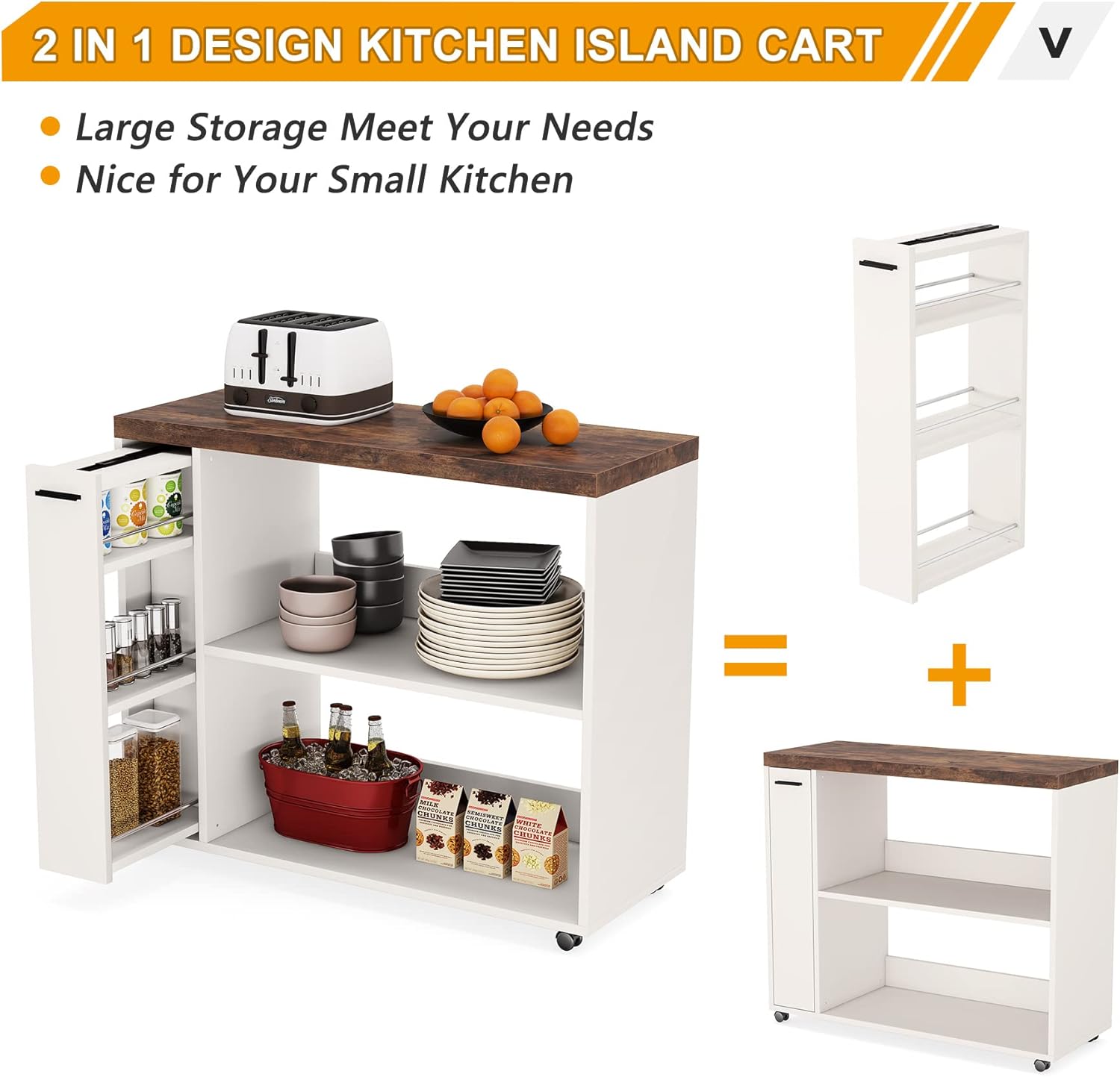
이미지: 클로즈업 view of the slim pull-out drawer, illustrating its three-tiered design and capacity for various kitchen items.
유지
- 청소: 표면을 마른 천으로 닦으세요. 잘 지워지지 않는 얼룩은 약간 거친 천을 사용하세요.amp cloth and mild cleaner, then dry immediately. Avoid harsh chemicals or abrasive cleaners.
- 유출: Clean up spills immediately to prevent staining or damage to the engineered wood surfaces.
- 패스너: 모든 나사와 볼트가 단단히 조여져 있는지 정기적으로 점검하세요. 안정성을 유지하기 위해 필요에 따라 다시 조이세요.
- 무게 분포 : 선반과 조리대에 무게를 고르게 분산시켜 구조물에 무리가 가지 않도록 하십시오.
- 환경 조건: Avoid exposing the cart to extreme temperatures or humidity, which can affect the wood material.
문제 해결
| 문제 | 가능한 원인 | 해결책 |
|---|---|---|
| 카트가 흔들리거나 불안정합니다. | 느슨한 잠금장치, 고르지 않은 바닥. | Check and tighten all screws and bolts. Ensure the cart is on a level surface. |
| 바퀴가 매끄럽게 굴러가지 않습니다. | 바퀴에 이물질이 끼어 바퀴가 잠겼습니다. | Clean any debris from the casters. Ensure the wheel brakes are disengaged. |
| Slim drawer sticks or is hard to open/close. | Misaligned slides; obstruction; overtightened screws. | Check if the drawer slides are properly aligned and free of obstructions. Ensure screws holding the slides are not overtightened. |
| 조립 중 부품이 누락되었습니다. | 포장 오류. | 구매 내역과 누락된 부품에 대한 구체적인 내용을 Tribesigns 고객 지원팀에 알려주세요. |
명세서
| 특징 | 세부 사항 |
|---|---|
| 제품 치수 | 16인치 깊이 x 39인치 너비 x 34인치 높이 |
| 품목 무게 | 70파운드 |
| 재료 | 엔지니어링 목재 |
| 색상 | 브라운 & 화이트 |
| 스타일 | 산업 |
| 선반 수 | 3 (including the slim drawer's tiers) |
| 조립이 필요합니다 | 예 |
| 제품 관리 지침 | 마른 천으로 닦기 |
| 모델 번호 | 216 |

Image: A technical diagram illustrating the precise dimensions of the kitchen island cart, including height, width, and depth.
보증 및 지원
Tribesigns is committed to providing quality products and customer satisfaction. For specific warranty information, please refer to the documentation included with your purchase or visit the official Tribesigns website. If you encounter any issues, require replacement parts, or have questions regarding your Kitchen Island Cart Model 216, please contact Tribesigns customer support. Have your model number and purchase date ready when contacting support.


