소개
This manual provides detailed instructions for the Powerwave Switch Wireless Controller. Learn how to set up, operate, maintain, and troubleshoot your controller to enhance your gaming experience on Nintendo Switch, PC, Android, and iOS devices.

앞쪽 view of the Powerwave Switch Wireless Controller, showcasing its Star White design with blue grips and red shoulder buttons. The controller features standard button layouts including A, B, X, Y buttons, a D-pad, and dual analog sticks.
제품 특징
- 무선 블루투스 연결: Enjoy seamless gaming without cables.
- 3-Speed Dual-Motor Vibration: Experience immersive feedback with adjustable vibration intensity.
- 모션 컨트롤: Enhance gameplay with precise motion sensing capabilities.
- 다중 플랫폼 호환성: Works wirelessly with Nintendo Switch, PC, Android, and iOS 13 and above.
- 프로그래밍 가능한 매크로 버튼 4개: Customize complex inputs and activate them with a single button press.
- 터보 모드: Enable rapid-fire commands for quick actions in games.
- 8-Colour Rotating LED Lighting Effect: Adds a vibrant visual element to your gaming setup.

Visual representation of the controller's key features, including Wireless Bluetooth, 3-Speed Dual-Motor, PC/Android/iOS13 compatibility, 8-Colour Rotating LED, and Programmable Macro Buttons.
설치 가이드
1. 초기 충전
Before first use, fully charge the controller using the provided USB-C cable. Connect the cable to the controller's USB-C port and the other end to a USB power source (e.g., Nintendo Switch dock, PC, or USB wall adapter). The LED indicators will show charging status.
2. 닌텐도 스위치와의 페어링
- Nintendo Switch HOME 메뉴에서 다음을 선택하세요. 컨트롤러, 그 다음에 그립/오더 변경.
- On the Powerwave controller, press and hold the 홈 버튼 (house icon) for 3-5 seconds until the LED indicators start flashing rapidly.
- 페어링이 완료되면 컨트롤러의 해당 플레이어 LED가 계속 켜집니다.
3. Pairing with PC, Android, or iOS (Bluetooth)
- 기기(PC, 안드로이드 휴대폰/태블릿, iOS 기기)에서 블루투스가 활성화되어 있는지 확인하십시오.
- On the Powerwave controller, press and hold the 홈 버튼 LED 표시등이 빠르게 깜박일 때까지 3~5초 동안 기다립니다.
- On your device, search for new Bluetooth devices. Select "Powerwave Controller" (or similar) from the list to pair.
- Once connected, the LED indicators on the controller will stop flashing and remain solid.
작동 지침
기본 제어
The Powerwave Switch Wireless Controller features standard button layouts for intuitive gameplay. Refer to your game's specific control scheme for optimal use.
Programmable Macro Buttons (M1, M2, M3, M4)
The controller includes four programmable macro buttons on the back (M1, M2, M3, M4) for executing complex command sequences with a single press.
- 프로그래밍 모드 진입: 를 누르고 계세요 매크로 버튼 (usually a small button near the M buttons) until the indicator light flashes.
- Recording Macro: Press the desired M button (M1-M4) you wish to program. Then, input the sequence of buttons you want to record (e.g., A, B, X, Y, L, R, ZL, ZR, D-pad directions, analog stick movements).
- 프로그래밍 모드 종료: 를 누르세요 매크로 버튼 again to save the macro and exit programming mode. The indicator light will stop flashing.
- Using Macro: Simply press the programmed M button during gameplay to execute the recorded sequence.
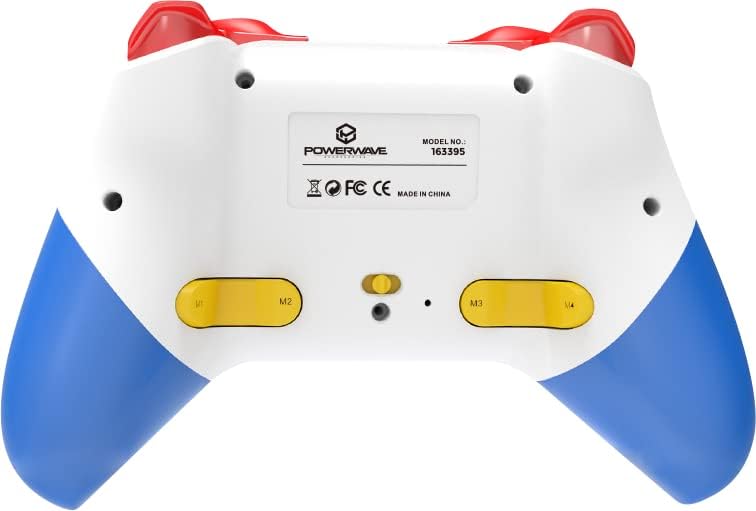
뒤쪽 view of the Powerwave Switch Wireless Controller, highlighting the M1, M2, M3, and M4 programmable macro buttons, along with the model number and regulatory markings.
터보 모드
Turbo mode allows a button to be pressed repeatedly as long as it is held down, providing a rapid-fire function.
- 터보 활성화: 를 누르고 계세요 터보 버튼 (usually marked 'T') and then press the desired action button (e.g., A, B, X, Y, L, R, ZL, ZR). The button will now be in Turbo mode.
- 터보 속도 조정: 를 잡고 있는 동안 터보 버튼, move the Right Analog Stick Up or Down to cycle through different turbo speeds (slow, medium, fast).
- 터보 비활성화: To remove Turbo from a specific button, press and hold the 터보 버튼 and then press the same action button again. To clear all Turbo settings, press and hold the 터보 버튼 5초 동안.
진동 조정
The controller features 3-speed dual-motor vibration. To adjust vibration intensity, press and hold the 진동 버튼 (if available, or a combination like Turbo + D-pad Up/Down) to cycle through intensities (Off, Low, Medium, High).
LED 조명 효과
The 8-colour rotating LED lighting effect can be toggled or adjusted. Refer to the specific button combination for your controller model, often involving a dedicated LED button or a combination with the Turbo button.
유지
- 청소: 부드럽고 마른 천을 사용하여 컨트롤러를 닦으세요. 잘 지워지지 않는 오염의 경우, 가볍게 두드리세요.amp천에 물을 묻혀 닦으세요. 강한 화학 물질이나 연마성 세제는 사용하지 마세요.
- 저장: 컨트롤러는 직사광선과 극한의 온도를 피해 서늘하고 건조한 곳에 보관하세요.
- 배터리 관리 : 배터리 수명을 연장하려면 컨트롤러를 자주 완전히 방전시키지 마세요. 장시간 사용하지 않더라도 정기적으로 충전하세요.
- 낙하 방지: 컨트롤러를 물리적 충격과 떨어뜨림으로부터 보호하세요. 이러한 충격과 떨어뜨림은 내부 구성 요소를 손상시킬 수 있습니다.
문제 해결
| 문제 | 가능한 해결책 |
|---|---|
| 컨트롤러가 켜지지 않습니다. | Ensure the controller is fully charged. Connect it to a power source and allow it to charge for at least 30 minutes before attempting to turn it on again. |
| Controller fails to pair with device. |
|
| Input lag or disconnection during gameplay. |
|
| 버튼이나 아날로그 스틱이 반응하지 않습니다. |
|
명세서
- 모델 번호: 163395
- 제품 크기: 15 x 6 x 10cm
- 무게: 212그램
- 연결성: 무선 블루투스
- 호환성: Nintendo Switch, Nintendo Switch Lite, Nintendo Switch OLED, PC, Android, iOS 13+
- 특징: 3-Speed Dual-Motor Vibration, Motion Controls, 4 Programmable Macro Buttons, Turbo Mode, 8-Colour Rotating LED Lighting Effect
- Unsupported Functions (Nintendo Switch): HD Rumble, NFC, IR Camera
보증 및 지원
For warranty information and technical support, please refer to the official Powerwave web사이트를 방문하거나 고객 서비스에 문의하세요. 보증 청구를 위해 구매 증빙 자료를 보관하세요.
Powerwave Official Web대지: www.powerwave.com.au


