소개
This manual provides detailed instructions for the operation and maintenance of your Raynic CR1019 8.7-inch Digital Alarm Clock. Please read this manual thoroughly before use to ensure proper functionality and to maximize your product experience. This device features a large LED display, dual alarms, USB and Type-C charging ports, temperature and humidity display, and adjustable brightness and volume.
패키지 내용
- Raynic CR1019 Digital Alarm Clock
- 전원 어댑터(유선형)
- 사용자 설명서
제품 끝view
The Raynic CR1019 Digital Alarm Clock is designed for ease of use and includes multiple features for convenience. The front panel displays time, date, day of the week, temperature, and humidity. The top panel features control buttons for various settings.

그림 1: 앞쪽 view of the Raynic CR1019 Digital Alarm Clock displaying time, date, temperature, and humidity, with a smartphone connected for charging.

그림 2: 위에view of the Raynic Digital Alarm Clock highlighting its large LED display, dual alarms, USB/Type-C charging, snooze, 12/24H/DST, temperature/humidity, adjustable brightness, and volume.
설정
1. 전원 연결
- 제공된 전원 어댑터를 알람시계 뒷면의 DC IN 포트에 연결하십시오.
- 어댑터를 일반 전기 콘센트에 꽂으세요. 디스플레이에 불이 들어옵니다.
2. 배터리 백업 설치 (선택 사항)
The clock requires 2 AAA batteries (not included) for battery backup. These batteries are only used to remember time and alarm settings during a power outage and do not power the display.

그림 3: 뒤쪽 view of the alarm clock with the battery compartment open, showing where to insert two AAA batteries for backup.
- 시계 뒷면에서 배터리 칸을 찾으세요.
- 배터리 덮개를 엽니다.
- AAA 배터리 2개를 올바른 극성(+/-)에 맞춰 넣으세요.
- 배터리 덮개를 닫습니다.
작동 지침
1. 시간 및 날짜 설정
Refer to the specific buttons on the top of the clock for time and date adjustments. Typically, a 'SET' or 'TIME SET' button is used to enter setting mode, and '+' / '-' buttons adjust values.
2. Dual Alarm Settings
The clock supports two independent alarms with four mode options: Weekdays (Mon-Fri), Weekends (Sat-Sun), Everyday (Mon-Sun), and One Time.

그림 4: Illustration of dual alarm functionality, allowing two separate wake-up times for different users or purposes.
- Press the 'ALARM 1' or 'ALARM 2' button to select the desired alarm.
- 조정 버튼을 사용하여 알람 시간을 설정하세요.
- Select the alarm mode (Weekdays, Weekends, Everyday, One Time) using the mode selection button.
- 알람을 활성화하려면 설정을 확인하십시오.
3. 밝기 조정
The display brightness can be adjusted to 5 levels (L1 to L5) to suit your preference, especially for light-sensitive individuals.
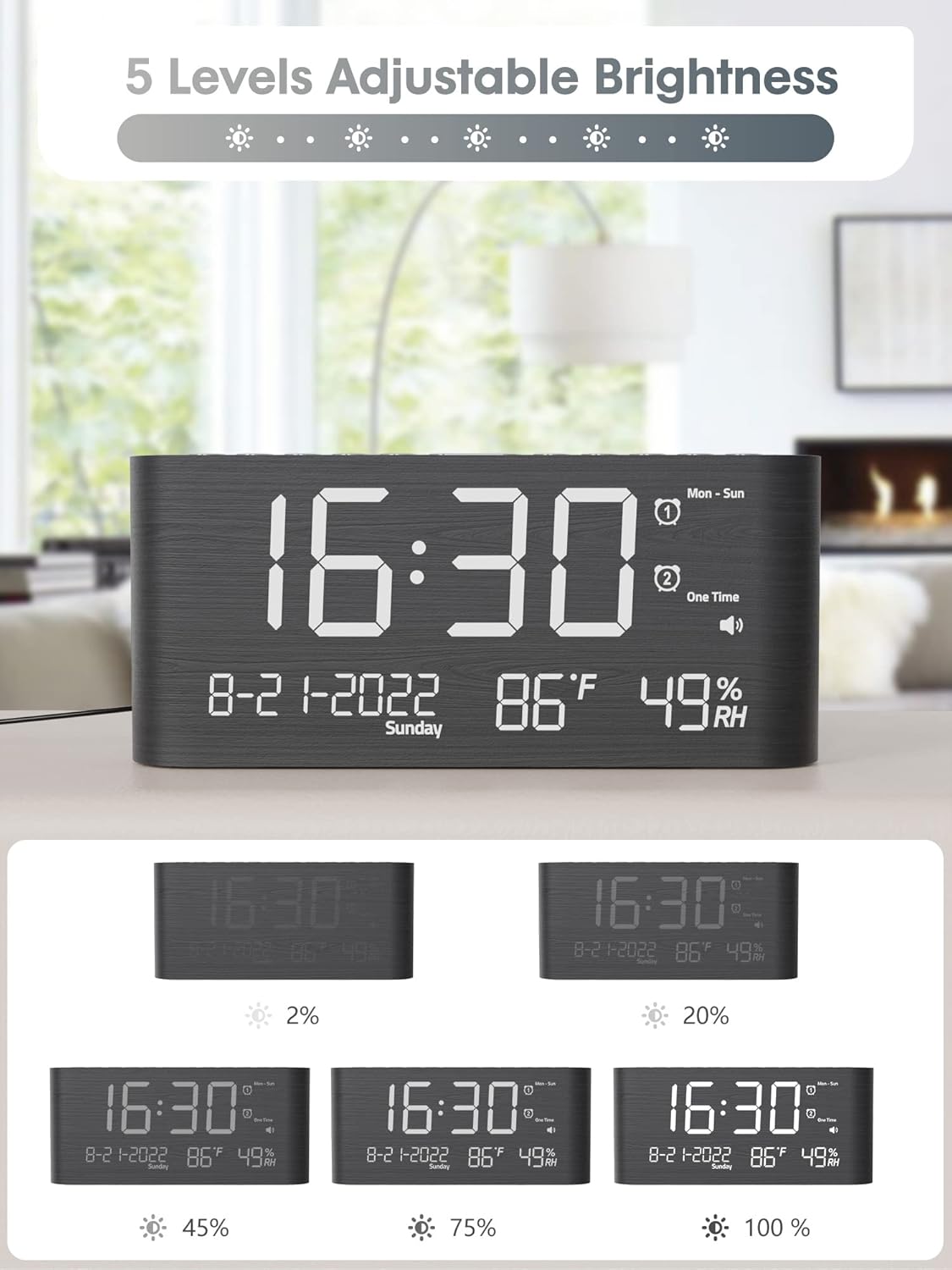
그림 5: Visual representation of the 5 adjustable brightness levels of the clock display.
- Press the 'DIMMER' or 'BRIGHTNESS' button repeatedly to cycle through the 5 brightness levels.
- 원하는 밝기를 선택하세요.
4. 볼륨 조절
The alarm volume can be set to 5 levels, ranging from 0dB to 120dB, with a gradual ascending tone.

그림 6: Depiction of the 5 adjustable volume levels for the alarm, suitable for various sleeping preferences.
- During alarm setting or when the alarm is sounding, use the 'VOLUME' or adjustment buttons to change the volume level.
5. 12H/24H/DST Switchable
You can switch between 12-hour and 24-hour time formats, and activate Daylight Saving Time (DST).

그림 7: Illustration of switching between 12-hour, 24-hour, and Daylight Saving Time (DST) display modes.
- Press the '12/24H' button to toggle between 12-hour and 24-hour formats.
- Press the 'DST' button to activate or deactivate Daylight Saving Time.
6. 스누즈 기능
When the alarm sounds, press the 'SNOOZE' button to temporarily silence the alarm for 9 minutes.

그림 8: Demonstrating the 9-minute snooze function by pressing the snooze button on the clock.
7. USB 및 Type-C 충전 포트
The clock includes both USB and Type-C charging ports for convenient charging of external devices.

그림 9: The back of the alarm clock with a smartphone and smartwatch charging simultaneously via the integrated USB and Type-C ports.
- 기기의 충전 케이블을 시계 뒷면의 USB-A 또는 Type-C 포트에 연결하세요.
- 기기가 충전을 시작하는지 확인하세요.
8. 온도 및 습도 표시
The clock displays accurate indoor temperature and humidity readings.

그림 10: The clock displaying current temperature and humidity, indicating its function for health care monitoring.
- The temperature and humidity are displayed automatically on the screen.
- To switch between Celsius and Fahrenheit, refer to the specific button (often combined with time/date settings).
유지
- 청소: 부드럽고 마른 천으로 시계를 닦으세요. 연마성 세제나 용제를 사용하지 마세요.
- 놓기: 시계를 안정적이고 평평한 곳에 놓으십시오. 직사광선, 극심한 온도 변화 및 높은 습도를 피하십시오.
- 힘: 항상 제공된 전원 어댑터를 사용하십시오.
문제 해결
- 디스플레이가 비어 있습니다:
Ensure the power adapter is securely connected to both the clock and a working electrical outlet. If using battery backup, remember it only saves settings, it does not power the display. - 알람이 울리지 않습니다:
Check if the alarm is activated and set to the correct time and mode. Verify the alarm volume is not set to 0dB. - 시간이 잘못되었습니다:
Re-enter the time and date settings. Ensure 12H/24H format and DST settings are correct for your region. - Devices not charging via USB/Type-C:
Ensure the clock is powered on. Check the charging cables and the devices themselves. Try a different port or cable.
명세서
| 특징 | 세부 사항 |
|---|---|
| 상표 | 레이 닉 |
| 모델 번호 | CR1019 |
| 디스플레이 유형 | 디지털 LED |
| 제품 치수 | 1.7"W x 3.6"H (Note: Full dimensions are 8.7"L x 1.7"W x 3.6"H) |
| 품목 무게 | 7.7 온스(0.48 파운드) |
| 전원 | 코드식 전기 |
| 배터리 백업 | 2 AAA batteries required (not included) for memory only |
| 특별 기능 | Dual Alarms, USB & Type-C Charging, Temperature, Humidity, Date, 5-level Brightness, 5-level Volume, 9-min Snooze, 12H/24H/DST |
| 재료 | 목재 |
보증 및 지원
Raynic products are designed for reliability and performance. For warranty information or technical support, please refer to the contact details provided with your purchase documentation or visit the official Raynic web대지. 보증 청구를 위해 구매 영수증을 보관하십시오.


