1. 중요한 안전 정보
본 제품을 사용하기 전에 모든 지침을 꼼꼼히 읽어 주십시오. 나중에 참조할 수 있도록 이 설명서를 보관하십시오.
- This product is designed exclusively for the original PlayStation 5 (PS5) Disc and Digital Editions. It is 호환되지 않음 with PS5 Slim or PS5 Pro consoles.
- Ensure proper ventilation around the PS5 console and the cooling stand.
- 제품을 물이나 과도한 습기에 노출시키지 마십시오.
- 제품을 분해하거나 개조하지 마십시오. 이는 보증을 무효화하고 제품 손상을 초래할 수 있습니다.
- 어린이의 손이 닿지 않는 곳에 보관하세요.
2. 패키지 내용
패키지에 모든 품목이 들어 있는지 확인하세요.
- 1 x Left Stand for PS5 Editions
- 1 x Right Stand with Fans and Chargers
- 1 x EVA Foam for PS5 Digital Edition (for proper fit)
- 1 x 헤드셋 홀더
- 1 x Safety Screw
- 1 x Custom Cable (for power connection)
영상: 언박싱 및 종료view of the Tokluck PS5 Horizontal Stand package contents.
3. 제품 오버view
The Tokluck PS5 Horizontal Stand is designed to enhance your gaming setup by providing efficient cooling, convenient controller charging, and organized storage for your headset. It ensures your PS5 console remains stable and cool during operation.

Image: The Tokluck PS5 Horizontal Stand with the PS5 console, two controllers, and a headset in place.

이미지: 자세한 내용view of the stand's features, highlighting cooling, charging, and headset storage.
호환성 참고:

Image: Visual representation indicating incompatibility with PS5 Slim and PS5 Pro models.
This stand is specifically designed for the original PS5 console. It is 호환되지 않음 with the newer PS5 Slim or PS5 Pro versions. Please ensure you have the correct PS5 model before installation.
4. 설정 및 설치
Follow these steps to correctly install your Tokluck PS5 Horizontal Stand:
- Prepare the Left Stand: If you have a PS5 Digital Edition, insert the provided EVA foam pad into the left stand for a secure fit. For the Disc Edition, this step is not necessary.
- 콘솔 보안: Place your PS5 console upside down onto the left stand. Use the included safety screw to firmly lock the console to the stand.
- Install the Right Stand: Position the console vertically and attach the right stand (which contains the cooling fans and charging ports) to the other side of the PS5 console. Ensure it clicks securely into place.
- 전원 연결: Use the custom cable to connect the stand to a USB port on your PS5 console. This provides power for the cooling fans and controller charging.
- Attach Headset Holder: Combine the two parts of the headset holder and insert it into the designated slot on the right stand.
- 컨트롤러 배치: Dock your PS5 DualSense or DualSense Edge controllers onto the charging stations.

Image: Quick installation guidance showing the steps to assemble the stand with the PS5 console.
Video: Detailed installation process for the Tokluck PS5 Horizontal Stand.
5. 사용 설명서
5.1. Cooling Fan Operation
The stand features two powerful cooling fans with three adjustable speed levels to optimize airflow and dissipate heat from your PS5 console.
- 전원 버튼: Press the power button on the front of the right stand to turn the fans on or off.
- 속도 조정 : Each press of the power button cycles through the three fan speeds:
- 높은: 4000 RPM
- 중간: 3700 RPM
- 낮은: 3400 RPM

Image: Illustration of the 3-level powerful cooling fan speed settings and their effect on console temperature.
Video: Demonstration of the fan speed adjustment on the Tokluck PS5 Horizontal Stand.
5.2. Controller Charging
The stand features two charging stations for your PS5 DualSense or DualSense Edge controllers.
- 빠른 충전: Controllers can be fully charged within approximately 2 hours.
- LED 표시등: The charging stations have LED indicators:
- Blue: Controller is fully charged.
- Red: Controller is currently charging.
- 충전 보호 : Built-in smart chip provides over-heated, short-circuit, over-current, and over-voltag전자 보호.

Image: Two PS5 controllers charging on the stand, illustrating the 2-hour fast charging capability.
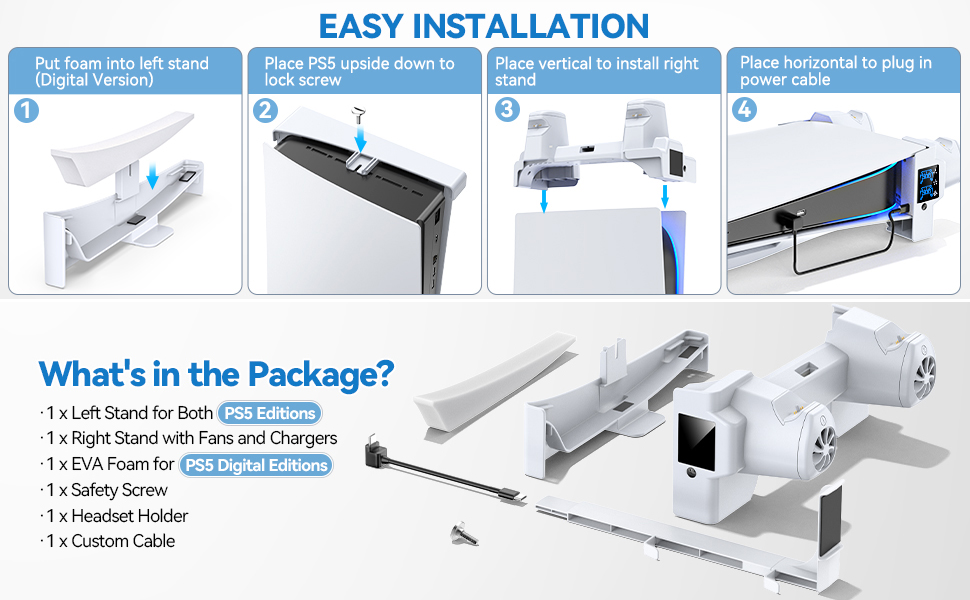
Image: Illustration of the smart chip and various charging protections for the controllers.
5.3. Headset Holder
The detachable headset holder provides a convenient place to store your gaming headset, keeping your gaming area tidy.
5.4. Standby Mode Functionality
The cooling and charging functions can operate even when your PS5 console is in standby mode, provided the USB ports are configured to supply power.
- To enable this, navigate to your PS5 settings: Settings > System > Power Saving > Features Available in Rest Mode > Supply Power to USB Ports > Always.

Image: Guide on configuring PS5 settings to allow charging and cooling in standby mode.
6. 유지관리
- Clean the stand regularly with a soft, dry cloth to prevent dust accumulation, especially around the fan vents.
- 연마성 세척제나 용제를 사용하지 마십시오.
- 최적의 냉각 성능을 위해 팬 통풍구가 막히지 않았는지 확인하십시오.
7. 문제 해결
7.1. Fans Not Turning On
- Check if the custom cable is securely connected to both the stand and a powered USB port on your PS5 console.
- Ensure the PS5 console is powered on or in a standby mode that supplies power to USB ports (refer to Section 5.4).
- Press the fan power button on the stand to cycle through speeds or turn it on.
7.2. 컨트롤러가 충전되지 않음
- Verify that the controllers are correctly seated in the charging docks.
- Confirm the custom cable is properly connected and the PS5 is supplying power to USB ports.
- Check the LED indicators on the charging stations (Red for charging, Blue for charged).
7.3. Stand Feels Unstable
- Ensure the safety screw is fully tightened, securing the PS5 console to the left stand.
- Confirm the right stand is properly clamped to the console.
- Verify that the EVA foam pad is correctly installed for PS5 Digital Edition consoles.

Image: Features ensuring the stability of the PS5 console on the horizontal stand.
8. 사양
| 모델 번호 | TO-P5801 |
| 제품 치수 | 4.96 x 5.12 x 11.42 인치 |
| 품목 무게 | 1.1파운드 |
| 호환 장치 | PS5 Digital & Disc Console (Not PS5 Slim/Pro) |
| Cooling Fan Speeds | 3 Levels (4000 RPM, 3700 RPM, 3400 RPM) |
| 컨트롤러 충전 시간 | 약 2시간 |
| 색상 | 하얀색 |
9. 보증 및 지원
For warranty information or technical support, please refer to the product packaging or contact Tokluck customer service directly. Keep your purchase receipt as proof of purchase.
