1. 서론
This manual provides instructions for the LogiLink ID0209 Wireless Keyboard. This keyboard is designed for comfortable, precise, and quiet typing, featuring an adjustable RGB backlight and a long-lasting battery. It connects wirelessly via 2.4 GHz radio technology and is compatible with various operating systems.

Figure 1: LogiLink ID0209 Wireless Keyboard
2. 패키지 내용
다음 품목이 패키지에 포함되어 있는지 확인하세요.
- LogiLink ID0209 Wireless Keyboard
- USB 2.4 GHz Receiver Dongle
- USB-A to Micro USB Charging Cable
- 사용 설명서 (본 문서)
3. 설정
3.1 키보드 충전
Before initial use, fully charge the keyboard. Connect the supplied USB-A to Micro USB cable to the keyboard's Micro USB port (located on the side) and the other end to a USB power source (e.g., computer USB port, USB wall adapter).
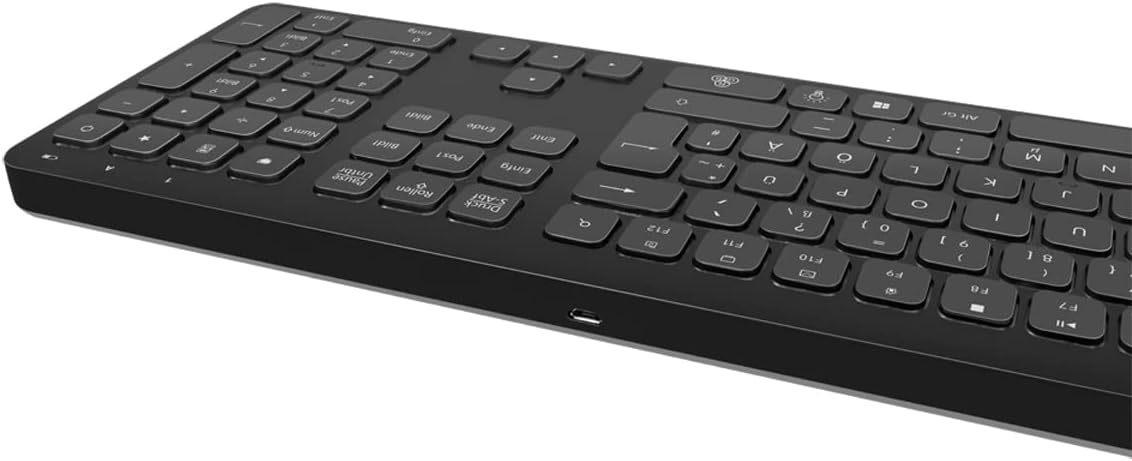
그림 2: 키보드 측면 view with Micro USB charging port
3.2 Connecting the USB Receiver Dongle
Insert the 2.4 GHz USB receiver dongle into an available USB port on your computer or compatible device. The system will automatically detect and install the necessary drivers.

Figure 3: USB 2.4 GHz Receiver Dongle
3.3 전원 켜기/끄기
Locate the ON/OFF switch on the back of the keyboard. Slide the switch to the 'ON' position to power on the keyboard. Slide it to 'OFF' when not in use to conserve battery life.
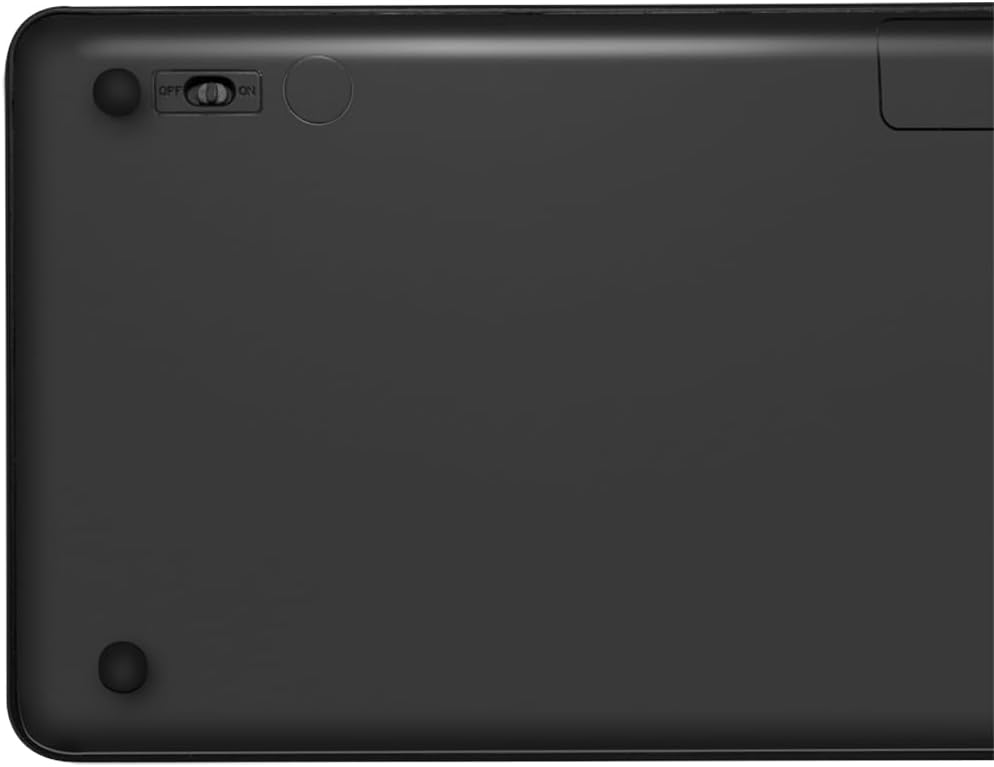
Figure 4: Keyboard back with ON/OFF switch
The keyboard should automatically connect to the USB receiver once both are powered on and within range (up to 10 meters).
4. 사용 설명서
4.1 백라이트 제어
The keyboard features an adjustable RGB backlight with 7 colors and 3 brightness levels, including a breathing mode.
- 색상 변경: 를 누르세요 Fn + 전구 키 to cycle through the 7 available colors (green, blue, yellow, purple, cyan, white, red).
- 밝기 조정: 를 누르세요 Fn + Up Arrow key 밝기를 높이고 Fn + Down Arrow key 밝기를 낮추려면 3단계 밝기 조절이 가능합니다.
- 호흡 모드: 를 누르세요 Fn + RGB Cycle key (often depicted as a swirling icon) to activate or deactivate the breathing backlight mode.

Figure 5: Keyboard with RGB backlight in use
4.2 단축키
The keyboard includes 17 shortcut keys for quick access to various functions. Some shortcut keys are specifically designed for Windows operating systems.
To use a shortcut key, press and hold the Fn key, then press the desired function key (e.g., F1-F12, multimedia keys).
- 멀티미디어 컨트롤: Play/Pause, Stop, Previous Track, Next Track, Volume Up, Volume Down, Mute.
- 생산력: Open Mail, Web Browser, My Computer, Search.
- 다른: Lock Screen, Calculator.

Figure 6: Close-up of keyboard keys, including numpad and function row
4.3 Automatic Energy-Saving Mode
The keyboard is equipped with an automatic energy-saving mode. After a period of inactivity, the keyboard will enter a sleep state to conserve battery. Press any key to wake it up.
5. 유지관리
키보드의 수명과 최적의 성능을 보장하려면 다음 유지 관리 지침을 따르세요.
- 청소: 부드럽고 마른 보풀 없는 천으로 키보드 표면을 닦으세요. 잘 지워지지 않는 얼룩은 살짝 두드려 닦아내세요.amp천에 물이나 순한 세척액을 묻혀 닦아주세요. 과도한 습기는 피하세요.
- 저장: 키보드는 직사광선과 극한의 온도를 피해 시원하고 건조한 곳에 보관하세요.
- 액체를 피하세요: 키보드를 액체에 노출시키지 마십시오. 실수로 액체를 쏟은 경우, 즉시 키보드 전원을 끄고 완전히 말린 후 사용하십시오.
- 조심스럽게 다루십시오: 키보드를 떨어뜨리거나 강한 충격을 주지 마세요.
6. 문제 해결
If you encounter issues with your LogiLink ID0209 keyboard, refer to the following common problems and solutions:
| 문제 | 가능한 원인 | 해결책 |
|---|---|---|
| 키보드가 응답하지 않습니다 | 키보드가 꺼져 있습니다 배터리 부족 USB 수신기가 연결되지 않음 범위를 벗어남 | Ensure keyboard is ON 키보드 충전 Plug USB receiver firmly into a working USB port Move keyboard closer to the receiver (within 10m) |
| 백라이트가 작동하지 않음 | 백라이트가 꺼져 있습니다 배터리 부족 | Press Fn + Light Bulb key to turn on/cycle 키보드 충전 |
| 키가 눌리거나 반응하지 않습니다. | 키 아래에 먼지나 이물질이 있음 | Clean the keyboard as per maintenance instructions |
| 연결이 자주 끊김 | 간섭 범위를 벗어남 배터리 부족 | 다른 무선 장치에서 멀리 이동하세요 Move keyboard closer to the receiver 키보드 충전 |
7. 사양
| 특징 | 세부 사항 |
|---|---|
| 상표 | 로지링크 |
| 모델 번호 | 아이디0209 |
| 연결 기술 | 2.4 GHz Wireless (High-frequency) |
| 무선 범위 | 최대 10미터 |
| 키의 개수 | 111개의 키 |
| 단축키 | 17 (some Windows-specific) |
| 백라이트 | Adjustable RGB (7 colors, 3 brightness levels, breathing mode) |
| 키 유형 | Flat keys |
| 호환 장치 | Windows, Mac OS, Android, iOS, Smart TV systems |
| 특별 기능 | Ergonomic, Backlit, Automatic Energy-Saving Mode |
| 충전 포트 | 마이크로 USB |
| 색상 | 검은색 |
| 재료 | 플라스틱 |
| 제조업체 | 2direct GmbH |
| 원산지 | 중국 |
8. 보증 및 지원
보증 정보 및 기술 지원에 대해서는 구매 시 제공된 설명서를 참조하거나 LogiLink 공식 웹사이트를 방문하십시오. web사이트. 보증 청구를 위해 구매 증빙 자료를 보관하세요.


