제품 끝view
The Ratakee Digital AM/FM Radio Alarm Clock (Model RA01SA) is designed for ease of use and clear readability, featuring large 1.4-inch LED digits. This versatile alarm clock offers multiple alarm sound options, an AM/FM radio with preset capabilities, a dimmable display, sleep timer, and snooze function. It operates via AC power with a battery backup for continued functionality during power outag에스.
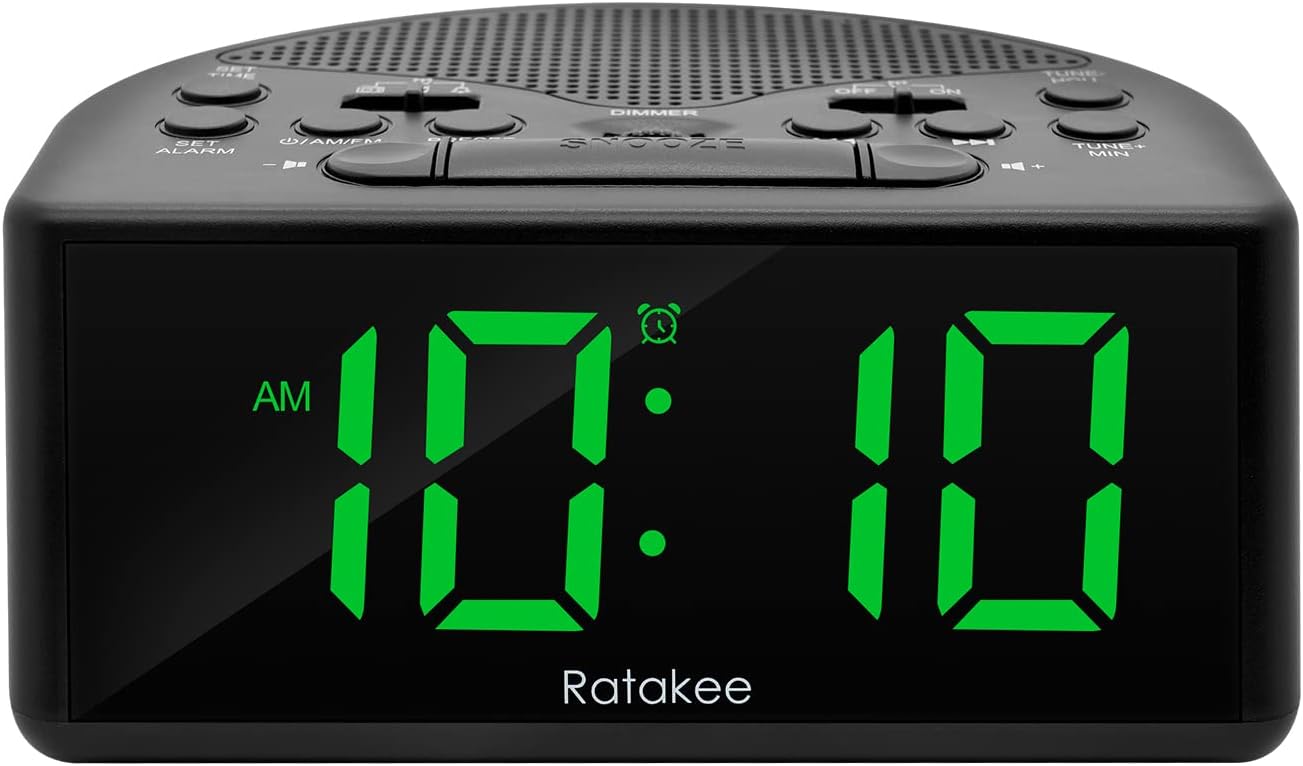
그림 1: 전면 view of the Ratakee Digital AM/FM Radio Alarm Clock displaying 10:10 AM.
설정
알람 시계 전원 켜기
The alarm clock can be powered by an AC outlet or by batteries for backup.
- AC 전원: Connect the included power cord to the AC120V outlet and plug it into a wall socket. The display will light up, and the radio will be operational.
- 배터리 백업 : 전원을 위해tage protection, insert 3 AA batteries (not included) into the battery compartment located on the bottom of the unit. When powered by batteries, the display will auto-dim after 20 seconds of no operation to conserve power, but the clock, alarm, and radio functions will remain active.

Figure 2: Illustration of the dual power methods: AC cord connection and battery compartment for 3 AA batteries.
작동 지침
This section details the operation of your Ratakee alarm clock. Refer to Figure 3 for button and switch locations.

Figure 3: Top panel controls of the Ratakee Digital AM/FM Radio Alarm Clock.
시간 설정
- 를 누르고 계세요 시간 설정 버튼을 2초 동안 누르세요. 시침 숫자가 깜빡이기 시작합니다.
- 사용하세요 TUNE+ HOU 버튼을 눌러 시간을 조정합니다.
- 사용하세요 TUNE- MIN 버튼을 눌러 분을 조정합니다.
- 를 누르세요 시간 설정 버튼을 다시 누르면 시간 설정 모드를 확인하고 종료합니다.
알람 설정
The alarm clock offers three selectable alarm sounds: AM/FM radio, music, or a classic beep.

Figure 4: The alarm clock offers three distinct alarm sound options.
- 를 누르고 계세요 알람을 설정하다 button for 2 seconds. The alarm hour digits will flash.
- 사용하세요 TUNE+ HOU 알람 시간을 설정하는 버튼입니다.
- 사용하세요 TUNE- MIN 알람 시간을 분으로 설정하는 버튼입니다.
- Slide the alarm tone switch (located near the 알람을 설정하다 button) to select your desired alarm sound: radio, music, or beep.
- 를 누르세요 알람을 설정하다 button again to confirm the alarm time and sound.
- To turn the alarm ON or OFF, use the dedicated ON/OFF slide switch for the alarm (located on the top panel, near the right side).
알람 볼륨 조절: The alarm volume is adjustable from 5 to 15 levels. When using the radio as an alarm, the clock will play the last station you listened to at the set volume level.
AM/FM 라디오 작동
The radio allows you to store up to 20 AM and 20 FM stations.

Figure 5: The alarm clock features AM/FM radio with strong reception capabilities.
- Turn Radio On/Off: 를 누르세요 ON/AM/FM 라디오를 켜거나 끄는 버튼입니다.
- 스위치 밴드: 라디오가 켜져 있는 동안 ON/AM/FM AM과 FM 대역을 전환하는 버튼입니다.
- 수동 조정 : 사용하세요 TUNE+ HOU 그리고 TUNE- MIN buttons to manually tune to your desired frequency.
- 자동 스캔/사전 설정: 를 누르세요 사전 설정 button to scan and store available stations automatically.
- 프리셋 불러오기: 사용하세요 사전 설정 저장된 방송국을 순환하는 버튼입니다.
- 볼륨 조절: 사용하세요 볼륨 + 그리고 용량 - buttons to adjust the radio volume (1-16 levels).
메모: When listening to FM stations with earphones (via the earphone jack), stereo mode will automatically activate for enhanced sound.
디스플레이 디머
The alarm clock features a full-range dimmable LED display (0-100% brightness).

Figure 6: Adjusting the display brightness from 0% to 100% for optimal view주고받음.
회전하다 주차 knob (located on the top panel) to adjust the display brightness to your preferred level.
슬립 타이머
슬립 타이머를 사용하면 라디오를 일정 시간 동안 재생한 후 자동으로 꺼집니다.
To activate the sleep timer, press the 잠 button. Each press will cycle through available sleep timer durations (e.g., 10, 20, 30, 60, 90 minutes). The radio will turn off automatically after the selected time.
스누즈 기능
알람이 울리면 큰 버튼을 누르세요 선잠 button (located on the top center) to temporarily silence the alarm for an additional 9 minutes of sleep.

Figure 7: Easily activate the snooze function for a short delay in your alarm.
이어폰 잭
A 3.5mm earphone jack is provided on the side of the unit for private listening. Plug in your earphones to enjoy radio content without disturbing others.
유지
- 청소: To clean the unit, wipe it with a soft, dry cloth. Do not use abrasive cleaners or solvents.
- 배터리 교체: If using battery backup, replace the 3 AA batteries when the display dims significantly or the clock functions become unreliable during a power outage. 새 배터리를 넣을 때 극성이 올바른지 확인하십시오.
- 저장: 장기간 보관할 경우 누액을 방지하기 위해 배터리를 제거하십시오.
문제 해결
| 문제 | 가능한 원인 / 해결책 |
|---|---|
| 디스플레이가 어둡거나 꺼져 있습니다. |
|
| 알람이 울리지 않습니다. |
|
| 라디오 수신이 나쁘거나 잡음이 있습니다. |
|
| Cannot set radio presets. |
|
명세서
| 특징 | 세부 사항 |
|---|---|
| 상표 | 라타키 |
| 모델 번호 | RA01SA |
| 디스플레이 유형 | Digital LED (Green Digits) |
| 디스플레이 크기 | 1.4 inches (LED Digits) |
| 전원 | Corded Electric (AC120V) / Battery Powered (3 AA batteries, not included) |
| 제품 치수 | 폭 5.4인치 x 높이 2.4인치 |
| 품목 무게 | 0.4킬로그램(14온스) |
| 라디오 대역 | AM/FM (20 AM, 20 FM presets) |
| 알람 벨소리 | 3 (AM/FM Radio, Music, Beep) |
| 알람 볼륨 | Adjustable (5-15 levels) |
| 디스플레이 디머 | 0-100% (Rotary Knob) |
| 슬립 타이머 | 10-90분 |
| 다시 알림 시간 | 9 분 |
| 이어폰 잭 | 예 |
| 재료 | 플라스틱 |
| 실내/실외 사용 | 실내 |
보증 및 지원
보증 유형: 평생 보증
For technical support, troubleshooting assistance, or warranty claims, please contact Ratakee customer service. Refer to the product packaging or the official Ratakee web최신 연락처 정보는 사이트에서 확인하세요.
You may also find helpful resources and frequently asked questions on the manufacturer's support page.
