1. 서론
This manual provides detailed instructions for the MoreJoy Smartwatch, Model MJ221. This device is designed to monitor various health metrics and provide smart notifications, compatible with both iPhone and Android smartphones. Please read this manual thoroughly before using the product to ensure proper operation and maintenance.

Figure 1: MoreJoy Smartwatch, showcasin직사각형 디스플레이와 검은색 스트랩이 특징입니다.
2. 주요 특징
The MoreJoy Smartwatch offers a range of functionalities to enhance your daily life and health monitoring:
- Large 1.7-inch Touch Screen: Features a 1.7-inch (4.3 cm) rectangular touch screen with a resolution of 240 x 280 pixels, providing a wide display area for clear viewing of information, calls, and notifications.
- 건강 모니터링: Integrates a comprehensive health tracking system including heart rate, blood pressure, and blood oxygen (SpO2) monitoring. It also tracks sleep patterns, distinguishing between deep and light sleep phases. Note: The data collected by this device is for reference only and cannot be used for medical diagnosis or treatment.
- 스마트 알림: Displays incoming calls, text messages, and app notifications directly on your wrist, accompanied by vibration alerts.
- IP68 방수 기능: Designed with an IP68 waterproof rating, making it suitable for activities such as swimming, rinsing, bathing, and enduring sweat without damage.
- 다양한 스포츠 모드: Supports 20 different sport modes to track various physical activities.
- 긴 배터리 수명: Offers up to 7 days of typical use and approximately 20 days of standby time on a full charge.
- 폭넓은 호환성: Compatible with smartphones running iOS 9.0/Android 4.4 and above.
- 추가 도구: Includes practical functions such as a timer, stopwatch, wake-up gesture, phone finder, sedentary reminder, and music control.
- 사용자 정의 가능한 시계 화면: Allows users to personalize the watch face to match their style.
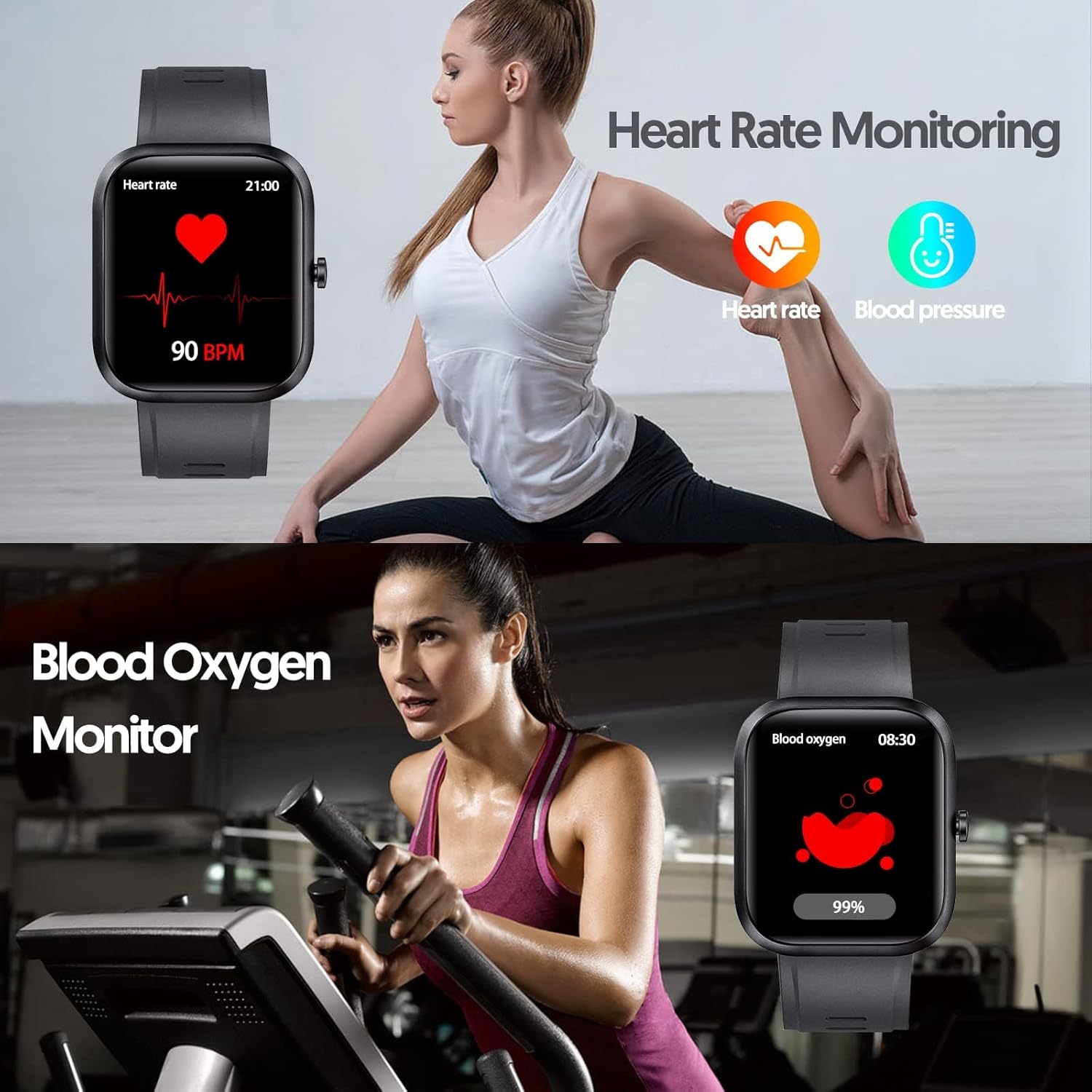
Figure 2: Illustration of the smartwatch's heart rate and blood oxygen monitoring capabilities.

Figure 3: Depiction of the automatic sleep quality monitoring feature, showing deep, light, and awake hours.

Figure 4: Visual representation of the smartwatch's IP68 water resistance, suitable for swimming, rinsing, bathing, and sweat.
3. 설정 가이드
3.1 초기 충전
Before first use, fully charge your MoreJoy Smartwatch. Connect the charging cable to the charging port on the back of the watch and plug the USB end into a standard USB power adapter (not included) or a computer's USB port. The watch display will indicate charging status.
3.2 앱 설치
To unlock the full functionality of your smartwatch, you need to install the companion application on your smartphone. The specific app name is typically provided in the product packaging or a small quick start guide. If you cannot locate it, search for "MoreJoy Smartwatch" or scan a QR code if provided on the watch screen or packaging. Ensure your smartphone meets the compatibility requirements (iOS 9.0/Android 4.4 or above).
3.3 스마트폰과 페어링
- 스마트폰에서 Bluetooth가 활성화되어 있는지 확인하세요.
- 스마트폰에 설치된 컴패니언 앱을 엽니다.
- 앱 내 안내에 따라 새 기기를 추가하세요. 앱에서 사용 가능한 스마트워치를 검색합니다.
- Select "MoreJoy MJ221" or the corresponding device name from the list.
- Confirm the pairing request on both your smartphone and the smartwatch, if prompted.
- 페어링이 완료되면 시계가 휴대폰과 시간과 데이터를 동기화합니다.
4. 사용 설명서
4.1 기본 탐색
- 터치 스크린: Swipe left/right, up/down to navigate through menus and functions. Tap to select an option.
- 측면 버튼: Typically used to return to the home screen or wake up the device.
- 깨우는 동작: Raise your wrist to automatically illuminate the screen. This feature can usually be enabled/disabled in the app settings.
4.2 상태 모니터링
Access health monitoring features by swiping through the watch interface or selecting them from the main menu. Ensure the watch is worn snugly on your wrist for accurate readings.
- 심박수: Tap the heart rate icon to initiate a measurement.
- 혈압: Tap the blood pressure icon to start a measurement.
- 혈중 산소(SpO2): Tap the SpO2 icon to measure your blood oxygen level.
- 수면 추적: The watch automatically monitors your sleep when worn during the night. View detailed sleep data (deep sleep, light sleep, awake time) in the companion app.
4.3 스포츠 모드
The smartwatch supports 20 different sport modes. To start a workout:
- 시계에서 "스포츠" 또는 "운동" 섹션으로 이동하세요.
- 원하는 활동을 선택하세요(예: 달리기, 자전거 타기, 수영).
- Tap to start the activity. The watch will begin tracking relevant metrics like duration, steps, distance, and calories burned.
- Tap again or press the side button to pause or end the workout.

그림 5: 이상view of the 20 available sport modes for activity tracking.
4.4 알림 및 기타 기능
- 메시지 알림: Ensure notification permissions are granted to the app on your smartphone. Messages will appear on the watch screen.
- 음악 제어: Control music playback on your smartphone directly from the watch (play, pause, skip tracks).
- 앉아서 보내는 시간 상기시키기: 앱에서 일정 시간 동안 활동이 없으면 움직이도록 알림을 설정하세요.
- 사용자 정의 시계 화면: Change your watch face via the companion app. Many options are available to suit your preference.

Figure 6: The smartwatch displaying smart notifications for texts and messages.

그림 7: 예amples of customizable watch faces to fit individual style preferences.
5. 관리 및 유지 보수
5.1 스마트워치 청소하기
Regularly clean your smartwatch to ensure hygiene and proper function. Use a soft, lint-free cloth to wipe the screen and body. For stubborn dirt, slightly damp천에 물을 묻혀 닦아주세요. 강한 화학 물질, 연마성 세제 또는 용제는 사용하지 마세요.
5.2 방수성
The MoreJoy Smartwatch has an IP68 water resistance rating. This means it is protected against immersion in water up to 1.5 meters for up to 30 minutes. It is suitable for swimming in a pool, showering, and can withstand sweat and splashes. However, it is not recommended for diving, hot water activities (like saunas or hot tubs), or high-pressure water jets.
5.3 배터리 관리
- 배터리를 자주 완전히 방전시키지 마세요.
- 시계를 극한의 온도(고온 또는 저온)에 노출시키지 마십시오. 배터리 수명과 성능에 영향을 미칠 수 있습니다.
- Use only the provided charging cable or a compatible replacement.
6. 문제 해결
| 문제 | 가능한 원인 | 해결책 |
|---|---|---|
| 시계가 켜지지 않습니다. | 배터리가 소진되었습니다. | 시계를 최소 30분 동안 충전하세요. |
| 스마트폰과 페어링할 수 없습니다. | Bluetooth is off; app not running; watch not discoverable; incorrect app. | Ensure Bluetooth is on. Restart the app and watch. Check if the correct companion app is installed. Refer to section 3.2 for app installation. |
| 아무런 알림도 받지 못했습니다. | App permissions not granted; app not running in background; phone's Do Not Disturb mode. | Check app notification permissions in your phone's settings. Ensure the app is running. Disable Do Not Disturb mode on your phone. |
| 부정확한 건강 데이터. | Watch not worn snugly; sensor dirty; not a medical device. | Ensure the watch is worn correctly and snugly on your wrist. Clean the sensor on the back of the watch. Remember, data is for reference only. |
| 배터리 수명이 짧습니다. | Frequent use of power-intensive features; excessive notifications; old battery. | Reduce screen brightness, limit background app refresh, or disable unnecessary notifications. Ensure full charge cycles. |
7. 사양
| 특징 | 세부 사항 |
|---|---|
| 상표 | 모어조이 |
| 모델 번호 | 엠제이221 |
| 운영 체제 | 안드로이드(iOS와 호환) |
| 화면 크기 | 1.69 인치 (4.3cm) |
| 연결성 | USB, 블루투스 |
| 특별 기능 | Heart Rate Monitor, Sleep Monitor, Notification, Blood Pressure Monitor, Blood Oxygen (SpO2) |
| 호환 장치 | Smartphone (iOS 9.0+/Android 4.4+) |
| 배터리 유형 | 1 리튬 폴리머 배터리(포함) |
| 배터리 수명 | 최대 7일(사용 시), 20일(대기 시) |
| 방수성 | IP68 |
| 대상 청중 | Men, Women (Adult) |
| 모양 | Oval (Rectangular display) |

Figure 8: Dimensions of the MoreJoy Smartwatch (46mm x 41mm) and suitable wrist length (90-116mm).
8. 보증 및 지원
Information regarding product warranty and availability of spare parts is not provided in the product details. For specific warranty terms, technical support, or inquiries about spare parts, please refer to the official MoreJoy website or contact their customer service directly. Contact details are typically found on the product packaging or the manufacturer's official web대지.
Software updates are not guaranteed beyond the point of sale, as per available information.