1. 서론
This manual provides detailed instructions for the setup, operation, and maintenance of your Lavaudio DS220 HiFi Bluetooth Receiver. Please read this manual thoroughly before using the device to ensure proper functionality and to maximize your audio experience. The DS220 is designed to seamlessly integrate high-resolution Bluetooth audio into your existing home stereo system.
2. 안전 정보
- 기기를 물이나 과도한 습기에 노출시키지 마세요.
- 열원 근처나 직사광선에 장치를 두지 마십시오.
- 제공된 전원 어댑터와 케이블만 사용하세요.
- 기기를 직접 분해하거나 수리하지 마십시오. 모든 정비는 자격을 갖춘 기술자에게 맡기십시오.
- 작동 중에는 장치 주변에 적절한 환기가 이루어지도록 하세요.
3. 패키지 내용
아래 나열된 모든 품목이 패키지에 포함되어 있는지 확인하세요.
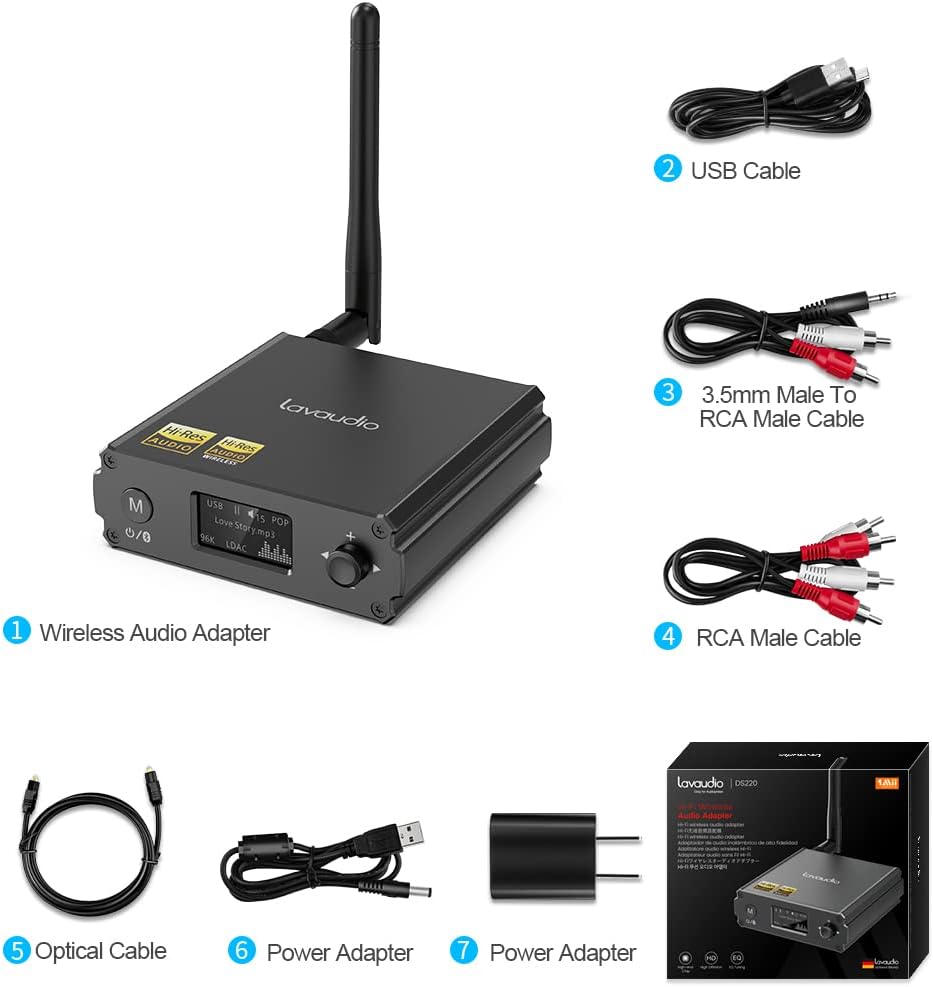
Image: Contents of the Lavaudio DS220 package, including the receiver, cables, and power adapter.
- Lavaudio DS220 HiFi Bluetooth Receiver x 1
- USB 충전 케이블 x 1
- 3.5mm Female to 2RCA Splitter Cable x 1
- 2RCA to 2RCA Stereo Audio Cable x 1
- 광 오디오 케이블 x 1
- 전원 어댑터 x 1
- 사용 설명서 x 1
4. 제품 오버view
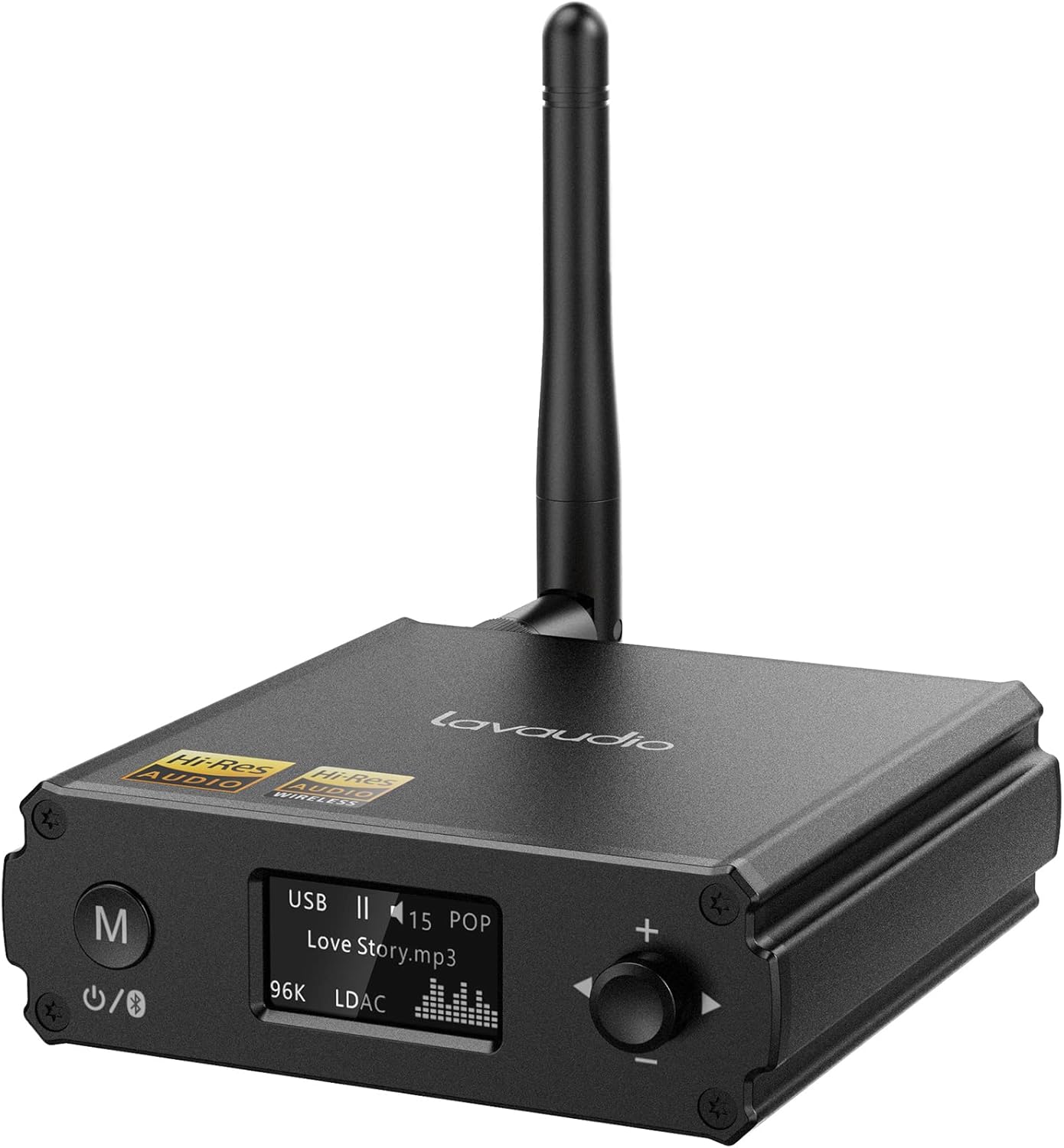
이미지: 앞면 view of the Lavaudio DS220 HiFi Bluetooth Receiver with its antenna.
4.1 전면 패널 컨트롤 및 디스플레이

Image: Close-up of the DS220's OLED display and control buttons.
- M 버튼: Press and hold for 2 seconds to enter pairing mode. Press and hold for 4 seconds to power off. Press and hold for 10 seconds to perform a factory reset.
- OLED 디스플레이: Shows current mode (USB, Bluetooth), track information, volume level, and EQ mode.
- 회전식 조절 손잡이 (+/-): Adjusts volume. Press to cycle through EQ modes.
4.2 후면 패널 포트

이미지: 후면 view of the DS220 showing its various output and input ports.
- DC 5V : 전원 입력 포트.
- 선택 해제: 광 디지털 오디오 출력.
- R-RCA OUT-L: 아날로그 RCA 스테레오 오디오 출력.
- USB 입력 : USB Type-C input for connecting to a computer or other audio source.
5. 설정
5.1 초기 전원 켜기
Connect the provided power adapter to the DC 5V port on the DS220 and plug it into a power outlet. The device will automatically power on and enter pairing mode for first-time use.
5.2 오디오 시스템에 연결하기
The DS220 offers flexible output options to connect to your amp앰프 또는 파워드 스피커:
- Using RCA Cables: Connect the 2RCA to 2RCA stereo audio cable from the R-RCA OUT-L ports on the DS220 to the corresponding RCA input ports (e.g., AUX IN) on your amp전원 공급기 또는 전원 스피커.
- Using Optical Cable: Connect the optical audio cable from the OPT OUT port on the DS220 to the optical input port on your amplifier 또는 DAC.
귀하의 것을 확인하십시오 amplifier or audio system is set to the correct input mode (e.g., AUX, Optical) corresponding to your connection.
6. 사용 설명서

Image: Step-by-step visual guide for connecting, pairing, playing, and adjusting EQ.
6.1 Bluetooth IN Mode

Image: Detailed guide for Bluetooth IN mode setup.
- 전원 켜기: Ensure the DS220 is powered on. For first-time use, it will automatically enter pairing mode, indicated by a quickly flashing Bluetooth icon on the OLED display.
- Enter Pairing Mode (if not first-time use): If the device is already connected or in standby, press and hold the 'M' button for 2 seconds until the Bluetooth icon flashes rapidly.
- 편성: On your smartphone, tablet, or other Bluetooth audio source, enable Bluetooth and search for available devices. Select "DS220" from the list to connect.
- 음악 재생: Once connected, the Bluetooth icon will stop flashing and remain solid. You can now play audio from your connected device through the DS220.
6.2 USB IN Mode

Image: Diagram illustrating USB IN mode setup.
To use the DS220 as a USB DAC:
- Connect the provided USB cable from your computer/laptop or other audio source device to the USB IN port on the DS220.
- Connect the DS220's RCA or Optical output to your amp전원 공급기 또는 전원 스피커.
- The DS220 will automatically switch to USB audio mode. You can now play audio from your computer through the DS220.
6.3 EQ Mode and Volume Control
- EQ 모드: Press the rotary knob to cycle through various EQ modes such as Rock, Pop, Jazz, etc. The selected EQ mode will be displayed on the OLED screen. You can also adjust Bass and Treble settings within the EQ menu.
- 볼륨 조절: 볼륨을 높이려면 다이얼을 시계 방향으로 돌리고, 볼륨을 낮추려면 시계 반대 방향으로 돌리세요.
7. Audio Quality and Codecs
The Lavaudio DS220 supports various high-definition audio codecs to ensure optimal sound quality:

Image: Comparison of audio bitrates for various codecs supported by the DS220.
- LDAC : Supports up to 24bit/96 kHz sampling rate with a bitrate of 990 kbps, offering high-resolution wireless audio.
- aptX-HD: Supports up to 24bit/48 kHz sampling rate with a bitrate of 576 kbps, providing high-definition audio over Bluetooth.
- AAC : Supports up to 16bit/96 kHz sampling rate with a bitrate of 264 kbps.
- SBC : Supports up to 16bit/48 kHz sampling rate with a bitrate of 328 kbps, a standard Bluetooth audio codec.

Image: The DS220 integrated into a home stereo setup for high-definition audio.
The DS220 features a Qualcomm 5125 Bluetooth chip and an ESS ES9018K2M DAC chip for superior audio processing.
8. 문제 해결
다음의 일반적인 문제와 해결책을 참조하세요.
- Q1: How to enter pairing mode?
- A: For first-time use, the Lavaudio DS220 automatically enters pairing mode after power-on. To manually enter pairing mode, press and hold the 'M' button for 2 seconds until the Bluetooth icon on the display flashes rapidly.
- Q2: What does it mean when the Bluetooth icon slowly flashes?
- A: A slowly flashing Bluetooth icon indicates that the DS220 is in standby mode.
- Q3: Why do I have a sound problem when connecting DS220 by optical output?
- A: If your device does not support a 96K sample rate, try switching LDAC off. This often resolves sound issues. To do this, find DS220 in your phone's Bluetooth list, click to open the drop-down list, and switch LDAC to off. Ensure you use a power adapter for power supply to eliminate ground loop noise.
9. 사양
| 상표 | 라바디오 |
| 모델 번호 | DS220 |
| 연결 기술 | 블루투스 |
| 컨트롤러 유형 | 버튼 제어 |
| 호환 장치 | 개인용 컴퓨터, 스마트폰 |
| 오디오 출력 모드 | 스테레오 재생 |
| 서라운드 사운드 채널 구성 | 2.0 |
| 출력 전력 | 5 와트 |
| 채널 수 | 2 |
| 품목 무게 | 12.6 온스 |
| 패키지 크기 | 5.63 x 4.92 x 2.4 인치 |
10. 유지관리
To ensure the longevity and optimal performance of your Lavaudio DS220, follow these maintenance guidelines:
- 청소: 부드럽고 마른 천을 사용하여 기기 외부를 닦으세요. 액체 세척제나 에어로졸은 사용하지 마세요.
- 저장: 장시간 사용하지 않을 경우, 직사광선과 극한의 온도를 피해 시원하고 건조한 곳에 보관하세요.
- 손질: 기기를 조심스럽게 다루십시오. 떨어뜨리거나 강한 충격을 주지 마십시오.
11. 보증 및 지원
For warranty information and technical support, please refer to the official Lavaudio web사이트를 방문하거나 고객 서비스에 문의하세요. 보증 청구에 대비해 구매 증빙 자료로 구매 영수증을 보관하세요.
참고: 제공된 데이터에 따르면 임베드할 수 있는 공식 제품 영상이 없었습니다.


