소개
This manual provides instructions for the proper use and maintenance of your Alecto AK-20 Alarm Clock with Thermometer. Please read these instructions carefully before operating the device and retain them for future reference. The AK-20 is designed to display time, date, day, and indoor temperature, featuring multiple alarms, a snooze function, and radio-controlled time synchronization.
안전 정보
- 기기를 극한의 온도, 직사광선 또는 높은 습도에 노출시키지 마세요.
- 장치를 떨어뜨리거나 강한 충격을 가하지 마십시오.
- 직접 분해하거나 수리하지 마십시오. 모든 정비는 자격을 갖춘 기술자에게 맡기십시오.
- 사용한 배터리는 현지 규정에 따라 책임감 있게 폐기하십시오.
패키지 내용
포장을 풀 때 모든 품목이 모두 들어 있고 양호한 상태인지 확인하세요.
- Alecto AK-20 Alarm Clock
- User Manual (NL/EN/DE/FR)
제품 끝view
The Alecto AK-20 features a clear digital display and intuitive controls for easy operation.

그림 1: 전면 view of the Alecto AK-20 Alarm Clock, showing the large digital display with time, date, day, and temperature, along with control buttons at the bottom.

그림 2: 각도 view of the Alecto AK-20, highlighting the main display and the alarm ON/OFF switches on the right side.
제어 및 표시 요소:
- 대형 디지털 디스플레이: Shows time (AM/PM indicator), date, day of the week, and indoor temperature.
- 시간 설정 버튼: 시간 설정 모드로 들어가는데 사용됩니다.
- - / + Buttons: Used to adjust values (decrease/increase).
- 알람 설정 버튼: 알람 설정 모드로 들어가는데 사용됩니다.
- ALARM 1-4 ON/OFF Switches: Located on the side for individual alarm activation.
- 스누즈/라이트 버튼: Located on top, activates backlight and snooze function.
- AUTO LIGHT Switch: Located on the back, controls automatic backlight.
- 리셋 버튼: Located on the back, for factory reset.

그림 3: 오른쪽 view of the alarm clock, showing the physical ON/OFF switches for Alarm 3 and Alarm 4.

그림 4: 뒤로 view of the alarm clock, showing the battery compartment, RESET button, and AUTO LIGHT switch.
설정
1. 배터리 설치
- 알람시계 뒷면에 있는 배터리함을 찾으십시오(그림 4 참조).
- 배터리 덮개를 엽니다.
- AA 배터리 두 개를 올바른 극성(+ 및 -)에 맞춰 넣으세요.
- 배터리 덮개를 단단히 닫으세요.
The display will light up, and the clock will begin searching for the DCF radio signal for automatic time synchronization.
2. Initial Time and Date Synchronization (DCF)
The AK-20 is a radio-controlled clock. Upon battery installation, it will automatically attempt to synchronize with the DCF signal. This process may take several minutes. A signal icon on the display indicates successful reception.
- 신호 수신을 좋게 하려면 시계를 창가에 두세요.
- 간섭을 일으킬 수 있는 전자 기기 근처에 두지 마십시오.
3. Manual Time and Date Setting (Optional)
If DCF synchronization is not desired or unsuccessful, you can set the time and date manually:
- 를 누르고 계세요 시간 설정 시간 숫자가 깜빡일 때까지 버튼을 누르세요.
- 사용하세요 - or + 버튼으로 시간을 조정합니다.
- 누르다 시간 설정 다시 시간을 확인하고 분으로 넘어갑니다.
- 분, 년, 월, 일에 대해서도 같은 과정을 반복하십시오.
- 누르다 시간 설정 설정 모드를 종료하려면 마지막으로 한 번 더 입력하세요.
4. 언어 선택
The device supports multiple languages for day display. To change the language:
- 일반 시간 표시 모드에서 버튼을 누르세요. - 버튼을 반복해서 누릅니다.
- The day of the week will cycle through available languages (Dutch, French, German, English, Spanish, Italian, Danish, Russian).
- Stop when your desired language is displayed.
작동 지침
1. 알람 설정
The AK-20 allows setting up to four independent alarms.
- 를 누르고 계세요 알람 설정 button until the alarm time (e.g., ALARM-1) starts flashing.
- 사용하세요 - or + 원하는 알람 시간을 조정하는 버튼입니다.
- 누르다 알람 설정 다시 시간을 확인하고 분으로 넘어갑니다.
- 사용하세요 - or + 원하는 알람 시간을 분 단위로 조절할 수 있는 버튼이 있습니다.
- 누르다 알람 설정 to confirm and move to the next alarm (ALARM-2, ALARM-3, ALARM-4).
- Repeat steps 2-4 for each alarm you wish to set.
- After setting all desired alarms, press 알람 설정 알람 설정 모드를 종료하려면.
2. 경보 활성화/비활성화
Each alarm has a dedicated ON/OFF switch on the side of the unit (refer to Figure 3).
- Slide the corresponding switch to ON to activate an alarm. An alarm icon will appear on the display.
- 스위치를 끄다 to deactivate an alarm. The alarm icon will disappear.
3. 스누즈 기능
알람이 울리면 누르세요 스누즈 / 라이트 button on top of the clock. The alarm will temporarily stop and sound again after a few minutes (typically 5-10 minutes, depending on the model's default setting).
4. 백라이트 기능
The display features a backlight for visibility in low-light conditions.
- 수동 백라이트: 짧게 누르세요 스누즈 / 라이트 버튼을 누르면 백라이트가 몇 초 동안 켜집니다.
- 자동 백라이트: On the back of the unit, slide the 자동 조명 로 전환하다 ON. The backlight will automatically illuminate in dark environments. Slide to 끄다 이 기능을 비활성화하려면.
5. 온도 표시
The integrated thermometer displays the indoor temperature.
- 섭씨(°C)와 화씨(°F) 사이를 전환하려면 버튼을 누르세요. + 일반 시간 표시 모드에서 버튼을 누르세요.
유지
- 부드럽고 마른 천으로 기기를 닦으세요. 연마성 세제나 용제는 사용하지 마세요.
- 장기간 기기를 사용하지 않을 경우, 배터리 누출을 방지하기 위해 배터리를 제거하세요.
문제 해결
| 문제 | 가능한 원인 | 해결책 |
|---|---|---|
| 디스플레이가 비어 있거나 어둡습니다. | 배터리가 부족하거나 잘못 삽입되었습니다. | 배터리를 새 AA 배터리로 교체하고 극성이 올바른지 확인하세요. |
| 시간이 정확하지 않습니다. | DCF 신호가 수신되지 않았거나 수동 시간이 설정되지 않았습니다. | Ensure the clock is in an area with good signal reception. Manually set the time if necessary. |
| 알람이 울리지 않습니다. | 알람이 활성화되지 않았거나 잘못 설정되었습니다. | Check the alarm ON/OFF switch on the side. Verify alarm time settings. |
| 백라이트가 작동하지 않습니다. | AUTO LIGHT switch is OFF or batteries are low. | Check the AUTO LIGHT switch on the back. Replace batteries if needed. |
이러한 해결 방법을 시도한 후에도 문제가 지속되면 고객 지원팀에 문의하세요.
명세서
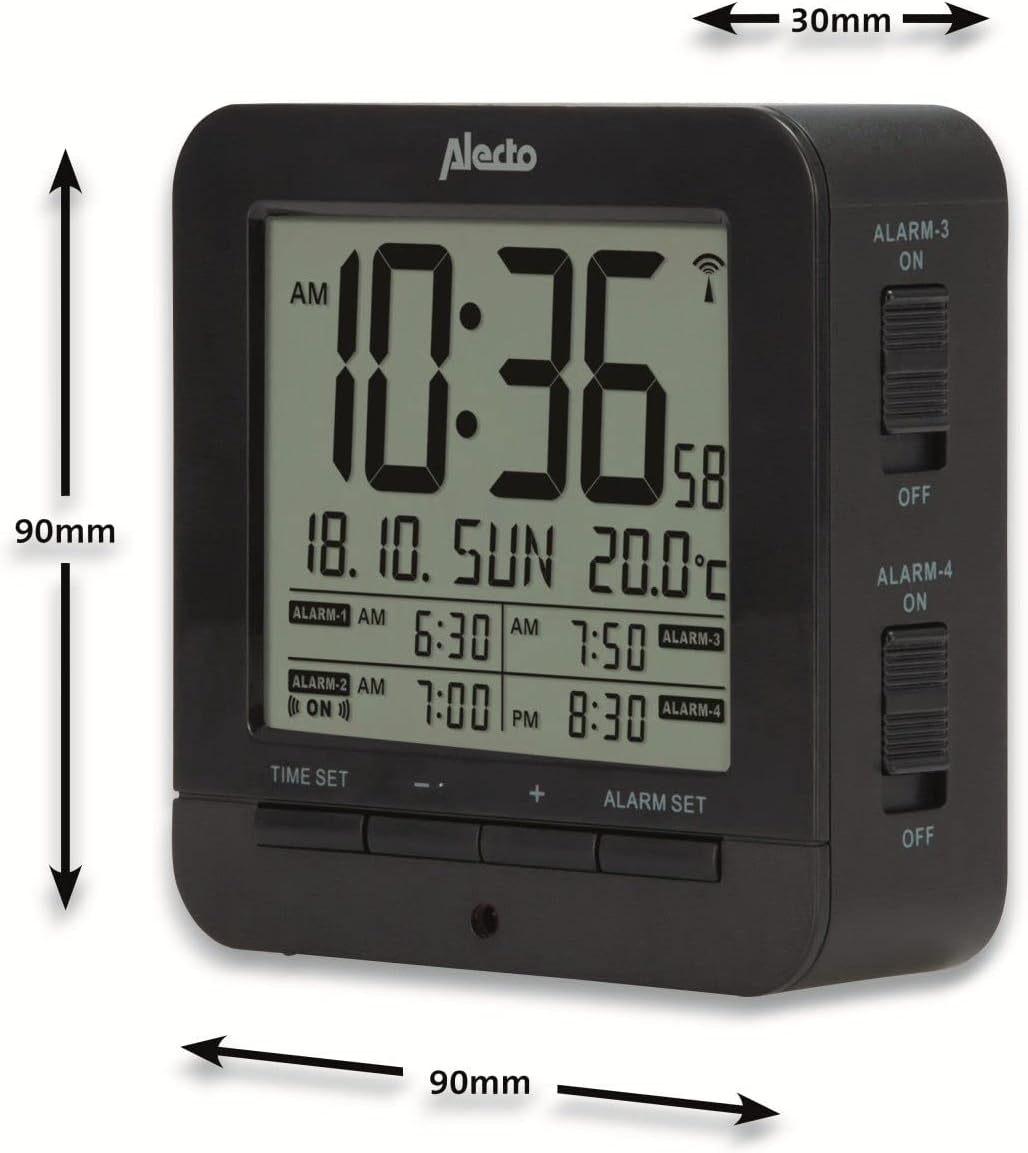
Figure 5: Alecto AK-20 Alarm Clock showing its approximate dimensions: 90mm height, 90mm width, and 30mm depth.
| 특징 | 세부 사항 |
|---|---|
| 모델 번호 | AK-20 (A003319) |
| 상표 | 알렉토 |
| 색상 | 검은색 |
| 재료 | 아크릴로니트릴 부타디엔 스티렌(ABS) |
| 치수(높이 x 너비 x 깊이) | 9 x 9 x 3cm (약 3.54 x 3.54 x 1.18인치) |
| 화면 크기 | 6.4 x 5.4cm(약 2.52 x 2.13인치) |
| 무게 | 231g(약 0.51파운드) |
| 전원 | AA 배터리 2개(포함되지 않음) |
| 디스플레이 유형 | 디지털 |
| 특별 기능 | Temperature Display, 4 Alarms, Snooze Function, Backlight, DCF Radio Control |
| 온도 단위 | °C / °F 선택 가능 |
| 지원 언어 | Dutch, French, German, English, Spanish, Italian, Danish, Russian |
보증 및 지원
Alecto products are manufactured to high quality standards. For information regarding warranty terms and conditions, please refer to the documentation provided with your purchase or visit the official Alecto website. For technical support or service inquiries, please contact your retailer or the Alecto customer service department.


