1. 서론
Thank you for choosing the KAIDI KD-771 TWS Smart Touch V5.1 Wireless Earbuds. This manual provides essential information for the proper use, setup, and maintenance of your new earbuds. Please read it carefully before use and retain it for future reference.
패키지 내용:
- 1 Pair of KAIDI KD-771 Wireless Earbuds
- 1 충전 케이스
- 1 USB Charging Cable (Type-C)
- 1 사용자 설명서

Image 1.1: KAIDI KD-771 Wireless Earbuds with their retail packaging.
2. 안전 정보
- 제품을 분해, 수리 또는 개조하지 마십시오. 화재, 전자 장치 고장 또는 제품 전체 손상이 발생할 수 있습니다.
- 기기를 극한의 온도, 직사광선, 높은 습도에 두지 마세요.
- Avoid exposing the earbuds to water or other liquids. While rated IPX4 for splash resistance, they are not waterproof and should not be submerged.
- 제공된 충전 케이블이나 인증된 동등 제품만 사용하세요.
- Do not use the earbuds at excessively high volumes for extended periods to prevent hearing damage.
- 어린이의 손이 닿지 않는 곳에 보관하세요.
3. 제품 오버view
The KAIDI KD-771 earbuds feature a compact design with intuitive touch controls and a portable charging case.

Image 3.1: The KAIDI KD-771 Wireless Earbuds alongside their closed charging case.

이미지 3.2: 상세 view of the earbuds and charging case, highlighting the USB Type-C charging port and earbud design.
구성 요소:
- 이어 버드 : Left and Right earbuds with Smart Touch sensors.
- 충전 케이스: Stores and charges the earbuds. Features a battery indicator LED and a USB Type-C charging port.
- 마이크로폰: 통화 기능이 각 이어버드에 내장되어 있습니다.
4. 설정
4.1 이어버드와 케이스 충전
처음 사용하기 전에 이어버드와 충전 케이스를 완전히 충전하세요.
- 이어버드를 충전 케이스에 넣으세요. 이어버드가 제대로 장착되었는지 확인하세요.
- Connect the USB Type-C charging cable to the charging port on the case and the other end to a USB power source (e.g., wall adapter, computer).
- 충전 케이스의 LED 표시등이 켜져 충전 상태를 보여줍니다. 충전이 완료되면 표시등의 색상이 바뀌거나 꺼집니다.
- A full charge provides approximately 4 hours of earbud usage, with additional charges available from the case.
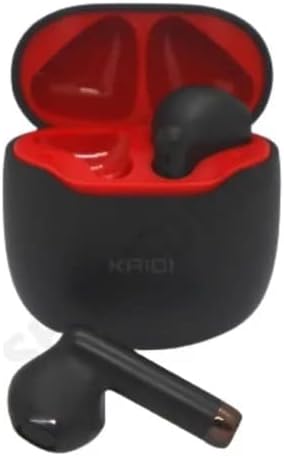
Image 4.1: Earbuds placed inside the charging case, ready for charging.
4.2 장치와의 페어링
The earbuds use Bluetooth V5.1 for a stable and low-latency connection.
- 전원 켜기: 충전 케이스를 여세요. 이어버드가 자동으로 켜지고 페어링 모드로 진입합니다. 음성 안내가 나올 수 있습니다.
- 블루투스 활성화: On your smartphone or other Bluetooth-enabled device, go to the Bluetooth settings and ensure Bluetooth is enabled.
- 장치 선택: In the list of available Bluetooth devices, locate and select "KD-771".
- 연결 확인: 연결이 완료되면 확인음이 들리고 이어버드를 사용할 준비가 됩니다.
- 자동 재연결: After initial pairing, the earbuds will automatically connect to the last paired device when removed from the case, provided Bluetooth is active on the device.
5. 사용 설명서
The KAIDI KD-771 earbuds feature Smart Touch controls for easy management of audio and calls.
5.1 스마트 터치 컨트롤
- 재생/일시 중지: 양쪽 이어버드를 한 번 탭하세요.
- 다음 트랙: 오른쪽 이어버드를 두 번 탭하세요.
- 이전 트랙 : 왼쪽 이어버드를 두 번 탭하세요.
- 전화 받기/종료: 수신 전화나 통화 중일 때 한쪽 이어버드를 한 번 탭합니다.
- 전화 거부: 전화가 오는 동안 한쪽 이어버드를 2초간 길게 누르세요.
- Voice Assistant 활성화 : 한쪽 이어버드를 세 번 탭합니다(예: Siri, Google Assistant).
- 볼륨 조절: Volume adjustments must be made directly on the connected device (smartphone, tablet, etc.). The earbuds do not have integrated volume controls.
5.2 전원 켜기/끄기
- 전원 켜기: 충전 케이스를 열거나, 이어버드가 케이스 밖에 있고 전원이 꺼져 있는 경우 양쪽 이어버드의 터치 영역을 3초 동안 길게 누르세요.
- 전원 끄기 : 이어버드를 충전 케이스에 다시 넣고 뚜껑을 닫으세요. 또는 양쪽 이어버드의 터치 영역을 5초 동안 길게 누르세요.
6. 유지관리
6.1 청소
- 부드럽고 마른 보푸라기 없는 천으로 이어버드와 충전 케이스를 닦으세요.
- 연마성 세척제, 알코올, 화학 용제는 사용하지 마세요.
- 이어폰과 케이스의 충전 접점이 깨끗하고 이물질이 없는지 확인하세요.
6.2 보관
- 사용하지 않을 때는 이어버드를 충전 케이스에 보관하여 보호하고 충전 상태를 유지하세요.
- 직사광선 및 극한의 온도를 피하고 서늘하고 건조한 곳에 보관하십시오.
6.3 방수성
The KAIDI KD-771 earbuds are rated IPX4, meaning they are resistant to splashes of water from any direction. This makes them suitable for workouts or light rain. However, they are not designed for submersion in water, showering, or swimming. Avoid exposing them to heavy rain or direct streams of water.
7. 문제 해결
| 문제 | 가능한 원인 | 해결책 |
|---|---|---|
| 이어폰의 전원이 켜지지 않습니다. | 배터리가 부족합니다. | 이어버드와 충전 케이스를 완전히 충전하세요. |
| 이어폰이 기기와 페어링되지 않습니다. | Bluetooth is off on device; earbuds not in pairing mode; device list cluttered. | Ensure Bluetooth is on. Place earbuds in case, close, then open to re-enter pairing mode. Forget "KD-771" on your device and try pairing again. |
| 이어폰에서 소리가 나지 않습니다. | 볼륨이 너무 낮음; 이어폰이 연결되지 않음; 미디어가 일시 정지됨. | 기기의 볼륨을 높이세요. 블루투스 연결을 확인하세요. 미디어가 재생 중인지 확인하세요. |
| 한쪽 이어버드에서 소리가 나지 않습니다. | Earbuds not properly synced; low battery on one earbud. | 이어버드 두 개를 모두 케이스에 넣고 뚜껑을 닫았다가 다시 여세요. 두 이어버드가 모두 충전되었는지 확인하세요. |
| 충전 케이스가 충전되지 않습니다. | 케이블 또는 전원 공급 장치에 문제가 있습니다. | Try a different USB Type-C cable and/or power adapter. Ensure connections are secure. |
8. 사양
- 모델 이름: 케이디-771
- 연결 기술 : 무선(블루투스 V5.1)
- 무선 통신 기술: 블루투스
- 제어 방법: 만지다
- 특별 기능: Volume control (via device), Lightweight, Microphone included, IPX4 Splash Resistant
- 귀 위치: 인이어
- 재료: 플라스틱
- 주파수 응답: 20 Hz - 20 kHz (implied from 20000 Hz spec)
- Sound Responsiveness: 115데시벨
- 임피던스: 32옴
- 주파수 범위: 2.400 - 2.485GHz
- 전원: 배터리
- Average Battery Life (Earbuds): 4시간
- 배터리 구성: 리튬이온
- 충전 포트: USB 타입-C
- 제품 무게: 100g
- ANATEL 인증: 18583-21-14467
9. 보증 및 지원
9.1 제조업체 보증
이 제품에는 제조업체 보증이 제공됩니다. 3개월 구매일로부터. 본 보증은 정상적인 사용 중 발생한 제조상의 결함에 적용됩니다. 오용, 사고, 무단 개조 또는 정상적인 마모로 인한 손상은 보증되지 않습니다.
9.2 고객 지원
For technical assistance, warranty claims, or further inquiries, please contact your retailer or the KAIDI customer support channel provided at the point of purchase. Please have your proof of purchase and product model number (KD-771) ready when contacting support.


