1. 서론
The LinkTap D1 Smart Sprinkler Timer is an advanced dual-zone wireless water timer designed to provide efficient and intelligent irrigation for your garden. It allows you to manage two independent watering zones from a single device, offering remote control via mobile and web applications. The system integrates weather-adaptive technology to optimize water usage and includes robust features for leak detection and real-time alerts, ensuring the health of your plants and the integrity of your watering system.
주요 특징은 다음과 같습니다.
- Dual-zone control for managing two separate watering areas.
- Remote control via mobile and web 응용 프로그램.
- Automatic weather-based adjustments for water conservation.
- 24/7 flow monitoring with instant notifications for leaks, clogs, or valve failures.
- Reliable Zigbee mesh network for wider and more stable wireless coverage.
- Smart anti-freeze protection to prevent pipe damage.
- Expandable system supporting up to 15 devices per Gateway.

Image 1.1: The LinkTap D1 Smart Sprinkler Timer (right) and its accompanying Gateway (left), which is essential for connectivity.
2. 설정
Setting up your LinkTap D1 Smart Sprinkler Timer is a straightforward process. Follow these steps to get your system operational:
2.1. 게이트웨이 설치
- Connect the LinkTap Gateway to your router using an Ethernet cable.
- Plug the Gateway's power adapter into an electrical outlet.
- Wait for the Gateway's indicator lights to show a stable internet connection (refer to Gateway manual for specific light indicators).
2.2. 타이머 설치
- Ensure the LinkTap D1 timer is within range of the Gateway. For larger yards, consider using a LinkTap Extender to enhance coverage.
- Screw the LinkTap D1 timer onto a standard garden hose faucet. Ensure a tight fit to prevent leaks.
- Connect your garden hoses or irrigation lines to the two outlets at the bottom of the D1 timer.

Image 2.1: The LinkTap D1 timer securely attached to a garden faucet with two hoses connected, ready for operation.
2.3. 앱 페어링
- Download the LinkTap mobile application from your device's app store.
- 계정을 만들거나 로그인하세요.
- 앱에서 새로운 기기를 추가하는 옵션을 선택하세요.
- Scan the QR code located on your LinkTap D1 timer. The device should pair automatically within seconds.

Image 2.2: Simplified diagram illustrating the connection flow from the LinkTap D1 timer to the Gateway and then to the internet for remote control and alerts.
3. Operating the LinkTap D1
The LinkTap D1 offers flexible control options, including manual operation and advanced scheduling via the mobile application.
3.1. 수동 제어
You can manually turn on or off each watering zone directly from the D1 timer by pressing the respective 'Manual On/Off' buttons. This is useful for quick watering tasks without using the app.
3.2. App-Based Scheduling and Control
The LinkTap app provides comprehensive control over your irrigation system:
- Multi-Cycle Schedules: Program watering schedules by date, duration, and volume for each zone.
- 즉시 켜기/끄기: Start or stop watering immediately from anywhere.
- Weather-Adaptive Watering: The system can automatically adjust or skip watering cycles based on local weather conditions.

Image 3.1: The LinkTap D1's rain skip feature automatically prevents watering during or after rainfall, conserving water.
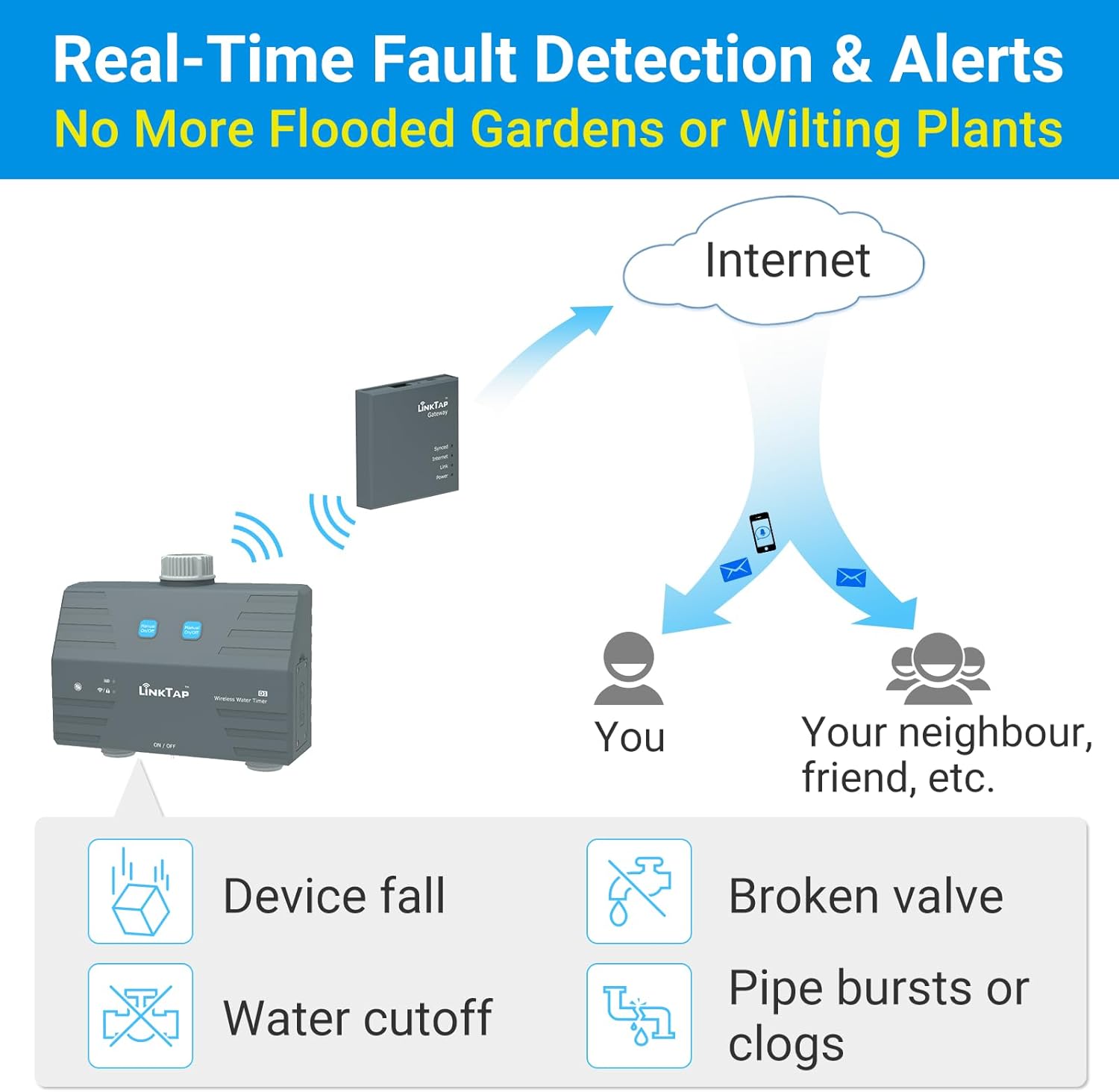
Image 3.2: Temperature adaptive watering adjusts irrigation duration based on ambient temperature, ensuring optimal plant hydration.
3.3. Flow Monitoring and Data
The D1 timer features built-in flow meters that provide real-time data on water consumption. This data is accessible through the app, allowing you to track usage and identify potential issues.

Image 3.3: Screenshots from the LinkTap app displaying detailed watering history and flow rate data, enabling precise monitoring.

Image 3.4: The LinkTap D1 supports flexible watering modes, allowing users to set schedules based on desired water volume or duration.
4. 유지관리
Proper maintenance ensures the longevity and optimal performance of your LinkTap D1 Smart Sprinkler Timer.
4.1. Anti-Freeze Protection
The LinkTap D1 features smart anti-freeze protection. When temperatures drop below a preset threshold, the valve automatically opens to prevent ice buildup and reduce the risk of pipe damage. However, for prolonged freezing conditions, it is recommended to disconnect the timer and store it indoors.

Image 4.1: The smart anti-freeze protection feature helps prevent damage to the timer and pipes during cold weather by automatically opening the valve.
4.2. 일반 관리
- Clean the exterior of the timer periodically with a damp 천. 독한 화학 물질을 사용하지 마십시오.
- Inspect hose connections regularly for leaks and tighten if necessary.
- During winter months or extended periods of non-use, disconnect the timer from the faucet and store it in a dry, protected area to prevent damage from freezing temperatures.
5. 문제 해결
This section addresses common issues you might encounter with your LinkTap D1 Smart Sprinkler Timer.
5.1. Real-Time Fault Detection & Alerts
The LinkTap D1 system is designed to provide real-time alerts for various issues, helping you maintain an efficient watering system:
- Device Fall: Notifies you if the timer has fallen or been dislodged.
- Broken Valve: Alerts you to a malfunctioning internal valve.
- Water Cutoff: Informs you if the water supply to the timer has been interrupted.
- Pipe Bursts or Clogs: Detects unusual flow patterns that may indicate a burst pipe or clog in your irrigation lines.
These alerts are sent directly to your mobile device via push notifications, allowing for immediate action.
Image 5.1: The LinkTap system provides comprehensive real-time fault detection and alerts to prevent damage and water waste.
5.2. 연결 문제
- No Connection to Gateway: Ensure the Gateway is properly connected to your router and powered on. Check the Gateway's indicator lights.
- 타이머가 응답하지 않음: Verify the timer is within range of the Gateway. If you have a large property, consider adding a LinkTap Extender to boost the Zigbee signal.
- 앱이 동기화되지 않음: Check your internet connection. Ensure the LinkTap app is updated to the latest version.
Image 5.2: The LinkTap system can be expanded with an Extender to create a robust mesh network, improving connectivity over large areas.
5.3. 물주기 문제
- 물 흐름 없음: Check if the faucet is fully open. Ensure the timer is not in manual off mode or that a schedule is active. Inspect for clogs in hoses or the timer's inlets/outlets.
- 부정확한 유량 측정값: Ensure the flow meters are clear of debris. Recalibrate if necessary via the app (refer to app instructions).
6. 사양
| 특징 | 세부 사항 |
|---|---|
| 상표 | 링크탭 |
| 모델 | D1 |
| 색상 | 다크 그레이 |
| 제품 치수 | 6.02인치 깊이 x 6.61인치 너비 x 2.87인치 높이 |
| 품목 무게 | 1.76 파운드 |
| 설정 수 | 5 (referring to general settings categories) |
7. 보증 및 지원
7.1. 보증 정보
The LinkTap D1 Smart Sprinkler Timer is backed by a 2년 보증. 본 보증은 정상적인 사용 환경에서 발생하는 재료 및 제조상의 결함에 적용됩니다. 보증 청구를 위해 구매 증빙 서류를 보관해 주십시오.
7.2. 고객 지원
For technical assistance, troubleshooting beyond this manual, or warranty inquiries, please visit the official LinkTap website or contact their customer support team. Detailed contact information and FAQs can typically be found on the manufacturer's support page.
LinkTap Official Web대지: www.link-tap.com (전ample link, please refer to actual product documentation for precise URL)


