1. 제품 오버view
The Kuephom Portable CD Player (Model PM11-Black) is a versatile audio device designed for personal and multi-user listening. It features a built-in speaker, rechargeable battery, and anti-skip protection, making it suitable for various environments including home, car, and travel. The player supports multiple audio formats and offers adjustable playback speed for learning purposes.

Image 1.1: Kuephom Portable CD Player and accessories.
주요 특징:
- 충전식 배터리: Integrated 1500mAh battery provides up to 8 hours of playback with earphones or 5 hours with the built-in speaker on a 4-hour charge.
- 내장 스피커: Allows direct listening without external headphones or speakers.
- 건너뛰기 방지 보호: Ensures uninterrupted audio playback during movement or light shocks.
- Memory Playing: Resumes playback from the last played track when the device is turned on again.
- 폭넓은 호환성: Supports CD, CD-R, CD-RW, MP3, and WMA formats.
- 다중 연결 옵션: Includes 3.5mm AUX input/output, USB port, and headphone jack.
- Adjustable Playback Speed: Useful for language learning or musical practice.
2. 설정 가이드
2.1 장치 충전
Before initial use, fully charge the CD player. The device features a built-in rechargeable battery, eliminating the need for disposable AA batteries.
- Locate the charging port on the side of the CD player.
- Connect the provided USB charging cable to the player and a compatible USB power source (e.g., wall charger, power bank, car charger, computer USB port).
- 충전 표시등이 켜집니다. 완전히 충전하는 데는 일반적으로 약 4시간이 걸립니다.

Image 2.1: Charging options for the CD player.
2.2 CD 넣기
The CD player supports standard CD, CD-R, CD-RW, MP3, and WMA disc formats.
- Locate the 'OPEN' switch on the side of the player.
- Slide the switch to the 'OPEN' position to release the lid.
- Gently place the CD onto the central spindle with the label side facing up. Ensure the CD is securely seated.
- 뚜껑이 딸깍 소리가 나면서 제자리에 고정될 때까지 꽉 닫으세요.
Video 2.2: Demonstrates the basic functions and usage scenarios of the Kuephom Portable CD Player, including loading a CD and identifying ports.
2.3 외부 장치 연결
- 헤드폰: Plug the included earbuds or your preferred 3.5mm headphones into the headphone jack (blue port).
- 보조 연결: Use the provided 3.5mm audio cable to connect the player's AUX port (green port) to external speakers or a car's AUX input.
- USB 재생 : Insert a USB flash drive into the USB port to play compatible audio file(MP3, WMA).

Image 2.3: Connecting the CD player to a car's audio system.
3. 사용 설명서
3.1 전원 켜기/끄기
Locate the power switch on the side of the player. Slide it to the 'ON' position to power on the device. Slide it to 'OFF' to power off.
3.2 기본 재생 컨트롤
The control panel on the top of the player features intuitive buttons:
- 재생/일시정지(►▮): 재생을 시작하거나 일시 정지하려면 누르세요.
- 이전 트랙 (◀◀): Press once to go to the beginning of the current track. Press twice to go to the previous track.
- Next Track (►►): 다음 트랙으로 건너뛰려면 누르세요.
- 볼륨 높이기(+): 볼륨을 높입니다.
- 볼륨 낮추기(-): 볼륨을 낮춥니다.
3.3 고급 재생 기능
- Repeat (REP): Cycles through repeat modes (e.g., repeat one, repeat all, random).
- 모드(MODE): Switches between different playback modes (e.g., CD, USB, AUX).
- A-B Repeat (A-B): Allows repeating a specific segment of audio.
- Program (PROG): Enables programming a custom playback order for tracks.
- Speed Adjustment (SPEED +/-): Adjusts the playback speed, useful for language learning or transcribing audio.

Image 3.1: The adjustable playback speed feature is beneficial for learning.
3.4 Anti-Skip and Memory Functions
- 건너뛰기 방지 보호: This function is automatically activated when the player is turned on, providing a buffer against minor shocks and vibrations to ensure continuous playback.
- Memory Playing: The device remembers the last played track and position, resuming from that point when powered on again.
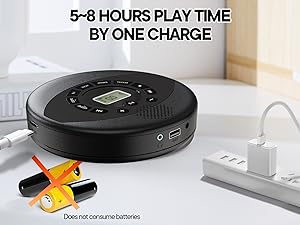
Image 3.2: Anti-shock protection for active use.
4. 유지관리
4.1 Cleaning the CD Player
- 부드럽고 마른 천으로 플레이어 외부를 닦으십시오.
- For the lens, use a specialized CD lens cleaning kit. Do not touch the lens directly.
- 연마성 세척제나 용제를 사용하지 마십시오.
4.2 배터리 관리
- 배터리 수명을 연장하려면 배터리를 자주 완전히 방전하지 마세요.
- 장기간 사용하지 않을 때는 기기를 서늘하고 건조한 곳에 보관하세요.
- Charge the device at least once every three months if unused to prevent deep discharge.
4.3 CD 케어
- CD를 다룰 때는 지문이나 흠집이 생기지 않도록 가장자리를 잡으세요.
- CD는 부드럽고 보풀 없는 천으로 중앙에서 바깥쪽으로 닦아주세요.
- Store CDs in their cases to protect them from dust and damage.
5. 문제 해결
| 문제 | 가능한 원인 | 해결책 |
|---|---|---|
| 플레이어가 켜지지 않습니다. | 배터리가 방전되었습니다. 전원 스위치가 꺼져 있습니다. | Charge the battery. Ensure the power switch is in the 'ON' position. |
| 소리가 나지 않습니다. | Volume is too low. Headphones/AUX cable not connected properly. CD/USB not playing. | Increase volume. Check connections. Ensure CD/USB is playing and not paused. |
| CD가 끊기거나 재생되지 않습니다. | CD is dirty or scratched. CD is not properly seated. Incorrect CD format. | Clean the CD. Re-seat the CD. Ensure the CD format (CD, CD-R, CD-RW, MP3, WMA) is supported. |
| USB 재생이 작동하지 않습니다. | USB drive not properly inserted. Incompatible file 체재. | USB 드라이브가 완전히 삽입되었는지 확인하십시오. file파일 형식은 MP3 또는 WMA입니다. |
6. 제품 사양
| 특징 | 세부 사항 |
|---|---|
| 모델 번호 | PM11-Black |
| 제품 치수 | 5.7 x 5.7 x 1.2 인치 |
| 품목 무게 | 1.01파운드 |
| 배터리 유형 | 1개의 리튬 폴리머 배터리(포함) |
| 연결성 | 보조, USB |
| 특별 기능 | Anti-Skip Protection, Portable, Programmable Memory, Rechargeable |
| 포함된 구성 요소 | CD player X 1, Earbuds X 1, Audio cable X 1, Charging cable X 1, Pouch X 1 |
| 지원되는 형식 | CD, CD-R, CD-RW, MP3, WMA |
7. 보증 및 지원
For warranty information and customer support, please contact Kuephom directly. Details regarding product warranty periods and service procedures are typically provided with your purchase documentation or can be found on the official Kuephom web대지.
If you encounter any issues not covered in this manual, please reach out to Kuephom customer service for assistance.


