1. 제품 오버view
The DieseRC 433Mhz Wireless Remote Control Switch is a versatile relay receiver system designed for remote control of various electrical devices. It operates on a 433Mhz radio frequency, offering stable and reliable performance with high reception sensitivity. The system supports multiple operating modes and a wide voltage range, making it suitable for diverse applications.

이미지 1.1: The DieseRC Wireless Remote Control Switch system, including the receiver module and five keyfob transmitters.
동영상 1.1 : A demonstration of the relay remote control switch in action, showing momentary and latched modes with a light bulb and an electromagnetic lock, and the reset function.
주요 특징:
- 433Mhz RF Wireless Technology: Ensures stable and reliable signal transmission, capable of passing through walls, floors, and doors within a 50-meter open area range.
- 다양한 작동 모드: Supports Momentary, Toggle, Latched, and Delay modes, programmable to suit specific application requirements.
- 와이드볼tage 호환성: The receiver operates safely within a 5V to 30V DC range, making it compatible with 5V, 12V, 24V, and 30V systems.
- 고품질 릴레이: Equipped with a 10A relay designed for over 100,000 operations, ensuring durability and stability.
- 무전위 접점: Features Normally Open (NO), Common (COM), and Normally Closed (NC) terminals for flexible wiring.
- 다중 사용자 제어: One receiver can store up to 20 transmitters, and one transmitter can control multiple receivers.
- 안전한 코딩: 보안 강화를 위해 EV1527 학습 코드를 사용합니다.
2. 패키지 내용
- 1 x DieseRC 433Mhz Wireless Relay Receiver Module
- 5 x DieseRC Keyfob Transmitters (each with 2x CR2016 batteries installed)
- 1 x Receiver Housing (for protection)
3. 사양
| 특징 | 사양 |
|---|---|
| 모델 번호 | 5301+5*KT03 |
| 운영 볼륨tage (수신기) | 직류 5V - 30V |
| RF 주파수 | 433MHz |
| 릴레이 전류 정격 | 10 Amps (AC 250V, DC 30V) |
| 연락처 유형 | 상시 개방(NO), 일반(COM), 상시 폐쇄(NC) |
| 코딩 유형 | EV1527 학습 코드 |
| 원격 제어 범위 | 최대 50미터(개방형) |
| 송신기 배터리 | 2 x CR2016 (포함) |
| 제품 치수 | 0.35 x 0.35 x 0.15 inches (Receiver module) |
4. 안전 정보
- Ensure all power is disconnected before performing any wiring to prevent electric shock.
- 올바른 볼륨 확인tage and current ratings for your application to avoid damage to the device or connected equipment.
- Do not expose the receiver module to moisture or extreme temperatures.
- Installation should be performed by individuals familiar with electrical wiring and safety procedures.
5. 설정 및 배선
The receiver module features three terminals for connecting your device: Normally Open (NO), Common (COM), and Normally Closed (NC). It also has terminals for power input (+V and -V).

이미지 5.1: 상세한 view of the receiver module's components and wiring terminals.
Basic Wiring Principles:
- 전원 입력: Connect your DC 5V-30V power supply to the +V and -V terminals on the receiver.
- 장치 연결: The relay acts as a switch. Connect your device's power line through the COM and either NO or NC terminals, depending on whether you want the device to be ON or OFF when the relay is inactive.
- 상시 열림(NO): The circuit is open (device OFF) when the relay is inactive. It closes (device ON) when the relay is activated by the remote.
- 상시 닫힘(NC): The circuit is closed (device ON) when the relay is inactive. It opens (device OFF) when the relay is activated by the remote.
- 공통(COM): This is the common terminal for the relay switch.

이미지 5.2: Diagram illustrating the DC 5V-30V safety remote control setup.

이미지 5.3: Example wiring configurations for different types of devices.
Example Application: Garage Door Opener
This system can be integrated with existing wired garage door openers. The receiver acts as a companion device, allowing remote control of the garage door.
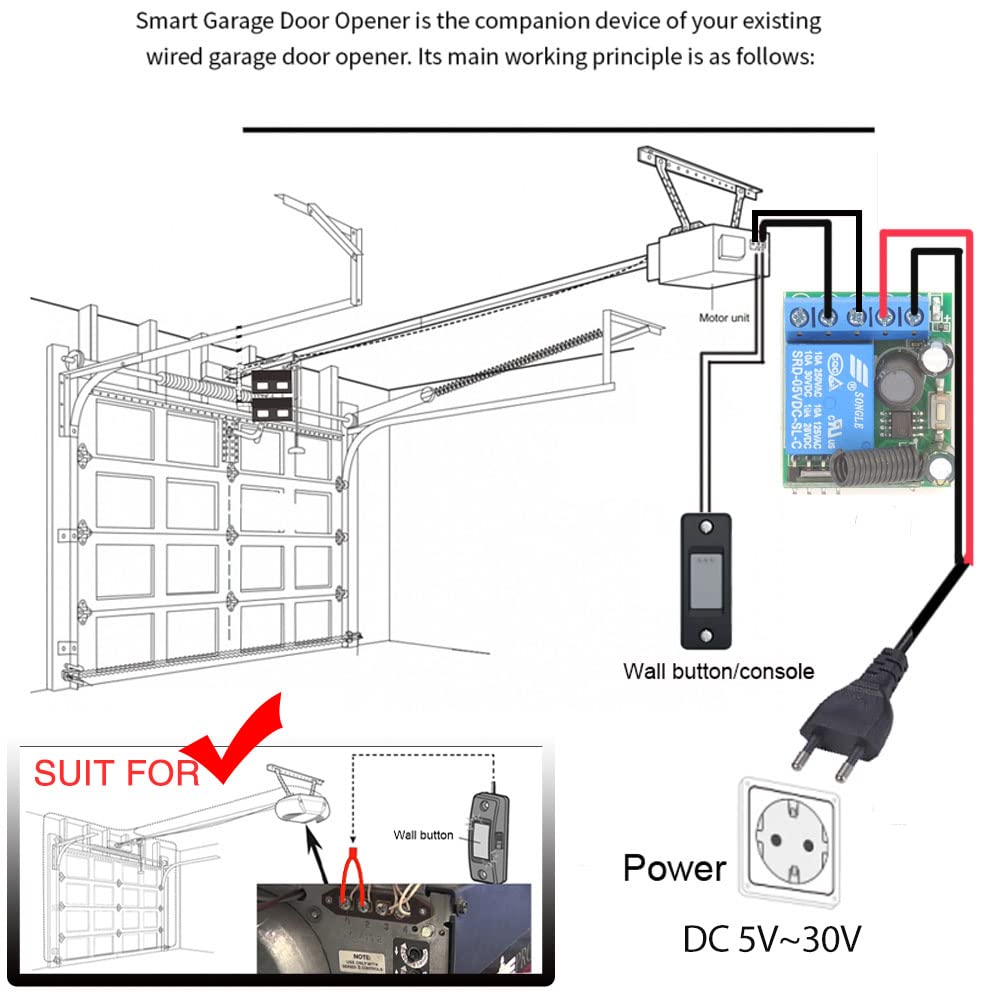
이미지 5.4: Wiring for a garage door opener application.
6. 작동 모드 및 프로그래밍
The DieseRC receiver supports four operating modes: Momentary, Toggle, Latched, and Delay. The default mode is Latched. To change the mode or pair new transmitters, follow the programming steps below. The "Learning Button" on the receiver module is used for programming.
동영상 6.1 : A detailed guide on how to program the remote control switch for Momentary, Toggle, Latched, and Delay modes, including the reset function.

이미지 6.1: Visual representation of the different operating modes.

이미지 6.2: Visual guide for programming the receiver to different operating modes.
6.1. 순간 모드 (모드 1)
In Momentary mode, the relay activates only while the remote button is pressed and held. It deactivates when the button is released.
- Press the Learning Button on the receiver 1회. 표시등이 켜집니다.
- Press the desired button on your transmitter (e.g., "ON" button). The indicator light on the receiver will flash, then turn off, indicating successful pairing.
- Test: Press and hold the transmitter button to activate the relay; release to deactivate.
6.2. 모드 전환 (모드 2)
토글 모드에서는 리모컨 버튼을 한 번 누르면 릴레이가 작동하고, 두 번 누르면 작동이 중지됩니다.
- Press the Learning Button on the receiver 2번. 표시등이 켜집니다.
- Press the desired button on your transmitter. The indicator light on the receiver will flash, then turn off, indicating successful pairing.
- Test: Press the transmitter button once to activate; press again to deactivate.
6.3. 래치 모드 (모드 3)
In Latched mode, one button (e.g., "ON") activates the relay, and another button (e.g., "OFF") deactivates it. This mode requires two buttons on the transmitter.
- Press the Learning Button on the receiver 3번. 표시등이 켜집니다.
- Press the "ON" button on your transmitter. The indicator light will flash.
- Immediately press the "OFF" button on the same transmitter. The indicator light on the receiver will flash, then turn off, indicating successful pairing.
- Test: Press "ON" to activate; press "OFF" to deactivate.
6.4. Delay Mode (Mode 4, 5, 6, 7)
In Delay mode, the relay activates when the button is pressed and held, and deactivates after a set delay (5, 10, 15, or 20 seconds) once the button is released.
- 5-second Delay: Press the Learning Button 4번.
- 10-second Delay: Press the Learning Button 5번.
- 15-second Delay: Press the Learning Button 6번.
- 20-second Delay: Press the Learning Button 7번.
- After pressing the Learning Button the required number of times for your desired delay, the indicator light will turn on.
- Press the desired button on your transmitter. The indicator light on the receiver will flash, then turn off, indicating successful pairing.
- Test: Press and hold the transmitter button to activate. Release the button, and the relay will deactivate after the programmed delay.
6.5. 수신기 재설정
To clear all programmed transmitters from the receiver:
- Press the Learning Button on the receiver 8번. The indicator light will flash rapidly, then turn off.
- All previously paired transmitters are now cleared. You will need to re-program any transmitters you wish to use.
7. 유지관리
7.1. 송신기 배터리 교체
The keyfob transmitters are powered by two CR2016 batteries. If the remote control range decreases or the indicator light on the transmitter becomes dim, it may be time to replace the batteries.
- Locate the screw port on the back of the transmitter.
- 송신기 c를 조심스럽게 여세요asing.
- Remove the old CR2016 batteries and insert new ones, ensuring correct polarity.
- C를 닫으세요asing 안전하게.
7.2. 일반 관리
- Keep the receiver and transmitters clean and dry.
- 기기를 떨어뜨리거나 강한 충격을 가하지 마십시오.
- Store in a cool, dry place away from direct sunlight and corrosive materials.
8. 문제 해결
- 문제: The remote control does not activate the receiver.
- 해결책: Check if the transmitter batteries are depleted and replace them if necessary. Ensure the transmitter is within the effective operating range (up to 50 meters in open areas). Verify that the transmitter is correctly paired with the receiver according to the programming instructions for the desired mode.
- 문제: The receiver indicator light does not respond during programming.
- 해결책: Ensure the receiver is properly powered (DC 5V-30V). Check the power connections. If the issue persists, try resetting the receiver (press Learning Button 8 times) and then re-program.
- 문제: The device connected to the relay does not turn ON/OFF.
- 해결책: Verify that the device is correctly wired to the NO/COM/NC terminals and that the wiring is secure. Check the power supply to the connected device. Ensure the relay is clicking when activated by the remote, indicating it's switching.
- 문제: 작동 범위가 짧습니다.
- 해결책: Replace transmitter batteries. Ensure there are no significant obstructions (thick walls, metal structures) between the transmitter and receiver. Avoid sources of strong RF interference.
9. 보증 및 지원
DieseRC products are designed for reliability and performance. For specific warranty details, please refer to the product packaging or contact DieseRC customer support.
For technical assistance or further inquiries, please visit the official DieseRC website or contact their customer service department. Contact information can typically be found on the product packaging or the brand's online store.
제조업체: 디제RC


