1. 서론
The Guardo Fit Coach Explore is an advanced activity tracker designed to monitor various aspects of your health and fitness. This manual provides essential information for setting up, operating, and maintaining your device to ensure optimal performance and longevity.
2. 패키지 내용
패키지에 모든 품목이 들어 있는지 확인하세요.
- Guardo Fit Coach Explore Activity Tracker
- 충전 케이블
- 사용 설명서 (본 문서)
3. 설정
3.1 장치 충전
Before first use, fully charge your Guardo Fit Coach Explore. Connect the charging cable to the charging port on the back of the device and plug the other end into a USB power source (e.g., computer, USB wall adapter). The device will display a charging indicator.

이미지: 후면 view of the activity tracker highlighting the charging contacts and sensors, alongside a display showing blood pressure readings.
3.2 앱 설치 및 페어링
- Download the official Guardo Fit Coach app from your smartphone's app store (compatible with Android operating systems).
- 스마트폰에서 Bluetooth가 활성화되어 있는지 확인하세요.
- 앱을 열고 화면의 지시에 따라 계정을 만들거나 로그인하세요.
- 앱 내에서 '기기 추가' 또는 '새 기기 페어링'을 선택하세요.
- The app will search for your Guardo Fit Coach Explore. Select your device from the list to initiate pairing.
- Confirm the pairing request on both your smartphone and the activity tracker if prompted.

Image: The activity tracker worn on a wrist, showing a watch face with icons for different applications, indicating smartphone connectivity.
4. 사용 설명서
4.1 기본 탐색
The Guardo Fit Coach Explore features a touchscreen display for interaction. Swipe left, right, up, or down to navigate through menus and features. Tap to select an option or confirm an action. The device may also have physical buttons for specific functions like power on/off or returning to the home screen.

Image: The activity tracker's display showing a customizable watch face with a unique spiral graphic.
4.2 알림 수신
Once paired with your smartphone, the activity tracker can display notifications for incoming calls, messages, and app alerts. Ensure notification permissions are granted in your smartphone's settings and within the Guardo Fit Coach app.

Image: The activity tracker's screen showing an incoming call notification with the caller's number and options to answer or reject the call.
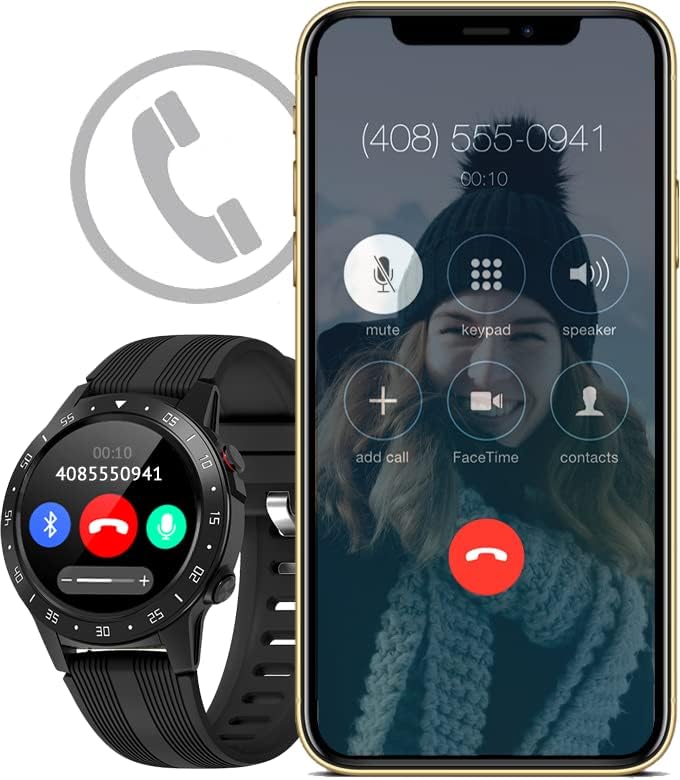
Image: The activity tracker and a smartphone side-by-side, both indicating an incoming call, demonstrating call notification synchronization.
4.3 음악 제어
Control music playback on your paired smartphone directly from your activity tracker. This feature allows you to play, pause, skip tracks, and adjust volume without needing to access your phone.

Image: The activity tracker and a smartphone displaying synchronized music playback interfaces, allowing remote control of audio.
5. 특징
The Guardo Fit Coach Explore offers a range of features to support your active lifestyle:
- 멀티스포츠 트래커: Track various activities such as indoor and outdoor sports, cycling, and climbing.
- Custom Activity Tracking: Monitor specific activities with tailored settings.
- GPS: Built-in GPS for accurate tracking of routes and distances during outdoor activities.
- 심박수 모니터: 심박수를 지속적으로 모니터링하세요.
- 혈압 모니터: Measure your blood pressure directly from the device.
- 알림: 전화, 메시지 및 앱 알림을 받으세요.
- 나침반: Integrated digital compass for navigation.
- 가속도계: Measures movement and activity.
- 고도계: Measures altitude, useful for hiking and climbing.
- 기압계: Measures atmospheric pressure, aiding in weather prediction and altitude accuracy.

Image: The activity tracker's display surrounded by icons symbolizing its diverse functionalities, including communication and utility features.

Image: The activity tracker's screen showing real-time GPS data, such as distance covered, pace, and heart rate, overlaid on a map.
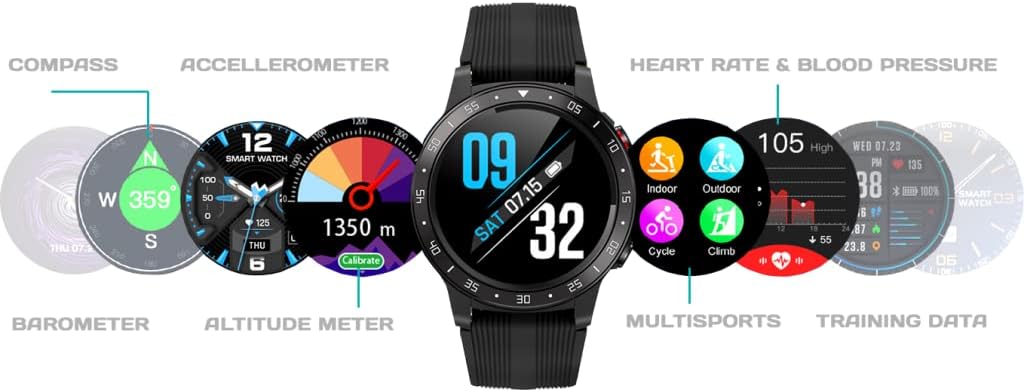
이미지: 포괄적인 view of the activity tracker's display, showcasing various data points from its integrated sensors, including environmental and health metrics.
6. 유지관리
6.1 청소
Regularly clean your activity tracker to prevent skin irritation and maintain device functionality. Use a soft, damp, lint-free cloth to wipe the screen and strap. Avoid harsh chemicals or abrasive materials.
6.2 배터리 관리
배터리 수명을 연장하려면 기기를 극한 온도에 노출시키지 마십시오. 기기를 정기적으로 충전하되, 장시간 완전히 충전하거나 완전히 방전된 상태로 두지 마십시오.
7. 문제 해결
7.1 장치가 켜지지 않음
- 기기가 완전히 충전되었는지 확인하세요. 충전기에 최소 30분 이상 연결해 두세요.
- Press and hold the power button (if applicable) for 10-15 seconds to attempt a forced restart.
7.2 페어링 문제
- 스마트폰에서 Bluetooth가 활성화되어 있고 기기가 범위 내에 있는지 확인하세요.
- Restart both your smartphone and the activity tracker.
- Forget the device in your smartphone's Bluetooth settings and attempt to pair again through the Guardo Fit Coach app.
- 앱이 최신 버전으로 업데이트되었는지 확인하세요.
7.3 부정확한 판독값
- Ensure the device is worn snugly on your wrist, about one finger's width above your wrist bone.
- 기기 뒷면의 센서를 청소하세요.
- GPS를 사용할 때는 탁 트인 공간에 있는지 확인하십시오. view 하늘의.
8. 사양
| 특징 | 사양 |
|---|---|
| 상표 | 구아르도 |
| 모델 | 탐구하다 |
| 호환 장치 | 스마트폰 (안드로이드 OS) |
| 디스플레이 유형 | 액정표시장치 |
| 화면 크기 | 40 밀리미터 |
| 무선 연결 | 블루투스 |
| GPS | 내장형 GPS |
| 입력 장치 | 마이크, 터치스크린 |
| 충전식 배터리 포함 | 예 |
| 특별 기능 | Custom activity tracking, Blood pressure monitor, GPS, Notifications, Multisport Tracker |
9. 안전 정보
- 장치를 열거나 분해하려고 하지 마세요.
- 기기를 극한의 온도, 직사광선, 습기에 노출되지 않도록 하세요.
- This device is not a medical instrument. The data provided is for reference only and should not be used for medical diagnosis or treatment.
- 새로운 운동 프로그램을 시작하기 전이나 건강상의 우려가 있는 경우 의사와 상담하십시오.
- 해당 지역 규정에 따라 장치와 배터리를 폐기하세요.


