소개
The Closer Pets MiBowl Microchip Automatic Pet Feeder is designed to provide controlled access to food for your pets, especially in multi-pet households. Utilizing microchip technology, it ensures that only designated pets can access their meals, preventing food theft and allowing for regulated diets. This feeder is suitable for both wet and dry food and features a quiet operation and a design focused on pet comfort.

Image: The Closer Pets MiBowl Microchip Automatic Pet Feeder, showing its sleek design and transparent food bowl cover.
주요 특징
- Microchip Access: Automatically detects your pet's microchip or RFID collar tag, granting exclusive access to their food.
- Multi-Pet Compatibility: Can be programmed for up to 10 different pets, ideal for households with multiple animals or pets on special diets.
- Food Versatility: Suitable for both wet and dry pet food.
- Odor and Pest Control: The fully enclosed design helps keep food fresh and prevents pests from accessing the food.
- 조용한 작동: Features an ultra-quiet lid mechanism for a peaceful feeding experience.
- 인체공학적 디자인: Provides a natural feeding position, allowing pets to eat comfortably with paws on the ground.
- 조절 가능한 개구부: Includes removable clips to adjust the opening width, accommodating smaller pets like kittens or puppies.

Image: Diagram illustrating key features of the MiBowl feeder, including the swing lid for pest control and the open base for increased pet comfort and access.
설치 가이드
1. 포장 풀기 및 배터리 설치
Carefully remove all components from the packaging. The MiBowl feeder requires 4 x C-type batteries (not included). Locate the battery compartment, typically on the underside or rear of the unit. Insert the batteries, ensuring correct polarity as indicated.
2. Programming Your Pet's Microchip or RFID Tag
The MiBowl feeder can be programmed to recognize your pet's existing microchip or the supplied RFID collar tag. Follow these steps to pair your pet:
- 공급기의 전원이 켜져 있는지 확인하세요.
- 를 누르고 계세요 'PET' button (often indicated by a paw print icon) on the control panel until the indicator light flashes.
- Gently guide your pet's head into the feeder opening, allowing the feeder to scan their microchip. If using an RFID collar tag, 유지하다 tag near the front of the feeder.
- The indicator light will change (e.g., solid green) to confirm successful pairing.
- Repeat for up to 10 different pets if you have multiple animals.

이미지: 클로즈업 view of the MiBowl control panel, showing the 'PET', 'TRAINING', battery indicator, 'OPEN', and 'CLOSE' buttons.

Image: Visual explanation of how the MiBowl works, showing that only paired pets can access the food, while unpaired pets are locked out.
3. Adjusting Opening Width (Optional)
For smaller pets, the MiBowl comes with removable clips that can be inserted to narrow the opening. This provides an extra shield and ensures comfortable access for kittens or small dogs.

Image: Comparison of the MiBowl's opening width with and without the optional clips installed, showing 3.5 inches with clips and 6 inches without.
작동 지침
1. 피더 채우기
Lift the transparent lid to access the food bowl. Fill the bowl with your pet's preferred wet or dry food. The bowl can hold up to 340g of food. Close the lid securely after filling.
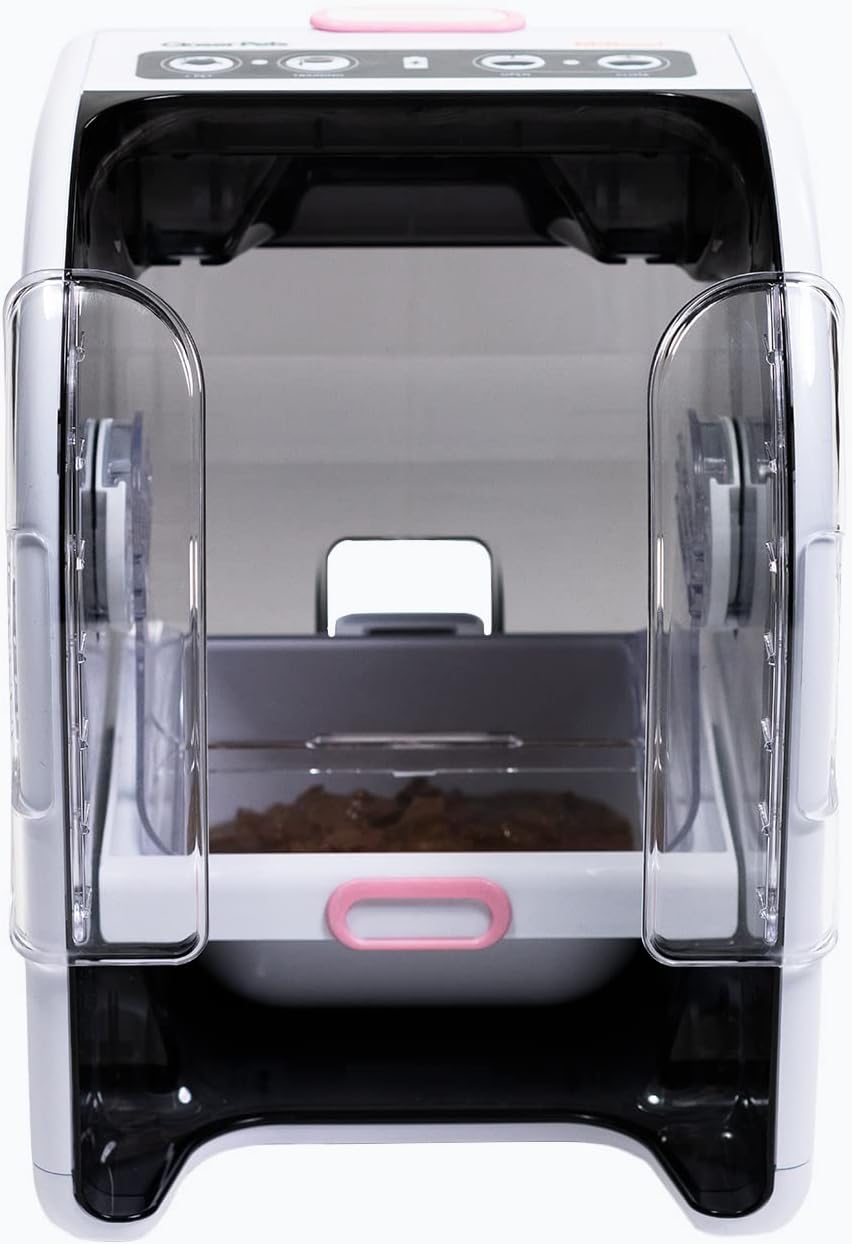
Image: The MiBowl feeder with its lid open, revealing the food bowl filled with pet food and the transparent side clips.
2. 자동 급지
Once a programmed pet approaches the feeder, the MiBowl will detect their microchip or RFID tag. The lid will automatically open, allowing the pet to access their food. After the pet moves away, the lid will quietly close, keeping the food fresh and secure.

Image: A black and white cat with its head inside the MiBowl feeder, demonstrating how the pet accesses the food when the lid is open.
3. 훈련 모드
For pets new to automatic feeders, the MiBowl includes a 'TRAINING' mode. Press the 'TRAINING' button (indicated by a graduation cap icon) to keep the lid open for a set period, allowing your pet to become accustomed to the feeder without the lid movement. Refer to the full manual for specific training program details.
4. 수동 조작
The control panel also features 'OPEN' and 'CLOSE' buttons, allowing you to manually open or close the lid as needed, for example, during cleaning or when introducing your pet to the feeder.
유지
피더 청소
Regular cleaning is essential to maintain hygiene and ensure the longevity of your MiBowl feeder. The food bowl and lid components are designed for easy removal and cleaning.
- Remove any remaining food from the bowl.
- Carefully detach the food bowl and the transparent lid components.
- Wash these parts with warm, soapy water. Rinse thoroughly and dry completely before reassembling.
- 본체를 광고용 세제로 닦으세요amp 천으로 닦아주세요. 본체를 물에 담그지 마세요.
배터리 교체
When the battery indicator light on the control panel signals low power, replace all 4 x C-type batteries simultaneously to ensure optimal performance. Always use fresh, high-quality batteries.
문제 해결
| 문제 | 가능한 원인 | 해결책 |
|---|---|---|
| Lid does not open for programmed pet. |
|
|
| 뚜껑이 완전히 닫히지 않습니다. |
|
|
| Unpaired pets can still access food. |
|
|
| Feeder is noisy during operation. |
|
|
명세서
| 특징 | 세부 사항 |
|---|---|
| 모델 번호 | CP500 |
| 상표 | 가까운 애완 동물 |
| 치수(길이 x 너비 x 높이) | 33cm x 22.1cm x 24.2cm(13인치 x 8.7인치 x 9.5인치) |
| 무게 | 1.4kg(3.1파운드) |
| 전원 | 4 x C-type Batteries (not included) |
| 식량 용량 | Up to 340g (dry or wet food) |
| 대상 종 | 고양이, 소형견 |
| 재료 | Durable Pet Feeder Material |
| 특징 | 마이크로칩 리더 |

Image: Diagram showing the dimensions of the Closer Pets MiBowl feeder in centimeters.
보증 및 지원
The Closer Pets MiBowl Microchip Automatic Pet Feeder is covered by a standard manufacturer's warranty. For specific warranty details, claims, or technical support, please refer to the warranty information provided with your product packaging or visit the official Closer Pets web대지.
For general inquiries or assistance with your purchase, you may also contact the seller, Pet Mate Ltd., through the platform where the product was purchased.
중요한 안전 정보
- 이 제품은 가정용으로만 사용하도록 설계되었습니다.
- 본체를 물이나 기타 액체에 담그지 마십시오.
- 사용하지 않을 때나 정비 중에는 어린이와 애완동물의 손이 닿지 않는 곳에 보관하십시오.
- 사료통은 안정적이고 평평한 곳에 놓아야 합니다.
- Use only the specified battery type (4 x C-type). Do not mix old and new batteries or different battery types.
- 사용한 배터리는 현지 규정에 따라 책임감 있게 폐기하십시오.
- Do not attempt to modify or repair the feeder yourself. Refer to qualified personnel for service.
공식 제품 영상
판매자가 제공한 공식 제품 영상이 없어 본 설명서에 포함할 수 없었습니다.


