1. 서론
This manual provides essential information for the safe and efficient use of your Black Shark 5 Pro gaming smartphone. Please read this guide thoroughly before operating the device to ensure optimal performance and longevity. Keep this manual for future reference.
2. 디바이스 오버view
Familiarize yourself with the physical components of your Black Shark 5 Pro.
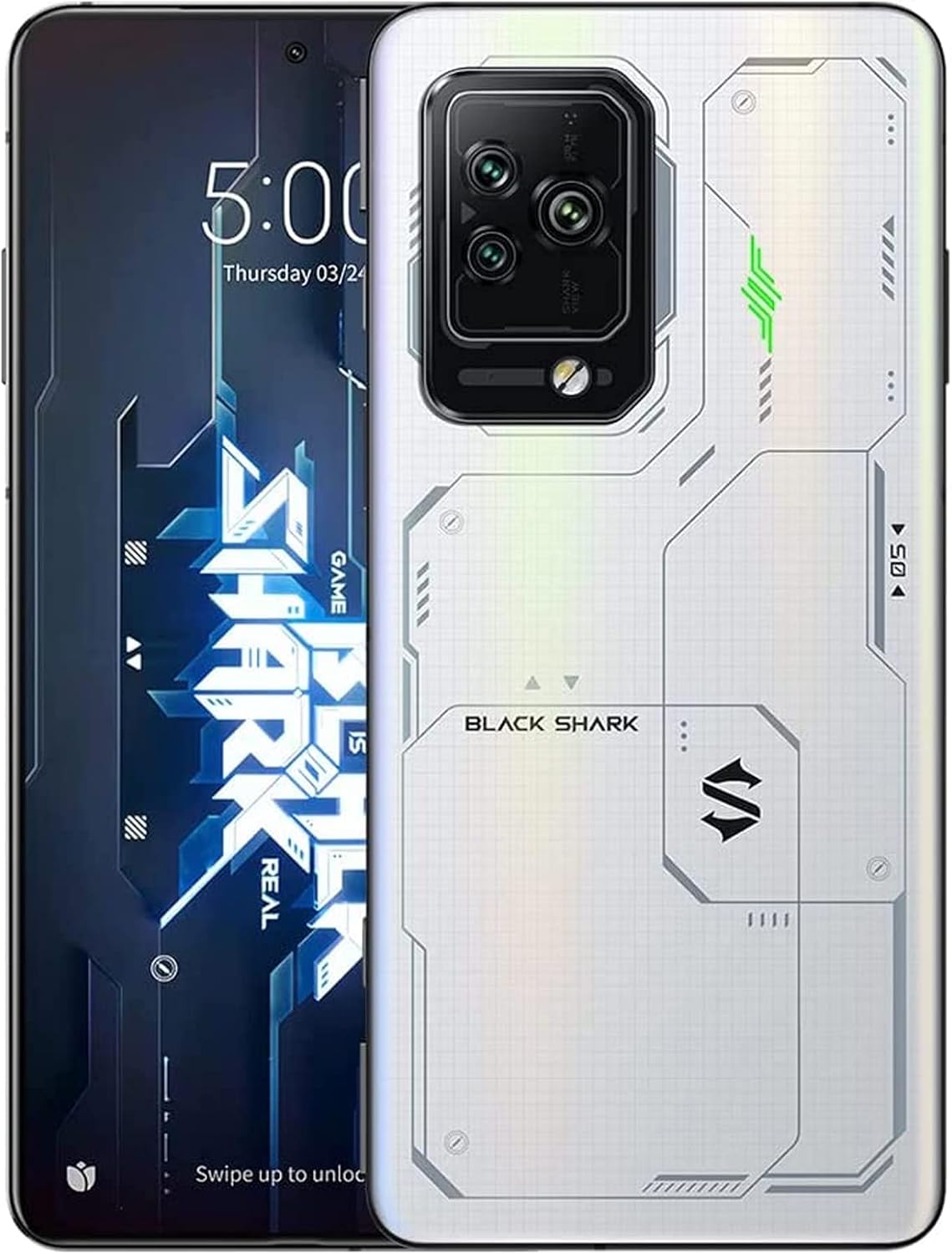
Figure 2.1: Black Shark 5 Pro Front and Rear View. This image displays the smartphone from both the front, highlighting its display, and the back, showcasing the camera array and the distinctive white design.
2.1 물리적 구성 요소
- 표시하다: Front screen for interaction and content view주고받음.
- 후면 카메라 모듈: Located on the back, housing multiple camera lenses and flash.
- 전원 버튼: Typically on the side, used to power on/off and lock/unlock the screen.
- 볼륨 버튼: Located on the side, for adjusting audio levels.
- Magnetic Pop-Up Triggers: Retractable shoulder buttons for enhanced gaming control.
- USB-C 포트: 충전 및 데이터 전송용입니다.
- SIM 카드 트레이: Slot for inserting SIM cards.
3. 설정
3.1 언박싱 및 초기 검사
포장에서 모든 구성품을 조심스럽게 꺼내십시오. 다음 구성품이 모두 있는지 확인하십시오.
- Black Shark 5 Pro Smartphone
- USB-C 케이블
- 전원 어댑터(120W)
- SIM 추출 도구
- 빠른 시작 가이드(포함된 경우)
기기에 눈에 띄는 손상이 있는지 검사하십시오. 구성품이 누락되었거나 손상된 경우 고객 지원팀에 문의하십시오.
3.2 SIM 카드 설치
- 기기 측면에서 SIM 카드 트레이를 찾으세요.
- SIM 꺼내기 도구를 트레이 옆에 있는 작은 구멍에 넣고 트레이가 튀어나올 때까지 살짝 누르세요.
- 나노 SIM 카드의 금색 접점이 아래를 향하도록 트레이에 놓으세요.
- 트레이를 장치에 조심스럽게 다시 삽입하여 제자리에 딸깍 소리가 날 때까지 밀어 넣으세요.
3.3 초기 전원 켜기 및 설정
- 블랙 샤크 로고가 나타날 때까지 전원 버튼을 길게 누르세요.
- 화면의 지시에 따라 언어 선택, Wi-Fi 연결, Google 계정 설정, 보안 설정 등 초기 설정을 완료하세요.
3.4 장치 충전
The Black Shark 5 Pro supports 120W Hyper Charge technology for rapid charging.

Figure 3.1: 120W Hyper Charge. This image illustrates the rapid charging capability of the Black Shark 5 Pro, indicating a full charge can be achieved in approximately 15 minutes.
- Connect the USB-C cable to the phone's charging port and the other end to the 120W power adapter.
- 전원 어댑터를 벽면 콘센트에 꽂으세요.
- The device can reach a full charge in approximately 15 minutes using Ultimate Mode or 24 minutes in Even Mode.
- Use only the official Black Shark 120W charger and cable for optimal charging speed and safety.
4. 사용 설명서
4.1 디스플레이 기능
The Black Shark 5 Pro features a 6.67-inch OLED E4 display designed for gaming and multimedia.

Figure 4.1: 144Hz E-Sports Display. This image highlights the key features of the Black Shark 5 Pro's display, including its 144Hz refresh rate, 10-bit color depth, and HDR 10+ support.
- 새로 고침 빈도: Supports up to 144Hz for smooth visuals. Adjust in Display Settings.
- 터치 Samp링 비율: 720Hz for highly responsive touch input, crucial for gaming.
- 색상 정확도: 10-bit color depth, DCI-P3 color gamut, and HDR 10+ for vivid and accurate colors.
- 눈 관리: SGS eyecare protection is integrated to reduce eye strain.
4.2 Magnetic Pop-Up Triggers
The device includes physical shoulder triggers for enhanced gaming control.
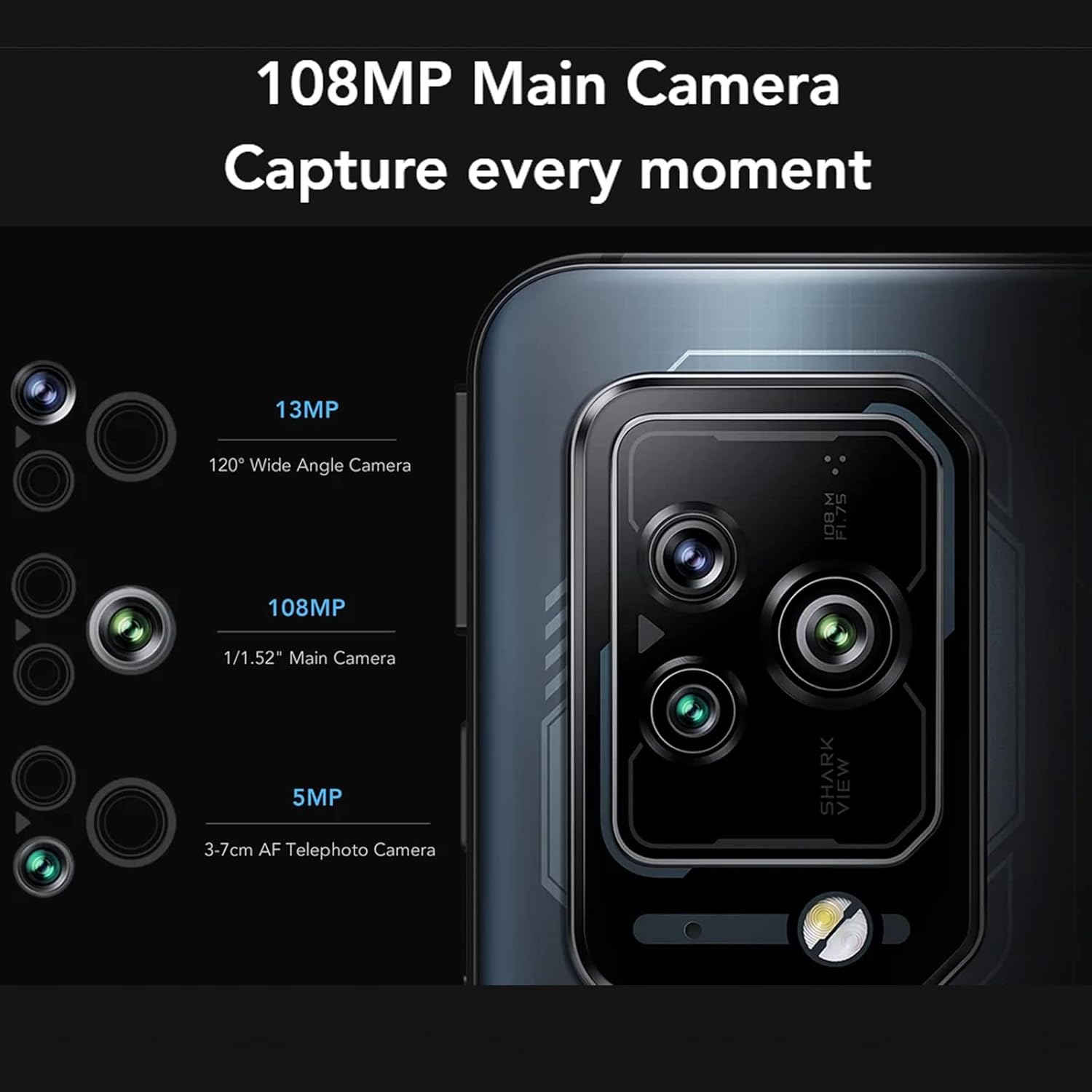
Figure 4.2: Magnetic Pop-Up Triggers. This image displays the side of the Black Shark 5 Pro, highlighting the physical switches used to activate the retractable shoulder triggers.
- 활성화: Flick the side-mounted switches to extend or retract the triggers.
- 사용자 정의: Triggers can be mapped to in-game actions or customized for other functions like flashlight activation or screenshots via the device settings.
4.3 카메라 작동
The Black Shark 5 Pro is equipped with a versatile camera system.
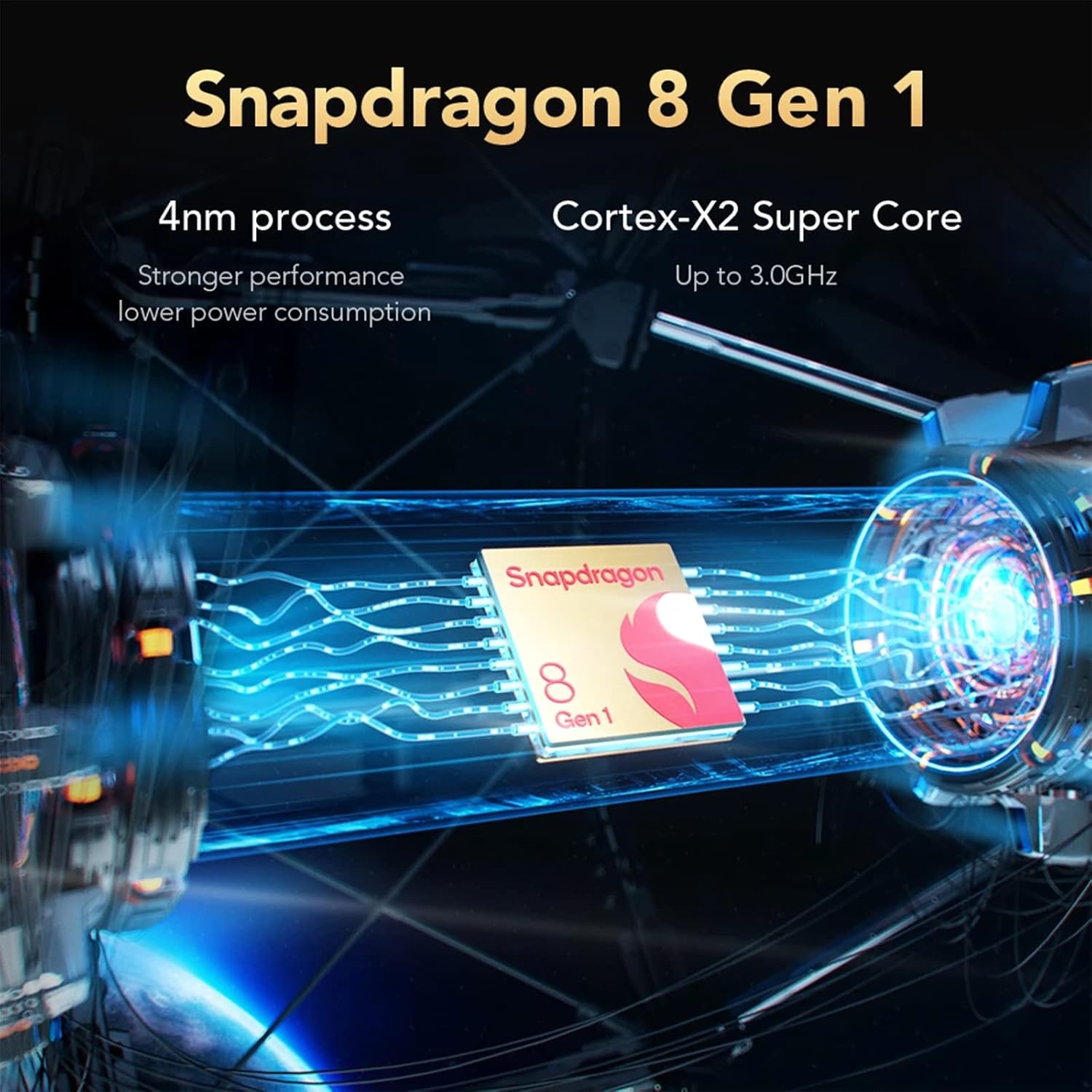
Figure 4.3: Camera Module. This image details the Black Shark 5 Pro's triple camera setup, including a 108MP main sensor, a 13MP 120° wide-angle lens, and a 5MP 3-7cm AF telephoto macro lens.
- 메인 카메라: 고해상도 사진 촬영을 위한 108MP 센서.
- 광각 카메라: 13MP 120° lens for capturing broader scenes.
- 망원 카메라: 5MP 3-7cm AF lens for close-up and detailed shots.
- 홈 화면이나 앱 서랍에서 카메라 앱을 엽니다.
- Select desired modes (Photo, Video, Portrait, Pro, etc.) and tap the shutter button to capture.
4.4 성능 및 냉각
The device is powered by a high-performance processor and advanced cooling system.

Figure 4.4: Snapdragon 8 Gen 1. This image illustrates the Snapdragon 8 Gen 1 processor, emphasizing its 4nm process technology and Cortex-X2 Super Core for powerful performance.
- 프로세서: Snapdragon 8 Gen 1 5G mobile platform for fast processing and graphics.
- 메모리 및 스토리지 : 12GB LPDDR5 RAM and 256GB UFS 3.1 storage ensure smooth multitasking and quick app loading.
- 냉각 시스템: Anti-gravity Dual VC Liquid Cooling with a combined area of 5320mm² helps maintain stable performance during intensive use by efficiently dissipating heat.
5. 유지관리
5.1 장치 청소
- 부드럽고 보푸라기가 없는 천을 사용하여 화면과 본체를 닦으세요.
- 강한 화학 물질, 연마재 또는 에어로졸 스프레이는 사용하지 마세요.
- 장치를 과도한 습기에 노출시키지 마십시오.
5.2 소프트웨어 업데이트
최적의 성능, 보안, 새로운 기능에 대한 액세스를 보장하려면 소프트웨어 업데이트를 정기적으로 확인하고 설치하세요.
- 로 이동 설정 > 휴대전화 정보 > 시스템 업데이트 사용 가능한 업데이트를 확인하세요.
- 업데이트를 시작하기 전에 기기의 배터리 잔량이 충분하고 인터넷 연결이 안정적인지 확인하십시오.
5.3 스토리지 관리
To maintain device performance, periodically manage your storage.
- 불필요한 삭제 file앱, 미디어.
- 백업을 위해 클라우드 저장 서비스를 활용하세요.
- 저장 공간 사용량을 확인하세요 설정 > 저장소.
6. 문제 해결
This section addresses common issues you might encounter with your Black Shark 5 Pro.
6.1 장치 전원이 켜지지 않음
- 배터리가 충전되어 있는지 확인하세요. 기기를 충전기에 최소 15분 이상 연결해 두세요.
- 전원 버튼을 10~15초간 길게 눌러 강제로 다시 시작하세요.
6.2 충전 문제
- Verify that the charger and USB-C cable are securely connected to both the device and the power outlet.
- Use the original Black Shark 120W charger and cable.
- 다른 전원 콘센트를 사용해 보세요.
- 충전 포트에 이물질이나 손상이 있는지 검사하세요.
6.3 성능 저하
- 사용하지 않는 백그라운드 애플리케이션을 닫습니다.
- Clear cache data from apps and system settings.
- 충분한 저장 공간을 확보하세요.
- 주기적으로 장치를 다시 시작하세요.
6.4 네트워크 연결 문제
- 와이파이: 공유기를 재시작하세요. 휴대폰에서 Wi-Fi 네트워크를 삭제하고 다시 연결하세요.
- 모바일 데이터: Ensure your SIM card is properly installed and your mobile data plan is active. Check network settings.
- 블루투스: 두 기기가 모두 페어링 모드에 있고 범위 내에 있는지 확인하세요.
6.5 공장 초기화(최후의 수단)
문제가 지속될 경우 공장 초기화를 통해 해결될 수 있습니다. 경고: 기기의 모든 데이터가 삭제됩니다. 진행하기 전에 중요한 데이터를 백업하세요.
- 이동하다 설정 > 시스템 > 옵션 재설정 > 모든 데이터 삭제(공장 초기화).
- 화면의 지시에 따라 재설정을 확인하십시오.
7. 사양
Key technical specifications for the Black Shark 5 Pro smartphone.
| 특징 | 세부 사항 |
|---|---|
| 모델명 | Black Shark 5 Pro (SHARK KTUS-H0) |
| 프로세서 | Qualcomm Snapdragon 8 Gen 1 (4nm) |
| 숫양 | 12GB LPDDR5 |
| 내부 저장소 | 256GB UFS 3.1 |
| 표시하다 | 6.67" OLED E4, 144Hz Refresh Rate, 720Hz Touch Sampling Rate, 10-bit Color, HDR 10+ |
| 후방 카메라 | 108MP Main, 13MP Ultra-Wide, 5MP Telephoto Macro |
| 배터리 용량 | 4650mAh(리튬폴리머) |
| 충전 중 | 120W Hyper Charge |
| 운영 체제 | Android(버전은 다를 수 있음) |
| 연결성 | 5G, Wi-Fi, 블루투스 |
| 치수 | 19.3 x 15.2 x 6.2 cm (Package); 730 g (Package) |
| 특별 기능 | Magnetic Pop-Up Triggers, Anti-gravity Dual VC Liquid Cooling |
8. 안전 정보
- 배터리 안전: Do not attempt to replace the battery yourself. Use only authorized service centers. Avoid exposing the battery to extreme temperatures or direct sunlight.
- 방수 기능: 이 장치는 방수가 안됨. Avoid exposure to liquids. Liquid damage is not covered under warranty.
- 작동 온도: 권장 온도 범위(일반적으로 0°C ~ 35°C) 내에서 기기를 작동하십시오.
- 처분: 기기 및 배터리는 현지 규정에 따라 책임감 있게 폐기하십시오. 일반 생활 쓰레기로 버리지 마십시오.
- 운전 안전: 운전 중에는 휴대전화를 사용하지 마십시오. 항상 도로 안전을 최우선으로 생각하십시오.
9. 보증 및 지원
For warranty information, please refer to the warranty card included with your product or visit the official Black Shark website. For technical support, troubleshooting assistance, or service inquiries, please contact Black Shark customer service through their official channels.
참고: 보증 약관은 지역에 따라 다를 수 있습니다.


