1. 서론
The BOYA BY-XM6 S2 is a 2.4GHz dual-channel wireless microphone system designed to capture clear, broadcast-quality sound. It is ideal for a wide range of applications including vlogging, live streaming, interviews, and mobile journalism. This system offers stable signal transmission, high-fidelity recording, and an intuitive OLED display, making your audio recording process efficient and reliable.
2. 패키지 내용
아래 나열된 모든 품목이 패키지에 포함되어 있는지 확인하세요.
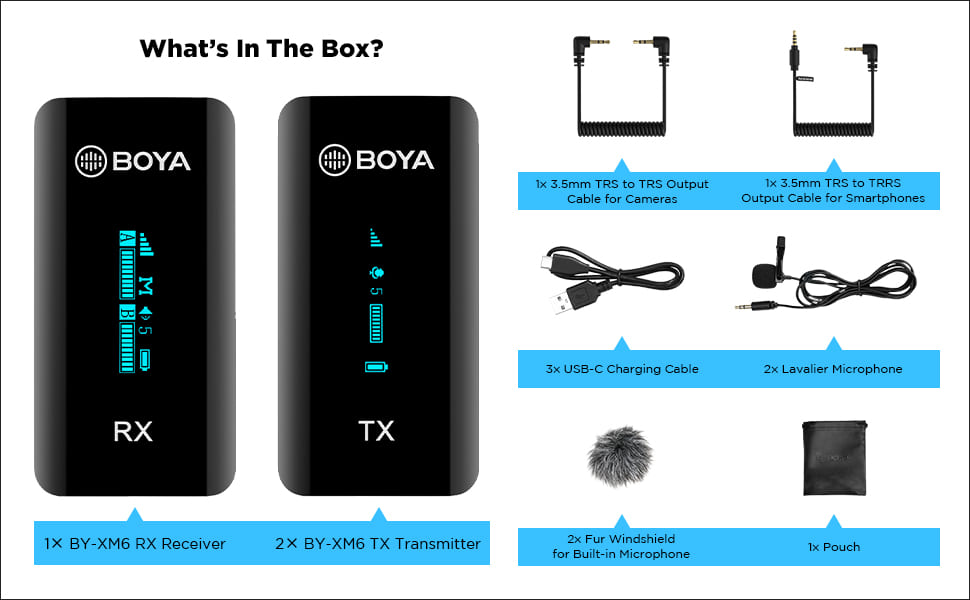
Image: All components included in the BOYA BY-XM6 S2 system package.
- 1x BY-XM6 RX 수신기
- 2x BY-XM6 TX 송신기
- 카메라용 1x 3.5mm TRS-TRS 출력 케이블
- 스마트폰용 1x 3.5mm TRS - TRRS 출력 케이블
- 3x USB-C 충전 케이블
- 2x 핀 마이크
- 내장 마이크용 2x 모피 앞유리
- 1x 파우치
3. 제품 오버view
3.1개의 구성요소
The BY-XM6 S2 system consists of two transmitters (TX) and one receiver (RX). Each unit is compact and features an OLED display for easy monitoring of settings and battery life.

Image: The BOYA BY-XM6 S2 system, including the receiver (RX) and two transmitters (TX).
3.2 주요 특징
- 2.4GHz Digital Frequency: Ensures stable and reliable wireless transmission up to 100 meters (328 feet) without obstacles.
- Dual Channel System: Supports two person interviewing or recording simultaneously.
- 고품질 녹음: Built-in low-noise microphone and included lavalier microphones provide clear audio.
- OLED 디스플레이: Easy-to-read screen shows battery level, signal strength, audio levels, and more.
- 다양한 입력 모드: Can be used with the built-in microphone or external lavalier microphones.
- Real-time Headphone Monitoring: Allows you to monitor audio output directly from the receiver.
- 모노/스테레오 스위치: Provides flexibility for post-production by allowing selection between mono and stereo recording modes.
- 긴 배터리 수명: Up to 7 hours of operation time on a single charge.
- 소형 및 휴대성: Lightweight design for easy carrying and discreet use.

Image: Key features of the BOYA BY-XM6 S2 system, highlighting its wireless capabilities and display.
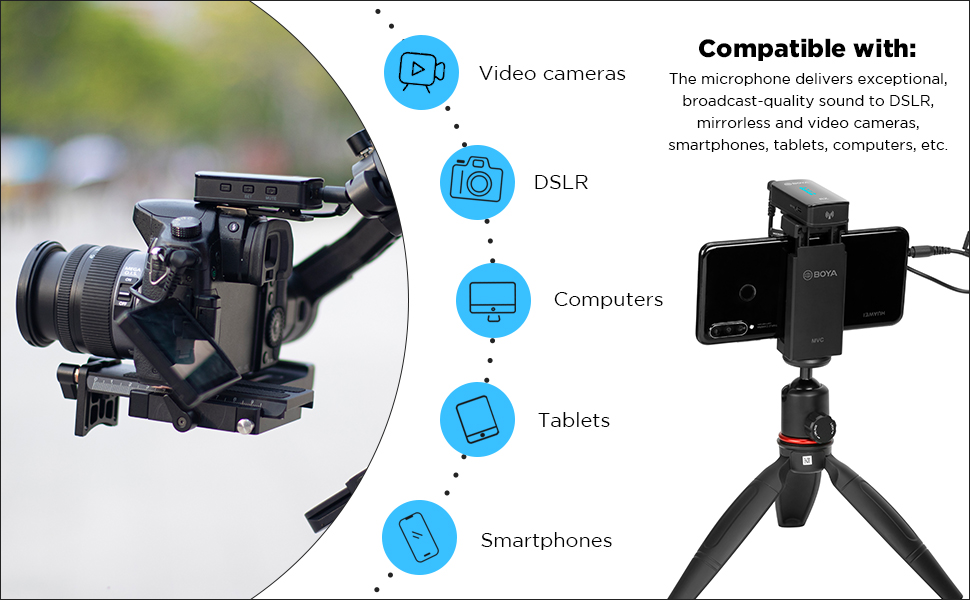
Image: The BOYA BY-XM6 S2 is compatible with various devices including cameras, smartphones, and computers.

Multiple input modes

Up to 7 hours operation time

초소형 사이즈
4. 설정 가이드
4.1 기기 충전
Before first use, fully charge the transmitter (TX) and receiver (RX) units using the provided USB-C charging cables. Connect the cables to a standard USB power adapter (not included) or a computer's USB port. The OLED display will indicate charging status.
4.2 전원 켜기/끄기
- 전원 켜기: Long press the power button on both the TX and RX units until the OLED display illuminates.
- 전원 끄기 : Long press the power button again on both units until the display turns off.
4.3 녹음 장치 연결하기
The BY-XM6 S2 system is designed for plug-and-play operation. The TX and RX units will automatically pair upon powering on. If pairing fails, refer to the troubleshooting section.
- 카메라(DSLR/미러리스)용: Use the 3.5mm TRS to TRS output cable. Connect one end to the RX's 'OUT' port and the other end to your camera's microphone input.
- 스마트폰/태블릿의 경우: Use the 3.5mm TRS to TRRS output cable. Connect one end to the RX's 'OUT' port and the other end to your smartphone's headphone/microphone jack. For devices without a 3.5mm jack, an appropriate adapter (e.g., USB-C to 3.5mm or Lightning to 3.5mm) may be required (not included).
- Connecting Lavalier Microphone: Plug the lavalier microphone into the 'MIC IN' port on the TX unit. Ensure it is securely connected.
5. 사용 설명서
5.1 음소거 기능
To mute the transmitter, short press the mute button on the TX unit. A mute icon will appear on the OLED display. Short press again to unmute.
5.2 제어를 얻으세요
Adjust the audio input gain on the TX unit to optimize sound levels and prevent distortion. Use the '+' and '-' buttons to increase or decrease the gain. Monitor the audio level bar on the OLED display to ensure levels are within the optimal range.
5.3 모노/스테레오 모드 선택
The receiver (RX) allows you to switch between mono and stereo output modes. Navigate through the menu on the RX unit to select the desired mode. In mono mode, both transmitter audio signals are mixed into a single channel. In stereo mode, each transmitter's audio is output to a separate channel (left/right).
5.4 실시간 모니터링
Connect headphones to the 3.5mm headphone jack on the RX unit to monitor the audio in real-time. This allows you to check audio quality and levels during recording.
6. 유지관리
- 청소: 부드럽고 마른 천으로 제품을 닦으십시오. 독한 화학 약품이나 연마제를 사용하지 마십시오.
- 저장: Store the system in a cool, dry place away from direct sunlight and extreme temperatures. Use the provided pouch for protection.
- 배터리 관리 : 배터리 수명을 최적화하려면 배터리를 자주 완전히 방전시키지 마십시오. 장기간 사용하지 않더라도 정기적으로 충전하십시오.
- 앞유리: Regularly clean or replace the fur windshields to maintain effective wind noise reduction.
7. 문제 해결
| 문제 | 가능한 원인 | 해결책 |
|---|---|---|
| 소리가 나지 않거나 볼륨이 작음 | Incorrect cable connection; low gain setting; muted transmitter; low battery. | Ensure cables are securely connected. Adjust gain on TX. Check if TX is muted. Charge units. |
| Voice breaks or signal dropouts | Obstacles between TX and RX; exceeding operating range; strong interference. | Reduce distance between TX and RX. Ensure clear line of sight. Avoid areas with strong Wi-Fi or other 2.4GHz devices. |
| Poor noise cancellation / Excessive background noise | Improper microphone placement; no windshield used; high ambient noise. | Ensure lavalier mic is placed correctly (e.g., 6-8 inches from mouth). Use the fur windshield, especially outdoors. Record in quieter environments. |
| 페어링되지 않은 유닛 | Units too far apart; interference; pairing error. | Bring TX and RX closer together. Power cycle both units. Refer to manual for manual pairing steps if auto-pairing fails. |
| OLED 디스플레이가 작동하지 않습니다. | Low battery; unit not powered on; hardware issue. | Charge the unit. Long press power button to ensure it's on. If issue persists, contact support. |
8. 기술 사양
| 특징 | 사양 |
|---|---|
| 전송 유형 | 2.4GHz 디지털 주파수 |
| 작동 범위 | Up to 100m (328ft) (without obstacle) |
| RF 출력 전력 | <10mW |
| 극성 패턴 | 전방위 |
| 주파수 응답 | 35Hz-18kHz |
| Maximum SPL (Built-in Mic) | 120dB 음압 |
| Maximum SPL (Lavalier Mic) | 110dB 음압 |
| Sensitivity (Built-in Mic) | -39데시벨 |
| Sensitivity (Lavalier Mic) | -39데시벨 |
| 신호대잡음비 | > 84dB |
| 전력 요구 사항 | 내장 리튬 이온 배터리 또는 USB-C DC 5V |
| 내장 배터리 수명 | 약 7시간 |
| 오디오 입력 | 3.5mm TRS MIC/LINE IN 잭 또는 내장 마이크 |
| 무게(TX/RX) | Approx. 32g (1.13oz) each |
| Dimensions (TX/RX) | 62.1×31.6×16.5mm |
| 오디오 출력 커넥터 | 3.5mm Headphone Jack; 3.5mm TRS Output Jack |
| 오디오 출력 레벨 | –60 dBV to -20dBV |
9. 보증 및 지원
This product is covered by a manufacturer's warranty. For specific warranty terms and conditions, please refer to the documentation provided with your purchase or visit the official BOYA website. For technical support, service, or inquiries regarding your BOYA BY-XM6 S2 system, please contact the importer/packer:
Dexter Ventures Pvt. Ltd.
New Delhi and Thane Maharashtra
이메일: contact@dexterventures.in


