1. 서론
This manual provides essential information for the proper use and maintenance of your Headwolf FPad 1 Android Tablet. Please read this guide thoroughly before operating the device to ensure optimal performance and longevity. The Headwolf FPad 1 is an 8-inch tablet designed for everyday use, featuring a responsive display and the Android 12 operating system.
2. 패키지 내용
Upon unboxing your Headwolf FPad 1 tablet, please verify that all the following items are included:
- Headwolf FPad 1 Tablet
- 사용자 가이드 (이 문서)
- Power Adapter (USB-A wall charger)
- USB-A to USB-C 충전 케이블
Note: The tablet may come with a pre-applied screen protector for immediate use.
3. Device Layout and Overview
Familiarize yourself with the physical components and ports of your Headwolf FPad 1 tablet.

그림 3.1: 앞면과 뒷면 view of the Headwolf FPad 1 Tablet.
3.1. 후면 패널
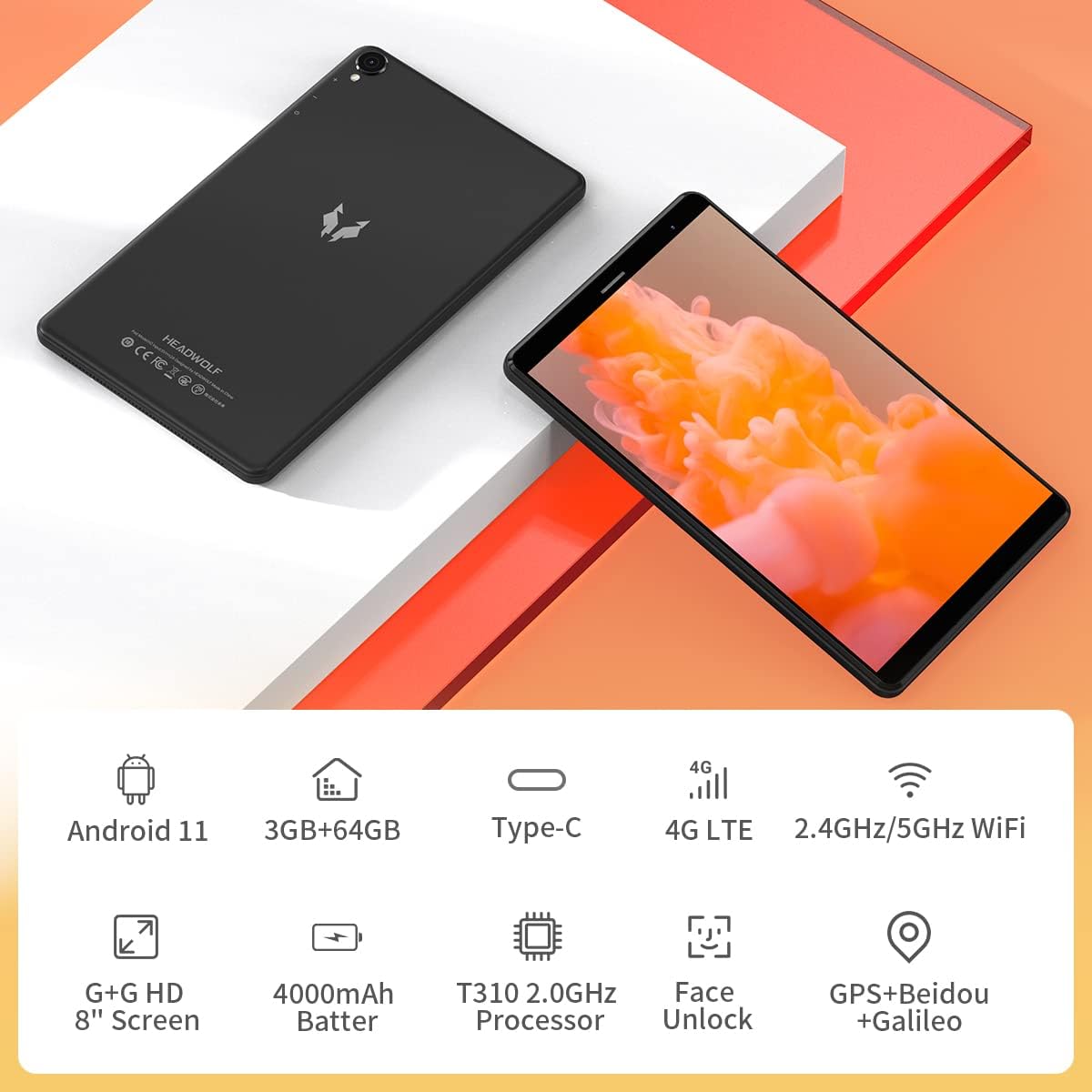
Figure 3.2: The back panel features the Headwolf logo, regulatory markings, and the rear camera module.
3.2. 전면 패널

Figure 3.3: The front of the tablet displays the 8-inch screen, the front-facing camera, and an earpiece for calls.
3.3. 측면 Views 및 포트

Figure 3.4: The side of the tablet includes the power button, volume rocker, 3.5mm headphone jack, SIM card slot, MicroSD card slot, and USB-C charging port.
- 전원 버튼: 오른쪽 측면에 위치하며, 기기의 전원을 켜거나 끄거나, 기기를 깨우거나 절전 모드로 전환하는 데 사용됩니다.
- 볼륨 조절 버튼: 전원 버튼 옆에는 오디오 볼륨을 조절하는 버튼이 있습니다.
- 후방 카메라: 5MP camera with LED flash, located on the back panel.
- 전면 카메라: 5MP camera, located on the front bezel above the screen.
- USB-C 포트: 충전 및 데이터 전송 기능은 상단 가장자리에 있습니다.
- 3.5mm 헤드폰 잭 : For connecting wired headphones, located on the top edge.
- SIM 카드 슬롯: Supports 4G LTE connectivity (check regional compatibility), located on the top edge.
- MicroSD 카드 슬롯: For expandable storage, located on the top edge.
- 스피커: Located on the bottom edge.
4. 설정
4.1. 초기 전원 켜기
- Press and hold the Power Button on the right side of the tablet until the Headwolf logo appears on the screen.
- The tablet will boot up, displaying the Android welcome screen.
4.2. 언어 및 지역 선택
Follow the on-screen prompts to select your preferred language and region. This will configure the tablet's default settings.
4.3. 네트워크 연결
Connect your tablet to a Wi-Fi network to access the internet and complete the setup process. You may also insert a 4G LTE SIM card for mobile data connectivity (if supported in your region).
4.4. 구글 계정 설정
Google 계정으로 로그인하거나 새 계정을 만드세요. Google Play 스토어에서 앱을 다운로드하고 Google 서비스를 이용하려면 Google 계정이 필요합니다.
5. 사용 설명서
5.1. 기본 탐색
- 터치스크린 제스처: 탭하여 선택하고, 스와이프하여 스크롤하고, 핀치하여 확대/축소합니다.
- 홈 화면: 앱과 위젯에 접근하세요. 화면을 이동하려면 왼쪽이나 오른쪽으로 스와이프하세요.
- 알림 패널: 화면 상단에서 아래로 살짝 밀어 알림과 빠른 설정에 접근하세요.
5.2. 연결성
- 와이파이: Go to Settings > Network & Internet > Wi-Fi to connect to available networks. The tablet supports 2.4GHz and 5GHz Wi-Fi.
- 블루투스: Go to Settings > Connected devices > Bluetooth to pair with Bluetooth accessories (e.g., headphones, speakers). The tablet supports Bluetooth 5.0.
- 4G LTE: If a compatible SIM card is inserted, mobile data can be enabled via Settings > Network & Internet > Mobile network.
- GPS: The tablet has built-in GPS for navigation and location services.
5.3. 카메라
The Headwolf FPad 1 features 5MP front and rear cameras.

Figure 5.1: The tablet is equipped with dual 5MP cameras and supports face unlock.
- 사진 찍기: Open the Camera app, select photo mode, and tap the shutter button.
- 비디오 녹화: In the Camera app, switch to video mode and tap the record button. Video recording is supported up to 1080p.
- 카메라 설정: Adjust settings like filters, white balance, and composition lines within the Camera app.
5.4. Media Consumption
Enjoy videos, music, and e-books on your tablet's HD display.

Figure 5.2: The 8-inch HD IPS display provides a clear view다양한 미디어 경험을 쌓았습니다.
- 비디오 재생 : Use pre-installed apps like YouTube or download others from the Play Store.
- 오디오: The tablet features stereo speakers. For a more immersive experience, connect headphones via the 3.5mm jack or Bluetooth.
5.5. 게임
The UNISOC T310 Quad-Core processor allows for smooth performance in most casual games. For graphically intensive games, performance may vary, and lower settings might be required for optimal gameplay.

Figure 5.3: The tablet's processor is capable of handling various gaming applications.
6. 유지관리
- 청소: 부드럽고 보풀이 없는 천을 사용하여 화면과 본체를 닦으세요. 독한 화학 물질은 피하세요.
- 배터리 관리 : 배터리 수명을 연장하려면 극한의 온도를 피하고 배터리를 자주 완전히 방전시키세요.
- 소프트웨어 업데이트: 최적의 성능과 보안을 보장하려면 정기적으로 시스템 업데이트를 확인하고 설치하세요.
- 스토리지 관리: 불필요한 것을 주기적으로 정리하세요 files and apps to free up internal storage. Consider using a MicroSD card for additional storage.
7. 문제 해결
This section addresses common issues you might encounter with your Headwolf FPad 1 tablet.
7.1. 장치 전원이 켜지지 않음
- Ensure the battery is charged. Connect the tablet to the power adapter and wait a few minutes before attempting to power it on again.
- 최소 10~15초 동안 전원 버튼을 길게 눌러 강제 재시작을 실행하세요.
7.2. Slow Performance/Freezing
- 백그라운드에서 실행 중인 사용하지 않는 애플리케이션을 닫습니다.
- 앱과 시스템에서 캐시 데이터를 지웁니다.
- 태블릿을 다시 시작하십시오.
- 충분한 여유 저장 공간을 확보하세요.
7.3. Wi-Fi 연결 문제
- Toggle Wi-Fi off and on in Quick Settings or Settings.
- Wi-Fi 라우터를 다시 시작하세요.
- 네트워크를 잊고 다시 연결하세요.
7.4. Camera Quality
The 5MP cameras are designed for basic photography and video calls. For optimal results, ensure good lighting conditions. Camera performance may not be comparable to high-end smartphone cameras.
8. 사양
| 특징 | 사양 |
|---|---|
| 상표 | 헤드울프 |
| 모델명/시리즈 | FPad 1 / F1 |
| 품목 모델 번호 | F2 |
| 운영 체제 | Android 12 (some marketing may refer to Android 11) |
| 화면 크기 | 8 인치 |
| 디스플레이 해상도 | 1280x800 HD IPS |
| 프로세서 | UNISOC T310 Quad-Core A75 (2 GHz) |
| 숫양 | 3GB (XNUMX기가바이트) |
| 내부 저장소 | 64GB (XNUMX기가바이트) |
| 확장 가능한 스토리지 | MicroSD up to 512GB (some sources indicate up to 2TB) |
| 후방 카메라 | 5 MP |
| 전면 카메라 | 5 MP |
| 배터리 용량 | 4000mAh (up to 7-8 hours usage) |
| 충전 포트 | USB 타입-C |
| 무선 연결 | 5G WiFi, Bluetooth 5.0, 4G LTE |
| 항해 | GPS, Beidou, Galileo |
| 치수(길이x너비x높이) | 8.31 x 0.38 x 4.97 인치 |
| 품목 무게 | 11.4온스(약 320g) |
| 색상 | Purple (as listed in specifications, though product images show black/grey) |
9. 보증 및 지원
For warranty information and technical support, please refer to the documentation included with your purchase or visit the official Headwolf web사이트. 보증 청구를 위해 구매 증빙 자료를 보관하세요.