1. 서론
The Fenix BC26R is a high-performance USB-C rechargeable bicycle light designed for various cycling conditions. It offers powerful illumination, a wide beam angle, and convenient features for an enhanced riding experience. This manual provides detailed instructions for the proper setup, operation, and maintenance of your BC26R bike light.
2. 제품 오버view
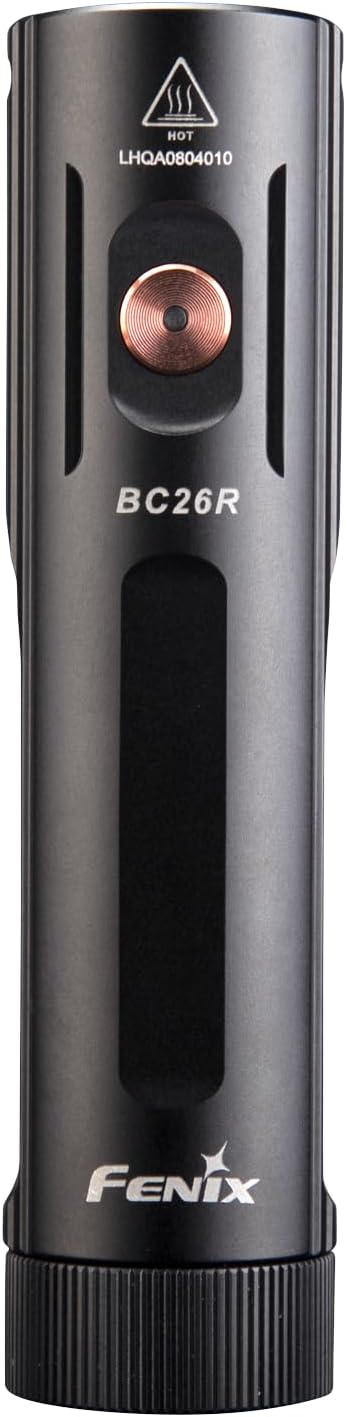
그림 2.1: 전면 view of the Fenix BC26R USB-C Rechargeable Bike Light.
The Fenix BC26R features a durable aluminum housing, a single operating button, and a USB-C charging port. It is designed for easy attachment and detachment from your bicycle handlebars using its quick-release mount.
3. 설정
3.1 패키지 내용
패키지에 다음 품목이 포함되어 있는지 확인하십시오.
- Fenix BC26R Bike Light
- USB-C 충전 케이블
- Quick-Release Bike Mount
- LumenTac Organizer (if included in bundle)
3.2 배터리 설치
The Fenix BC26R uses a removable 21700 lithium-ion battery. To install or replace the battery:
- Unscrew the tail cap of the light counter-clockwise.
- Insert the 21700 battery with the positive (+) terminal facing towards the head of the light.
- 꼬리 캡을 시계 방향으로 돌려 단단히 조여질 때까지 다시 조입니다.

Figure 3.1: Fenix BC26R with battery compartment open.
3.3 Mounting the Bike Light
The quick-release bike mount allows for easy attachment and removal of the light from your handlebars.
- Attach the quick-release mount to your bicycle handlebar. Ensure it is securely fastened and positioned to direct the light forward.
- Align the Fenix BC26R light with the mount.
- Press the light firmly into the mount until it clicks into place.
- To remove, press the release tab on the mount and slide the light forward.

Figure 3.2: Quick-release mount mechanism.
4. 운영
4.1 전원 켜기/끄기
- 켜려면: Press and hold the operating button for 0.5 seconds.
- 끄기: Press and hold the operating button for 0.5 seconds.
4.2 모드 선택
With the light turned on, single-click the operating button to cycle through the brightness modes in the following order: Low → Med → High → Turbo.
To activate the Flash mode, press and hold the operating button for 1.2 seconds. Single-click to return to the previously used constant lighting mode.
4.3 충전 중
The Fenix BC26R features a USB-C charging port for convenient recharging.
- 조명 측면에서 USB-C 충전 포트를 찾으세요.
- Connect the provided USB-C charging cable to the light and to a USB power source (e.g., wall adapter, power bank, computer).
- 충전 표시등은 충전 상태를 보여줍니다. 완전히 충전하는 데는 일반적으로 약 4시간이 걸립니다.
- Once charging is complete, disconnect the cable and ensure the port cover is securely closed to maintain water resistance.

Figure 4.1: Fenix BC26R connected for USB-C charging.
5. 유지관리
5.1 일반 관리
- 조명에 손상이나 마모 흔적이 있는지 정기적으로 검사하십시오.
- Keep the threads and O-rings clean. Lubricate O-rings periodically with silicone grease to maintain water resistance.
- Store the light in a cool, dry place when not in use. Remove the battery if storing for extended periods.
5.2 청소
Clean the body of the light with a soft cloth. For the lens, use a lens cleaning cloth to avoid scratches. Do not use abrasive cleaners or solvents.
6. 문제 해결
6.1 일반적인 문제
- 불이 켜지지 않음: Check if the battery is inserted correctly with the positive (+) terminal facing the head. Ensure the tail cap is fully tightened. The battery may be depleted; try charging it.
- 간헐적인 작동 또는 깜빡임: This could be due to loose battery contact or dirty contacts. Clean the battery contacts and ensure the tail cap is tight.
- 배터리 수명 감소: Ensure the battery is fully charged. Extreme temperatures can affect battery performance. Consider replacing the battery if it's old or frequently used.
If problems persist, please refer to the Warranty & Support section for assistance.
7. 사양
7.1 기술 매개변수

Figure 7.1: Fenix BC26R Technical Specifications.
| 특징 | 세부 사항 |
|---|---|
| 상표 | 피닉스 |
| 모델 번호 | BC26R |
| 최대 광 출력 | 1600루멘 |
| 설정 수 | 4 (plus Flash) |
| 전원 | Battery Powered (21700 Li-ion) |
| 충전 포트 | USB-C |
| 재료 | 알류미늄 |
| 방수 레벨 | 방수 (IP68) |
| 품목 무게 | 5.47 온스 |
| 장착 유형 | Handlebar Mount (Quick-Release) |
| 색상 | 검은색 |
8. 보증 및 지원
Fenix products are manufactured with high-quality materials and craftsmanship. For detailed warranty information and customer support, please refer to the official Fenix website or contact your authorized Fenix dealer. Keep your purchase receipt for warranty claims.


